


.png)


.png)
Agentic AI is no longer just “AI autocomplete.”
In 2026, it’s your junior engineer, QA assistant, release manager, and data analyst — all running in parallel.
If you’re building production apps in Flutter, Android, or iOS, mastering agentic workflows is becoming a competitive advantage.
In this guide, you’ll learn:
- 10 practical agentic AI productivity hacks
- Real-world mobile use cases
- Implementation flows (text diagrams)
- Production-ready code snippets (Dart, Kotlin, Swift)
- Common pitfalls and best practices
Let’s build smarter.
Why Agentic AI Matters in Modern Mobile Development
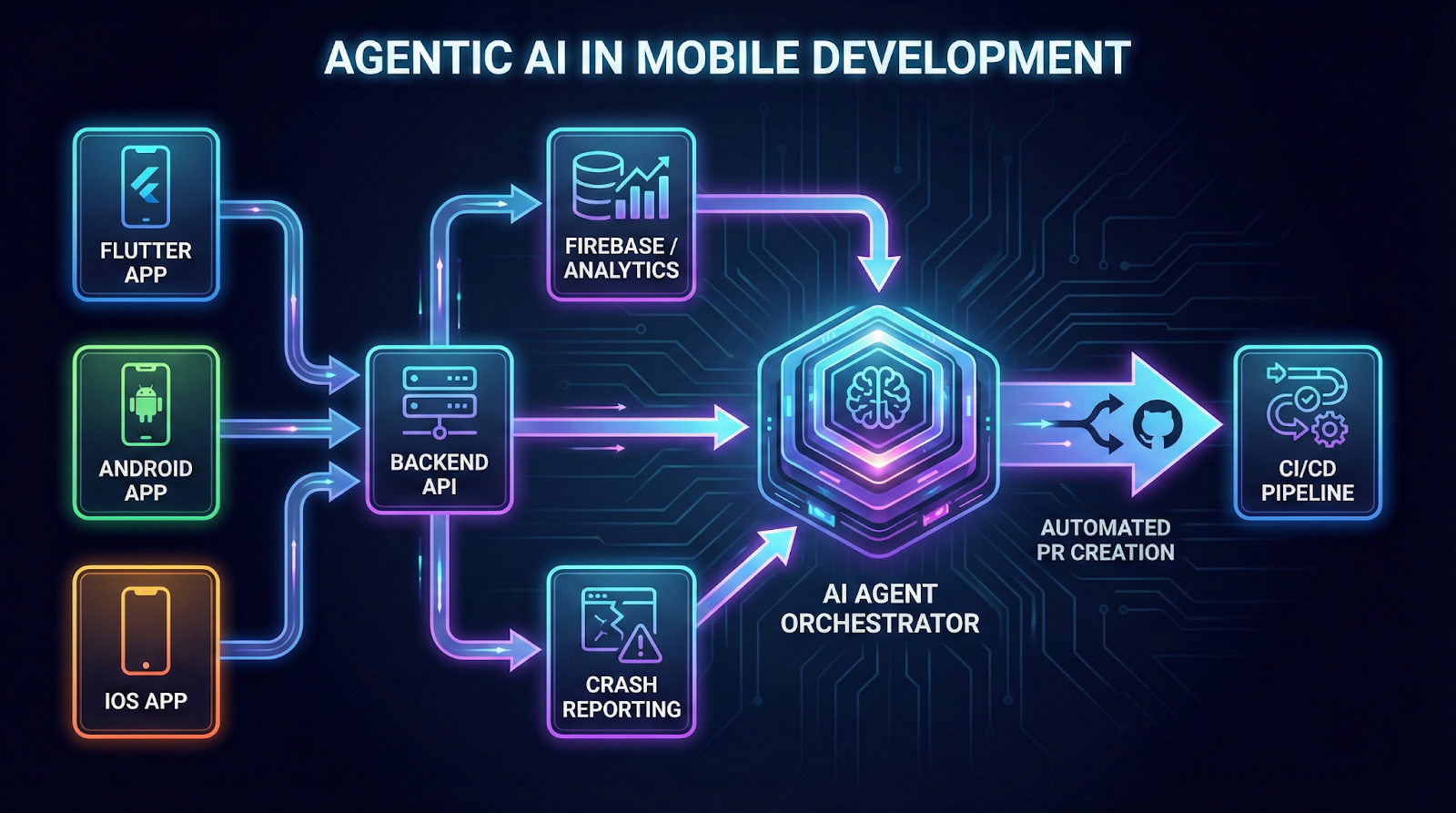
Modern mobile apps are:
- Multi-platform
- Feature-heavy
- Analytics-driven
- Subscription-powered
- Security-sensitive
Traditional AI helps you write code.
Agentic AI helps you run systems.
Instead of asking:
“Write a function.”
You define:
“Monitor crashes, analyze patterns, propose fixes, create a PR, notify Slack.”
That’s the shift.
1. Auto-Refactor Large Codebases with AI Agents
Large Flutter or Kotlin codebases accumulate technical debt quickly.
Agent Workflow
[Repo Scan]
↓
[Architecture Analysis]
↓
[Smell Detection]
↓
[Auto Refactor Suggestions]
↓
[PR Creation]
Flutter Example: Extract Widget Pattern
class ProfileHeader extends StatelessWidget {
  final String name;
  final String avatarUrl;

  const ProfileHeader({
    super.key,
    required this.name,
    required this.avatarUrl,
  });

  @override
  Widget build(BuildContext context) {
    return Row(
      children: [
        CircleAvatar(backgroundImage: NetworkImage(avatarUrl)),
        const SizedBox(width: 12),
        Text(name, style: Theme.of(context).textTheme.titleMedium),
      ],
    );
  }
}
Agent detects large widget tree → extracts reusable components → enforces design consistency.
Best Practice
- Limit refactor scope per PR.
- Require test validation before merge.
2. Intelligent API Contract Validation
Agents monitor backend schema drift and automatically verify mobile models.
Flow
[Backend Schema Change]
↓
[Agent Pulls OpenAPI Spec]
↓
[Diff vs Mobile DTOs]
↓
[Auto Update Models]
↓
[Run Integration Tests]
Kotlin DTO Example
@Serializable
data class SubscriptionResponse(
    val isActive: Boolean,
    val expiryDate: String?,
    val planId: String
)
If the backend adds a required field → agent updates DTO + flags missing usage.
3. Crash Analysis + Root Cause Summarization
Instead of manually parsing logs:
[Crashlytics Dump]
↓
[Stack Trace Clustering]
↓
[Pattern Recognition]
↓
[Root Cause Summary]
↓
[Fix Suggestion PR]
Swift Defensive Guard Example
guard let user = userRepository.currentUser else {
    assertionFailure("User must not be nil here")
    return
}
The agent might detect 78% crashes from null users and suggest a guarding pattern.
4. Smart Analytics Instrumentation Agent
Most apps under-track user behavior.
Instead of manually adding logs, agent ensures:
- Screen views
- Button taps
- Subscription flows
- Error states
For Flutter navigation, align with Flutter navigation and routing documentation to standardize screen tracking patterns.
Flutter Analytics Wrapper
void trackScreen(String name) {
  analytics.logScreenView(screenName: name);
}
The agent enforces usage across routes.
5. Autonomous Test Case Generation
Agents generate edge-case-heavy test coverage.
Workflow
[Source Code]
↓
[Edge Case Discovery]
↓
[Unit Test Generation]
↓
[Mock Data Injection]
↓
[Coverage Report]
Dart Test Example
test('Subscription expires correctly', () {
  final sub = Subscription(expiry: DateTime.now().subtract(Duration(days: 1)));
  expect(sub.isActive, false);
});
Pitfall
Don’t blindly trust AI-generated test assertions.
Always review logical correctness.
6. Store Listing Optimization Agent
Agents now:
- Analyze competitor listings
- Generate ASO keywords
- A/B test descriptions
Real use case:
- Subscription app improved install conversion by 18% using AI-generated copy experiments.
7. Performance Regression Monitoring
Agents compare builds:
[Build N-1 Metrics]
vs
[Build N Metrics]
↓
[Frame Drops / Memory Deltas]
↓
[Performance Regression Alert]
Flutter Performance Profiling
Use the official Flutter performance profiling guide for baseline benchmarking before AI comparisons.
Agents can auto-run performance tests in CI.
8. Native-Bridge Code Validation (Flutter)
When using platform channels, bugs often happen at the boundary.
Refer to Flutter platform channel documentation for standardized channel communication.
Dart Side
static const platform = MethodChannel('app.subscription');

Future<bool> isPremium() async {
  final result = await platform.invokeMethod<bool>('isPremium');
  return result ?? false;
}
Kotlin Side
MethodChannel(flutterEngine.dartExecutor.binaryMessenger, "app.subscription")
    .setMethodCallHandler { call, result ->
        if (call.method == "isPremium") {
            result.success(checkSubscription())
        }
    }
Agent can:
- Validate method name consistency
- Detect unhandled methods
- Generate fallback error handling
9. Lifecycle-Aware Memory Leak Detection (Android & iOS)
Agents analyze misuse of lifecycle components.
Follow patterns in the Android activity lifecycle guide to avoid leaks.
Kotlin Example
override fun onDestroy() {
    super.onDestroy()
    _binding = null
}
Agent detects:
- ViewBinding leaks
- Context misuse
- Long-lived coroutine scopes
10. Continuous Feature Ideation from Analytics
Agent observes:
- Drop-off in onboarding
- Subscription cancel reasons
- Screen-level churn
Flow
[Analytics Data]
↓
[Behavior Clustering]
↓
[Feature Gap Hypothesis]
↓
[Proposed Experiment]
↓
[Auto Jira Ticket Draft]
Real-world example:
- Detected 42% drop on paywall screen
- Suggested pricing comparison table
- Conversion increased 11%
Best Practices for Using Agentic AI in Mobile Dev
Common Pitfalls
- Over-automation without guardrails
- Blind trust in AI-generated logic
- Letting agents modify billing or auth code unsupervised
- Ignoring performance costs of AI SDKs
Implementation Blueprint for 2026 Mobile Teams
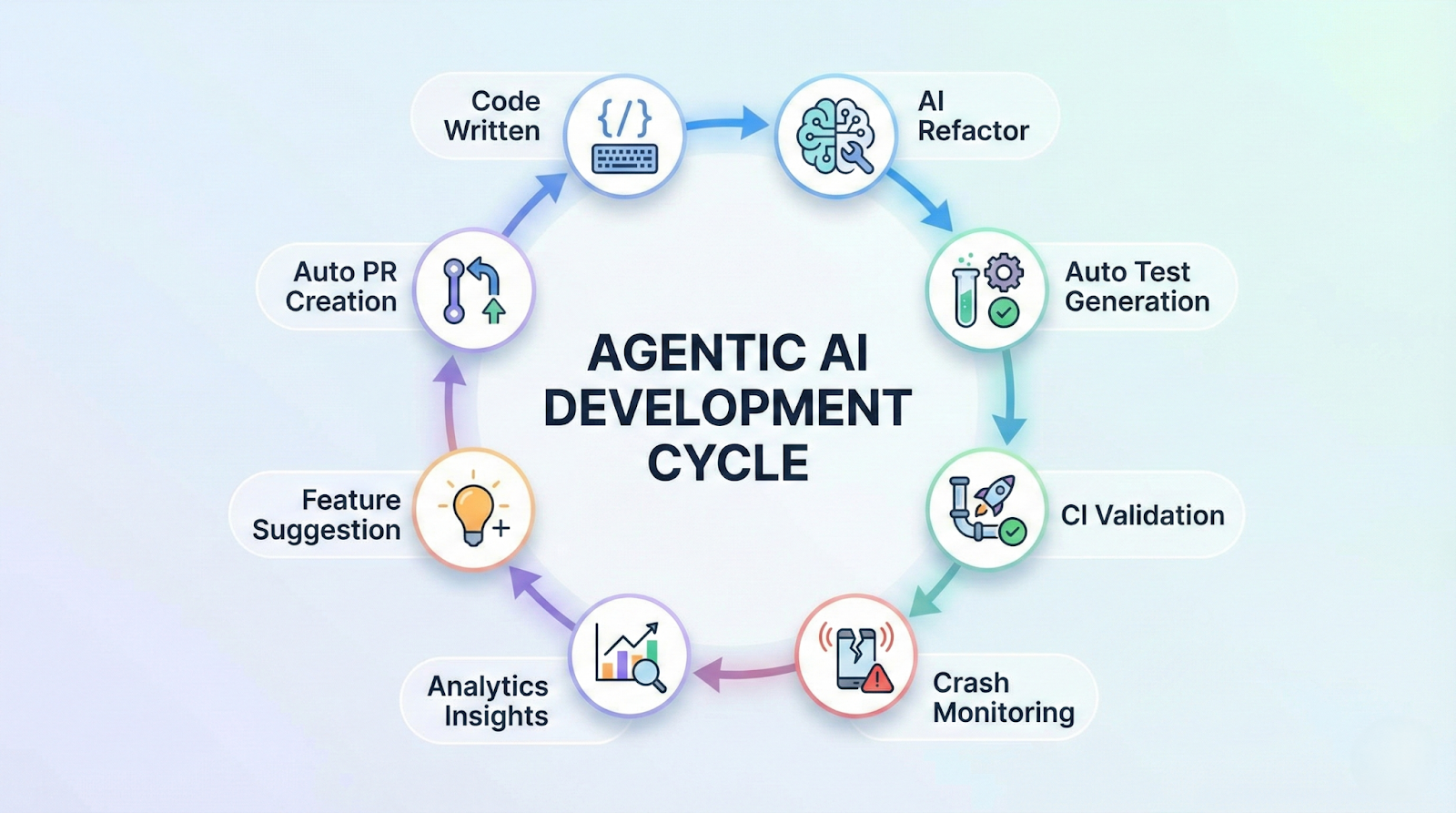
Phase 1: AI-Assisted Coding
Phase 2: AI-Driven Testing
Phase 3: AI Monitoring + Crash Triage
Phase 4: AI Product Analytics Loop
Phase 5: Semi-Autonomous DevOps Agents
Start small. Scale responsibly.
Conclusion
Agentic AI is not about replacing developers.
It’s about:
- Reducing cognitive load
- Eliminating repetitive tasks
- Surfacing patterns humans miss
- Shipping faster with fewer regressions
In 2026, the best mobile developers won’t just write clean code.
They’ll orchestrate intelligent systems.
If you master these 10 agentic AI productivity hacks, you’re not just coding apps.
You’re building leverage.








