


.png)


.png)
Your Flutter iOS build was working fine last week. Then you ran flutter upgrade, opened Xcode, and suddenly you are staring at a wall of red. Sound familiar?
Every major Flutter release brings valuable improvements — but for iOS developers, upgrades carry extra weight. Apple's tight control over its toolchain means a Flutter update can touch your Xcode version, your simulator architecture, your signing configuration, and your rendering pipeline all at once. Flutter 3.41 is no exception. It ships a focused but meaningful set of iOS changes that can trip up even experienced developers if they go in blind.
This guide walks you through every iOS-relevant change in Flutter 3.41, explains why each one matters, and gives you the code and commands needed to migrate safely.
Introduction: What Is Flutter 3.41?
Flutter 3.41 is a stable release that landed in mid-2026, shipping improvements across the framework, Material widgets, iOS, Android, macOS, and the web. For iOS developers specifically, this release is about stability and toolchain alignment — ensuring Flutter keeps pace with Apple's rapidly evolving platform, particularly around Xcode 26 and iOS 26.
If you maintain a Flutter app with any non-trivial iOS integration — custom platform channels, PlatformViews, background blur effects, or an App Store release pipeline — this release has direct implications for you.
Key iOS Changes in Flutter 3.41

1. Xcode 26 Simulator Support: The arm64 Exclusion Is Gone
This is the change most likely to quietly save your CI pipeline.
For a long time, Flutter projects excluded arm64 from simulator builds to avoid compilation conflicts on Apple Silicon Macs. That exclusion was baked into EXCLUDED_ARCHS in your Podfile. With Xcode 26, Apple changed how simulator slices are handled, and that old exclusion began causing build failures.
Flutter 3.41 removes the exclusion at the tooling level, meaning your project should compile correctly for both arm64 and x86_64 simulator targets without manual configuration.
What to check: If your Podfile has a manual EXCLUDED_ARCHS override, remove it:
# Podfile -- Remove this block if present; Flutter now handles it
# post_install do |installer|
#   installer.pods_project.targets.each do |target|
#     target.build_configurations.each do |config|
#       config.build_settings['EXCLUDED_ARCHS[sdk=iphonesimulator*]'] = 'arm64'
#     end
#   end
# end
Leaving this override in place will conflict with Flutter's updated build settings and can produce confusing linker errors.
2. Dynamic Content Resizing
Flutter 3.41 relands Dynamic Content Resizing for iOS after the feature was briefly reverted in a prior patch cycle. This feature allows the Flutter view's dimensions to respond fluidly to content changes — useful for scenarios like keyboards appearing over form fields, bottom sheet expansions, and scroll-aware layouts.
Previously, the Flutter UIViewController held a static frame that required manual adjustment via platform channels whenever the iOS keyboard or a system overlay changed the available viewport. Now Flutter handles this at the engine level.
For developers using MethodChannel to manually adjust layout in response to keyboardWillShow notifications, you may find that some of that boilerplate is no longer
necessary. Verify your existing behavior and remove redundant layout code:
// Before 3.41 -- manual keyboard offset adjustment via platform channel
class _MyFormState extends State<MyForm> {
  double _bottomPadding = 0;

  @override
  void initState() {
    super.initState();
    const channel = MethodChannel('com.myapp/keyboard');
    channel.setMethodCallHandler((call) async {
      if (call.method == 'keyboardHeightChanged') {
        setState(() {
          _bottomPadding = call.arguments as double;
        });
      }
    });
  }

  @override
  Widget build(BuildContext context) {
    return Padding(
      padding: EdgeInsets.only(bottom: _bottomPadding),
      child: const TextField(),
    );
  }
}

// After 3.41 -- MediaQuery handles this correctly at the engine level
class _MyFormState extends State<MyForm> {
  @override
  Widget build(BuildContext context) {
    return Padding(
      // MediaQuery.of(context).viewInsets.bottom reflects keyboard height
      padding: EdgeInsets.only(
        bottom: MediaQuery.of(context).viewInsets.bottom,
      ),
      child: const TextField(),
    );
  }
}
3. Dynamic MinimumOSVersion in App.framework
This one has quietly caused App Store rejections for many Flutter teams. When Flutter builds your App.framework, it previously hardcoded the MinimumOSVersion in the framework's Info.plist. If your project targeted a higher OS version than the hardcoded value, or if the value got out of sync between your main target and the Flutter framework, Apple's submission validator would reject the build.
Flutter 3.41 dynamically sets this value from your project's deployment target at build time, so the framework always matches your app's target.
Action required: Ensure your Podfile specifies a minimum iOS version explicitly:
# Podfile
platform :ios, '13.0'
And your ios/Runner.xcodeproj deployment target is consistent. Flutter's tooling will now propagate this value into App.framework automatically.
4. iOS Style Blurring: Engine-Level via Impeller
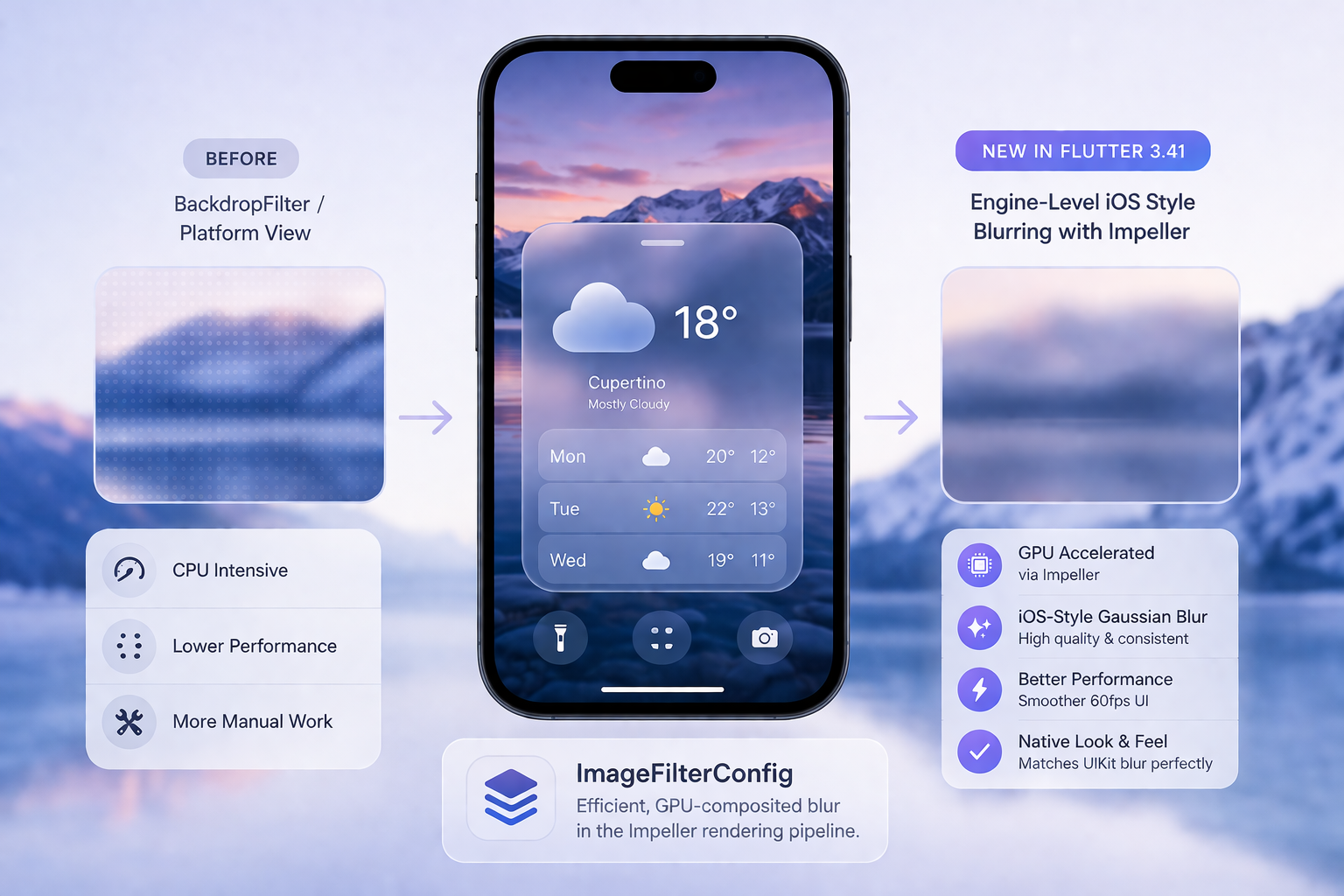
This is the most visually impactful change for apps using background blur effects, frosted glass UI patterns, or iOS-style sheets.
Flutter 3.41 introduces engine-level iOS style blurring, implemented directly in the Impeller rendering pipeline. Previously, achieving a true iOS-style gaussian blur required either a BackdropFilter widget — which had performance trade-offs — or a platform view that hosted a native UIVisualEffectView.
The new implementation (ImageFilterConfig) enables blur operations to be composited efficiently on the GPU, matching the look and performance of native UIKit blur effects.
// Use BackdropFilter with ClipRRect for iOS-style frosted glass
import 'dart:ui';

Widget buildFrostedCard(Widget child) {
  return ClipRRect(
    borderRadius: BorderRadius.circular(16),
    child: BackdropFilter(
      filter: ImageFilter.blur(sigmaX: 20, sigmaY: 20),
      child: Container(
        decoration: BoxDecoration(
          color: Colors.white.withValues(alpha: 0.15),
          borderRadius: BorderRadius.circular(16),
          border: Border.all(
            color: Colors.white.withValues(alpha: 0.3),
          ),
        ),
        child: child,
      ),
    ),
  );
}
The companion change — Platform View Blur Clipping with Rounded Rects — means this now works correctly even when a platform view sits beneath the blur layer. Prior to 3.41, blur clipping only worked with rectangular clip regions, causing visual glitches when rounded corners were involved.
5. Auto-Generated ExportOptions.plist for Manual Code Signing
Teams using manual code signing (common in enterprise environments where the distribution certificate is managed outside of Xcode's automatic signing) previously had to maintain a hand-crafted ExportOptions.plist. If this file drifted from the actual provisioning profile or method of distribution, xcodebuild -exportArchive would fail silently or with a cryptic error.
Flutter 3.41's tooling now auto-generates ExportOptions.plist when CODE_SIGN_STYLE=Manual is detected, deriving the correct method, provisioningProfiles, and signingCertificate values from your project settings.
In your Fastlane or CI script, you can now remove manual ExportOptions.plist management:
# Fastfile -- Before 3.41
lane :deploy do
  gym(
    project: "ios/Runner.xcodeproj",
    export_options: {
      method: "app-store",
      provisioningProfiles: {
        "com.myapp.bundle" => "MyApp Distribution Profile"
      }
    }
  )
end

# After 3.41 -- Flutter handles ExportOptions generation;
# you can let flutter build ipa drive the export step
lane :deploy do
  sh("flutter build ipa --release --export-method app-store")
  upload_to_app_store(ipa: "build/ios/ipa/MyApp.ipa")
end
6. Build System: Clean on Framework Header Changes
One of the more insidious iOS build bugs involved stale precompiled module caches. When you upgraded Flutter and ran a build, Xcode sometimes used cached module maps from the previous Flutter version, resulting in errors like:
error: Module 'Flutter' was not compiled with library evolution support
or:
Precompiled module is out of date
Flutter 3.41 addresses this by automatically triggering a clean build when framework headers change. You no longer need to manually run cd ios && flutter clean && pod install after every SDK upgrade — the tooling detects header changes and handles cache invalidation itself.
That said, running a clean after a major upgrade is still good practice:
flutter clean
cd ios && pod deintegrate && pod install && cd ..
flutter build ios --release
7. View Lifecycle & Autofill Fixes
A subtle but important fix lands for apps with complex UIViewController hierarchies. Previously, autofill context cleanup had a race condition: when a Flutter view was dismissed before the autofill session completed, the underlying FlutterTextInputPlugin could hold a stale reference, leading to a crash or unexpected keyboard behavior on the next presentation.
This is particularly relevant for apps using add-to-app (hybrid navigation), where Flutter screens are presented modally over native ViewControllers.
Additionally, iOS can now set the application locale before the FlutterViewController is fully initialized. This means locale-dependent UI — date formats, number separators, RTL layout — is correct on the very first frame, rather than requiring a re-render after mount.
8. Dart 3.9 and Cupertino Widget Stability
Flutter 3.41 bumps the Dart SDK to 3.9, bringing the latest language features including improved type inference and pattern matching enhancements.
A sweeping stability pass was also made across Cupertino widgets: CupertinoButton, CupertinoNavigationBar, CupertinoActionSheet, CupertinoAlertDialog, CupertinoTextField, and many more were hardened against crashes in zero-size (0x0) rendering environments. This matters for apps using snapshot testing, Flutter Driver, or any scenario where widgets are rendered off-screen.
Migration Guide: Step-by-Step
Step 1 — Upgrade the Flutter SDK
flutter upgrade
flutter --version
# Verify: Flutter 3.41.x • Dart 3.9.x
If you are version-pinned in CI, update your FVM config or flutter-version action:
# .github/workflows/ios.yml
- uses: subosito/flutter-action@v2
with:
    flutter-version: '3.41.0'
    channel: 'stable'
Step 2 — Clean and Reinstall Dependencies
flutter clean
cd ios
pod deintegrate
pod install --repo-update
cd ..
Step 3 — Update iOS Project Settings
Open ios/Runner.xcodeproj in Xcode and verify:
- Deployment Target: Set to your minimum supported iOS version (iOS 13.0 recommended).
- Build Settings: Remove any EXCLUDED_ARCHS overrides for the simulator.
- Signing: If using manual signing, let Flutter now handle ExportOptions.plist generation rather than maintaining it manually.
Step 4 — Validate with Xcode
flutter build ios --release --no-codesign
Then open Xcode and run a full archive build to catch any signing or framework version mismatches before they reach CI.
Step 5 — Run Your Test Suite
flutter test
flutter test integration_test/
Pay particular attention to tests involving:
- Cupertino widgets in constrained environments
- Autofill or text input flows
- Anything using BackdropFilter or platform views
Platform Channel Example: Checking iOS Version at Runtime
Some migration paths depend on the iOS version at runtime. Here is a clean pattern using MethodChannel:
// lib/services/platform_service.dart
import 'package:flutter/services.dart';

class PlatformService {
  static const _channel = MethodChannel('com.myapp/platform');

  static Future<String> getIOSVersion() async {
    try {
      final version = await _channel.invokeMethod<String>('getIOSVersion');
      return version ?? 'unknown';
    } on PlatformException catch (e) {
      return 'error: ${e.message}';
    }
  }
}

// ios/Runner/AppDelegate.swift
import UIKit
import Flutter

@main
@objc class AppDelegate: FlutterAppDelegate {
  override func application(
    _ application: UIApplication,
    didFinishLaunchingWithOptions launchOptions: [UIApplication.LaunchOptionsKey: Any]?
  ) -> Bool {
    let controller = window?.rootViewController as! FlutterViewController
    let channel = FlutterMethodChannel(
      name: "com.myapp/platform",
      binaryMessenger: controller.binaryMessenger
    )

    channel.setMethodCallHandler { call, result in
      if call.method == "getIOSVersion" {
        result(UIDevice.current.systemVersion)
      } else {
        result(FlutterMethodNotImplemented)
      }
    }

    return super.application(application, didFinishLaunchingWithOptions: launchOptions)
  }
}
Real-World Use Case: CI/CD Impact
For a production app releasing weekly via Xcode Cloud or Fastlane, Flutter 3.41 changes two things in your pipeline:
1. Remove the manual clean step triggered by header changes. Flutter now handles this. If your pipeline has a conditional clean based on a hash of the Flutter SDK path, you can simplify it.
2. Update your ExportOptions logic. If you were templating ExportOptions.plist in your CI scripts for manual signing, validate that Flutter's auto-generated version matches your provisioning profile setup before removing your existing logic. Run a single manual archive/export with the new tooling and compare the generated ExportOptions.plist to your old one.
For Xcode Cloud users, no changes to the ci_scripts/ci_post_clone.sh pattern are required — Flutter's standard build invocation handles the new behavior transparently.
Performance and Stability Considerations
Build performance: The automatic clean-on-header-change feature adds a full clean to the first build after an SDK upgrade, which will be slower than an incremental build. This is expected. Subsequent builds will be incremental as normal.
Rendering: The engine-level blur implementation via Impeller reduces overdraw in blur-heavy UIs. If your app uses multiple stacked BackdropFilter widgets, you may observe a measurable frame time improvement, particularly on older devices.
App size: Generating App.framework as a proper Mach-O dynamic library via gen_snapshot (rather than a wrapped binary) can result in a modest reduction in framework size and improved dyld load time.
Common Issues and Fixes
Issue: error: Module 'Flutter' was not compiled with library evolution support
Fix: Run flutter clean && cd ios && pod deintegrate && pod install. This clears stale module caches.
Issue: CocoaPods could not find compatible versions for pod "Flutter"
Fix: Run pod repo update before pod install. Your local CocoaPods spec repo may be stale.
Issue: Simulator build fails with building for iOS Simulator, but linking in object file built for iOS
Fix: Remove any EXCLUDED_ARCHS overrides in your Podfile and target build settings. Flutter 3.41 handles this correctly without manual configuration.
Issue: Archive export fails with No profiles for 'com.myapp.bundle' were found
Fix: Ensure your provisioning profile is installed in your keychain and that CODE_SIGN_STYLE=Manual is set explicitly in your build settings. Flutter's auto-generation relies on this flag being present.
Issue: CupertinoNavigationBar crashes in integration tests
Fix: This was a pre-3.41 bug related to 0x0 rendering. Upgrading to 3.41 resolves it without code changes on your side.
Best Practices for a Safe Upgrade
Use a feature branch. Never upgrade Flutter on main directly. Create an upgrade/flutter-3.41 branch, run your full test matrix, and merge only after green.
Pin your Flutter version in CI. Use FVM (flutter_version in .fvm/fvm_config.json) or the subosito/flutter-action flutter-version parameter to ensure all developers and CI runners use the same SDK version.
Test on a physical device. Simulator builds validate compilation. Physical device testing validates Impeller rendering, code signing, and dynamic content resizing behavior together.
Validate your minimum deployment target. With MinimumOSVersion now set dynamically, confirm that your platform :ios in your Podfile and your Xcode deployment target are consistent. A mismatch will produce a build warning that escalates to a rejection at App Store submission.
Check third-party plugins. Run flutter pub outdated and update any plugins that have released patches for Flutter 3.41 compatibility. Plugin authors particularly need to account for the Dart 3.9 SDK constraint.
Conclusion
Flutter 3.41 is a solid, iOS-focused release that simplifies development by removing long-standing manual workarounds. With fixes like improved Xcode 26 support, better resizing, and streamlined build processes, upgrading is straightforward for most teams. Staying updated ensures compatibility with Apple’s ecosystem and keeps your project easier to maintain over time.
All code examples target Flutter 3.41+ and Dart 3.9. Swift examples are compatible with Swift 5.9+ and iOS 13.0 deployment target.








