


.svg)




Introduction
AI agents are no longer a backend-only concern. As large language models become more capable and infrastructure costs drop, mobile developers are increasingly expected to embed intelligent, context-aware experiences directly into their apps. Flutter, with its growing ecosystem and cross-platform reach, is now well-positioned to take on that challenge — and Google's Flutter AI Toolkit is the most direct path there.
This article is a technical deep dive into how you can design, build, and ship AI agents using the Flutter AI Toolkit. Whether you're building a customer support bot, a coding assistant, or a multi-step autonomous workflow inside a mobile app, the concepts here apply directly. You'll walk away understanding not just the "how," but the architectural reasoning behind the decisions you'll need to make.
The goal isn't to replicate a basic chatbot tutorial. The goal is to give you the mental model and implementation blueprint for building agents that can reason, retain context, and take action — all from within a Flutter application.
Core Concept: What Is the Flutter AI Toolkit?
The Flutter AI Toolkit is an open-source package published by Google that provides a set of pre-built, customizable UI components and provider abstractions for integrating generative AI into Flutter applications. At its core, the toolkit wraps the complexity of talking to LLM backends — primarily Google's Gemini models — while exposing a clean, Flutter-idiomatic API that respects the reactive programming model developers already use.
What separates this toolkit from simply calling a REST API in a FutureBuilder is the depth of its abstraction. The toolkit provides a LlmChatView widget that handles conversation rendering, input state, streaming responses, and error recovery out of the box. Behind it, the LlmProvider interface lets you swap backends — whether that's Gemini via Firebase, a self-hosted model, or any other provider — without changing your UI code.
Building an AI agent, however, is more than just a chat UI. An agent needs memory, tools it can invoke, and a decision loop that can break a complex request into sub-tasks. The Flutter AI Toolkit gives you the scaffolding; your architecture provides the intelligence layer on top.
Key components of the toolkit include:
- LlmChatView — The primary pre-built chat widget with streaming support
- LlmProvider — Abstract interface for connecting any LLM backend
- GeminiProvider — First-party implementation for Google Gemini
- ChatMessage model — Structured type for user, assistant, and system messages
- Tool/function calling hooks — Extension points for agent action execution
Why It Matters for Flutter Developers
The historical argument against building AI features natively in Flutter was plausible: LLM integration required server-side orchestration, Python toolchains, and infrastructure that had no natural mapping to a Dart codebase. The Flutter AI Toolkit dissolves that argument. You can now keep your entire agent loop — context management, tool invocation, response streaming — inside your Flutter app without a custom backend.
This is significant for indie developers and small teams. Shipping an AI-native feature no longer requires spinning up a Node.js or Python service just to proxy model calls. The toolkit handles token streaming, provider authentication via Firebase, and conversation history management natively. The developer experience improvement is real: fewer network hops, fewer services to maintain, and a single codebase that owns the full feature.
At a broader scale, this matters because Flutter's cross-platform model means an agent you build once runs on Android, iOS, web, and desktop. That's a meaningful leverage point when time-to-market is a constraint.
Why this toolkit deserves your attention:
- Streaming-first design keeps UI responsive even on slow network conditions
- Provider abstraction means you're not locked into a single LLM vendor
- Firebase integration handles authentication and rate-limiting without custom infrastructure
- Built-in conversation history gives agents access to multi-turn context by default
- Open-source codebase allows inspection, forking, and contribution
Architecture Breakdown
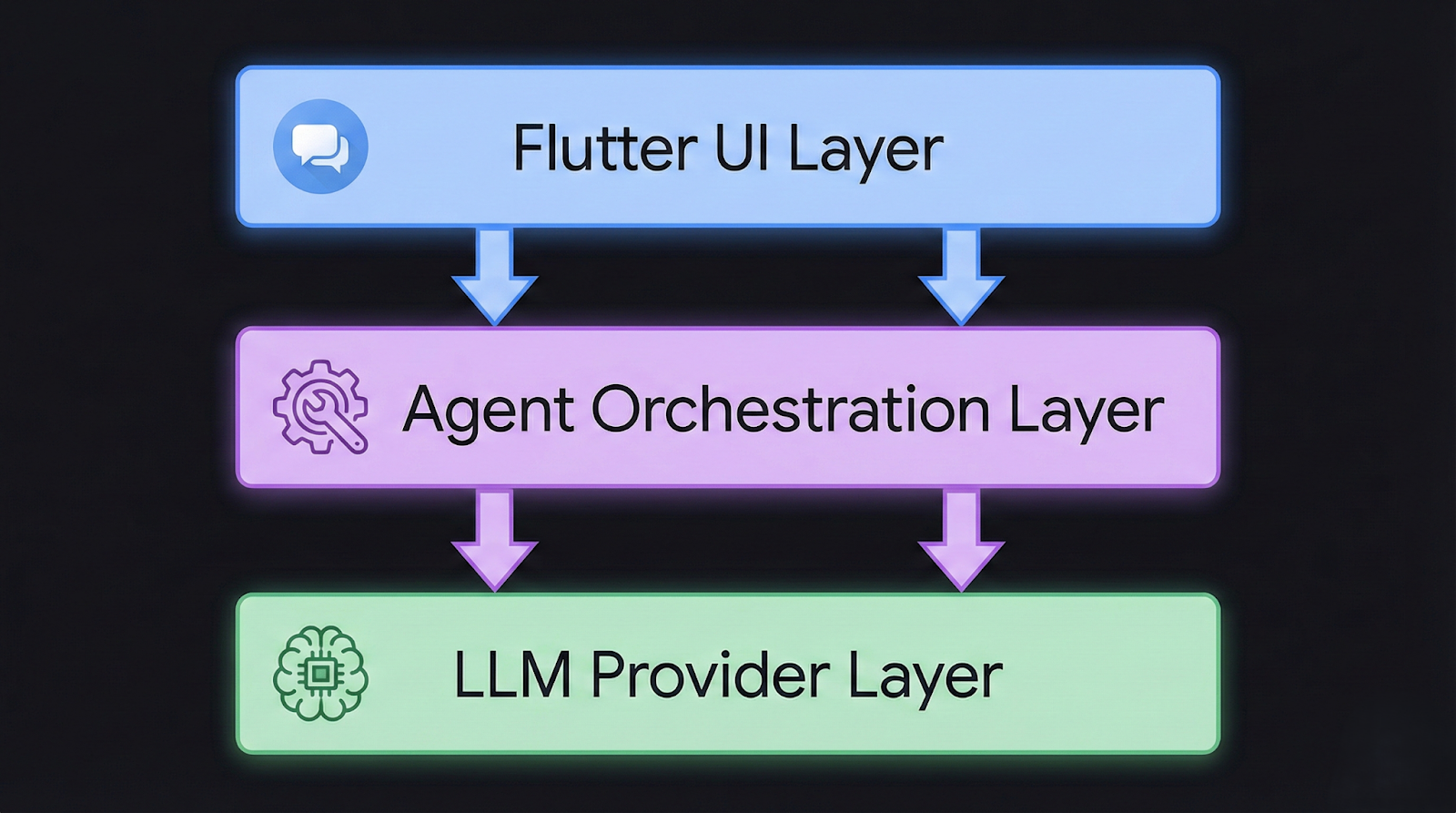
Before writing a line of code, it helps to understand the three-layer architecture of a Flutter AI agent. Many developers make the mistake of treating the toolkit as the entire system. In practice, the toolkit occupies only the presentation and communication layers. The agent logic — the part that makes the system intelligent — lives in a separate layer you define.
The three layers work as follows. The presentation layer is owned by the Flutter AI Toolkit. It handles rendering messages, capturing input, streaming tokens into the UI, and managing loading and error states. The agent orchestration layer is where you define the agent's capabilities: what tools it can call, how it manages memory, and when it should escalate or retry. The provider/model layer is the LLM backend — Gemini, OpenAI via a custom provider, or any model accessible over HTTP.
┌──────────────────────────────────────────────┐
│               Flutter UI Layer               │
│     LlmChatView  ←→  ChatMessage stream      │
└─────────────────────┬────────────────────────┘
                      │
┌─────────────────────▼────────────────────────┐
│         Agent Orchestration Layer            │
│  ToolRegistry | MemoryManager | StateGraph   │
└─────────────────────┬────────────────────────┘
                      │
┌─────────────────────▼────────────────────────┐
│         LLM Provider Layer                   │
│   GeminiProvider | CustomLlmProvider         │
└──────────────────────────────────────────────┘
The agent orchestration layer is where most of your custom code lives. It intercepts model responses, detects when the model has requested a tool call, executes the tool, and feeds the result back into the next model turn. This loop continues until the model produces a final answer without requesting further tool invocations.
Core components in a well-structured Flutter agent:
- ToolRegistry — A map of tool names to Dart functions the agent can invoke
- MemoryManager — Handles windowed or summarized conversation history
- AgentController — Manages the action loop between model output and tool execution
- StateGraph (for complex agents) — Defines valid transitions between agent states
- ProviderAdapter — Bridges your orchestration layer to the LlmProvider interface
Implementation Deep Dive
Setting up a basic agent takes less time than you might expect, given the toolkit's design. The complexity lives not in the initial setup but in the orchestration logic you layer on top. Here's a structured path from zero to a working agent.
Start by adding the necessary dependencies to your pubspec.yaml. You'll need flutter_ai_toolkit and, if you're using Gemini, firebase_core and the Gemini SDK. Initialize Firebase in your main.dart before calling runApp. This is standard Flutter + Firebase setup, and the toolkit's documentation covers the specifics with version-pinned examples.
Step 1: Install and configure the toolkit
Add flutter_ai_toolkit to pubspec.yaml and run flutter pub get. Configure your Firebase project with Gemini API access enabled.
Step 2: Create a custom LlmProvider for agent-aware communication
Rather than using GeminiProvider directly, subclass or wrap it to intercept responses and detect function call payloads before they reach the UI.
Step 3: Define your tool registry
Create a Map<String, Future<String> Function(Map<String, dynamic>)> that maps tool names to async Dart functions. These are the actions your agent can take — fetching data, writing to a database, calling a third-party API.
Step 4: Implement the agent loop
In your provider wrapper, after each model response, check if the response contains a function call. If it does, look up the tool in your registry, execute it, and inject the result as a new system message before requesting the next model turn.
Step 5: Wire in memory management
Use a MemoryManager class that trims or summarizes the conversation history beyond a configurable token window. Pass the managed history to each new model request.
Step 6: Mount LlmChatView with your custom provider
LlmChatView(
  provider: AgentProvider(
    toolRegistry: myToolRegistry,
    memoryManager: MemoryManager(maxTokens: 4096),
  ),
  welcomeMessage: 'How can I help you today?',
)
The AgentProvider here is your custom class that implements LlmProvider. The LlmChatView doesn't care about the implementation details — it just streams messages in and out.
Advanced Patterns
Once the basic agent loop is working, the interesting engineering problems begin. Most production agents need more than a simple tool-call loop. They need to handle multi-step planning, graceful degradation when tools fail, and context strategies that prevent runaway token costs.
One pattern worth adopting early is tool result caching. If your agent calls the same tool with the same arguments within a session, you can cache the result and return it immediately without a network call. This reduces latency and cost, especially when agents re-verify data mid-task.
Another critical pattern is retry logic with exponential backoff at the provider level. LLM APIs have rate limits, and mobile network conditions are unreliable. Your AgentProvider should handle 429 and transient 5xx responses with configurable retry behavior before surfacing errors to the UI.
Advanced optimization points to implement incrementally:
- Structured output parsing — Prompt the model to respond in JSON and parse it before tool execution to reduce hallucinated tool names
- Agent state persistence — Serialize agent state to local storage so sessions survive app backgrounding
- Parallel tool execution — When the model requests multiple independent tools, execute them concurrently using Future.wait
- Confidence gating — Add a scoring step that evaluates whether the agent's planned action meets a confidence threshold before executing
- Streaming tool results — For long-running tools, stream intermediate results back to the UI to maintain responsiveness
Real-World Use Cases
In-App Customer Support Agent
A support agent embedded in a SaaS mobile app can access the user's account data, ticket history, and knowledge base articles as tools. When a user describes a billing issue, the agent calls the getSubscriptionDetails tool, reads the response, and either resolves the issue directly by calling applyCredit or escalates by creating a support ticket via createTicket. The Flutter AI Toolkit handles the conversational surface; your backend handles execution. This pattern reduces support ticket volume while keeping engineers out of the loop for routine issues.
Code Review Assistant for Developer Tools
Developer-facing apps — think mobile IDE companions or CI dashboard tools — can embed an agent that reviews code diffs, suggests improvements, and links to relevant documentation. The agent receives a diff as a string, calls a lintCode tool, and returns structured feedback. Since the toolkit supports markdown rendering natively in its message views, formatted code suggestions appear cleanly without custom widget work.
Autonomous Data Entry Agent
Field service apps often require manual data entry after completing a job. An agent can listen to a voice recording, transcribe it via a tool call, extract structured fields (job completion status, materials used, hours logged), and pre-fill a form — asking the user to confirm rather than type. This pattern uses the agent not as a chat interface but as a background processor with a confirmation UI step.
Trade-offs to consider across these use cases:
- Latency vs. depth — More tool calls produce better answers but slower responses; cache aggressively
- Privacy vs. capability — Tools that read user data must be scoped carefully, especially under GDPR and CCPA
- Cost vs. quality — Larger context windows improve agent reasoning but increase token costs per turn
- Offline support — Agent loops requiring live API calls won't function without connectivity; design fallbacks
Common Mistakes
The most common mistake developers make when first building Flutter AI agents is conflating the chat UI with the agent. The toolkit's LlmChatView is an interface component. If you're putting agent logic inside widget classes or directly inside onSendMessage callbacks, you've already created a maintenance problem. The agent loop belongs in a dedicated service or controller layer, decoupled from the widget tree.
Another frequent mistake is ignoring token limits until they cause failures in production. Every conversation message consumes tokens. A naive implementation that passes the full conversation history to every model call will eventually hit the context window limit — typically silently, with the model simply truncating history. Implement token estimation and windowing from day one, even if your initial window is generous.
Mistakes that consistently surface in Flutter agent projects:
- No tool error handling — Unhandled tool exceptions crash the agent loop silently; always wrap tool calls in try/catch and return structured error messages to the model
- Blocking the UI thread — Long-running tool operations should always be async and never block the main isolate
- Prompt injection via user input — Never interpolate raw user input directly into system prompts without sanitization
- Hardcoded provider credentials — API keys in Dart source files are extractable from release builds; use Firebase Remote Config or secure storage
- No abort mechanism — If the model enters an infinite tool-call loop, users have no way out; always expose a cancel action in the UI
Best Practices
Building production AI agents in Flutter requires the same discipline as building any stateful, networked feature — but the failure modes are less familiar because LLM behavior is non-deterministic. Treating your agent like a deterministic service is the root cause of most reliability issues. Design for uncertainty from the start.
Separate your agent's capabilities from its interface. The LlmProvider abstraction in the Flutter AI Toolkit makes this achievable. Write your AgentProvider against the LlmProvider interface so that swapping from Gemini to another model in the future requires only a provider-level change, not a UI rewrite. This also makes unit testing dramatically easier — you can mock the provider and inject scripted responses without hitting a live API.
The Flutter AI Toolkit's official pub.dev documentation provides provider interface specs that are worth reviewing before you implement your first custom provider.
Best practices for Flutter AI agent development:
- Layer your architecture — Keep UI, orchestration, and provider concerns in separate classes with clearly defined contracts
- Stream everything — Use Dart streams for model output; never accumulate full responses before rendering
- Version your prompts — Store system prompts in versioned config files, not hardcoded strings; prompt changes affect agent behavior significantly
- Log tool calls — Record every tool invocation with inputs, outputs, and latency in your telemetry pipeline
- Test with adversarial inputs — Users will find edge cases your prompts don't handle; test with malformed, ambiguous, and hostile inputs before shipping
- Rate-limit on the client — Don't rely solely on backend rate limiting; implement client-side debounce and request queuing in your AgentProvider
Conclusion
The Flutter AI Toolkit lowers the barrier to building AI agents on mobile without lowering the ceiling on what's possible. The pre-built UI components handle the rendering complexity that would otherwise consume weeks of development time. The provider abstraction gives you a clean interface to the model layer that's testable, swappable, and production-ready.
What the toolkit doesn't do is design your agent for you. The orchestration layer — the memory management, the tool registry, the retry logic, the context windowing — is your responsibility. And that's appropriate. The intelligent behavior of your agent is your product differentiator; the toolkit is the infrastructure that lets you build it faster.
Flutter's cross-platform reach makes this investment particularly valuable. An agent you architect correctly in Dart runs across Android, iOS, and web without meaningful modification. As LLM capabilities continue to improve and mobile hardware catches up with on-device inference requirements, Flutter developers who understand agent architecture today will be positioned to ship features that currently seem aspirational.
Key Takeaways
- The Flutter AI Toolkit provides production-grade chat UI and a LlmProvider interface, not a complete agent system
- Agent orchestration — tool calling, memory management, state control — lives in a custom layer you build on top of the toolkit
- The GeminiProvider is the fastest path to a working implementation; abstract it immediately so you're not locked in
- Token management is not optional; windowing and summarization must be built before your first production release
- Tool errors should be handled gracefully and returned to the model as structured messages, not surfaced as UI crashes
- Flutter's cross-platform model means a well-architected agent targets Android, iOS, and web from a single codebase
Practical Next Steps
- Install the Flutter AI Toolkit and run the provided example app to understand the default conversation flow before customizing anything.
- Sketch your tool registry — list every external action your agent needs to perform and define typed input/output contracts for each tool before writing code.
- Build a MemoryManager class that accepts a list of ChatMessage objects and returns a token-windowed subset; integrate it before any production testing.
- Implement your AgentProvider as a wrapper around GeminiProvider, adding the tool-call detection and execution loop, then write unit tests with mocked tool responses.
- Set up observability — log every tool invocation, model turn, and error to your analytics or logging pipeline so you can diagnose agent failures in production without reproducing them locally.








