


.png)


.png)
Detection, Prevention & Production Lessons
Recently, a critical supply chain attack targeting the Axios npm package (March 2026) required us to take immediate action across both our mobile and backend ecosystems. Since many mobile applications depend on Node.js services for APIs, CI/CD workflows, and build pipelines—and cross-platform frameworks like React Native also rely on Axios—this incident extended beyond a backend concern and directly impacted our mobile delivery pipelines.
This blog shares how we identified, mitigated, and hardened our systems with real production learnings.
Problem Statement
A compromised Axios release introduced malicious behavior via:
- Affected versions:
- axios@1.14.1
- axios@0.30.4
- Malicious dependency: plain-crypto-js
- Remote command & control (C2): sfrclak.com
- Payload included:
- Data exfiltration
- Remote access scripts (RAT)
- CI/CD pipeline compromise risk
The biggest problem:
Even if your mobile app is safe, your backend APIs, build systems, or automation scripts might already be compromised.
Solution / Approach
We approached this in 3 layers:
- Detection (Immediate Audit)
- Mitigation (Remove + Block)
- Prevention (Future-Proofing CI/CD & Dependencies)
Step 1: Automated Compromise Detection Script
We created a production-ready audit script to scan:
- Malicious Axios versions
- Suspicious dependencies
- RAT artifacts
- Network traces to C2 domains
- Suspicious processes
Here is the script we used internally:
#!/usr/bin/env bash
# =============================================================================
# Axios Supply Chain Attack - Compromise Checker
# CVE Reference: Axios npm supply chain attack (March 31, 2026)
# Affected versions: axios@1.14.1, axios@0.30.4 (via plain-crypto-js@4.2.1)
# C2 Domain: sfrclak[.]com
# =============================================================================

set -euo pipefail

# ---------- Colors & formatting ----------
RED='\033[0;31m'
GREEN='\033[0;32m'
YELLOW='\033[1;33m'
CYAN='\033[0;36m'
BOLD='\033[1m'
NC='\033[0m' # No Color

HOSTNAME_VAL=$(hostname)
OS_TYPE=$(uname -s)
TIMESTAMP=$(date -u +"%Y-%m-%dT%H:%M:%SZ")

# ---------- Result tracking ----------
FINDINGS=0
WARNINGS=0

log_header() {
    echo ""
    echo -e "${CYAN}${BOLD}══════════════════════════════════════════════════════════${NC}"
    echo -e "${CYAN}${BOLD}  $1${NC}"
    echo -e "${CYAN}${BOLD}══════════════════════════════════════════════════════════${NC}"
}

log_ok()      { echo -e "  ${GREEN}[✓ CLEAN ]${NC} $1"; }
log_warn()    { echo -e "  ${YELLOW}[! WARN  ]${NC} $1"; WARNINGS=$((WARNINGS+1)); }
log_hit()     { echo -e "  ${RED}[✗ FOUND ]${NC} $1"; FINDINGS=$((FINDINGS+1)); }
log_info()    { echo -e "  ${CYAN}[  INFO  ]${NC} $1"; }
log_skip()    { echo -e "  [  SKIP  ] $1"; }

# =============================================================================
echo ""
echo -e "${BOLD}╔══════════════════════════════════════════════════════════╗${NC}"
echo -e "${BOLD}║     Axios Supply Chain Attack -- Compromise Checker       ║${NC}"
echo -e "${BOLD}║         github.com/axios/axios | March 31, 2026          ║${NC}"
echo -e "${BOLD}╚══════════════════════════════════════════════════════════╝${NC}"
echo ""
echo -e "  Host      : ${BOLD}${HOSTNAME_VAL}${NC}"
echo -e "  OS        : ${BOLD}${OS_TYPE}${NC}"
echo -e "  Scan time : ${BOLD}${TIMESTAMP}${NC}"
echo ""

# =============================================================================
log_header "1. RAT Artifact Check (Platform-Specific Files)"
# =============================================================================

case "$OS_TYPE" in
  Darwin)
    RAT_PATH="/Library/Caches/com.apple.act.mond"
    if [ -f "$RAT_PATH" ]; then
        log_hit "macOS RAT binary detected: ${RAT_PATH}"
        log_hit "File details: $(file "$RAT_PATH" 2>/dev/null || echo 'unable to stat')"
        log_hit "SHA256: $(shasum -a 256 "$RAT_PATH" 2>/dev/null || echo 'unable to hash')"
    else
        log_ok "macOS RAT binary not found: ${RAT_PATH}"
    fi
    ;;
  Linux)
    RAT_PATH="/tmp/ld.py"
    if [ -f "$RAT_PATH" ]; then
        log_hit "Linux RAT script detected: ${RAT_PATH}"
        log_hit "File details: $(file "$RAT_PATH" 2>/dev/null || echo 'unable to stat')"
        log_hit "SHA256: $(sha256sum "$RAT_PATH" 2>/dev/null || echo 'unable to hash')"
    else
        log_ok "Linux RAT script not found: ${RAT_PATH}"
    fi
    ;;
  MINGW*|MSYS*|CYGWIN*)
    # Windows (Git Bash / Cygwin)
    WIN_RAT="%PROGRAMDATA%\\wt.exe"
    WIN_BAT="%PROGRAMDATA%\\system.bat"
    log_info "Windows detected -- checking via PowerShell paths"
    for p in "C:/ProgramData/wt.exe" "C:/ProgramData/system.bat"; do
        if [ -f "$p" ]; then
            log_hit "Windows RAT artifact detected: ${p}"
        else
            log_ok "Not found: ${p}"
        fi
    done
    ;;
  *)
    log_skip "Unknown OS type '${OS_TYPE}' -- skipping platform-specific artifact check"
    ;;
esac

# =============================================================================
log_header "2. Malicious Axios Version Check (node_modules)"
# =============================================================================

AXIOS_SEARCH_DIRS=(
    "$HOME"
    "/opt"
    "/srv"
    "/var/www"
    "/usr/local"
    "/home"
    "/app"
    "/workspace"
)

MALICIOUS_AXIOS_VERSIONS=("1.14.1" "0.30.4")
SAFE_AXIOS_VERSIONS=("1.14.0" "0.30.3")

found_any_axios=0

for base_dir in "${AXIOS_SEARCH_DIRS[@]}"; do
    if [ ! -d "$base_dir" ]; then continue; fi

    # Find all axios package.json files (suppress permission errors)
    while IFS= read -r pkg_json; do
        if [ -z "$pkg_json" ]; then continue; fi
        dir=$(dirname "$pkg_json")

        # Only process axios package directories (not nested deps)
        pkg_name=$(grep -m1 '"name"' "$pkg_json" 2>/dev/null | awk -F'"' '{print $4}' || true)
        if [ "$pkg_name" != "axios" ]; then continue; fi

        version=$(grep -m1 '"version"' "$pkg_json" 2>/dev/null | awk -F'"' '{print $4}' || true)
        found_any_axios=1

        is_malicious=0
        for mv in "${MALICIOUS_AXIOS_VERSIONS[@]}"; do
            if [ "$version" = "$mv" ]; then
                is_malicious=1
                break
            fi
        done

        if [ "$is_malicious" -eq 1 ]; then
            log_hit "MALICIOUS axios@${version} found at: ${dir}"
        else
            log_ok "axios@${version} at: ${dir}"
        fi
    done < <(find "$base_dir" -maxdepth 8 -name "package.json" -path "*/axios/package.json" 2>/dev/null || true)
done

if [ "$found_any_axios" -eq 0 ]; then
    log_info "No axios installations found in standard directories"
fi

# =============================================================================
log_header "3. Malicious Dependency Check (plain-crypto-js)"
# =============================================================================

PLAIN_CRYPTO_FOUND=0

for base_dir in "${AXIOS_SEARCH_DIRS[@]}"; do
    if [ ! -d "$base_dir" ]; then continue; fi
    while IFS= read -r pkg_json; do
        if [ -z "$pkg_json" ]; then continue; fi
        dir=$(dirname "$pkg_json")
        pkg_name=$(grep -m1 '"name"' "$pkg_json" 2>/dev/null | awk -F'"' '{print $4}' || true)
        if [ "$pkg_name" = "plain-crypto-js" ]; then
            version=$(grep -m1 '"version"' "$pkg_json" 2>/dev/null | awk -F'"' '{print $4}' || true)
            log_hit "Malicious package 'plain-crypto-js@${version}' found at: ${dir}"
            PLAIN_CRYPTO_FOUND=1
        fi
    done < <(find "$base_dir" -maxdepth 10 -name "package.json" 2>/dev/null || true)
done

if [ "$PLAIN_CRYPTO_FOUND" -eq 0 ]; then
    log_ok "'plain-crypto-js' not found in node_modules directories"
fi

# =============================================================================
log_header "4. C2 Domain Network Check (sfrclak.com)"
# =============================================================================

C2_DOMAIN="sfrclak.com"

# Check /etc/hosts for block
if grep -qi "$C2_DOMAIN" /etc/hosts 2>/dev/null; then
    log_ok "C2 domain is blocked in /etc/hosts"
else
    log_warn "C2 domain '${C2_DOMAIN}' is NOT blocked in /etc/hosts"
fi

# Check DNS resolves (if nslookup/dig available)
if command -v nslookup &>/dev/null; then
    if nslookup "$C2_DOMAIN" &>/dev/null 2>&1; then
        log_warn "C2 domain '${C2_DOMAIN}' resolves via DNS -- verify egress firewall blocks it"
    else
        log_ok "C2 domain '${C2_DOMAIN}' does not resolve (may be already sinkholed/blocked)"
    fi
else
    log_skip "nslookup not available -- skipping DNS resolution check"
fi

# Check recent connections in logs (macOS/Linux)
if [ "$OS_TYPE" = "Darwin" ]; then
    if log show --predicate "eventMessage contains 'sfrclak'" --last 7d 2>/dev/null | grep -qi "sfrclak"; then
        log_hit "C2 domain traffic found in system logs!"
    else
        log_ok "No C2 domain traffic found in macOS system logs (last 7 days)"
    fi
fi

# Check /var/log for any references
if ls /var/log/*.log &>/dev/null 2>&1; then
    if grep -rl "sfrclak" /var/log/*.log 2>/dev/null | grep -q .; then
        log_hit "C2 domain reference found in /var/log -- check immediately"
    else
        log_ok "No C2 domain references found in /var/log"
    fi
fi

# =============================================================================
log_header "5. Suspicious Process Check"
# =============================================================================

# Check for the RAT binary running as a process (macOS)
if [ "$OS_TYPE" = "Darwin" ]; then
    if ps aux 2>/dev/null | grep -v grep | grep -q "com.apple.act.mond"; then
        log_hit "RAT process 'com.apple.act.mond' is currently RUNNING!"
    else
        log_ok "RAT process 'com.apple.act.mond' is not running"
    fi
fi

# Check for ld.py running (Linux)
if [ "$OS_TYPE" = "Linux" ]; then
    if ps aux 2>/dev/null | grep -v grep | grep -q "/tmp/ld.py"; then
        log_hit "RAT process '/tmp/ld.py' is currently RUNNING!"
    else
        log_ok "RAT process '/tmp/ld.py' is not running"
    fi
fi

# Check for suspicious node processes running setup.js from temp dirs
if ps aux 2>/dev/null | grep -v grep | grep -q "setup\.js"; then
    log_warn "Found a node process running 'setup.js' -- verify it is not malicious"
    ps aux 2>/dev/null | grep -v grep | grep "setup\.js" | while read -r line; do
        log_warn "  Process: ${line}"
    done
else
    log_ok "No suspicious 'setup.js' node processes found"
fi

# =============================================================================
log_header "6. Windows Registry Run Key Check (Windows only)"
# =============================================================================

if [ "$OS_TYPE" = "MINGW"* ] || [ "$OS_TYPE" = "MSYS"* ] || [ "$OS_TYPE" = "CYGWIN"* ]; then
    # Check for system.bat registry persistence
    if command -v reg &>/dev/null; then
        if reg query "HKCU\Software\Microsoft\Windows\CurrentVersion\Run" 2>/dev/null | grep -qi "system.bat"; then
            log_hit "Malicious Registry Run key pointing to system.bat found!"
        else
            log_ok "No malicious Registry Run key found"
        fi
    else
        log_skip "reg command not available"
    fi
else
    log_skip "Not a Windows system -- skipping Registry check"
fi

# =============================================================================
log_header "7. Related Malicious Packages (@shadanai/openclaw, @qqbrowser/openclaw-qbot)"
# =============================================================================

RELATED_PKGS=("@shadanai/openclaw" "@qqbrowser/openclaw-qbot")

for base_dir in "${AXIOS_SEARCH_DIRS[@]}"; do
    if [ ! -d "$base_dir" ]; then continue; fi
    for pkg in "${RELATED_PKGS[@]}"; do
        pkg_path_part="${pkg//@/}"
        pkg_path_part="${pkg_path_part/\//-}"
        # Search for these packages
        while IFS= read -r found; do
            if [ -n "$found" ]; then
                log_hit "Related malicious package '${pkg}' found at: $(dirname "$found")"
                FINDINGS=$((FINDINGS+1))
            fi
        done < <(find "$base_dir" -maxdepth 10 -name "package.json" 2>/dev/null | xargs grep -l "\"name\": \"${pkg}\"" 2>/dev/null || true)
    done
done

log_ok "Related malicious package scan complete"

# =============================================================================
log_header "SCAN SUMMARY"
# =============================================================================

echo ""
echo -e "  Host      : ${BOLD}${HOSTNAME_VAL}${NC}"
echo -e "  Scan time : ${BOLD}${TIMESTAMP}${NC}"
echo ""

if [ "$FINDINGS" -gt 0 ]; then
    echo -e "  ${RED}${BOLD}⚠  COMPROMISE INDICATORS FOUND: ${FINDINGS}${NC}"
    echo ""
    echo -e "  ${RED}IMMEDIATE ACTIONS REQUIRED:${NC}"
    echo -e "  ${RED}1. Isolate this system from the network${NC}"
    echo -e "  ${RED}2. Rotate ALL credentials and secrets on this system${NC}"
    echo -e "  ${RED}3. Audit CI/CD pipeline runs that installed axios@1.14.1 or @0.30.4${NC}"
    echo -e "  ${RED}4. Remove plain-crypto-js from node_modules${NC}"
    echo -e "  ${RED}5. Downgrade axios to 1.14.0 or 0.30.3${NC}"
    echo -e "  ${RED}6. Block egress to sfrclak.com at firewall level${NC}"
    echo -e "  ${RED}7. Contact your security team immediately${NC}"
elif [ "$WARNINGS" -gt 0 ]; then
    echo -e "  ${YELLOW}${BOLD}△  NO DIRECT COMPROMISE FOUND -- BUT ${WARNINGS} WARNING(S) NEED ATTENTION${NC}"
    echo ""
    echo -e "  Review warnings above and ensure:"
    echo -e "  • sfrclak.com is blocked at your firewall/DNS level"
    echo -e "  • Axios versions 1.14.1 / 0.30.4 are not deployed anywhere"
else
    echo -e "  ${GREEN}${BOLD}✓  NO COMPROMISE INDICATORS FOUND${NC}"
    echo ""
    echo -e "  ${GREEN}This system appears clean. Continue to:${NC}"
    echo -e "  • Ensure axios is on version 1.14.0 or 0.30.3"
    echo -e "  • Block sfrclak.com at the firewall/DNS level company-wide"
    echo -e "  • Audit any CI/CD runs from March 31 - April 1, 2026"
fi

echo ""
echo -e "  ${CYAN}For remediation details: https://thehackernews.com/2026/03/axios-supply-chain-attack-pushes-cross.html${NC}"
echo ""
What This Script Actually Checks
1. File System Indicators (RAT Artifacts)
- Checks known malicious file locations across OS
macOS: /Library/Caches/com.apple.act.mond
Linux: /tmp/ld.py
- Windows: ProgramData/wt.exe, system.bat
- Helps detect if malware already dropped payload on system
2. Node Modules Scan (Dependency Level)
- Scans common directories like $HOME, /var/www, /app
- Detects installed Axios versions inside node_modules
- Flags:
- axios@1.14.1 ❌
- axios@0.30.4 ❌
- Ensures even indirect (transitive) usage is caught
3. Malicious Dependency Detection
- Searches for plain-crypto-js in all dependencies
- Works for deeply nested packages (not just root level)
- Identifies hidden supply-chain injection via dependencies
4. Network & C2 Domain Check
- Checks if sfrclak.com is blocked in /etc/hosts
- Verifies if domain resolves via DNS
- Scans logs for any past communication
- Detects potential data exfiltration attempts
5. Suspicious Process Detection
- Monitors running processes for known attack patterns
Looks for:- RAT binaries
- /tmp/ld.py execution
- Node processes running setup.js
- Helps catch active compromise, not just installed packages
6. Windows Persistence Check
- Scans registry auto-start entries
- Path: HKCU\Software\Microsoft\Windows\CurrentVersion\Run
- Detects malicious startup scripts like system.bat
- Identifies persistence mechanism used by attackers
7. Related Malicious Packages
- Detects linked threat packages:
- @shadanai/openclaw
- @qqbrowser/openclaw-qbot
- Searches entire system for traces
- Covers extended attack surface beyond Axios
Step 2: Immediate Mitigation
Once we identified risks, we enforced strict cleanup steps.
Fix Axios Version
npm uninstall axios
npm install axios@1.14.0
# OR
npm install axios@0.30.3
Remove Malicious Dependency
npm uninstall plain-crypto-js
Block C2 Domain
echo "0.0.0.0 sfrclak.com" | sudo tee -a /etc/hosts
Rotate Secrets (Critical)
We have rotated all critical credentials—including API keys, Firebase credentials, CI/CD tokens, and app signing certificates—because in mobile applications, a leaked signing key can completely compromise the app.
Step 3: CI/CD Hardening (Most Important)
This is where we made the biggest improvement. We added a mandatory security gate before builds:
./check_axios_compromise.sh
Build Rules
- If malicious Axios found → ❌ Fail build
- If suspicious process detected → ❌ Block deployment
- If warnings → ⚠️ Manual review required
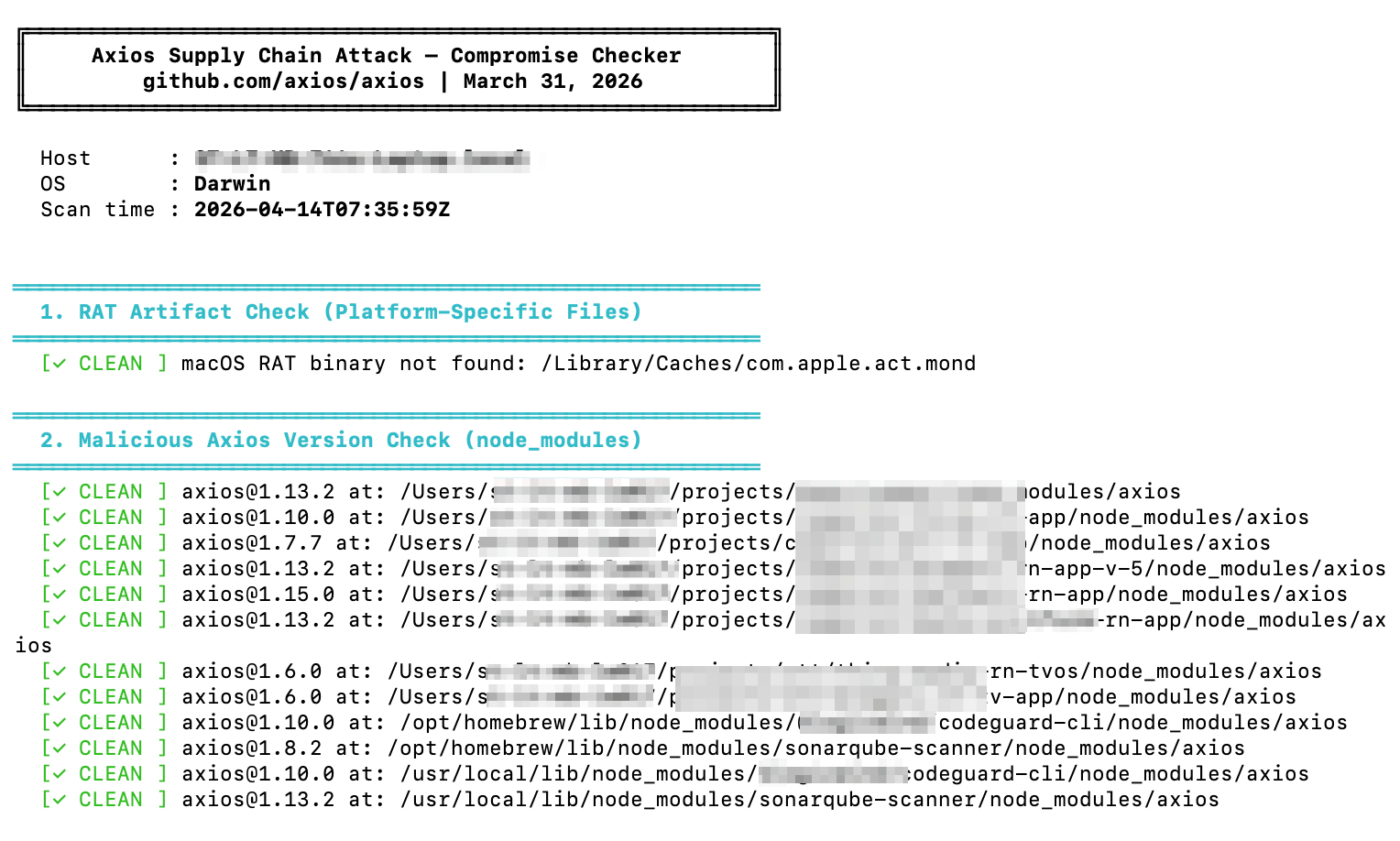
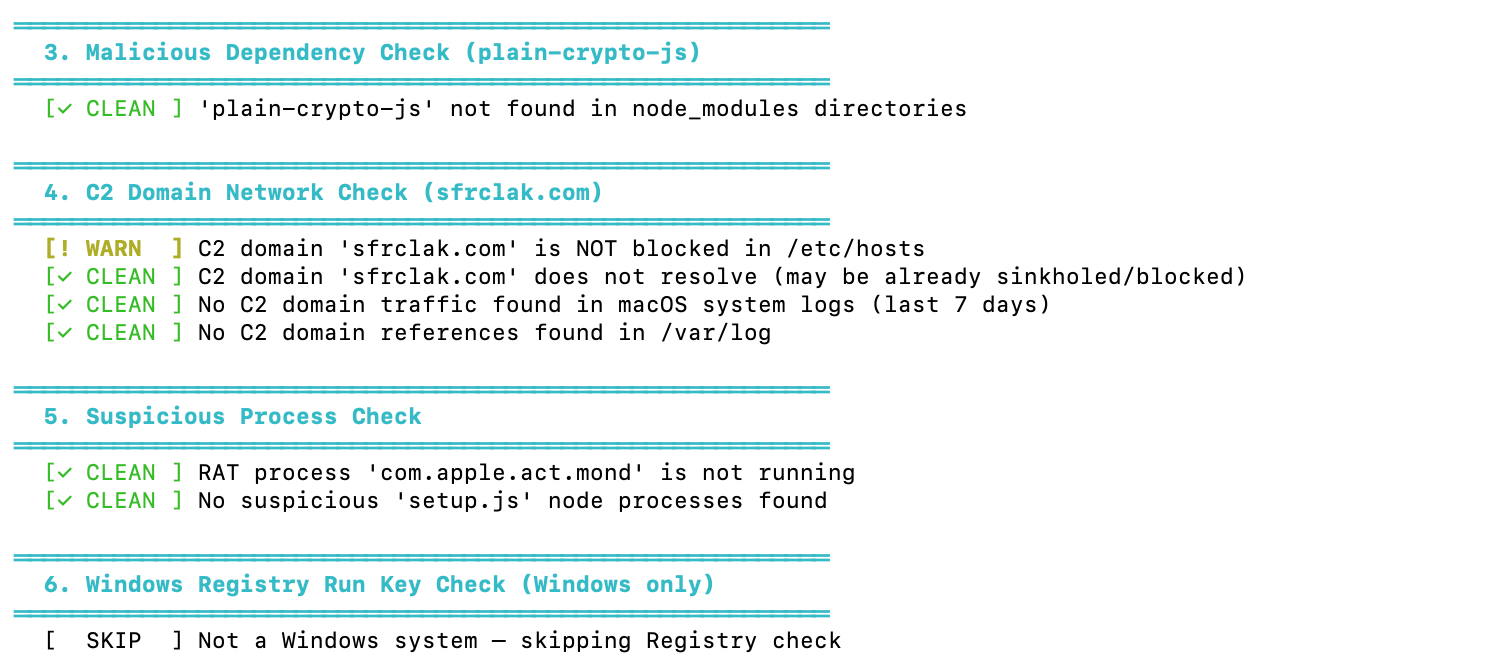
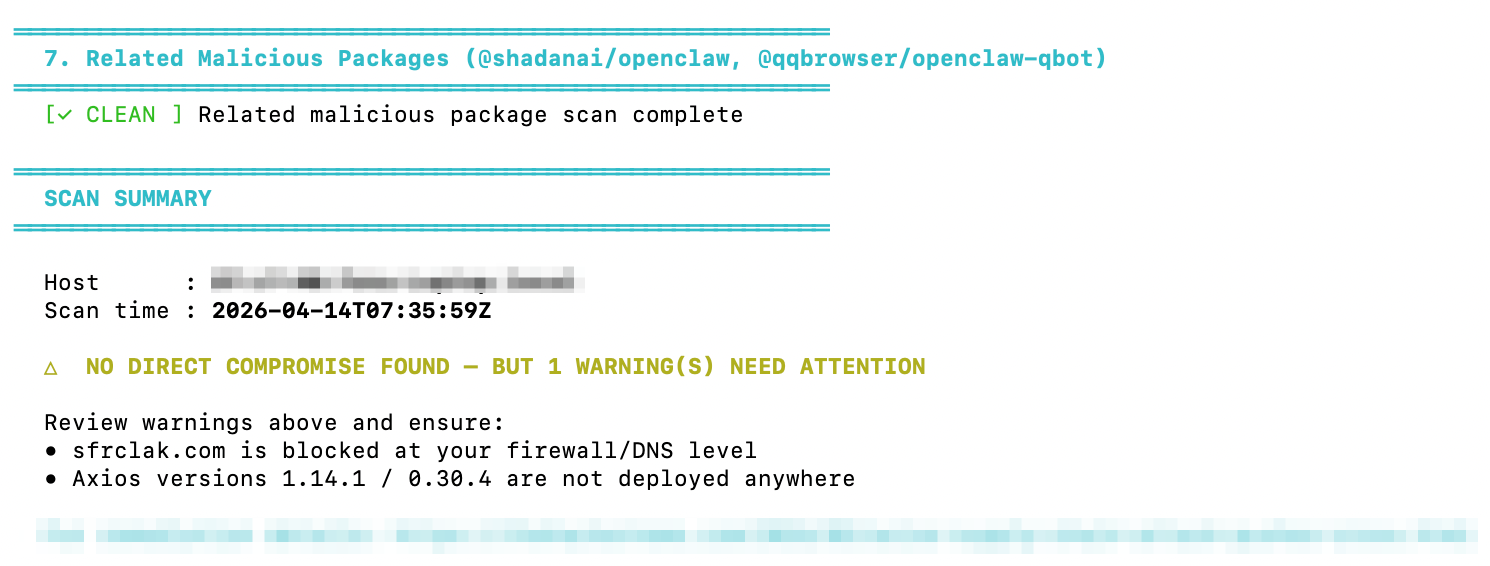
Script executed on local machine:
Step 4: Mobile Ecosystem Impact
Even though Axios is a Node.js package, it indirectly impacted mobile apps through backend systems and pipelines.
Where Impact Happens
Backend APIs can return corrupted responses, admin dashboards may leak data, CI/CD pipelines can produce compromised builds, and Firebase scripts may expose tokens.
Real Production Case
In one case, a staging API using a compromised Axios version started making unexpected outbound requests. It was detected early via an automated script—otherwise, it could have reached production and affected real users.
Best Practices & Trade-offs
What Worked Well
Automated system-wide scanning, CI/CD fail-fast checks, dependency version pinning, and network-level blocking helped detect and contain the issue early.
Trade-offs
These measures introduced slower upgrades, longer build times, and some operational overhead due to secret rotation. However, the cost is negligible compared to a real security incident.
Common Pitfalls to Avoid
Assuming Axios isn’t used directly is risky—it may exist as a transitive dependency in tools or scripts. Checking only package.json is not enough, since attacks often live inside node_modules and runtime files.
Ignoring CI/CD systems is another mistake, as they hold production secrets, signing keys, and deployment access.
Skipping log audits can hide early signals—always monitor system logs, /var/log, and outbound traffic.
Conclusion
This incident highlights a key reality: supply chain attacks are no longer rare. They are part of modern development risk.









