


.svg)




Why 16 KB Page Size Suddenly Matters
Android 15 introduces 16 KB memory page size support, a low-level platform change driven by modern ARM hardware efficiency improvements.
This is not optional or theoretical anymore.
In real production environments, we’re already seeing:
- Apps crashing at launch on Android 15 devices
- Native modules failing to load (dlopen errors)
- Third-party SDKs breaking silently due to misaligned .so files
If your React Native app includes any native dependency (and most do), you need to validate native library alignment now, not after Play Store enforcement.
What Break When Your App Isn’t 16 KB Ready?
React Native apps rely heavily on native binaries:
- React Native core
- Hermes / JSC
- Image processing
- ML / TensorFlow
- Encryption & security SDKs
If even one .so file is still aligned to 4 KB, the app may:
- Crash immediately on startup
- Fail to load native modules
- Pass CI but fail on real devices
Prerequisites
Before starting, make sure you have:
- Latest Android Studio
- A release APK or AAB
- Basic understanding of:
- Gradle
- Native libraries (.so)
- React Native dependency structure
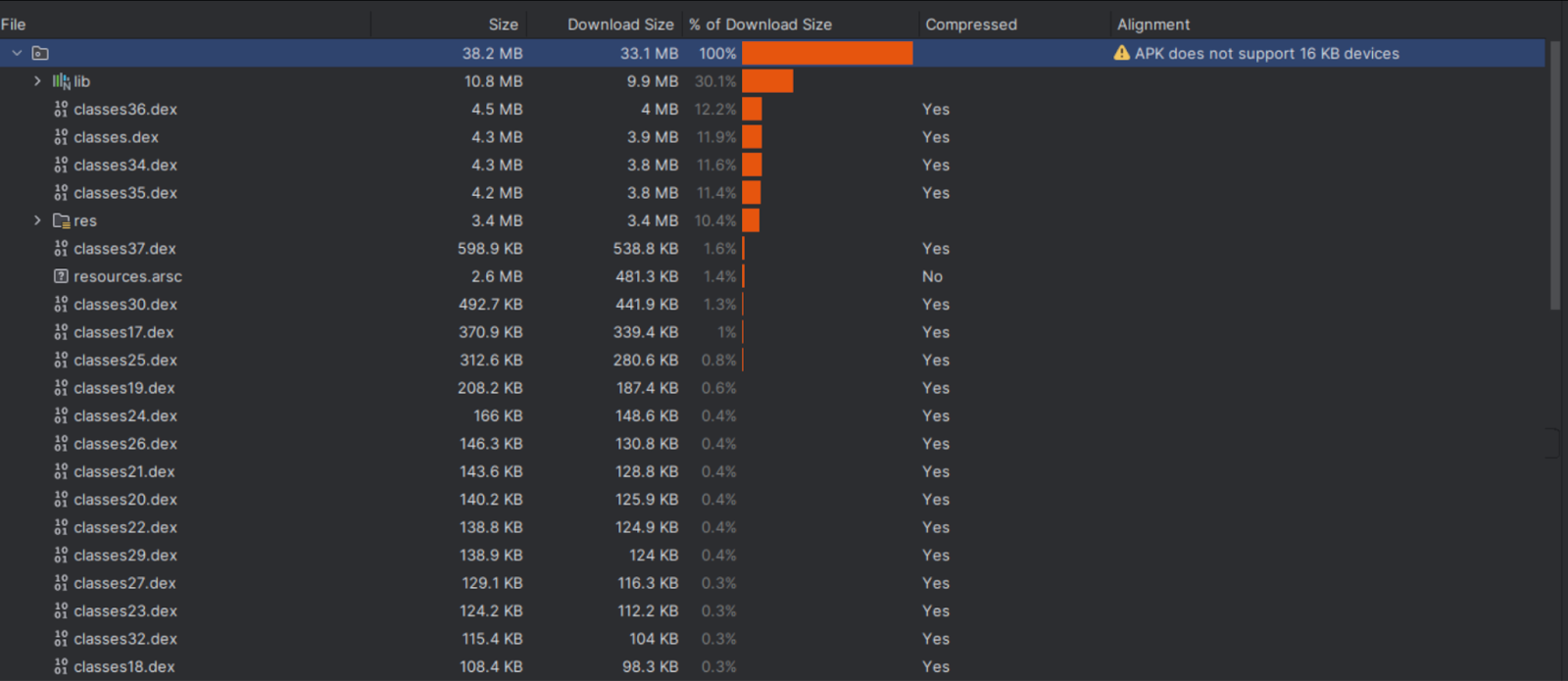
Step 1: Verify 16 KB Support Using APK Analyzer
to Check Native Library Alignment
- Build a release APK or AAB
- Open Android Studio
- Navigate to Build → Analyze APK…
- Select your APK
- Expand the lib/ directory
- Inspect .so files inside:
- arm64-v8a
- armeabi-v7a
Step 2: Migrate Your React Native App to 16 KB Compatibility
16 KB support is not a single change—it requires coordinated upgrades across your Android stack.
- Target Android 15 (API 35)
- Update android/app/build.gradle:
android {
    compileSdk 35

    defaultConfig {
        targetSdkVersion 35
        minSdkVersion 23
    }
}
Why this matters
- API 35 enables Android 15 compatibility testing
- Google Play will require API 35 targeting from August 2025
- 16 KB devices are validated only when targeting Android 15+
- Upgrade React Native (v0.77 or Higher)
React Native 0.77+ officially supports 16 KB memory pages.
Why older versions fail
- Built assuming 4 KB page size
- Native modules may crash during load
- No guarantees for Android 15 behavior
If you’re still on RN ≤ 0.76, upgrading is non-negotiable.
- Upgrade Android Gradle Plugin (AGP ≥ 8.5.1)
- Update android/build.gradle:
buildscript {
    dependencies {
        classpath("com.android.tools.build:gradle:8.5.1")
    }
}
Why this matters
- AGP 8.5+ correctly aligns uncompressed native libraries
- Older AGP versions silently ship misaligned .so files
- Use Android NDK r27+ (Prefer r28+)
- Specify your NDK version in gradle.properties:
android.ndkVersion=28.0.12433566
Why this matters
- NDK r28+ automatically produces 16 KB-aligned binaries
- r27 requires manual linker configuration
- Older NDKs are unsafe for Android 15
Step 3. Identify & Fix Non-Compliant Third-Party Libraries
- Most 16 KB issues come from third-party native dependencies.
Mapping .so Files to npm Packages
- Note the .so filename in APK Analyzer
- Cross-check against package.json
- Inspect library documentation or GitHub issues
- Example Mapping
- Common Libraries Requiring Updates
If no fix exists:
Check npm & GitHub
- File an issue
- Replace or fork as a last resort
Step 4. Clean Rebuild & Re-Verify
cd android
./gradlew clean
./gradlew assembleRelease
Rebuild the React Native app and verify that all build warnings are resolved. With these changes, the app now fully supports the 16 KB page size. Taking an early approach to the migration proved valuable, as it helped identify and avoid issues caused by partially supported native dependencies and third-party packages.
References








