


.svg)




Real-World Context (Why This Suddenly Matters)
If you’re maintaining a Flutter app that targets Android 14+ devices, you’ve probably started seeing discussions around 16 KB memory page size. This isn’t theoretical anymore—newer Android devices and system images are actively moving toward 16 KB pages instead of the traditional 4 KB.
In production terms:
- Apps built with native libraries not aligned for 16 KB can crash at launch.
- Flutter apps are affected because they ship native .so binaries (engine + plugins).
This is one of those platform changes that doesn’t break at compile time—but fails brutally at runtime.
What Is 16 KB Page Size (In Simple Engineering Terms)
Traditionally, Android devices use 4 KB memory pages.
Newer ARM64 devices (especially Android 14+) are moving to 16 KB pages for:
- Better memory efficiency
- Improved system performance
- Reduced TLB pressure
But here’s the catch
Native binaries must be built with 16 KB compatibility. If not, Android refuses to load them.
Flutter apps bundle:
- libflutter.so
- Plugin .so files (Firebase, camera, ML, etc.)
If any of these are incompatible → app crash.
How Flutter Is Handling This
Flutter 3.22+ (stable) introduced official 16 KB page size support.
What changed internally:
- Flutter engine binaries rebuilt with 16 KB compatibility
- Android toolchain updated
- Gradle & NDK alignment improved
📌 If your Flutter version is old, your app is at risk—even if your Dart code is perfect.
Step 1: Check Your Flutter Version (Non-Negotiable)

You should be on: Flutter 3.22.0 or newer if not upgrade flutter with below command

Production advice:
Don’t cherry-pick this. Engine-level changes cannot be backported safely.
Step 2: Verify Your App’s Native Libraries (Critical)
- Build a release APK or AAB first:

- Now inspect the native binaries: (Build path as per your local machine)

- Check the .so files using the below command.

If you see alignment issues or loader errors on 16 KB devices → rebuild with updated Flutter & NDK.
Step 3: Validate NDK & AGP Versions
Your android/build.gradle must not be outdated.
Recommended baseline:
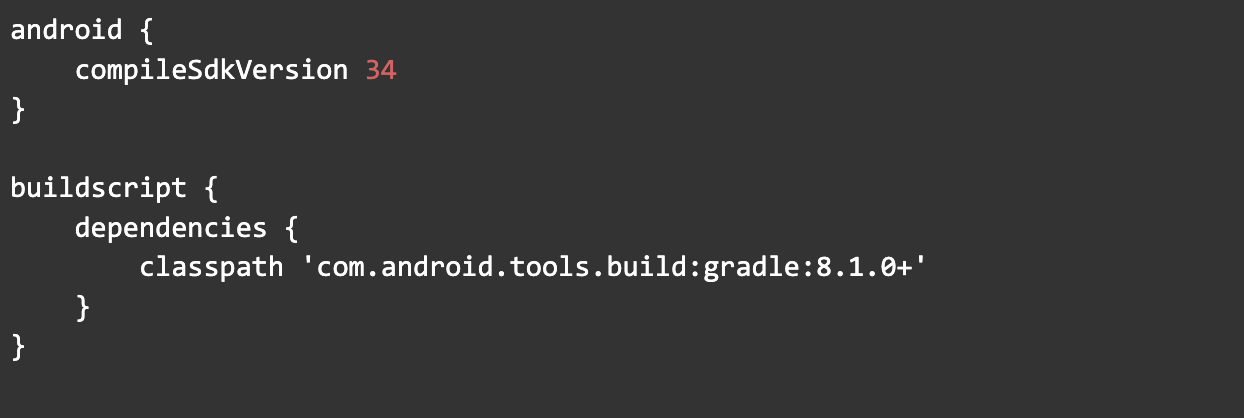
And ndkVersion in local.properties or CI:

Why this matters: Old NDKs silently generate binaries incompatible with 16 KB pages.
Step 4: Audit Third-Party Plugins (Most Common Failure)
From real production incidents 👇
The Flutter engine is usually fine—the plugins are not. A single faulty plugin can cause the entire app to crash at startup.
High-risk plugins:
- Camera
- ML / Vision
- Video / Audio codecs
- Crypto / Security SDKs
- Old Firebase forks
Check plugin .so files:
- Go to Build > Analyze APK…
- Open your release APK/AAB.
- Navigate to the lib/ folder to see all the .so libraries hiding inside.
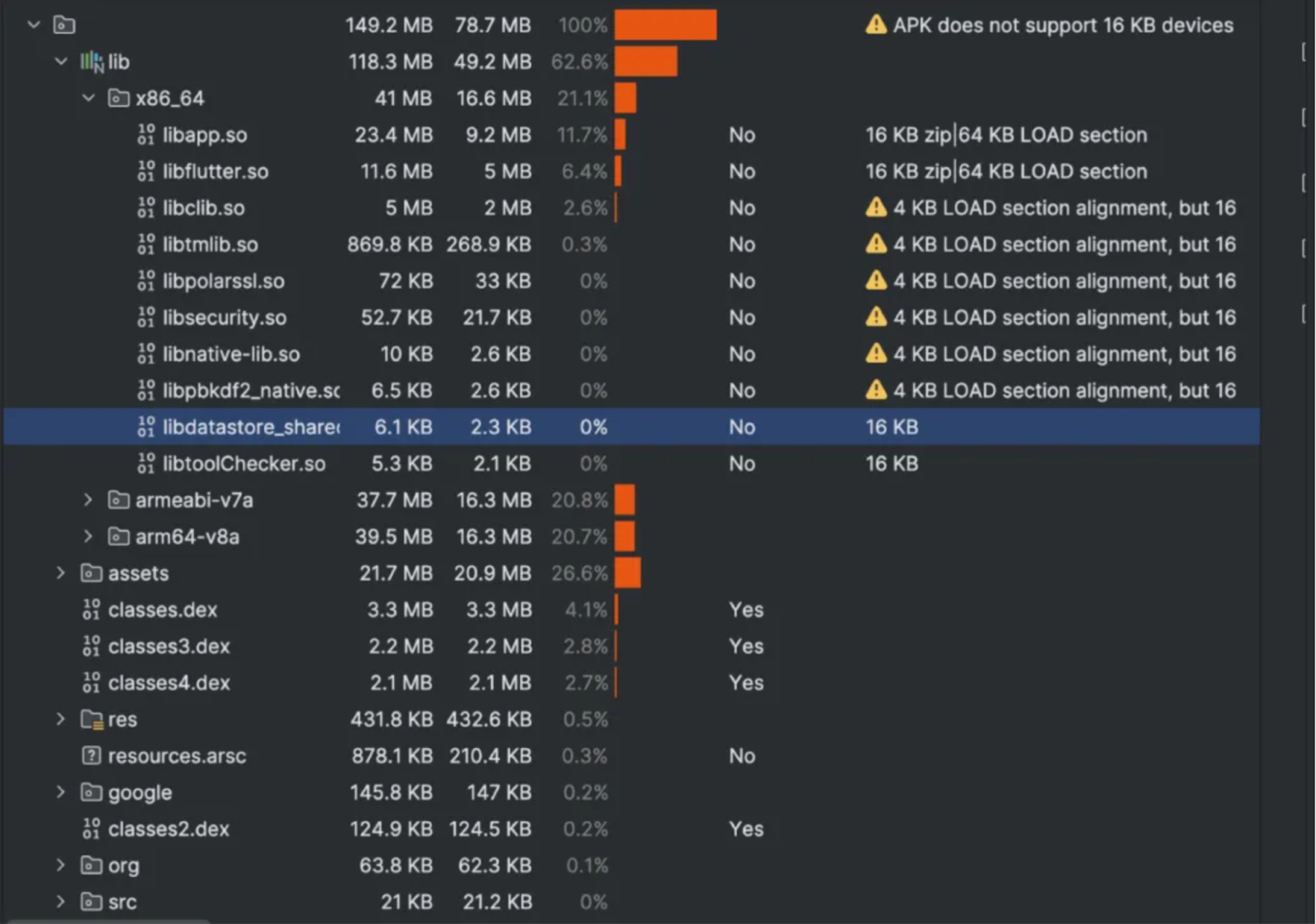

Spotting suspicious .so files in your app bundle usually means you’ve uncovered unused binaries that can quietly break 16KB support.
The Easiest Way to Survive the 16KB Page Size Migration
Upgrading all tools and dependencies to versions that support 16 KB page size is the simplest way to avoid obscure .so file issues and ensure smoother performance.
Here’s what you need:
- Android Gradle Plugin (AGP): 8.5.1+
- Gradle Wrapper: 8.5+
- NDK: r28+ (older ones can’t align binaries for 16KB correctly)
- Flutter: 3.32+
- Android Studio: Narwhal 2025.1.3+ (earlier versions may show false 16KB warnings)
Step 1: Update gradle-wrapper.properties

Step 2: Update Android Gradle Plugin in build.gradle
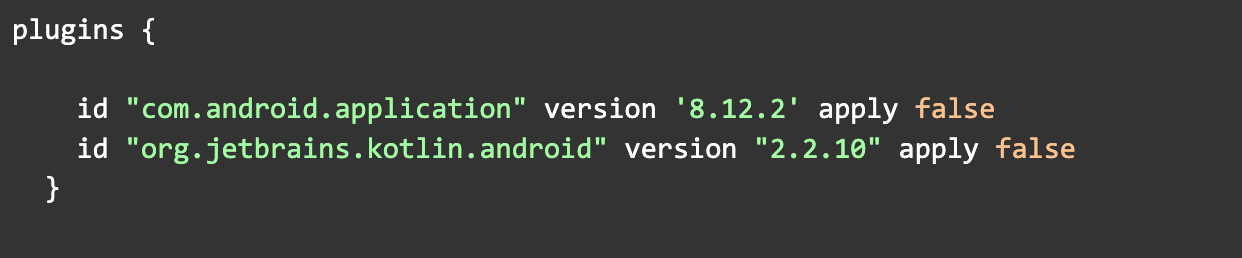
Step 3: Point to the New NDK

Step 4: Test on 16 KB Devices
Option 1: Android Emulator (Recommended)
Create an emulator with:
- Android 14
- ARM64
- 16 KB page size system image
Option 2: Physical Device (Best)
Some Pixel & OEM devices already ship with 16 KB enabled.
Run:

Typical failure log:

Step 5: Clean Build Process.

Rebuild the app and confirm that all warnings are resolved. Your app is now compatible with 16 KB page size. This is how I migrated an app. Don’t wait for the deadline—partial 16 KB support in some packages can cause issues. Early action made things much easier.








