


.svg)


Your Android app may be stable. Your feature may be complete. Your team may be ready to publish. But if the app does not meet Google Play’s latest target API requirement, the release can still stop at the final gate.
That is the reality for Android teams in 2026.
Google Play requires new apps and app updates to target Android 15, API level 35 or higher, with different requirements for Wear OS, Android Automotive OS, and Android TV apps. For mobile teams, this means API 35 is no longer just a technical upgrade. It is part of release eligibility.
The risk is not only that your app might fail to publish. The bigger risk is discovering the problem too late, when QA is complete, stakeholders are waiting, and a launch date is already planned.
For Android developers, QA teams, release managers, product owners, and app agencies, API 35 readiness should now be treated as a release checkpoint.
What Android API 35 Means for App Publishing
Android API 35 is the API level for Android 15. When your app targets API 35, it tells Android and Google Play that your app is built against Android 15 platform expectations.
This does not always mean your app stops supporting older Android versions. Many apps can still run on older Android devices while targeting API 35 for publishing.
Target API Is Not the Same as Minimum API
This is one of the most important points for non-technical teams to understand.
The target API level tells Android which platform behavior your app is prepared for.
The minimum API level tells Android the oldest Android version your app supports.
So, an app can target Android 15 while still supporting users on older Android versions. The target API is mainly about platform compliance, behavior expectations, privacy standards, and publishing readiness.
This distinction matters because API 35 should not be treated as a decision to drop older users. It should be treated as a requirement to keep the app aligned with modern Android standards.
Why Google Play Uses Target API Requirements
Google Play target API requirements exist to push apps toward newer privacy, security, and performance standards.
Each Android version introduces platform changes. These may affect permissions, background activity, notifications, storage, media access, security behavior, and how apps interact with the operating system.
By requiring apps to target newer API levels, Google encourages developers to keep apps safer and more reliable for users.
The User Experience Behind the Requirement
Most users never think about API levels. They only notice whether the app works well.
If an app behaves unexpectedly on newer Android devices, asks for permissions in a confusing way, fails in the background, or breaks key flows, users lose trust.
Target API updates help reduce that gap between old app behavior and modern Android expectations.
The Business Impact Behind the Requirement
For businesses, API 35 is connected to release continuity.
If the app is not ready, a bug fix may be delayed. A campaign release may miss its date. A product launch may get pushed back. A client delivery may need extra time.
That makes API 35 a business issue, not only an engineering task.
The Publishing Risk: What Happens If You Are Not Ready?
If your app does not target the required API level, Google Play may block your new app or app update submission.
That can immediately affect your release plan.
Your Next Update Could Be Delayed
The most direct impact is a delayed release. Even if the app feature is ready, the store submission may not move forward until the target API requirement is met.
This can be especially painful when the update includes an urgent bug fix, payment issue, security improvement, or feature tied to a business deadline.
Your Team May Be Forced Into Rushed Testing
Changing the target API level late can trigger unexpected work. Dependencies may need updates. Permissions may need retesting. Device behavior may need validation.
If this happens near the submission date, QA may be forced to test quickly under pressure.
That is when issues are missed.
Your App Experience May Change in Subtle Ways
API changes do not always break the app loudly. Sometimes, they create smaller behavior changes that only appear during real usage.
A notification may not appear as expected. A background process may behave differently. A permission prompt may affect onboarding. A media upload may fail on certain devices.
These are the kinds of issues teams need time to catch.
Where API 35 Can Catch Android Teams Off Guard
API 35 readiness often looks simple from the outside. But the real problems usually appear after the version number is changed.
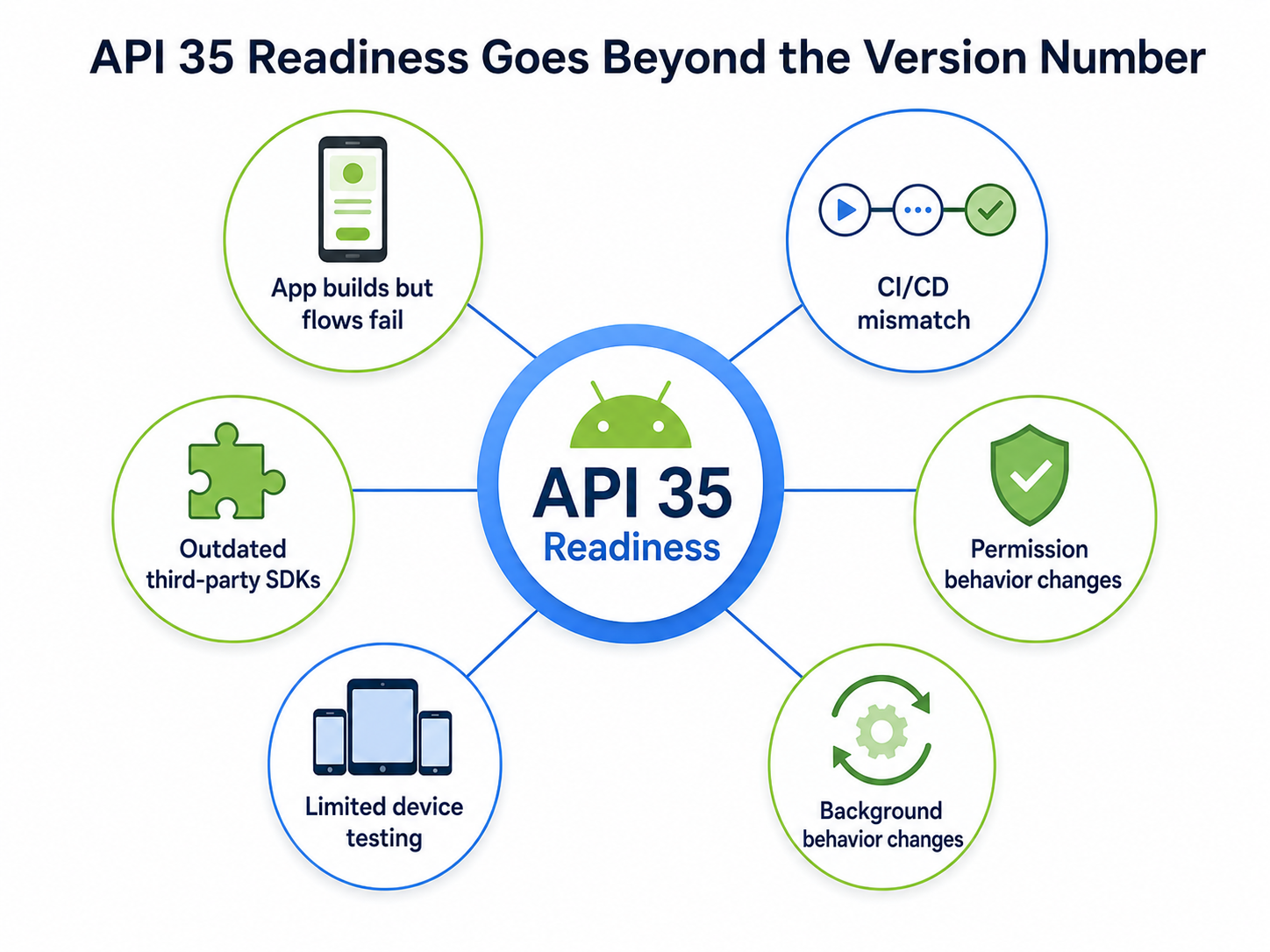
The App Builds, but the Experience Is Not Fully Tested
A successful build is not the same as a ready release.
The app still needs to be tested across important flows such as login, onboarding, payments, push notifications, deep links, media access, subscriptions, location, background tasks, analytics, and crash reporting.
If any of these flows depend on Android platform behavior, they should be checked after the API update.
Local Builds Work, but CI/CD Fails
A developer may update the app locally and create a working build. But if the CI/CD environment still uses older tools, Gradle settings, or Android SDK configurations, the official release build can fail later.
This creates a frustrating situation: the team thinks the app is ready, but the final pipeline says otherwise.
Third-Party SDKs Become the Weak Link
Android apps often depend on third-party SDKs for payments, analytics, ads, maps, messaging, authentication, customer support, security, and crash reporting.
One outdated SDK can create build errors, runtime issues, policy warnings, or unexpected app behavior.
Before targeting API 35, teams should review the SDKs that support critical business flows.
Device Coverage Is Too Narrow
Testing on one Android device is not enough.
Android apps run across different manufacturers, screen sizes, chipsets, OS versions, and hardware conditions. A flow that works on one device may behave differently on another.
API 35 testing should include real-device coverage, especially for apps with large or diverse user bases.
Why API 35 Readiness Should Start Before the Release Sprint
Many teams wait until the release sprint to update platform requirements. That approach creates unnecessary risk.
API readiness should happen earlier, before the release is already dependent on it.
Treat API 35 as a Release Milestone
Instead of placing API 35 work at the end, teams should make it a milestone in the release roadmap.
The team should know early whether the app builds, installs, runs, and passes QA with the updated target API.
Give QA Enough Time to Find Real Issues
QA needs time to test more than the happy path.
Permission flows, background behavior, deep links, payments, and third-party integrations should be validated carefully.
The earlier QA receives an API 35-ready build, the more useful their feedback becomes.
Avoid Blocking Urgent Fixes Later
If the app is not API 35-ready, even a small future fix may become harder to release.
A team may need to fix the original bug and complete the API upgrade at the same time. That slows everything down.
Preparing early keeps future releases more flexible.
A Smarter API 35 Readiness Plan
Teams do not need to panic about API 35. They need a clear process.
Start With Your Current Release Setup
Begin by checking the app’s current target API level, Android Gradle Plugin version, Gradle setup, build tools, and CI/CD configuration.
The goal is to understand how far the current setup is from API 35 readiness.
Review Dependencies Before Changing Everything
Before moving too fast, review the SDKs and libraries your app depends on.
Pay extra attention to anything connected to payments, authentication, analytics, ads, maps, messaging, push notifications, deep links, and security.
These are the areas where a dependency problem can affect the business directly.
Create a Dedicated API 35 Test Build
Do not wait for the final production build.
Create a dedicated API 35-ready test build and put it in front of QA, product owners, and key stakeholders.
This gives the team a safe way to identify issues before the release becomes time-sensitive.
Validate the Full User Journey
API testing should not only confirm that the app opens.
The team should test the journeys that matter most to users and revenue. For many apps, that includes signup, login, checkout, subscription, content access, search, notifications, profile updates, location features, and support flows.
Repeat With Updated Builds
If issues are found, fix them and distribute a new build.
API readiness is not a one-time check. It is a cycle of build, test, feedback, fix, and retest.
How OTA Testing Helps Android Teams Move Faster
During an API upgrade, teams often need to share multiple builds quickly.
Sending APKs manually or managing scattered files can lead to confusion. Testers may install the wrong version. Stakeholders may review an outdated build. Feedback may become difficult to connect to the correct release candidate.
This is where OTA build distribution becomes useful.
With OTA testing, teams can share Android builds through install links or QR codes. Testers can access the right build faster, and release teams can manage feedback with more clarity.
For API 35 readiness, OTA testing helps teams shorten the distance between engineering and QA. Instead of waiting for slow handoffs, teams can distribute updated builds quickly and keep validation moving.
How AppsOnAir Fits Into API 35 Release Preparation
AppsOnAir supports Android teams by making pre-release build distribution easier during platform transitions like API 35.
With AppsOnAir OTA Distribution, teams can share Android builds with QA teams, clients, product managers, and internal testers using simple links or QR codes. This helps teams validate API 35-ready builds before they reach Google Play submission.
The value is not only faster sharing. It is better release clarity.
When multiple builds are created during an API migration, teams need a reliable way to make sure everyone is testing the correct version. AppsOnAir helps reduce manual build-sharing confusion and supports smoother pre-release QA.
AppsOnAir can also support the broader update workflow. AppSync can help teams manage forced updates, optional updates, and maintenance messages when users need to move to supported app versions. AppRemark can help testers share feedback with better context during QA.
For teams preparing for API 35, AppsOnAir helps turn a potential release blocker into a more organized testing workflow.
What Product and Release Teams Should Watch Closely
API 35 may be an Android requirement, but product and release teams should stay involved.
They should ask whether the API 35-ready build has been created, whether QA has tested it on real devices, whether third-party SDKs are compatible, and whether the CI/CD pipeline can produce the final release build.
They should also check whether any business-critical journeys have changed after the update.
The earlier these questions are asked, the less likely the team is to face a surprise during Play Store submission.
Final Take: API 35 Is a Gate, Not a Checkbox
Android API 35 is not just another version number in a build configuration file.
It is now part of whether your Android app can move smoothly through Google Play publishing. If your team treats it casually, it can turn into a late-stage blocker. If your team prepares early, it becomes a manageable part of release planning.
The best approach is simple: check your current setup, update dependencies, test the build pipeline, create an API 35-ready build, distribute it for QA, and validate real user journeys before submission.
Google Play requirements will continue to evolve. The teams that win will not be the ones reacting to every new gate at the last minute. They will be the ones building release workflows that are ready for the next platform change.
AppsOnAir helps Android teams support that workflow with faster build distribution, cleaner QA handoffs, and better pre-release validation.
In 2026, release confidence is not only about writing good code. It is about making sure the app, the pipeline, the testers, and the publishing process are ready before the deadline arrives.








