


.svg)




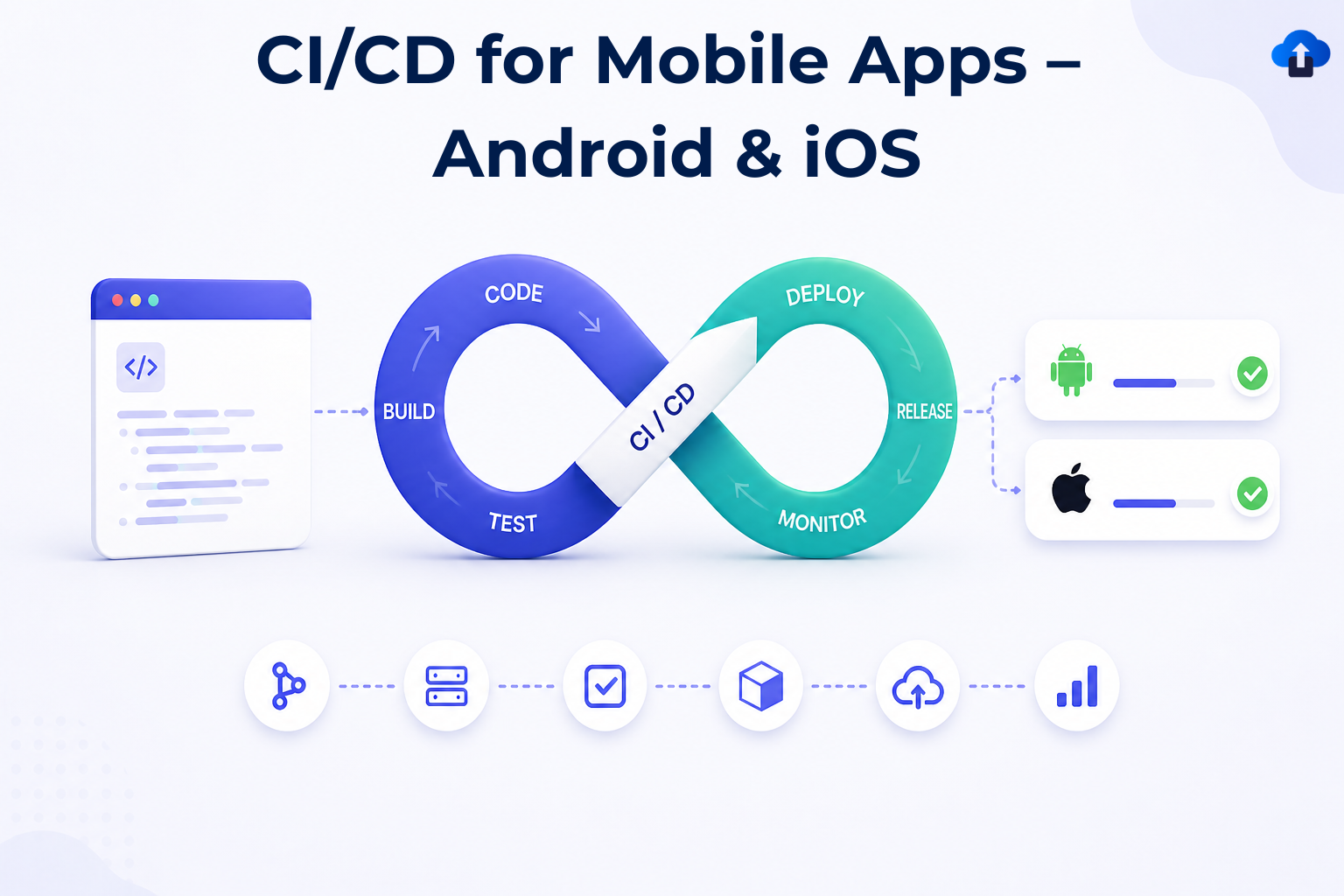
Mobile development has a distribution problem. Unlike web applications where a deployment can be pushed in minutes, mobile apps are subject to platform review cycles, signed binary requirements, multiple environment configurations, and an end-user base that may not update immediately. These constraints mean that the gap between writing code and delivering verified software to users can span days or weeks — unless you've invested seriously in automation. Continuous Integration and Continuous Delivery (CI/CD) pipelines are not an optional productivity enhancer in mobile engineering; they are the operational backbone that makes professional-grade release cadences possible.
The challenge is that mobile CI/CD is structurally different from backend or web CI/CD. You're not dealing with a single deployable artifact. On Android, you're producing APKs or AABs signed with keystores, running instrumented tests against physical or emulated devices, and distributing through tracks on Google Play. On iOS, you're managing provisioning profiles, certificates in Apple's developer ecosystem, Xcode Cloud builds or third-party runners, and a notariously slow App Store review cycle. A pipeline that conflates these concerns or ignores their platform-specific requirements will be fragile, slow, and ultimately ignored by the team.
This article covers CI/CD architecture and implementation for Android and iOS mobile applications. The focus is on the systems thinking required to make automation work at production scale: what to automate, how to structure environments, where pipelines break, and what patterns actually hold up when a team is shipping weekly or more.
Foundational Concepts
CI/CD is shorthand for a set of engineering practices and tooling patterns that emerged from the recognition that integrating and deploying code manually is both slow and error-prone. Continuous Integration refers to the practice of merging developer branches into a shared main branch frequently — ideally multiple times per day — with each merge triggering an automated build and test suite. The goal is to surface integration failures early, when they are cheap to fix. Continuous Delivery extends this by ensuring that every passing build produces a deployable artifact. Continuous Deployment is the logical end state where artifacts that pass all checks are released to production automatically, without human gating.
In the mobile context, "deployment" means something specific: an artifact in the hands of users through an app store, an internal testing track, or a direct distribution channel. The pipeline that gets code from a developer's machine to that state is often substantially more complex than teams initially estimate. It involves source control hooks, runner infrastructure, build toolchains (Gradle for Android, Xcode for iOS), code signing management, test orchestration, artifact storage, and integration with app distribution services.
The evolution of mobile CI/CD has been shaped by three forces: the maturation of hosted CI platforms (GitHub Actions, CircleCI, Bitrise, Codemagic), improvements in emulator and simulator speed, and the rise of tooling like Fastlane that abstracts away much of the signing and distribution ceremony. Teams that built these pipelines in 2015 were fighting platform tools with shell scripts. Today the tooling is dramatically better, but the architectural decisions — what runs where, in what order, with what triggers — still require deliberate design.
Key structural concepts every mobile CI/CD pipeline must account for:
- Build variants and flavors: Android build types (debug, release) and product flavors map to distinct signing configurations and environment endpoints. iOS schemes and configurations serve the same purpose.
- Code signing as infrastructure: Certificates and provisioning profiles are perishable, platform-managed credentials. Treating them as infrastructure — stored securely, rotated systematically — is prerequisite to reliable pipelines.
- Test pyramid layers: Unit, integration, and end-to-end (E2E) tests have different execution environments and time costs. They should run at different pipeline stages, not all at once.
- Artifact promotion: A single build artifact should be promoted from internal → QA → staging → production without being rebuilt. Rebuilding at each stage invalidates the integrity guarantee.
- Triggered vs. scheduled runs: Pull request validation, merge-to-main builds, and nightly regression suites serve different purposes and should have different configurations.
Why It Matters in Modern Mobile Development
The business case for mobile CI/CD is not primarily about developer productivity — though that is a real benefit. It is about release confidence and iteration velocity. Teams that ship under manual processes tend to batch changes, because each release is expensive to validate. Batching increases the surface area of each release, which in turn increases the probability of regression and the complexity of debugging when something goes wrong. CI/CD makes individual changes cheap to validate and therefore cheap to ship, which enables smaller, safer releases.
From a developer experience standpoint, automation changes what it feels like to work on a mobile team. When a developer opens a pull request and gets signal — build success, test results, a preview build — within fifteen minutes, the feedback loop is tight enough to be actionable. When that same developer has to wait until Thursday's manual QA cycle to discover that their change broke a layout on a specific SDK version, the cost in context switching and morale is significant.
There are also team-scale effects. As mobile teams grow, manual coordination around releases — who has the signing certificate, whose machine builds the release candidate, who has access to App Store Connect — becomes a bottleneck. Pipelines externalize this knowledge into version-controlled automation, removing individual single points of failure.
The specific pressures that make CI/CD essential for mobile:
- App store review latency: A rejected binary sent back for fixes costs days. Catching signing errors, missing permissions declarations, or privacy manifest omissions in the pipeline before submission eliminates the most common rejection causes.
- Device fragmentation: Android's screen size, OS version, and OEM customization surface area means regressions can exist on specific devices without appearing in development. Automated device testing at scale catches these early.
- Cross-platform coordination: Teams building on both Android and iOS need synchronized release cadences. Pipelines that share configuration and artifact promotion logic enforce consistency.
- Regulatory and security requirements: Industries with compliance requirements (finance, health) need verifiable build provenance. CI/CD produces audit trails that manual processes cannot.
- OTA update constraints: Unlike web, mobile cannot silently patch a live issue. A bug that ships costs user trust. Prevention through pre-release automation is the only economical mitigation.
Architecture & System Design Breakdown
A production-grade mobile CI/CD architecture consists of several interconnected layers, each with a distinct responsibility. Understanding these layers separately prevents the most common failure mode: a monolithic pipeline script that does everything in sequence, is impossible to debug, and takes forty-five minutes to run on every commit.
The first layer is the source control trigger layer. This is where pipeline execution is initiated based on events in the version control system. Typical triggers include pull request opened or updated (for validation pipelines), push to a protected branch like main or develop (for integration pipelines), tag creation (for release pipelines), and scheduled cron expressions (for nightly regression runs). Each trigger should map to a distinct pipeline configuration with scoped responsibilities — not a single universal pipeline.
The second layer is the build and compile layer. For Android, this means Gradle invoking the Android toolchain to produce a signed APK or AAB. For iOS, this means xcodebuild or Xcode Cloud producing a signed IPA. This layer must have access to signing credentials — keystores for Android, certificates and provisioning profiles for iOS — which should be injected from a secrets management system, never stored in the repository.
The third layer is the testing layer. This is where unit tests, integration tests, and optionally E2E tests execute. Unit and integration tests typically run in the build environment. E2E tests, which require running against actual app processes, need emulators, simulators, or physical devices. Cloud device testing services (Firebase Test Lab for Android, AWS Device Farm for both) belong in this layer for coverage that cannot be achieved locally.
The fourth layer is the artifact management layer. Build outputs — APKs, AABs, IPAs, dSYMs for crash symbolication — are uploaded to artifact storage with metadata (build number, commit SHA, branch, timestamp). This layer is the source of truth for what was produced and when.
The fifth layer is the distribution layer. Artifacts are pushed to the appropriate distribution target: internal testers via Firebase App Distribution or TestFlight, QA via a specific Play Console track, or production via a full store submission. Distribution should be gated on pipeline success and, for production, on explicit human approval.
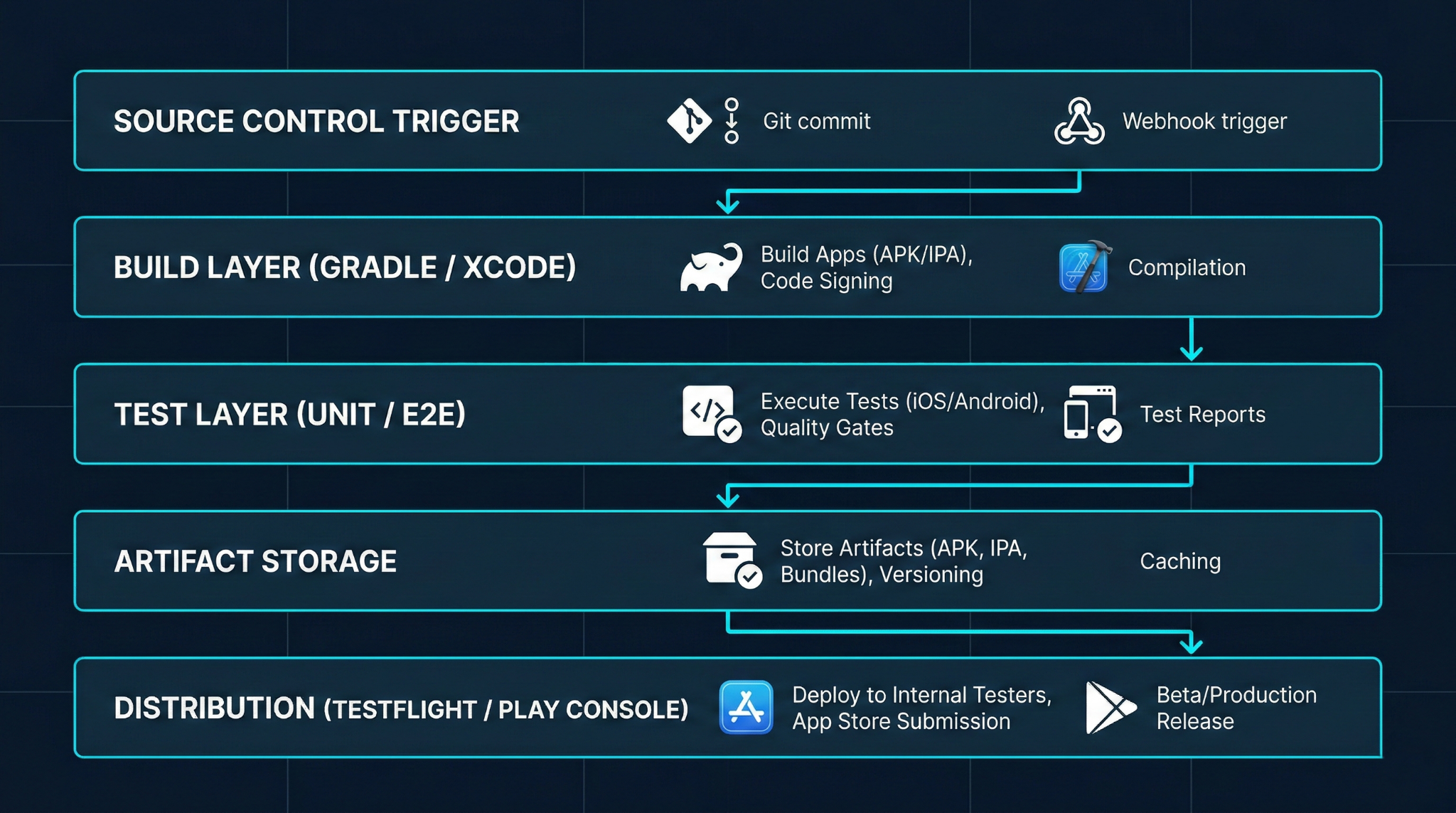
This layered model enables selective execution. A PR pipeline might run Build + Unit Tests only, completing in under ten minutes. A release pipeline runs all layers, taking longer but providing full confidence. Separating the layers also means failures are precisely locatable: a test layer failure does not implicate the build layer.
Implementation Deep Dive
Translating this architecture into a functioning pipeline requires decisions about tooling, runner infrastructure, and configuration management. The following workflow describes a practical implementation path applicable to both Android and iOS using GitHub Actions as the orchestration layer and Fastlane as the platform integration tool.

1. Repository structure and configuration files.
The pipeline configuration lives in .github/workflows/ for GitHub Actions. Create separate workflow files for PR validation (pr.yml), integration builds (build.yml), and release pipelines (release.yml). Fastlane lanes — organized in a Fastfile at the repo root — abstract the platform-specific commands. Each Fastlane lane corresponds to a distinct pipeline step: lane :build_debug, lane :run_unit_tests, lane :sign_and_archive, lane :distribute_to_firebase.
2. Secrets and signing configuration.
Android keystores should be stored as base64-encoded secrets in the CI platform's secret management. During the build step, the keystore is decoded to a temporary file and the path, alias, and passwords are passed to Gradle via environment variables. iOS code signing is most reliably managed using Fastlane Match, which stores encrypted certificates and provisioning profiles in a private repository and fetches them at build time. Never embed signing credentials in the repository in any form.
3. Build step configuration.
For Android, invoke Gradle through the wrapper: ./gradlew assembleRelease or bundleRelease for AAB. For iOS, invoke xcodebuild archive via Fastlane's gym action, specifying scheme, export method, and output path. Both steps should produce artifacts to a deterministic output directory that subsequent steps reference.
4. Test execution.
Unit tests run inline: ./gradlew testReleaseUnitTest for Android, fastlane scan for iOS. Instrumented Android tests targeting Firebase Test Lab should use the gcloud CLI or a Fastlane plugin to upload the test APK and target APK and retrieve results asynchronously. Store test reports as pipeline artifacts for post-run analysis.
5. Artifact upload.
Use platform-native actions or CLI tools to upload build outputs. For GitHub Actions, actions/upload-artifact persists files within a workflow run. For longer-term storage and cross-pipeline reference, upload to cloud storage (GCS, S3) tagged with the commit SHA and build number.
6. Conditional distribution.
Configure the distribution step to execute only on specific branches or tags, and for production releases, require a manual approval gate using GitHub Actions environments with protection rules. Distribution to Firebase App Distribution uses fastlane firebase_app_distribution, and TestFlight uses fastlane pilot upload.
# .github/workflows/release.yml (abbreviated)
name: Release Build
on:
  push:
    tags:
      - 'v[0-9]+.[0-9]+.[0-9]+'
jobs:
  android-release:
    runs-on: ubuntu-latest
    steps:
      - uses: actions/checkout@v4
      - name: Decode keystore
        run: echo "${{ secrets.KEYSTORE_BASE64 }}" | base64 -d > keystore.jks
      - name: Build release AAB
        run: ./gradlew bundleRelease
        env:
          KEYSTORE_PATH: keystore.jks
          KEY_ALIAS: ${{ secrets.KEY_ALIAS }}
          KEY_PASSWORD: ${{ secrets.KEY_PASSWORD }}
          STORE_PASSWORD: ${{ secrets.STORE_PASSWORD }}
      - name: Upload to Play Console
        run: bundle exec fastlane android deploy_internal
Advanced Patterns & Optimization
Once a functional pipeline is running, the focus shifts from correctness to reliability and speed. A pipeline that takes fifty minutes to complete will be circumvented. Engineers will push without waiting for results, merge anyway, or disable checks under time pressure. Pipeline performance is not an infrastructure detail — it is directly tied to whether the automation is respected and used.
The most impactful optimization for build speed is caching. Gradle's build cache should be enabled and persisted between CI runs using the runner's cache mechanism. Gradle dependencies, which can take several minutes to resolve on a cold build, are typically stable across commits and are an ideal cache target keyed on the build.gradle files' hash. Xcode's derived data and Swift package manager dependencies follow the same pattern. In practice, a well-cached pipeline can reduce a fifteen-minute cold build to three or four minutes.
Parallelization is the second major lever. Android and iOS pipelines are independent and should run concurrently, not sequentially. Within an Android pipeline, testDebugUnitTest and lintDebug can run in parallel if the runner has sufficient cores. GitHub Actions matrix builds enable running tests against multiple API levels simultaneously.
For E2E tests, which are often the longest-running segment, selective execution based on changed files significantly reduces wall-clock time. A test impact analysis step that inspects the diff and selects only relevant test suites is a significant investment but pays off at scale.
Five optimization points that deliver reliable pipeline acceleration:
- Gradle and Xcode build caching: Cache dependency resolution and compilation outputs keyed on lockfile hashes, not branch names.
- Parallel platform pipelines: Never serialize Android and iOS builds; run them as concurrent jobs.
- Conditional E2E execution: Trigger full device test suites only on merge to main or on release branches, not on every pull request.
- Incremental static analysis: Run lint and static analysis only on changed files using diff-aware invocation where tooling supports it.
- Artifact reuse across stages: Build once per pipeline run, promote the same binary through test, staging, and production rather than rebuilding at each stage.
Real-World Production Scenarios
Scenario 1: Multi-environment app with backend parity requirements.
A common architecture has separate development, staging, and production endpoints. Each environment requires a distinct build variant. The pipeline must produce all three variants from a single commit, ensuring that the staging binary tested by QA is byte-for-byte identical to the production binary — differing only in configuration. This is implemented through Android product flavors with injected BuildConfig fields and iOS build configurations with per-scheme environment plist files. The pipeline builds all variants in parallel, and the promotion workflow advances the staging artifact (not a new build) to production after approval.
Scenario 2: Feature flagging at the distribution layer.
Some teams distribute feature-flagged builds to internal testers via Firebase App Distribution using a separate app ID while keeping the main app ID clean for store submission. This requires two separate signing configurations and two separate distribution lanes in the pipeline. The advantage is that testers can install both the stable and experimental build simultaneously on the same device. The pipeline must track which features are active in which distributed build for crash triage to be meaningful.
Scenario 3: Large team with branch protection and required status checks.
At team scale, the pipeline becomes a gate. GitHub branch protection rules require specific workflow jobs to pass before merging. This necessitates that the PR pipeline be fast — under ten minutes — and reliable. A flaky test that randomly fails 5% of the time is not a minor nuisance; it is a source of friction on every merge and will eventually cause engineers to click "re-run" reflexively without investigating. The discipline required here is treating flaky tests as P1 bugs: find the source of non-determinism (order dependency, timing, external service call) and eliminate it.
Scenario 4: App Store submission automation.
Fully automated App Store submission removes a category of human error around metadata, screenshots, and version increments. Fastlane Deliver manages metadata from version-controlled text files and JSON, and can submit for review automatically. The risk is inadvertent submission of an unvetted build. Mitigating this requires explicit pipeline conditions — tagged commits only, manual environment approval, and Slack or email notifications with a cancellation window before submission completes.
Common Pitfalls and Failure Patterns
The most expensive CI/CD failures are the silent ones: pipelines that succeed but produce incorrect artifacts, or test suites that pass without actually exercising meaningful code paths. Teams often discover these failures only when a production issue reveals that the "tested" code path was never actually exercised by the automated suite.
On Android, keystore management is a perennial source of failure. If a keystore is lost or its credentials are not documented in a secrets management system, the team loses the ability to issue updates to an app already on the Play Store — because the Play Store requires update APKs to be signed with the same key as the original upload. This is not a theoretical risk. It happens when the developer who initially uploaded the app leaves the company and the keystore was stored only on their machine.
On iOS, provisioning profile expiration silently breaks builds. Profiles expire annually. If the CI runner's provisioning profile is not refreshed before expiration, the build will fail with a code signing error. Fastlane Match mitigates this by managing profile lifecycle centrally, but teams using manual profile management must set calendar reminders or automate expiration detection.
Five failure patterns to actively prevent:
- Rebuilding artifacts per environment: Producing a new binary for staging vs. production means the tested artifact is not what ships. Always promote a single artifact.
- Storing secrets in the repository: Even in encrypted form, secrets in source control are a persistent security liability. Use a dedicated secrets manager.
- Long-running monolithic pipelines: A single job that does everything serially creates a high blast radius for failures and kills iteration speed.
- Ignoring flaky tests: A test suite with known flaky tests trains engineers to ignore failures, eroding the signal value of the entire pipeline.
- No artifact retention policy: Retaining every build artifact indefinitely will exhaust storage. Define retention periods: short for PR builds, longer for release candidates, permanent for shipped versions.
Strategic Best Practices
The most important thing a mobile engineering team can do with their CI/CD investment is treat the pipeline code with the same rigor as product code. Pipeline configuration should be reviewed in pull requests, tested when changes are made (either in a staging CI environment or against a test branch), and documented so that any engineer can understand and modify it.
Version-pinning runner images and tool versions is foundational to reproducibility. A pipeline that installs "the latest version of Xcode" will silently produce different results as Xcode updates. Specifying exact versions — Xcode 16.2, Android Gradle Plugin 8.3.0, JDK 17 — is essential for builds that must be reproducible months after the initial run, which is required for regression analysis and regulatory audit.
Observability is often overlooked in pipeline design. Pipeline duration metrics, failure rates by job, and test failure rates by test file should be tracked over time. A sudden increase in build duration — perhaps caused by a new dependency being added without a cache update — is invisible without historical trend data. CI platforms emit this data; it should be consumed.
The Android Developers guide on continuous integration and Apple's documentation on Xcode Cloud workflows both provide platform-specific guidance that should inform pipeline configuration rather than being ignored in favor of generic CI documentation.
Six best practices that separate functional pipelines from excellent ones:
- Pin all tool versions explicitly: Gradle wrapper, AGP, Xcode version, JDK, Ruby/Bundler (for Fastlane) — no floating versions in production pipelines.
- Run the pipeline on every pull request: Feedback that arrives only after merge is not preventive feedback.
- Separate validation from release pipelines: A PR pipeline has a different purpose and acceptable runtime than a release pipeline; conflating them degrades both.
- Model signing infrastructure as code: Fastlane Match configuration, provisioning profile management, and keystore location should be documented and ideally version-controlled (with credentials externalized).
- Monitor pipeline health as a metric: Treat mean time to green, flakiness rate, and pipeline duration as engineering metrics with owners and improvement targets.
Conclusion
Mobile CI/CD isn’t a one-time setup—it’s a continuous investment that must evolve with team size, release speed, and app complexity.
Strong teams treat CI/CD as a product: monitored, reliable, and critical to development. Pipeline failures are handled as seriously as app failures.
Key principles:
- Layered pipelines
- Reusable artifacts (no rebuilds)
- Secure secrets management
- Reliable, stable tests
Mobile adds extra complexity (Apple signing, Play Store tracks, real devices), requiring both platform knowledge + CI/CD expertise.
Goal: A developer merges code and, within hours, it’s automatically tested, built, signed, and delivered—with fast, clear feedback if anything fails.
In short, great CI/CD is a mix of technical systems + team discipline + ongoing improvement.








