


.svg)




.png)
Problem Statement: When Flutter Alone Isn’t Enough
Flutter’s “write once, run everywhere” promise holds up well for UI and most business logic. But in real production apps, you’ll eventually hit a wall—accessing OS-level APIs, integrating an existing native SDK, or handling platform-specific behavior that Flutter doesn’t expose.
This is where Flutter Platform Channels become unavoidable.
Whether it’s payments, Bluetooth, NFC, background services, device sensors, or enterprise SDKs, Platform Channels act as the bridge between Dart and native Android/iOS code. They are not a last resort—they’re a core part of many large-scale Flutter apps.
This blog explains how Platform Channels actually work, when to use them, and how to design them cleanly, based on real-world production experience.
What Are Flutter Platform Channels?
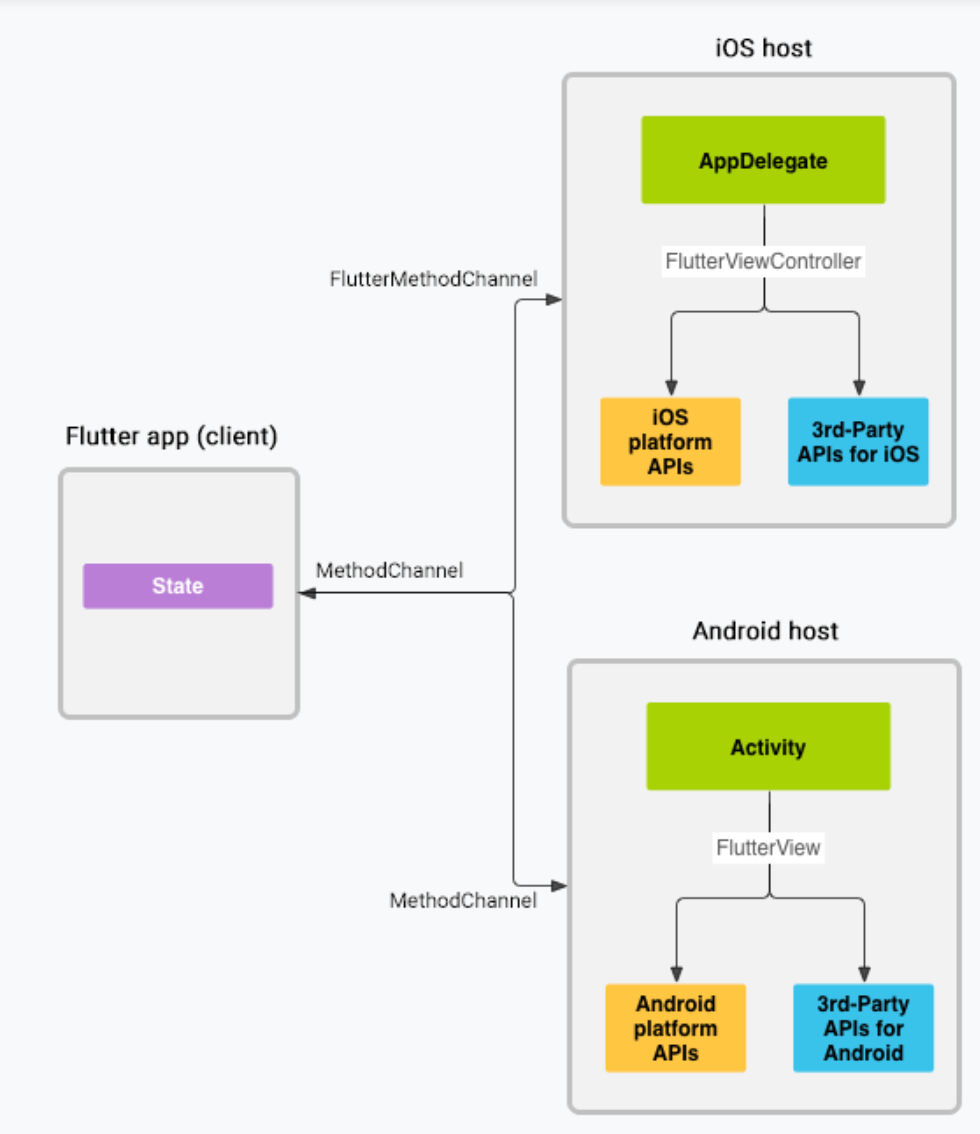
Flutter Platform Channels allow Dart code to communicate with native code written in Kotlin/Java (Android) or Swift/Objective-C (iOS).
In simple terms:
- Dart sends a message
- Native code handles it
- Native sends a response back to Dart
This communication is asynchronous, structured, and handled internally by Flutter’s engine using a binary messenger.
Flutter Platform Channels allow Dart code to talk to native code.
Think of it like this:
Flutter asks → Native does the work → Native replies
This happens asynchronously and safely using Flutter’s engine.
Types of Platform Channels
Why Platform Channels Exist (The Real Reason)
Flutter runs inside its own engine and cannot directly access native APIs.
In production, this becomes critical when:
- A required SDK doesn’t have a Flutter plugin
- You need low-level OS access (Bluetooth, system settings, sensors)
- Existing native code must be reused
- Performance-sensitive logic must stay native
Platform Channels give you controlled escape hatches without breaking Flutter’s architecture.
Simple Example: Show Native Toast from Flutter
What We’re Building
- A Flutter button
- On tap → show native Toast
Android → Toast
iOS → UIAlertController
This is the simplest real Platform Channel use case.
Step 1: Flutter (Dart) Code
- MethodChannel is created with a unique name
- Flutter calls showToast
- Message is sent to native side
import 'package:flutter/services.dart';
import 'package:flutter/material.dart';

class NativeToastExample extends StatelessWidget {
  static const _channel = MethodChannel('simple_toast');

  Future<void> showToast() async {
    await _channel.invokeMethod('showToast', {
      'message': 'Hello from Flutter 👋',
    });
  }

  @override
  Widget build(BuildContext context) {
    return Scaffold(
      appBar: AppBar(title: const Text('Platform Channel Demo')),
      body: Center(
        child: ElevatedButton(
          onPressed: showToast,
          child: const Text('Show Native Toast'),
        ),
      ),
    );
  }
}
Step 2: Android (Kotlin) Code
In MainActivity.kt File
- No background threads
- No lifecycle complexity
- Direct mapping from Flutter → Android
class MainActivity: FlutterActivity() {

  private val CHANNEL = "simple_toast"

  override fun configureFlutterEngine(flutterEngine: FlutterEngine) {
    super.configureFlutterEngine(flutterEngine)

    MethodChannel(
      flutterEngine.dartExecutor.binaryMessenger,
      CHANNEL
    ).setMethodCallHandler { call, result ->

      if (call.method == "showToast") {
        val message = call.argument<String>("message")
        Toast.makeText(this, message, Toast.LENGTH_SHORT).show()
        result.success(null)
      } else {
        result.notImplemented()
      }
    }
  }
}
Step 2: iOS (Swift) Code
- Similar android, Native iOS (swift) code integration in AppDelegate.swift file.
@UIApplicationMain
@objc class AppDelegate: FlutterAppDelegate {

  override func application(
    _ application: UIApplication,
    didFinishLaunchingWithOptions launchOptions: [UIApplication.LaunchOptionsKey: Any]?
  ) -> Bool {

    let controller = window?.rootViewController as! FlutterViewController
    let channel = FlutterMethodChannel(
      name: "simple_toast",
      binaryMessenger: controller.binaryMessenger
    )

    channel.setMethodCallHandler { call, result in
      if call.method == "showToast" {
        let args = call.arguments as? [String: Any]
        let message = args?["message"] as? String ?? ""

        let alert = UIAlertController(
          title: nil,
          message: message,
          preferredStyle: .alert
        )
        controller.present(alert, animated: true)
        DispatchQueue.main.asyncAfter(deadline: .now() + 1.5) {
          alert.dismiss(animated: true)
        }

        result(nil)
      } else {
        result(FlutterMethodNotImplemented)
      }
    }

    return super.application(application, didFinishLaunchingWithOptions: launchOptions)
  }
}
References / Official Docs
- Writing Custom Platform-Specific Code
- Flutter MethodChannel API Reference
- Flutter EventChannel API Reference
Common Mistakes to Avoid
- Using Platform Channels for business logic
- Blocking the native main thread
- Hardcoding channel names everywhere
- Not handling notImplemented
- Adding too much logic inside native handlers
When to Use Platform Channels
Platform Channels should be used when your Flutter app needs to communicate directly with native code. They are ideal for integrating native SDKs, accessing OS-level APIs, interacting with device hardware (such as sensors, Bluetooth, or biometrics), or reusing existing legacy native code that cannot be rewritten easily in Dart.
They should not be used for concerns that Flutter already handles well. Avoid Platform Channels for pure UI logic, app state management, or simple data formatting, as these are better managed directly within Flutter using Dart for better maintainability and performance.
Conclusion: Key Takeaways
Flutter Platform Channels are the official and safest way to talk to native code. You don’t need complex setups—just a clear contract and clean separation of responsibility.
Start simple, keep channels thin, and scale them properly when your app grows.








