


.svg)





Server-Driven UI (SDUI) is either the future of mobile architecture… or a maintenance nightmare waiting to explode.
If you're building Flutter apps that need faster iteration, A/B testing, or dynamic feature rollout without store releases, SDUI can feel like a superpower. But it also introduces schema drift, debugging chaos, and performance risks.
In this article, you’ll learn:
- What Server-Driven UI actually means in Flutter
- When it’s worth adopting (and when it’s not)
- A production-ready architecture blueprint
- Cross-platform implementation examples (Flutter, Android, iOS)
- Real-world use cases
- Hard lessons and common pitfalls
Let’s strip away the hype.
What Is Server-Driven UI (SDUI)?
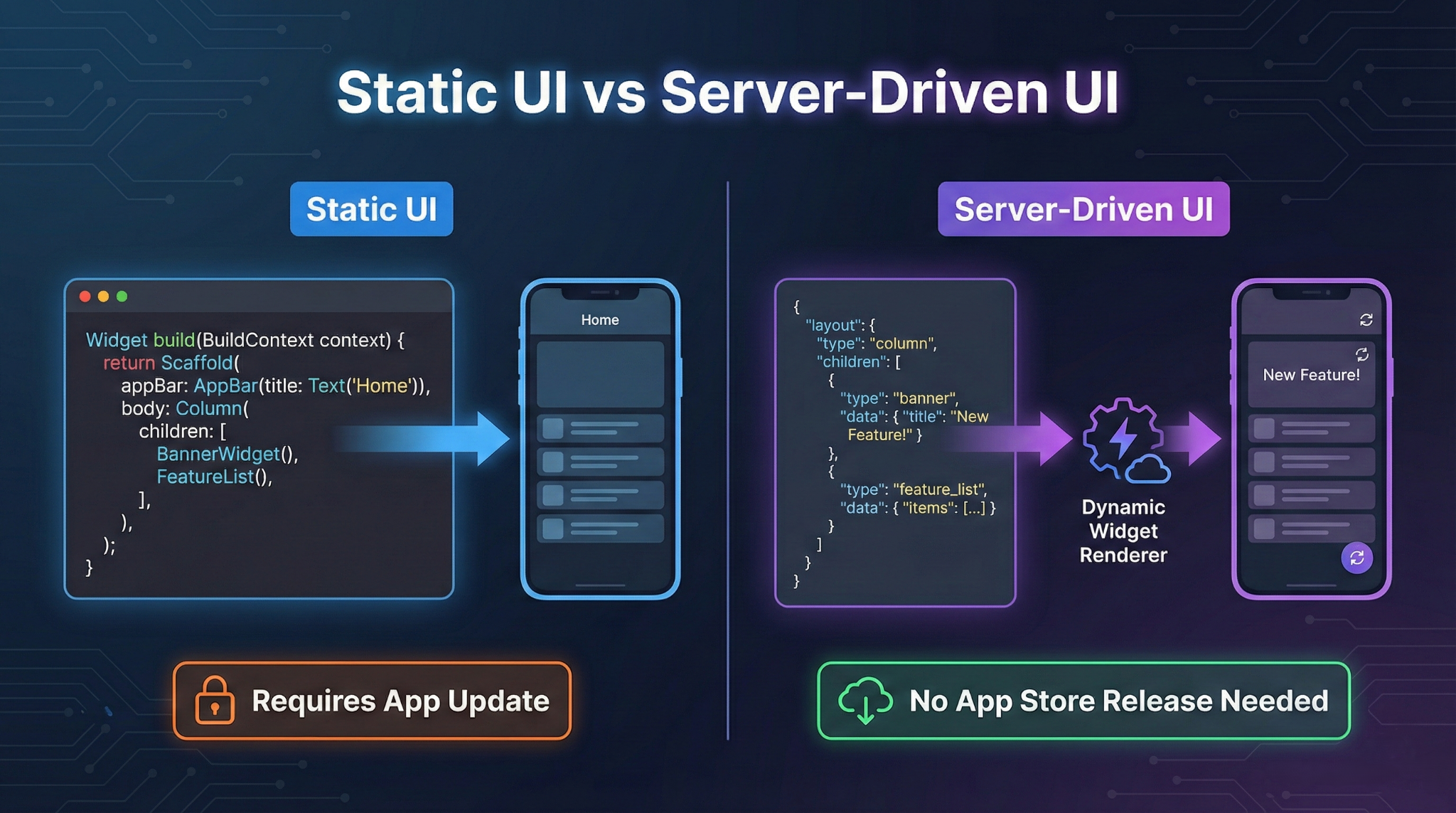
Server-Driven UI means the backend defines the UI structure, and the app renders it dynamically.
Instead of:
return Column(
  children: [
    Text("Welcome"),
    ElevatedButton(onPressed: ..., child: Text("Continue")),
  ],
);
You fetch:
{
  "type": "column",
  "children": [
    { "type": "text", "value": "Welcome" },
    { "type": "button", "label": "Continue", "action": "next_screen"}
  ]
}
And render it dynamically.
The UI becomes data.
Why Server-Driven UI Matters in Modern Mobile Development
In 2026, speed beats perfection.
SDUI enables:
- 🚀 Instant UI updates without app store release
- 🧪 A/B testing experiments
- 🌍 Market-specific layouts
- 💰 Paywall optimization
- 🧠 AI-personalised interfaces
If you’re running growth loops, subscriptions, or feature flags, SDUI reduces release friction dramatically.
Flutter already provides strong platform extensibility through mechanisms like Flutter platform channels documentation, making hybrid server + native UI orchestration feasible.
But the trade-off? You’re shifting UI responsibility to your backend.
Architecture Blueprint for Server-Driven UI in Flutter

High-Level Flow
[Client App]
↓
[Fetch JSON Layout]
↓
[Parse → Validate → Map to Widgets]
↓
[Action Dispatcher]
↓
[Navigation / API / Native Bridge]
Step-by-Step Implementation Flow
Step 1: Define a Stable JSON Schema
Example:
{
  "version": "1.0",
  "screen": {
    "type": "column",
    "padding": 16,
    "children": [
      {
        "type": "text",
        "style": "headline",
        "value": "Upgrade to Premium"
      },
      {
        "type": "button",
        "variant": "primary",
        "label": "Subscribe",
        "action": {
          "type": "purchase",
          "productId": "premium_monthly"
        }
      }
    ]
  }
}
Key Rule:
Never ship without versioning your schema.
Step 2: Build a Widget Factory (Flutter)
Production-style dynamic renderer:
typedef WidgetBuilderFunc = Widget Function(Map<String, dynamic>);

class WidgetRegistry {
  static final Map<String, WidgetBuilderFunc> _registry = {
    "text": _buildText,
    "button": _buildButton,
    "column": _buildColumn,
  };

  static Widget build(Map<String, dynamic> json) {
    final type = json["type"];
    final builder = _registry[type];

    if (builder == null) {
      return const SizedBox.shrink();
    }

    return builder(json);
  }

  static Widget _buildText(Map<String, dynamic> json) {
    return Text(
      json["value"] ?? "",
      style: _resolveTextStyle(json["style"]),
    );
  }

  static Widget _buildButton(Map<String, dynamic> json) {
    return ElevatedButton(
      onPressed: () => ActionDispatcher.handle(json["action"]),
      child: Text(json["label"] ?? ""),
    );
  }

  static Widget _buildColumn(Map<String, dynamic> json) {
    final children = (json["children"] as List)
        .map((e) => build(e))
        .toList();

    return Column(children: children);
  }
}
This pattern keeps UI mapping centralized and extensible.
Step 3: Action Dispatcher Layer
Never mix action logic inside widget builders.
class ActionDispatcher {
  static void handle(Map<String, dynamic>? action) {
    if (action == null) return;

    switch (action["type"]) {
      case "navigate":
        Navigator.pushNamed(context, action["route"]);
        break;

      case "purchase":
        _purchase(action["productId"]);
        break;
    }
  }
}
Now your UI stays declarative and pure.
Cross-Platform Comparison
Platform
Typical SDUI Pattern
Strength
Risk
Flutter
JSON → Widget factory
Fast iteration
Runtime crashes if schema breaks
Android
JSON → View binding
Native performance
Fragmentation risk
iOS
JSON → SwiftUI builder
Smooth animations
Hard debugging
Android (Kotlin) Example
Dynamic view rendering:
fun buildView(context: Context, json: JSONObject): View {
    return when (json.getString("type")) {
        "text" -> TextView(context).apply {
            text = json.getString("value")
        }
        "button" -> Button(context).apply {
            text = json.getString("label")
        }
        else -> View(context)
    }
}
Android lifecycle awareness is critical. See the official Android activity lifecycle guide to avoid recreation issues when views are rebuilt dynamically.
iOS (SwiftUI) Example
func buildView(from json: [String: Any]) -> AnyView {
    guard let type = json["type"] as? String else {
        return AnyView(EmptyView())
    }

    switch type {
    case "text":
        return AnyView(Text(json["value"] as? String ?? ""))

    case "button":
        return AnyView(
            Button(json["label"] as? String ?? "") {
                // Handle action
            }
        )

    default:
        return AnyView(EmptyView())
    }
}
SwiftUI’s declarative model works well with SDUI patterns. See official SwiftUI documentation for composition best practices.
Real-World Use Cases
1. Subscription Paywalls
Change layout weekly without App Store review delays.
2. Growth Experiments
Test 5 onboarding flows simultaneously.
3. Regional UI Personalisation
Different copy, layout, and CTAs for the US Vs EU.
4. Feature Flags + Remote Config
Combine SDUI with remote config for safe rollouts. AppsOnAir previously explored this in depth in their article on Flutter remote configuration implementation.
Best Practices (The Hard-Won Rules)
1. Strict Schema Versioning
if (schemaVersion != supportedVersion)
    fallbackToLocalLayout();
2. Graceful Fallback UI
Never trust the server 100%.
3. Offline Caching
Cache last successful layout:
- SharedPreferences / Hive
- SQLite
- Encrypted storage for sensitive flows
4. Analytics at Component Level
Track:
- Which component rendered
- Which action triggered
- Layout version
5. Restrict Dynamic Depth
Limit nesting to prevent performance degradation.
Common Pitfalls (Where Teams Fail)
1. No Validation Layer
Malformed JSON crashes production.
Solution:
Add model parsing + try/catch boundaries.
2. Over-Dynamic Everything
Not all screens should be server-driven.
Avoid:
- Highly animated dashboards
- Complex gesture-heavy screens
- Real-time charts
3. Backend Becoming UI Team
Without strong contracts, backend chaos begins.
Solution:
- Define JSON schema in shared OpenAPI or protobuf
- CI validation tests
- Versioned component registry
When You SHOULD Use Server-Driven UI
- Paywalls
- Marketing pages
- Onboarding
- Feature flags
- Experimentation-heavy apps
When You SHOULD NOT
- High-performance gaming UI
- Heavy animation-first experiences
- Offline-first enterprise apps
The Brutal Truth
Server-Driven UI doesn’t reduce complexity.
It moves complexity from client code to system design.
If your team lacks:
- Strong backend discipline
- Schema governance
- Observability
SDUI will hurt you.
But if you run growth-driven products, it can dramatically increase iteration velocity.
Conclusion
Server-Driven UI (SDUI) in Flutter is a powerful tool, but it is not a magical solution. Its true value emerges in specific contexts like growth experimentation, subscription optimisation, and rapid UI iteration, where flexibility and speed are paramount. However, its effectiveness dramatically declines when applied to deeply interactive experiences or when adopted by teams with poor governance and weak schema contracts. Therefore, SDUI should be treated as a precision instrument—a scalpel rather than a hammer. To wield it successfully, you must design it deliberately, version it strictly, and, above all, ensure that governance is so robust that your backend can never ship chaos to the frontend.








