


.png)


.png)
A Statistic That Should Concern Every Android Developer
You built a banking app. It took months. You followed every security guideline, implemented certificate pinning, protected your API keys, and went through rigorous QA.
Then one day a user emails support: "Your app asked for my full social security number during login. Is that normal?"
You check. Your app never does that. What the user installed was a repackaged clone of your APK — your UI, your branding, your icon — wrapped around a credential harvester and uploaded to a third-party APK site.
This is not a hypothetical. It happens regularly. And according to Google’s Android Security Reports over 50 times more malware comes from internet-sideloaded sources than from apps available through Google Play.
Understanding why this gap exists, and what you as a developer can do about it, is what this post is about.
The Threat Landscape: Why Sideloading Is a Malware Vector
Sideloading — installing APKs from sources other than an official app store — is one of Android's defining features. It enables enterprise distribution, testing workflows, open-source app ecosystems, and genuine developer freedom. None of that is going away.
But the same openness that enables legitimate use also enables abuse. When there is no vetting, no identity requirement, and no accountability, bad actors exploit the gap.
The most common attack patterns targeting your users through sideloading are:
- Repackaged APKs (often analyzed using tools like JADX – Android Dex to Java decompiler)
- Brand impersonation
- Repeat distribution

Google's Answer: Developer Verification and What It Changes
Google's response to this ecosystem problem is Android Developer Verification — a system that requires all apps to be registered by verified developers in order to be installed by users on certified Android devices.
Think of it like an ID check at the airport, which confirms a traveler's identity but is separate from the security screening of their bags — Google will be confirming who the developer is, not reviewing the content of their app or where it came from.
This analogy is worth unpacking for developers. The verification system is not about content moderation. It is about accountability. When a malicious app is linked to a verified identity, the cost of repeat distribution goes up dramatically. You cannot simply generate a new identity and start again.
Since Google implemented verification requirements on Google Play in 2023, they have seen firsthand
how helpful developer identification is in stopping bad actors from exploiting anonymity to distribute malware, commit financial fraud, and steal sensitive data. This system is now being extended beyond the Play Store to the broader Android ecosystem.
The enforcement timeline:
- March 2026 — Registration opens for all developers
- September 2026 — Enforcement begins in Brazil, Indonesia, Singapore, and Thailand
- 2027 and beyond — Global rollout
The ecosystem-level change matters for your app's security posture. But it is not a substitute for hardening your own app. Let's get into the practical side.
Defending Your App: The Developer's Security Checklist
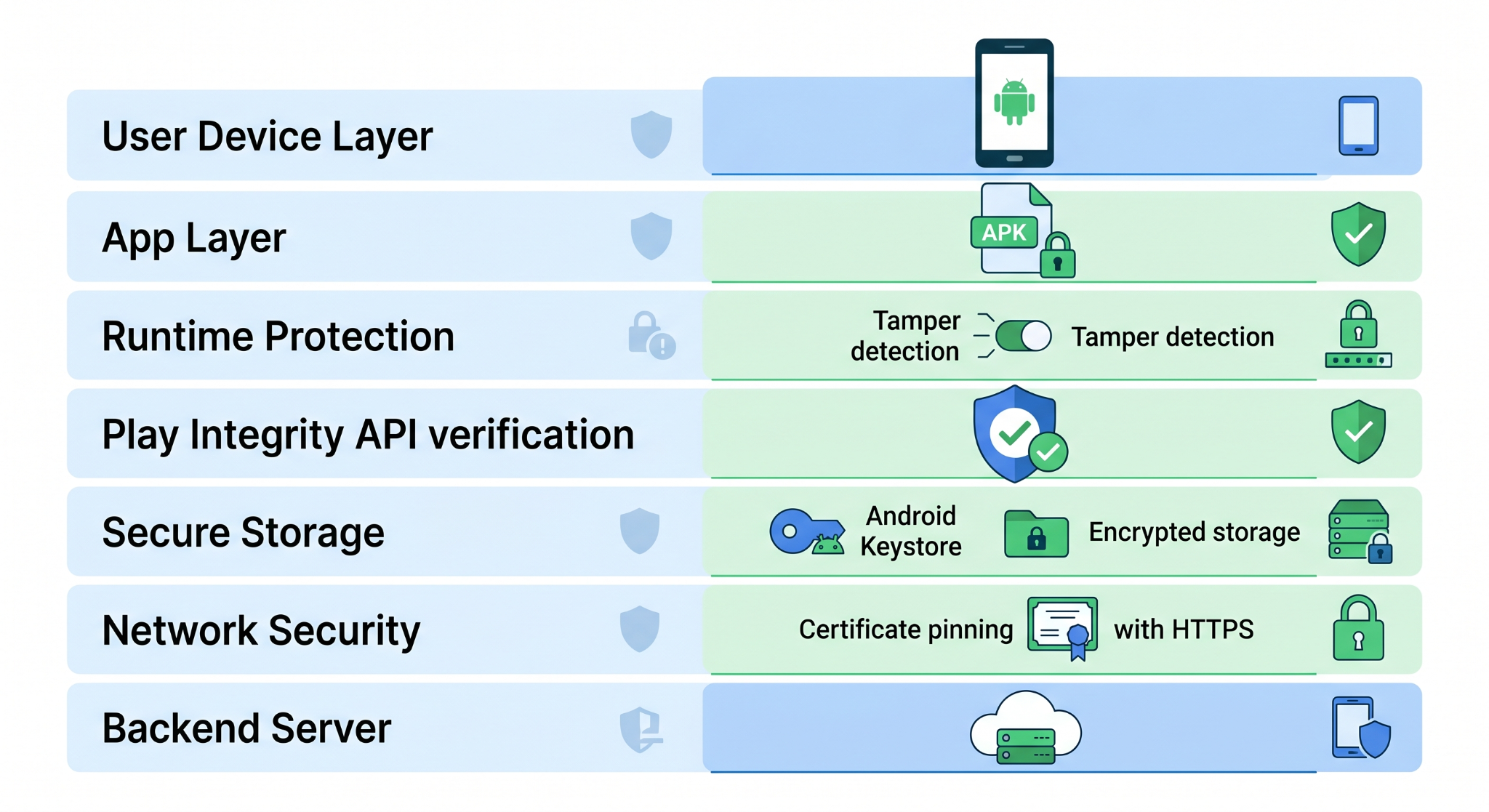
1. Use the Play Integrity API to Detect Fake Environments
The Play Integrity API is the most direct technical tool available to detect whether your app is running in a trustworthy environment. It tells you whether:
- The app binary has been tampered with (i.e., your APK was repackaged)
- The device has a valid Android license (not an emulator or rooted device being used for abuse)
- The app was installed from a recognized distribution channel
👉 Official documentation: Play Integrity API Guide
Here is how to integrate the Play Integrity API in Kotlin:
Add the dependency in build.gradle.kts:
dependencies {
    // User your project compatible version.
    implementation("com.google.android.play:integrity:1.4.0")
}
Request an integrity token:
import com.google.android.play.core.integrity.IntegrityManagerFactory
import com.google.android.play.core.integrity.IntegrityTokenRequest
import kotlinx.coroutines.tasks.await

class IntegrityChecker(private val context: Context) {

    private val integrityManager = IntegrityManagerFactory.create(context)

    suspend fun requestIntegrityToken(nonce: String): String {
        val request = IntegrityTokenRequest.builder()
            .setNonce(nonce)          // Server-generated, one-time nonce
            .setCloudProjectNumber(YOUR_CLOUD_PROJECT_NUMBER)
            .build()

        val response = integrityManager
            .requestIntegrityToken(request)
            .await()

        return response.token()
    }
}
Send the token to your server for verification:
// In your ViewModel or Repository
suspend fun performSensitiveAction(actionPayload: String) {
    // 1. Get a fresh nonce from your server
    val nonce = apiService.fetchNonce()

    // 2. Request an integrity token
    val token = integrityChecker.requestIntegrityToken(nonce)

    // 3. Send both to your server -- the server decodes and verifies the token
    apiService.performAction(
        payload = actionPayload,
        integrityToken = token
    )
}
Your backend then decodes the token using Google's Play Integrity API and checks three verdict fields:
requestDetails.requestPackageName → your package name
appIntegrity.appRecognitionVerdict → PLAY_RECOGNIZED | UNRECOGNIZED_VERSION | UNEVALUATED
deviceIntegrity.deviceRecognitionVerdict → MEETS_DEVICE_INTEGRITY | MEETS_BASIC_INTEGRITY
accountDetails.appLicensingVerdict → LICENSED | UNLICENSED | UNEVALUATED
If appRecognitionVerdict returns UNRECOGNIZED_VERSION, you are likely looking at a repackaged APK. If deviceIntegrity returns something weaker than MEETS_DEVICE_INTEGRITY, you are on a device that has been modified.
Important: Never make the integrity check client-side only. The token must always be verified server-side. A tampered app can simply return a hardcoded "pass" from a local check.
2. Sign Your APK Correctly and Use Play App Signing
Every APK you distribute must be signed with your private key. The signing certificate is what the Android Developer Verification system uses to bind your package name to your developer identity.
For Play Store distribution, use Google Play App Signing. Google holds the app signing key; you upload
with an upload key that can be rotated if compromised.
For distribution outside the Play Store, manage your own keystore. Generate a strong key:
keytool -genkey -v \
  -keystore release-keystore.jks \
  -alias my-release-key \
  -keyalg RSA \
  -keysize 4096 \
  -validity 10000
Configure signing in your build.gradle.kts, reading credentials from environment variables — never from hardcoded strings:
android {
    signingConfigs {
        create("release") {
            storeFile = file(System.getenv("KEYSTORE_PATH") ?: "release-keystore.jks")
            storePassword = System.getenv("KEYSTORE_PASSWORD")
            keyAlias = System.getenv("KEY_ALIAS")
            keyPassword = System.getenv("KEY_PASSWORD")
        }
    }
    buildTypes {
        release {
            signingConfig = signingConfigs.getByName("release")
            isMinifyEnabled = true
            isShrinkResources = true
            proguardFiles(
                getDefaultProguardFile("proguard-android-optimize.txt"),
                "proguard-rules.pro"
            )
        }
    }
}
You can verify your APK is correctly signed before distributing:
apksigner verify --print-certs my-release-app.apk
This outputs your certificate's SHA-256 fingerprint. Save this value — it's the fingerprint registered with the Android Developer Verification system.
3. Detect Tampering at Runtime
Even with the Play Integrity API, defense-in-depth is valuable. You can add a runtime tamper check that
compares your app's current signing certificate fingerprint to an expected value:
import android.content.pm.PackageManager
import java.security.MessageDigest

fun isAppTampered(context: Context): Boolean {
    return try {
        val packageInfo = context.packageManager.getPackageInfo(
            context.packageName,
            PackageManager.GET_SIGNING_CERTIFICATES
        )
        val signingInfo = packageInfo.signingInfo
        val signatures = signingInfo.apkContentsSigners

        val md = MessageDigest.getInstance("SHA-256")
        val currentFingerprint = signatures
            .map { sig ->
                md.digest(sig.toByteArray())
                    .joinToString("") { "%02x".format(it) }
            }
            .firstOrNull() ?: return true

        // Compare against your known-good fingerprint
        currentFingerprint != BuildConfig.EXPECTED_CERT_FINGERPRINT

    } catch (e: PackageManager.NameNotFoundException) {
        true // If we can't read our own package info, assume tampered
    }
}
Store your EXPECTED_CERT_FINGERPRINT in BuildConfig via buildConfigField in your Gradle file, and obfuscate it with ProGuard. Call this check early in your Application.onCreate() or before sensitive operations:
class MyApplication : Application() {
    override fun onCreate() {
        super.onCreate()
        if (isAppTampered(this)) {
            // Log the event to your analytics/security backend
            // Then gracefully exit or show an error screen
            // Do NOT silently continue
        }
    }
}
4. Protect Sensitive Data: No Secrets in the APK
A repackaged APK starts with your APK. Every API key, client secret, or hardcoded URL inside your APK is readable by anyone who decompiles it using JADX or apktool. This is true even with ProGuard enabled — obfuscation slows analysis but does not stop it.
Rules to live by:
- Never put API keys directly in strings.xml, BuildConfig, or source code
- Store secrets on your backend and request them at runtime with authentication
- Use Android Keystore for any credentials that must live on the device
// Storing a sensitive token securely using EncryptedSharedPreferences
import androidx.security.crypto.EncryptedSharedPreferences
import androidx.security.crypto.MasterKey

fun createSecurePreferences(context: Context): SharedPreferences {
    val masterKey = MasterKey.Builder(context)
        .setKeyScheme(MasterKey.KeyScheme.AES256_GCM)
        .build()

    return EncryptedSharedPreferences.create(
        context,
        "secure_prefs",
        masterKey,
        EncryptedSharedPreferences.PrefKeyEncryptionScheme.AES256_SIV,
        EncryptedSharedPreferences.PrefValueEncryptionScheme.AES256_GCM
    )
}
5. Enable Network Security Configuration
Prevent your app from communicating over cleartext HTTP and lock it to your server's certificate:
<!-- res/xml/network_security_config.xml -->
<network-security-config>
    <domain-config cleartextTrafficPermitted="false">
        <domain includeSubdomains="true">api.yourapp.com</domain>
        <pin-set expiration="2027-01-01">
            <!-- SHA-256 pin of your server's leaf certificate -->
            <pin digest="SHA-256">YOUR_PRIMARY_CERT_PIN_BASE64==</pin>
            <!-- Backup pin -->
            <pin digest="SHA-256">YOUR_BACKUP_CERT_PIN_BASE64==</pin>
        </pin-set>
    </domain-config>
</network-security-config>
Reference it in your AndroidManifest.xml:
<application
    android:networkSecurityConfig="@xml/network_security_config"
    ...>
A repackaged version of your app still has to talk to your server. Certificate pinning means that even if an attacker injects a proxy, the TLS connection will fail before any sensitive data is transmitted.
Real-World Use Cases
Banking and fintech apps are the primary targets of the malware patterns described by Google. The combination of Play Integrity API checks, certificate pinning, and runtime tamper detection represents a baseline security posture for any app handling financial data.
Healthcare apps storing protected health information have a compliance obligation that extends to distribution security. Ensuring your APK cannot be trivially repackaged matters for HIPAA and equivalent regional frameworks.
Enterprise apps distributed via MDM outside the Play Store still need to register under the new developer verification system. The verification record becomes your app's chain of custody documentation.
Common Mistakes Developers Make
Trusting the client. Security checks placed only in client code can be bypassed by anyone who can decompile your APK. Every security-critical decision must be validated server-side.
Static nonces with Play Integrity. A nonce that never changes can be replayed. Always generate fresh, server-side nonces for each integrity request, tied to the specific action being protected.
Ignoring ProGuard for library code. ProGuard's default rules exclude many Jetpack and third-party libraries from obfuscation. Review your -keep rules carefully to avoid accidentally exposing sensitive class names.
Letting certificates expire. If you have a pin-set expiration date in your network security config, you must rotate pins before that date or your app will fail to connect. Put a calendar reminder well in advance.
Assuming Play Store = safe enough. The Play Integrity API is not just for apps distributed outside the Play Store. Users can install your Play Store app, then root their device or use an emulator farm to commit abuse. Integrity checks protect your backend from these patterns regardless of distribution channel.
The Broader Picture: What Verification Means for Your App's Reputation
Beyond the technical security controls, there is a reputational dimension here that matters.
When a fake version of your app steals a user's credentials, the user blames your app. Your Play Store reviews suffer. Your support queue fills up. Your user acquisition costs rise because trust erodes.
The developer verification system is designed to create crucial accountability, making it much harder for malicious actors to quickly distribute another harmful app after the first one is taken down. That directly protects your brand as much as it protects users.
The international support for this initiative reflects how seriously this problem is taken at the policy level. Brazil's FEBRABAN sees it as a significant advancement in protecting users and encouraging accountability, and Indonesia's Ministry of Communications and Digital Affairs praised it for providing a balanced approach that protects users while keeping Android open.
As a developer, aligning with this direction is not just compliance — it is a signal to your users that you take their security seriously.
Conclusion
Security risks from sideloaded apps remain significantly higher, and while Google’s developer verification improves accountability, developers must still secure their apps themselves. Key steps include using the Play Integrity API with server-side checks, properly signing APKs, detecting tampering, protecting sensitive data, and enforcing secure network communication. Ultimately, security should be built into every layer of your app—not added at the end.








