


.png)


Mobile apps are no longer just UI layers.
They contain:
- Business logic
- API contracts
- Feature flags
- Subscription checks
- AI integrations
- Proprietary algorithms
And when your Flutter app ships, attackers can decompile, inspect, patch, and repackage it.
In this guide, you’ll learn:
- How reverse engineering actually happens in Flutter apps
- What makes Dart different from native Android/iOS
- A layered defense strategy (not just “turn on obfuscation”)
- Production-ready Flutter, Kotlin, and Swift hardening techniques
- Real-world attack scenarios and mitigation workflows
If you’re shipping paid features, AI logic, or sensitive IP — this matters.
Why Reverse Engineering Matters in Modern Mobile Development
In 2026, most Flutter apps:
- Use Firebase or custom backends
- Integrate RevenueCat / in-app billing
- Call AI APIs
- Store feature flags locally
- Rely on client-side entitlement checks
Attackers typically:
- Extract APK / IPA
- Decompile (jadx, Hopper, Ghidra)
- Analyze Dart snapshot or native binaries
- Patch logic (e.g., isPremium = true)
- Re-sign and redistribute
If your app checks subscriptions locally — it's already compromised.
Understanding Flutter Reverse Engineering
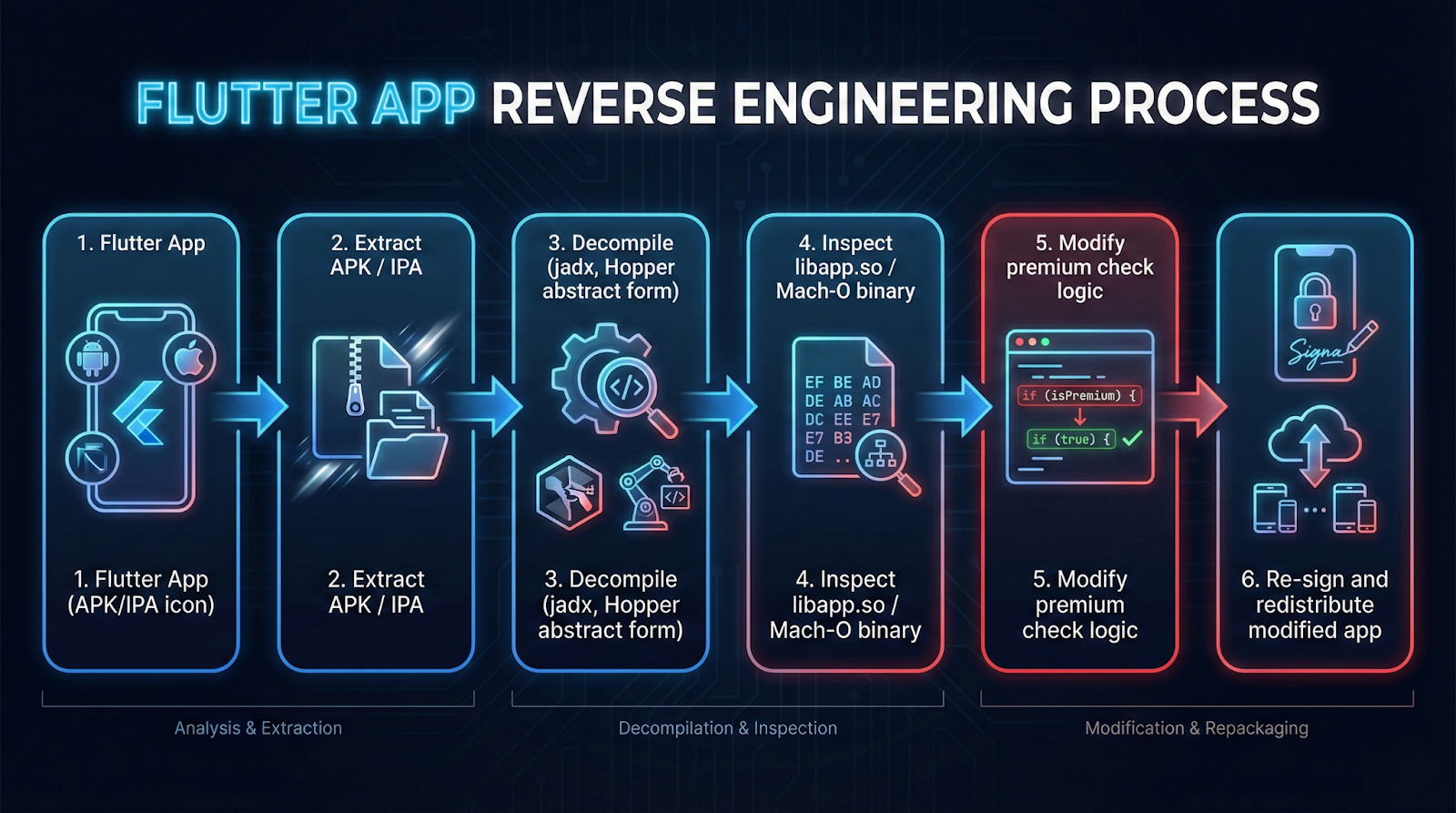
Flutter apps compile Dart to native code (AOT). That helps — but it does not make you safe.
Android
- Dart compiled into native ARM libraries (libapp.so)
- APK can be unpacked
- Strings, symbols, and logic patterns can still be analyzed
iOS
- AOT compiled Mach-O binary
- Harder to inspect than Android
- Still vulnerable to runtime hooking (Frida, LLDB)
For deep platform interaction, Flutter uses platform channels. See the official
Flutter platform channels documentation.
This becomes important when we move sensitive logic to native layers.
Layered Defense Strategy (Defense in Depth)
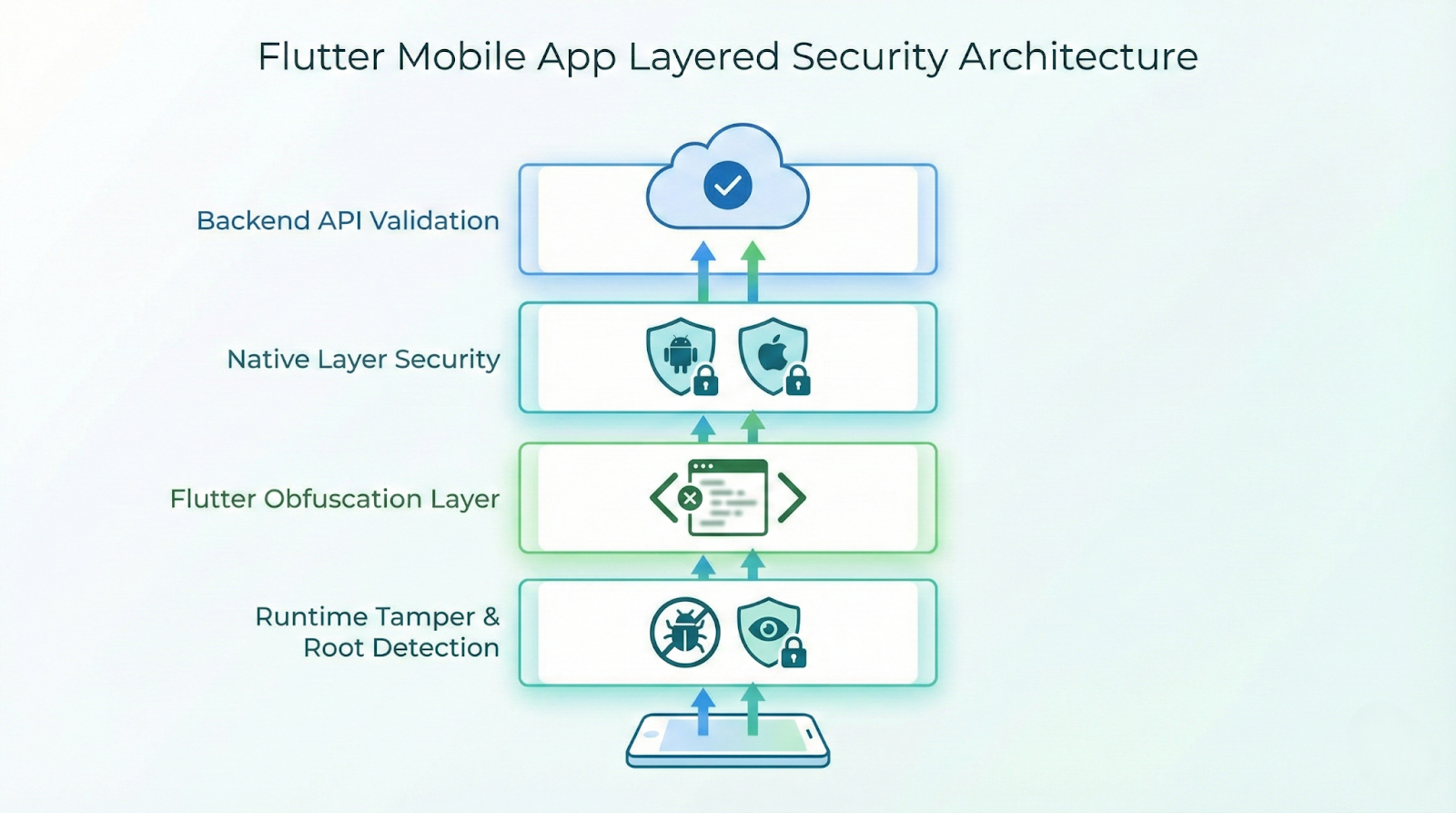
No single technique is enough.
Here’s the recommended architecture:
- Backend Validation (Source of truth)
- Native Layer Checks (Harder to patch)
- Flutter Obfuscation
- Runtime Tamper Detection
Let’s implement this properly.
1. Enable Dart Obfuscation (Release Builds Only)
Production Command
flutter build apk --release --obfuscate --split-debug-info=build/symbols
Or for app bundle:
flutter build appbundle --obfuscate --split-debug-info=build/symbolsWhy It Matters
- Renames Dart symbols
- Makes stack traces unreadable
- Slows static analysis
⚠️ Store your symbol files securely — needed for crash decoding.
2. Move Sensitive Logic to Native Code
Never keep:
- Subscription checks
- API secrets
- Signature validation
- Anti-tamper logic
purely in Dart.
Instead, use platform channels.
Flutter Side (Dart)
static const _channel = MethodChannel('security.check');

Future<bool> isDeviceCompromised() async {
  final result = await _channel.invokeMethod<bool>('isCompromised');
  return result ?? true;
}
Android Side (Kotlin)
class SecurityChannel(private val context: Context) {

    fun isCompromised(): Boolean {
        return isRooted() || isDebuggerAttached()
    }

    private fun isRooted(): Boolean {
        val paths = arrayOf(
            "/system/app/Superuser.apk",
            "/system/xbin/su"
        )
        return paths.any { File(it).exists() }
    }

    private fun isDebuggerAttached(): Boolean {
        return Debug.isDebuggerConnected()
    }
}
Android security behavior aligns with Android runtime model described in the
Android activity lifecycle guide.
iOS Side (Swift)
func isCompromised() -> Bool {
    return isJailbroken() || isDebuggerAttached()
}

func isJailbroken() -> Bool {
    let paths = [
        "/Applications/Cydia.app",
        "/bin/bash"
    ]
    return paths.contains { FileManager.default.fileExists(atPath: $0) }
}

func isDebuggerAttached() -> Bool {
    return isatty(STDERR_FILENO) != 0
}
Apple documents secure runtime patterns in
SwiftUI security-related documentation.
3. Enforce Backend-Driven Entitlements
Never trust:
bool isPremium = localStorage.getBool("premium") ?? false;
Instead:
App Launch
↓
Fetch User
↓
Backend Validates Receipt
↓
Returns Entitlement Token
↓
App Enables Features
Secure Flow
Future<void> loadEntitlement() async {
  final token = await secureStorage.read(key: 'auth_token');

  final response = await http.get(
    Uri.parse("https://api.yourapp.com/entitlement"),
    headers: {"Authorization": "Bearer $token"},
  );

  final isPremium = jsonDecode(response.body)["active"];
}
Even if the app is patched — the backend still controls access.
4. Enable Android R8 + Resource Shrinking
In android/app/build.gradle:
buildTypes {
    release {
        minifyEnabled true
        shrinkResources true
        proguardFiles getDefaultProguardFile(
            'proguard-android-optimize.txt'
        ), 'proguard-rules.pro'
    }
}
Add rules:
-keep class io.flutter.** { *; }
-keep class your.package.security.** { *; }
This removes unused methods and obfuscates Java/Kotlin.
5. Add Certificate Pinning
Prevents MITM attacks and modified API routing.
Dart (Using HttpClient)
HttpClient client = HttpClient()
  ..badCertificateCallback = (cert, host, port) => false;
Or use native SSL pinning for stronger guarantees.
6. Detect Runtime Hooking & Emulators
Android Emulator Detection (Kotlin)
fun isEmulator(): Boolean {
    return Build.FINGERPRINT.contains("generic")
}
iOS Runtime Hook Check
if (getenv("DYLD_INSERT_LIBRARIES") != nil) {
    exit(0)
}
Real-World Attack Scenarios
Implementation Workflow (Production Checklist)
1. Enable Dart obfuscation
2. Enable R8 + resource shrinking
3. Move validation logic to native layer
4. Implement backend entitlement API
5. Add certificate pinning
6. Add root/jailbreak detection
7. Monitor suspicious sessions server-side
Common Pitfalls
Relying Only on Obfuscation
Obfuscation slows attackers — it does not stop them.
Trusting Client-Side Subscription Flags
Anything in local storage can be patched.
Hardcoding Secrets
API keys must never live in the app binary.
Blocking All Rooted Devices
You’ll lose legitimate power users. Instead:
- Degrade sensitive features
- Add server monitoring
Best Practices for 2026
- Treat the client as compromised by default
- Make backend the source of truth
- Keep security logic layered
- Log suspicious patterns server-side
- Rotate API secrets regularly
- Use remote config to disable exploited features quickly
For deeper Flutter security architecture patterns, AppsOnAir explains practical platform layering in
Flutter platform channels explained with real examples.
Conclusion
Reverse engineering cannot be fully prevented.
But it can be:
- Expensive
- Time-consuming
- Detectable
- Unprofitable
The goal isn’t perfection.
The goal is making attacks harder than building your app.
If your Flutter app handles subscriptions, AI features, or proprietary logic — implement layered security now.
Because once your APK is out there, it’s open season.








