


.png)


.png)
Introduction
Every time your mobile app sends an API request, it's potentially crossing hostile territory — public Wi-Fi networks, compromised routers, or man-in-the-middle attackers waiting to intercept traffic. Yet a surprising number of production apps still rely on basic HTTPS and call it a day.
The reality? HTTPS alone is not enough.
In this guide, you'll learn how to properly encrypt API requests in mobile applications — from transport-layer security to payload encryption, certificate pinning, and token-based authentication. Whether you're building with Android, iOS, or React Native, these techniques apply across the board and are grounded in real-world production patterns.
The Problem: Why HTTPS Alone Isn't Enough
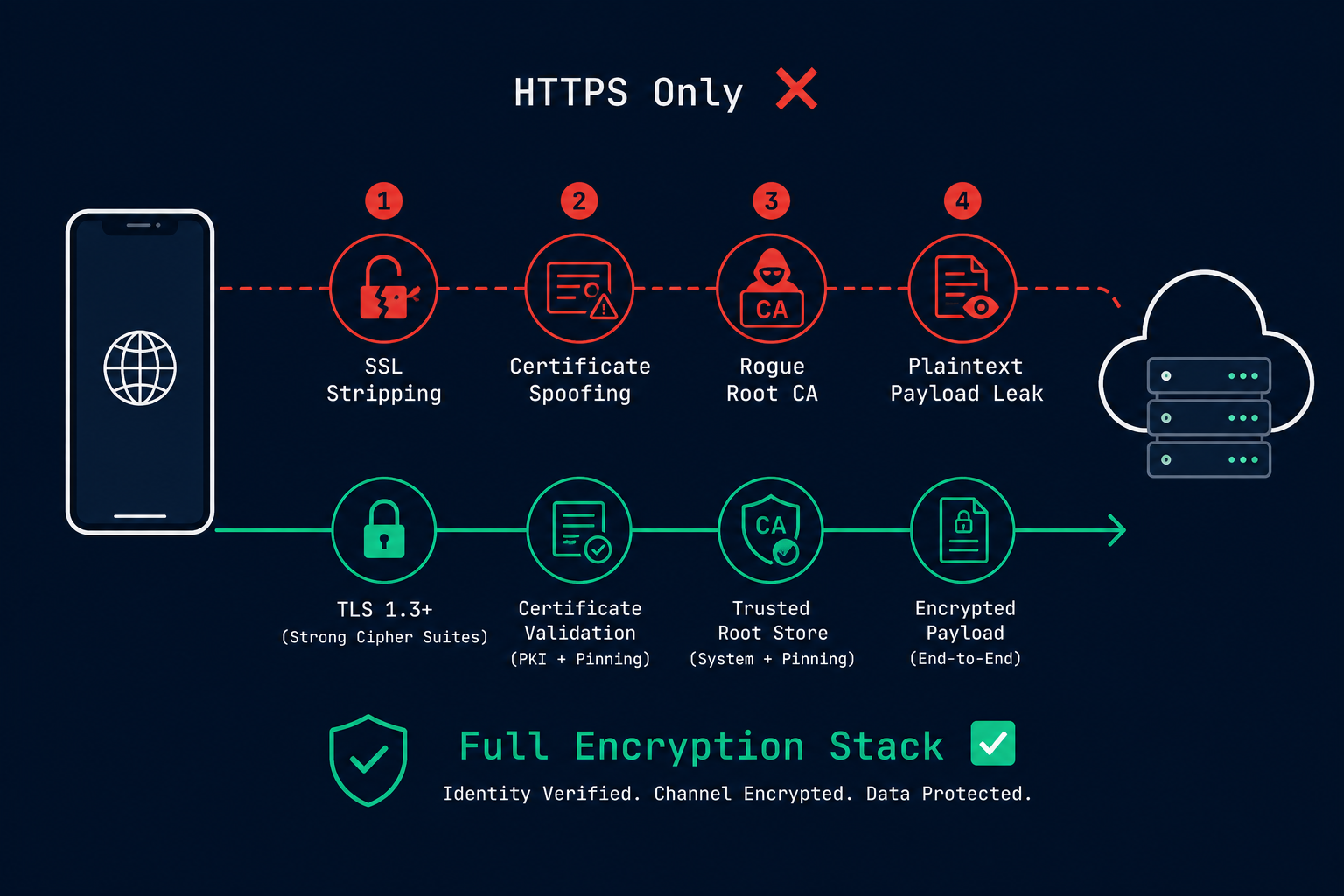
Most developers add https:// to their API base URL, tick it off the checklist, and move on. But this leaves several critical attack surfaces wide open.
Common vulnerabilities developers overlook:
- SSL stripping attacks — Downgrade HTTPS to HTTP silently
- Certificate spoofing — A malicious certificate authority issues a fake certificate
- Root CA compromise — Device trusts a rogue root certificate installed by malware
- Sensitive data in plaintext payloads — Even over HTTPS, logs and proxies can read request bodies
- Hardcoded API keys — Exposed in decompiled APKs or reverse-engineered IPAs
- Weak token storage — JWTs stored in SharedPreferences or AsyncStorage without encryption
Understanding these threats is the foundation of building a secure mobile API layer.
Layer 1: Transport Security (TLS Configuration)
Use TLS 1.2+ and Disable Weak Protocols
Your first line of defense is enforcing strong TLS settings on both server and client sides.
Android (OkHttp):
val spec = ConnectionSpec.Builder(ConnectionSpec.MODERN_TLS)
 .tlsVersions(TlsVersion.TLS_1_2, TlsVersion.TLS_1_3)
 .cipherSuites(
 CipherSuite.TLS_ECDHE_RSA_WITH_AES_128_GCM_SHA256,
 CipherSuite.TLS_ECDHE_RSA_WITH_AES_256_GCM_SHA384
 )
 .build()

val client = OkHttpClient.Builder()
 .connectionSpecs(listOf(spec))
 .build()
iOS (URLSession with App Transport Security):
In your Info.plist, ATS is enforced by default. Ensure you never disable it globally:
<!-- BAD -- Never do this in production -->
<key>NSAllowsArbitraryLoads</key>
<true/>
Instead, configure per-domain exceptions only when absolutely necessary and document the reason.
Enforce Certificate Pinning
Certificate pinning ensures your app only accepts the specific server certificate it was built with — even if a malicious CA issues a fraudulent certificate for your domain.
Android (OkHttp Certificate Pinning):
val client = OkHttpClient.Builder()
 .certificatePinner(
 CertificatePinner.Builder()
 .add("api.yourapp.com", "sha256/AAAAAAAAAAAAAAAAAAAAAAAAAAAAAAAAAAAAAAAAAAA=")
 .add("api.yourapp.com", "sha256/BBBBBBBBBBBBBBBBBBBBBBBBBBBBBBBBBBBBBBBBBBB=") // Backup pin
 .build()
 )
 .build()
Always include a backup pin. If you only pin one certificate and it expires, your app will break for all users until a new release is deployed.
iOS (TrustKit or Manual Pinning):
// Using URLSession delegate for manual pinning
func urlSession(
 _ session: URLSession,
 didReceive challenge: URLAuthenticationChallenge,
 completionHandler: @escaping (URLSession.AuthChallengeDisposition, URLCredential?) -> Void
) {
 guard let serverTrust = challenge.protectionSpace.serverTrust,
 let certificate = SecTrustGetCertificateAtIndex(serverTrust, 0) else {
 completionHandler(.cancelAuthenticationChallenge, nil)
 return
 }

 let serverCertData = SecCertificateCopyData(certificate) as Data
 let localCertData = NSData(contentsOfFile: Bundle.main.path(forResource: "your_cert", ofType: "cer")!)! as Data

 if serverCertData == localCertData {
 completionHandler(.useCredential, URLCredential(trust: serverTrust))
 } else {
 completionHandler(.cancelAuthenticationChallenge, nil)
 }
}
Layer 2: Payload Encryption
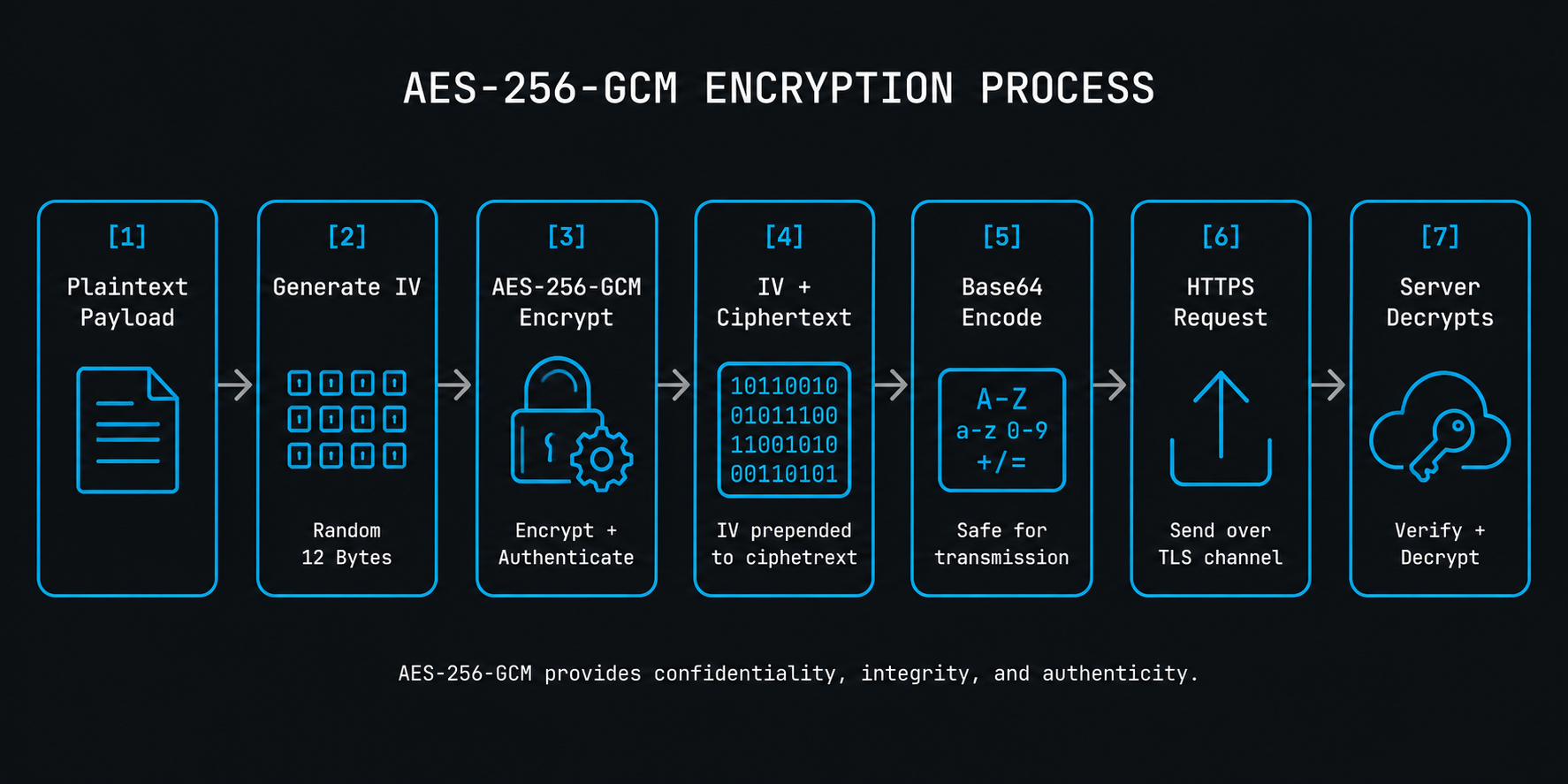
When your data is highly sensitive — medical records, financial information, PII — you should encrypt the request payload itself, independent of TLS.
AES-256-GCM Encryption
AES-GCM (Galois/Counter Mode) provides both encryption and integrity verification, making it ideal for API payloads.
Kotlin (Android):
fun encryptPayload(plaintext: String, secretKey: SecretKey): String {
 val cipher = Cipher.getInstance("AES/GCM/NoPadding")
 cipher.init(Cipher.ENCRYPT_MODE, secretKey)
 val iv = cipher.iv
 val encrypted = cipher.doFinal(plaintext.toByteArray(Charsets.UTF_8))

 // Combine IV + ciphertext and Base64 encode
 val combined = iv + encrypted
 return Base64.encodeToString(combined, Base64.NO_WRAP)
}
Swift (iOS):
import CryptoKit

func encryptPayload(_ plaintext: String, using key: SymmetricKey) throws -> String {
 let data = Data(plaintext.utf8)
 let sealedBox = try AES.GCM.seal(data, using: key)
 return sealedBox.combined!.base64EncodedString()
}
Key Management — The Critical Piece
Encryption is only as strong as your key management. Follow these rules:
The golden rule: Never hardcode secrets in source code. Use platform-native secure storage.
Layer 3: Authentication Token Security
Most API security failures happen at the authentication token level — not the transport level.
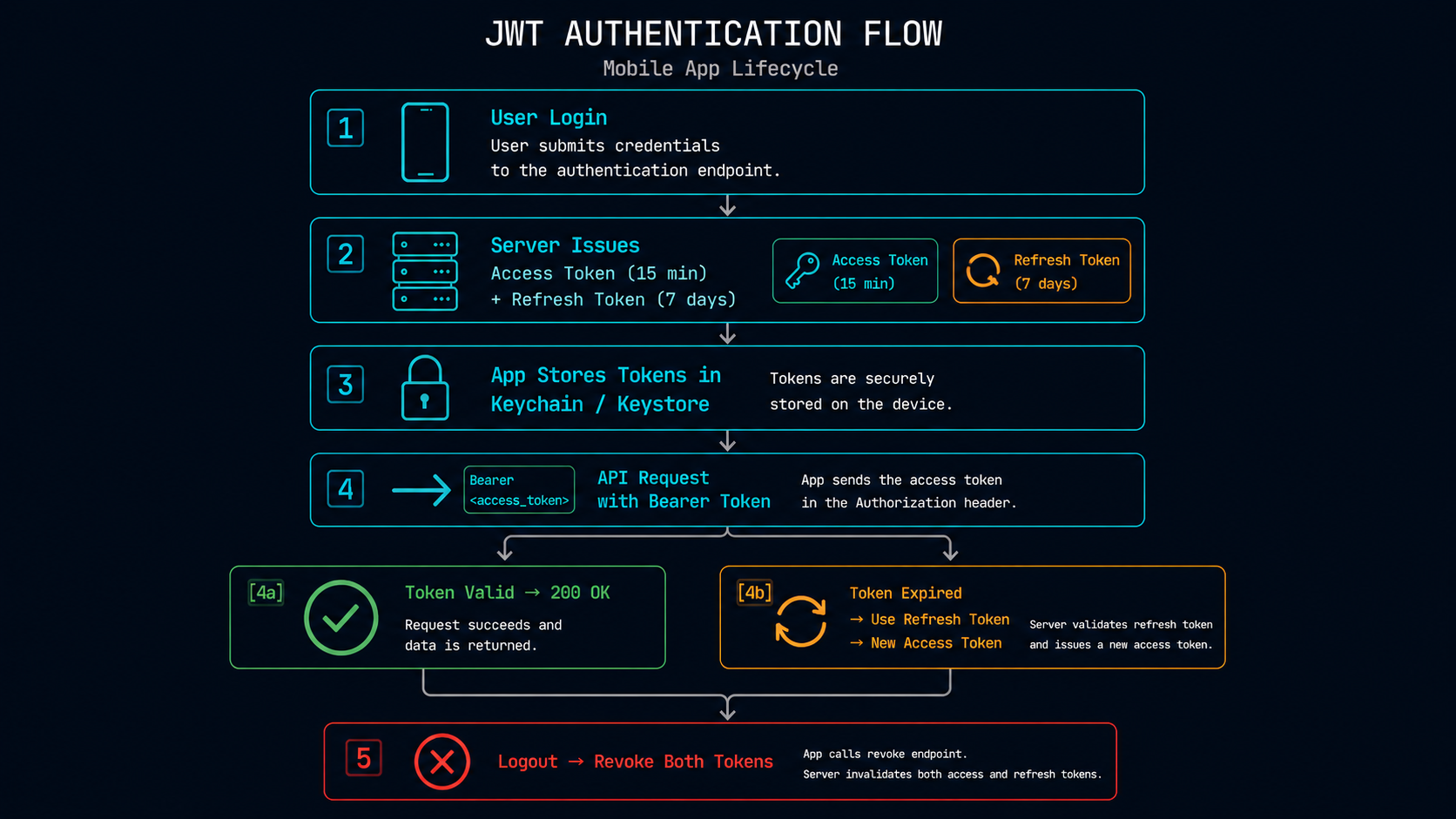
Use Short-Lived JWTs + Refresh Tokens
Access Token: 15-minute expiry (used for API calls)
Refresh Token: 7-day expiry (used only to get new access tokens)
Validate on every request (server-side):
# Python/FastAPI example
from jose import JWTError, jwt

def verify_token(token: str):
 try:
 payload = jwt.decode(token, SECRET_KEY, algorithms=["HS256"])
 if payload.get("exp") < time.time():
 raise HTTPException(status_code=401, detail="Token expired")
 return payload
 except JWTError:
 raise HTTPException(status_code=403, detail="Invalid token")
Store Tokens Securely
Android EncryptedSharedPreferences:
val masterKey = MasterKey.Builder(context)
 .setKeyScheme(MasterKey.KeyScheme.AES256_GCM)
 .build()

val sharedPrefs = EncryptedSharedPreferences.create(
 context, "secure_prefs", masterKey,
 EncryptedSharedPreferences.PrefKeyEncryptionScheme.AES256_SIV,
 EncryptedSharedPreferences.PrefValueEncryptionScheme.AES256_GCM
)

sharedPrefs.edit().putString("access_token", token).apply()
Step-by-Step Implementation Checklist
Step 1 — Server Setup
- Enable TLS 1.2/1.3 on your API server
- Configure HSTS headers (Strict-Transport-Security: max-age=31536000)
- Disable TLS 1.0 and 1.1 explicitly
- Use strong cipher suites (prefer ECDHE + AES-GCM)
Step 2 — Client-Side Hardening
- Implement certificate pinning with primary + backup pins
- Set certificate rotation schedule (90-day refresh cycle recommended)
- Use OkHttp on Android, URLSession on iOS with ATS enabled
Step 3 — Payload Encryption (if required)
- Agree on AES-256-GCM with server team
- Generate keys server-side, distribute via secure key exchange (ECDH)
- Never derive keys from user passwords directly (use PBKDF2 or Argon2)
Step 4 — Token & Auth Hardening
- Implement short-lived JWT access tokens
- Store in encrypted Keychain / EncryptedSharedPreferences
- Implement token refresh logic with retry on 401
- Clear all tokens on logout (explicit revocation if using opaque tokens)
Step 5 — Testing & Validation
- Use mitmproxy or Proxyman to verify certificate pinning is working
- Run MobSF (Mobile Security Framework) static analysis on your build
- Test token expiry and refresh flows manually
- Validate that no sensitive data appears in application logs
Best Practices for Production
- Rotate certificates proactively — Don't wait for expiry. Pin both current and next certificate.
- Use request signing — Sign requests with HMAC-SHA256 using a shared secret to prevent replay attacks.
- Add request timestamps — Reject requests older than 5 minutes on the server side.
- Never log sensitive payloads — Strip authorization headers and PII from any logging middleware.
- Implement rate limiting — Protect your API from brute-force attempts on authentication endpoints.
- Use Obfuscation — Apply ProGuard/R8 (Android) or obfuscation (iOS) to make reverse engineering harder.
Common Mistakes to Avoid
1. Pinning Leaf Certificates Only
Pinning the end-entity certificate means any certificate renewal breaks your app. Pin the intermediate CA instead for longer stability with less deployment risk.
2. Ignoring Certificate Expiry
Apps that don't handle certificate rotation fail silently at scale. Build a remote config fallback to push new pins without a full app release.
3. Symmetric Key Hardcoded in Source
Even obfuscated, hardcoded keys in APKs can be extracted. Use Android Keystore or iOS Secure Enclave for key generation and storage.
4. Storing Tokens in Plain AsyncStorage (React Native)
AsyncStorage is unencrypted. Use react-native-keychain or expo-secure-store for all sensitive tokens.
5. Skipping Token Revocation on Logout
Clearing a token locally doesn't invalidate it on the server. Implement a token blacklist or use short-lived tokens that expire quickly.
Key Takeaways
- HTTPS alone is not enough — certificate pinning, payload encryption, and secure token storage are all necessary layers
- AES-256-GCM is the recommended algorithm for symmetric payload encryption
- Platform Keystore/Keychain is the only acceptable place to store cryptographic keys on mobile
- Short-lived JWTs + refresh tokens reduce the blast radius of token theft
- Test your security use mitmproxy, MobSF, and manual testing before shipping to production
- Plan for certificate rotation from day one operational failures from expired pins are real and frequent
Conclusion
Securing API requests in mobile applications is not a one-time task — it's a layered strategy that requires attention at every level: transport, payload, authentication, and storage.
The patterns covered here — TLS hardening, certificate pinning, AES-GCM payload encryption, JWT best practices, and secure token storage — are production-tested and applicable regardless of your mobile platform.
Start with transport security, layer on certificate pinning, then work your way up to payload encryption for your most sensitive endpoints. Each layer you add significantly raises the cost of a successful attack.
Your users trust you with their data. Build like it.
FAQ
Q1. Is HTTPS not enough to secure mobile API requests?
HTTPS encrypts the transport channel, but it doesn't protect against certificate spoofing, rogue CAs, insecure token storage, or payload-level attacks. You need additional layers like certificate pinning and payload encryption for full coverage.
Q2. What is the difference between SSL pinning and certificate pinning?
Certificate pinning is the modern, correct term. SSL pinning is an older colloquial term. Both refer to the practice of hardcoding a specific server certificate or public key in your app so it rejects any certificate not matching, even if trusted by the device's root CA store.
Q3. How do I handle certificate pinning when my SSL certificate expires?
Always pin both your current certificate and the next (backup) certificate. Build a remote configuration mechanism to push updated pins to your app before rotation. Alternatively, pin the intermediate CA certificate, which changes less frequently.
Q4. Should I encrypt API request payloads if I already use TLS?
For most apps, TLS is sufficient. However, for highly sensitive data (health, financial, legal), adding payload-level AES-256-GCM encryption provides defense in depth — protecting data even if TLS is compromised by a malicious proxy or future vulnerability.
Q5. What is the safest way to store API tokens in a React Native app?
Use react-native-keychain or expo-secure-store, which back to Android Keystore and iOS Keychain respectively. Never use AsyncStorage for authentication tokens — it stores data as unencrypted plaintext on the device.
Official Resources (From Verified Sources):
- https://mas.owasp.org/MASTG
- https://developer.android.com/privacy-and-security/keystore
- https://developer.apple.com/documentation/security/keychain-services
- https://csrc.nist.gov/pubs/sp/800/52/r2/final
- https://datatracker.ietf.org/doc/html/rfc8446








