


.svg)




Flutter apps are easy to reverse engineer, clone, and abuse especially when your backend APIs are public. In production, this often leads to fake clients, bot traffic, quota abuse, and unauthorized access to paid features.
Flutter App Check is Firebase’s answer to this problem. But using it correctly especially across Android, iOS, debug builds, emulators, and older devices is where most teams struggle.
This blog explains what App Check actually protects, how it works internally, and how to integrate it properly in real Flutter apps without breaking local development or release builds.
Problem Statement
In real-world Flutter applications:
- Anyone can call your Firebase-backed APIs using Postman or curl
- APKs/IPAs can be cloned and re-signed
- Debug builds often leak API keys
- Bots can abuse free tiers and quotas
- App Store reviews suffer due to backend instability
Traditional authentication (Firebase Auth, JWTs) does not verify the app itself—only the user.
That’s where App Check comes in.
Solution
Firebase App Check verifies that incoming requests are coming from:
- Your genuine app
- Running on a real device
- Not from emulators, scripts, or modified binaries
It does this using platform-level attestation mechanisms:
Flutter acts as a thin client layer over these native checks.
How Firebase App Check Works (Internals)
Understanding this flow is key to avoiding production issues.
High-level flow
- App launches
- App Check SDK requests an attestation
- Platform API verifies device + app
- Firebase issues a short-lived App Check token
- Token is attached to every backend request
- Backend verifies token automatically
If the token is missing or invalid → request is blocked.
Flutter App Check Integration (Step-by-Step)
1. Enable App Check in Firebase Console
Before writing a single line of Flutter code, App Check must be configured correctly in the Firebase Console.
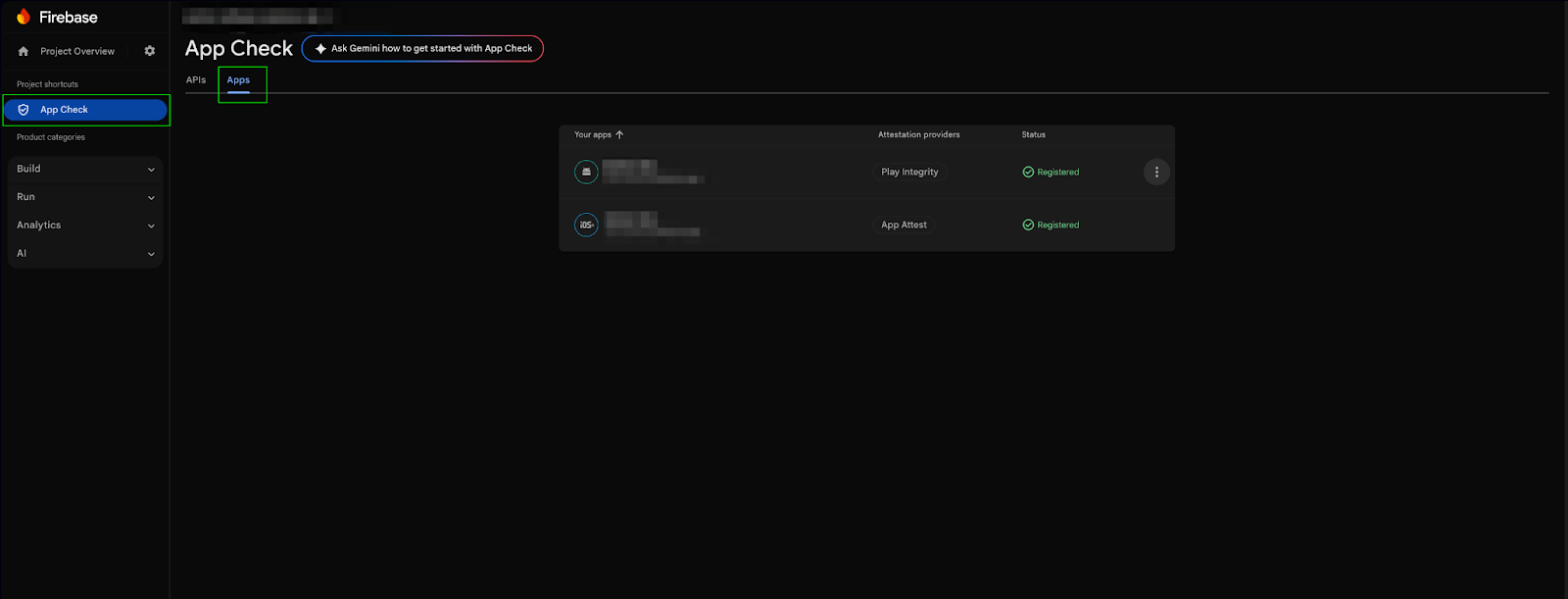
To Enable AppChek in the firebase console follow the below steps.
- Go to Firebase Console → App Check
- Register your Android & iOS apps
- Choose providers:
- Android → Play Integrity
- iOS → App Attest + DeviceCheck fallback
Do not enable enforcement immediately if your app is already live. Always start in monitor mode to observe real traffic and failures.
Android Configuration (SHA & Play Integrity)
App Check on Android relies heavily on SHA fingerprints.
A missing or incorrect SHA is the reason for 403 App Check errors.
Required SHA Fingerprints
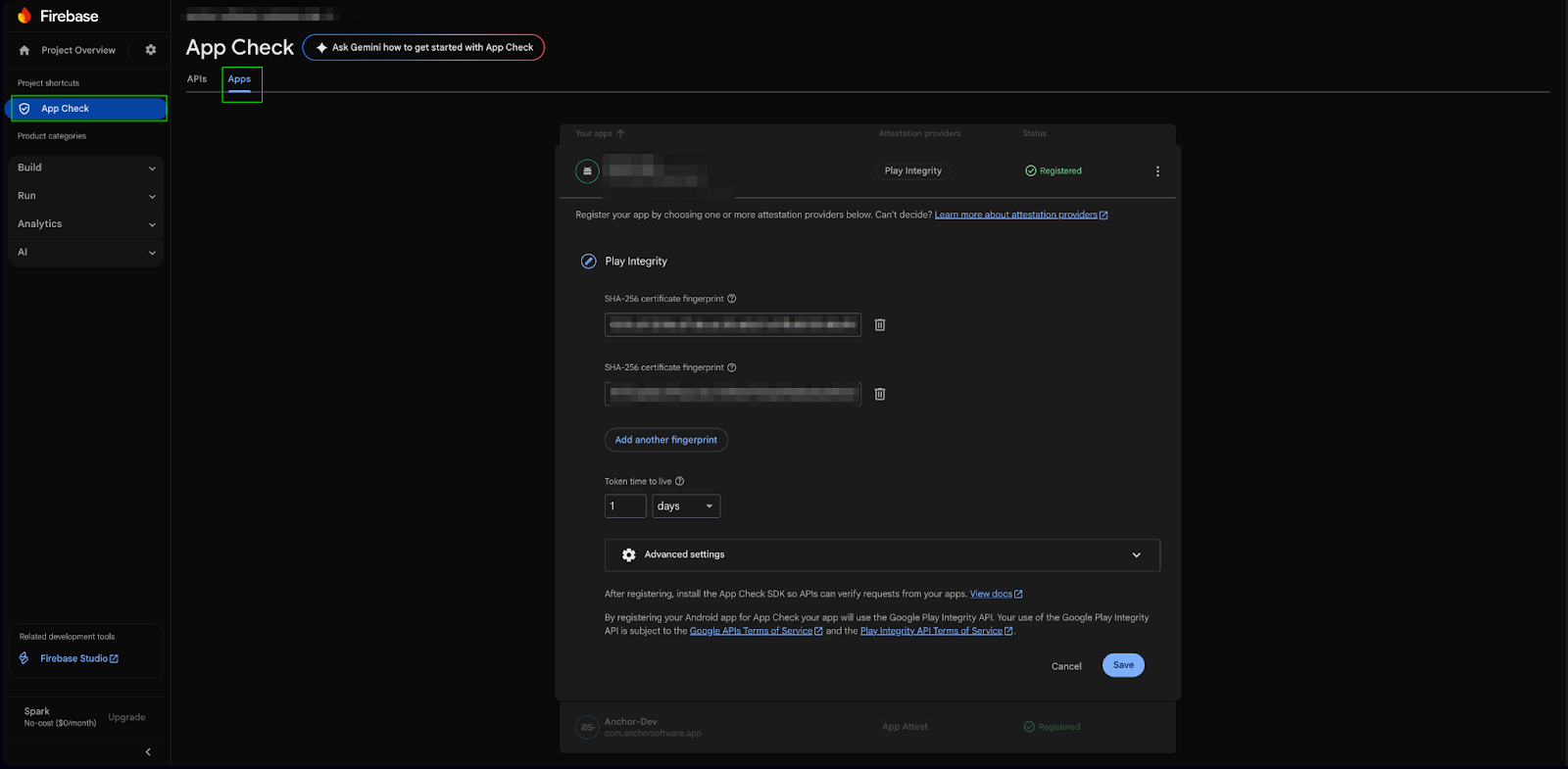
You must add all of the following in Firebase:
- Debug SHA-1
- Release SHA-1
- Play App Signing SHA-1 (mandatory for production)
- To get Play App Signing SHA-1 go to Play Console → App Integrity → App Signing. If Play App Signing SHA is missing, App Check will fail only in production, even if debug works perfectly.
iOS Configuration (Compatibility & App Attest)
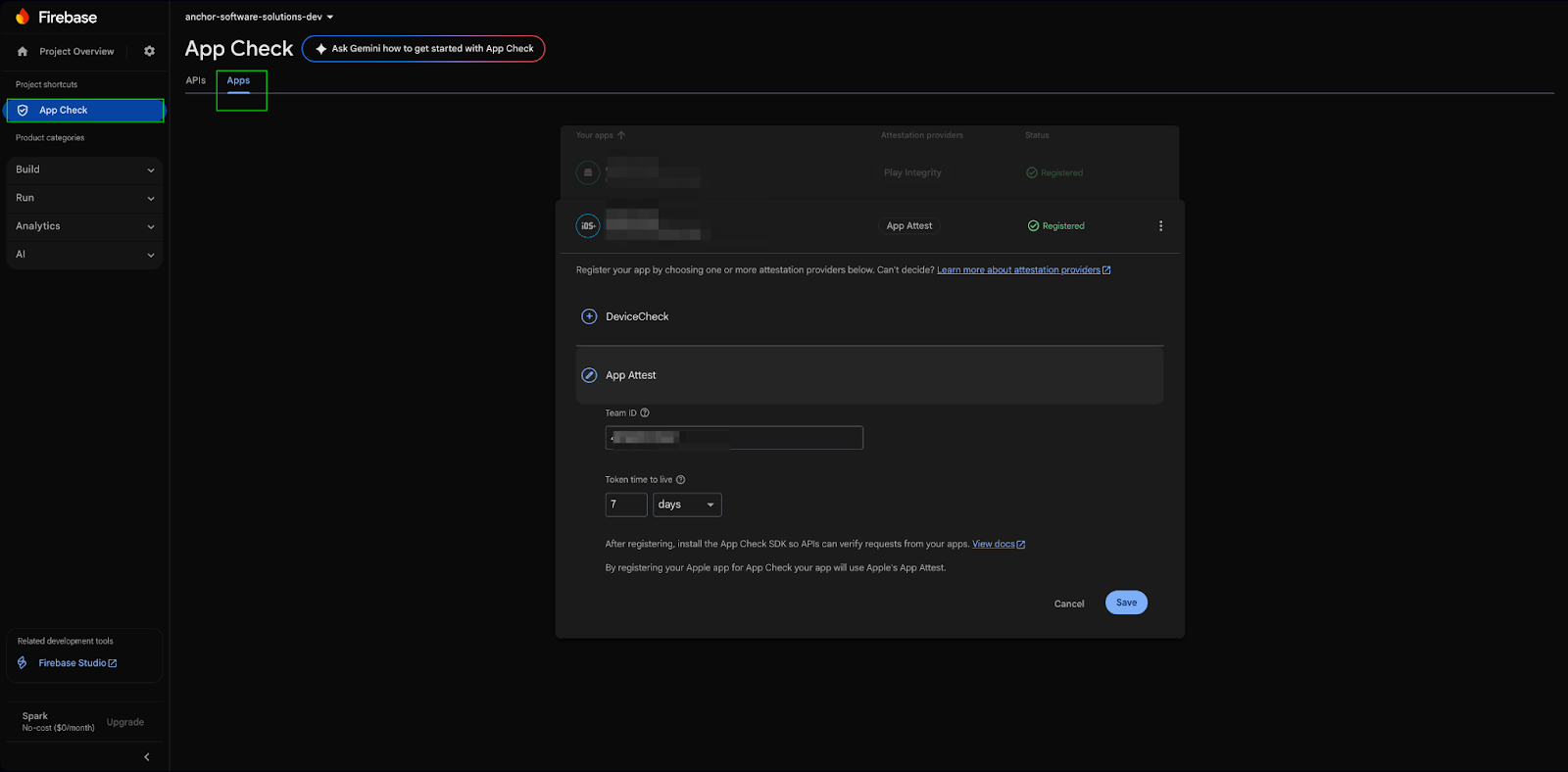
Firebase App Check on iOS relies on App Attest, with DeviceCheck as a fallback, to ensure compatibility across all supported iPhones.
In Firebase Console → App Check → iOS App, configure:
- Provider: App Attest
- Fallback: DeviceCheck
This setup is mandatory for real-world apps to avoid blocking legitimate users.
iOS Compatibility Breakdown
- iOS 14 and above: App Check uses App Attest (strongest security)
- iOS 11 to iOS 13: App Check automatically falls back to DeviceCheck
- iOS Simulator: Not supported (use Debug provider only)
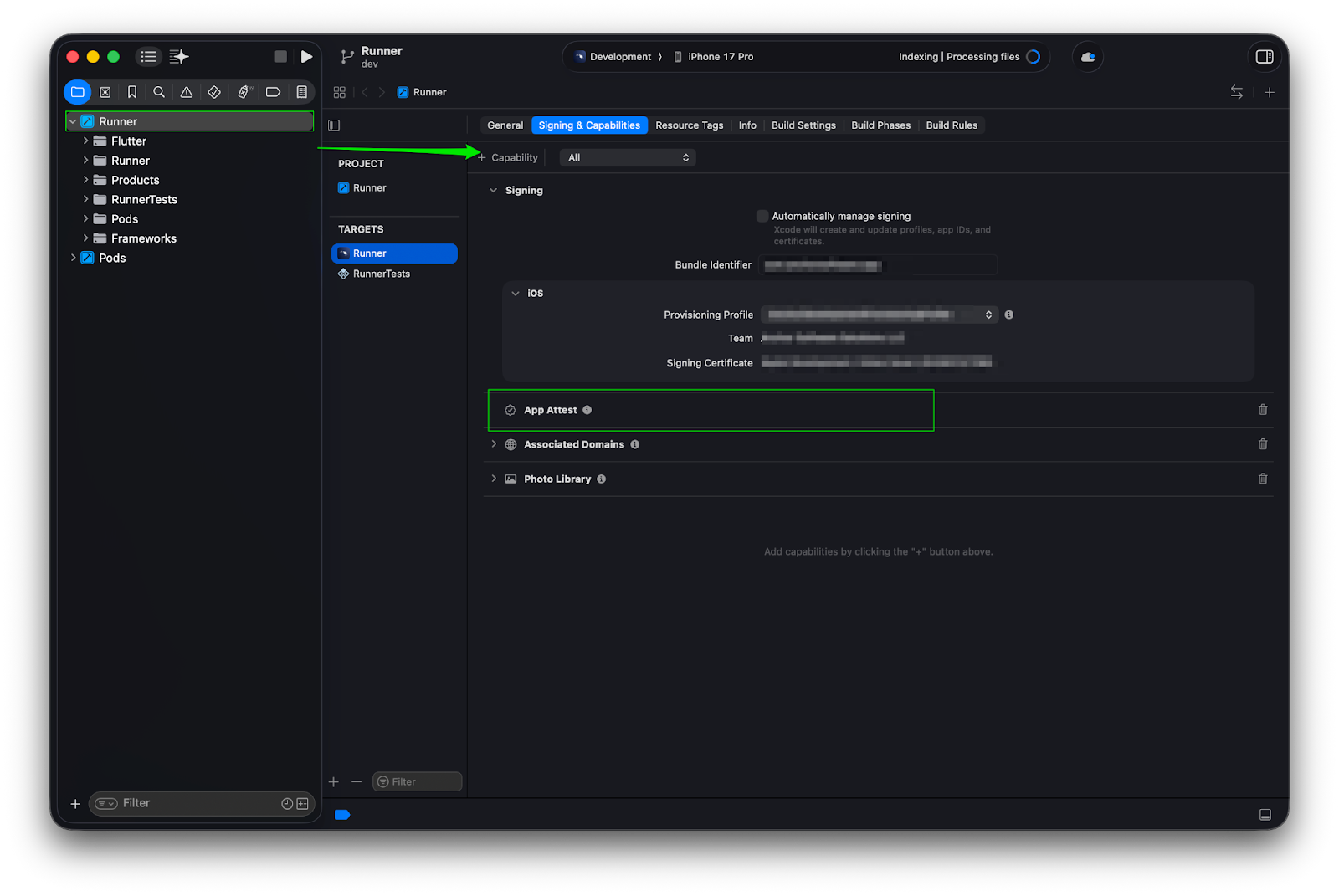
Enable App Attest Capability
In Xcode:
- Open ios/Runner.xcworkspace
- Select Runner target
- Go to Signing & Capabilities
- Click + Capability
- Add App Attest
Without this capability, App Attest will silently fail even if Firebase Console is configured correctly.
2. Add flutter dependency
Here the pub dev official dependency firebase_app_check
dependencies:
  firebase_app_check: ^0.2.1
3. Initialize App Check Correctly
 await FirebaseAppCheck.instance.activate(
      providerAndroid: kDebugMode ? AndroidDebugProvider() : AndroidPlayIntegrityProvider(),
      providerApple: kDebugMode ? AppleDebugProvider() : AppleAppAttestProvider(),
    );
You can make this much clearer by explicitly mentioning the iOS version support and provider fallback logic in Firebase App Check.
Debug & emulators cannot pass real attestation.
Firebase will print a debug token in logs (Xcode / Logcat) only.
Enforcing App Check (Production Strategy)
Recommended rollout
- Monitor mode (no enforcement)
- Analyze traffic & failures
- Fix false negatives
- Enable enforcement gradually
What happens on enforcement?
- Missing token → 403
- Invalid token → blocked
- Bot traffic → eliminated
App Attest vs DeviceCheck (iOS Reality)
App Attest provides strong, hardware-backed security and tightly binds attestation to a specific device, but it is only available on iOS 14 and above. DeviceCheck, while supported on a wider range of iOS versions, offers comparatively weaker security with limited device binding. Both providers may not support emulators or simulators and are intended for use on real devices only.
Common Pitfalls to Avoid
Enabling Enforcement Too Early
One of the most common mistakes is enabling App Check enforcement before your app ecosystem is fully ready.
When enforcement is turned on prematurely, it can instantly block legitimate traffic such as QA builds, CI pipelines, and internal test users.
Before enforcing App Check, ensure:
- All app variants (debug, staging, production) are properly registered
- QA and CI environments are configured with debug tokens
- Backend logging is enabled to monitor failures safely
Ignoring Debug Tokens
Debug tokens are essential for local development and testing.
Without them, developers may experience blocked API calls with little to no visible error feedback, making debugging extremely difficult.
A healthy App Check setup:
- Uses debug tokens only in development environments
- Never hardcodes debug tokens in production builds
- Clearly separates debug and release configurations
Assuming App Check Replaces Authentication
App Check is not an authentication system.
It validates that requests come from a genuine app, but it does not verify who the user is or what they are allowed to do.
You still need:
- Firebase Authentication or a custom auth system
- Backend authorization checks
- Role-based or feature-level access validation
App Check and authentication solve different problems and must work together.
Expecting Real-Time Protection
App Check tokens are refreshed periodically, not on every request.
This means it is not designed to block attacks instantly or detect every malicious request in real time.
Because of this:
- Short-lived abuse may still pass temporarily
- Token revocation is not immediate
- Additional server-side protection is required for high-risk APIs
Production Best Practices
A strong production setup treats App Check as one layer in a larger security strategy, not a single switch.
Recommended best practices include:
- Combining App Check with authentication and rate limiting
- Logging App Check failures separately from auth failures
- Adding graceful fallback handling for older or unsupported devices
- Never hardcoding debug tokens in source code
- Rotating keys and configurations immediately if abuse is detected
These steps significantly reduce the risk of accidental outages and long-term abuse.
When App Check Is Not Enough
App Check is effective, but it is not a silver bullet.
It does not protect against advanced attack vectors such as jailbroken devices with kernel-level access, binary patching, or stolen valid tokens.
For high-risk or high-scale applications, additional safeguards are recommended:
- SSL pinning to prevent man-in-the-middle attacks
- Server-side anomaly and behavior detection
- Feature-level authorization instead of global access control
These layers help protect your app even when App Check is bypassed.
Conclusion
Flutter App Check is a mandatory security foundation for serious production apps.
Used correctly, it:
- Blocks fake or automated clients
- Protects backend quotas
- Improves backend stability
- Significantly reduces abuse
Used incorrectly, it:
- Breaks real users
- Blocks QA and internal testing
- Causes silent and hard-to-debug production failures
Treat App Check as infrastructure, not a toggle—and test it with the same discipline as your backend systems.








