


.png)


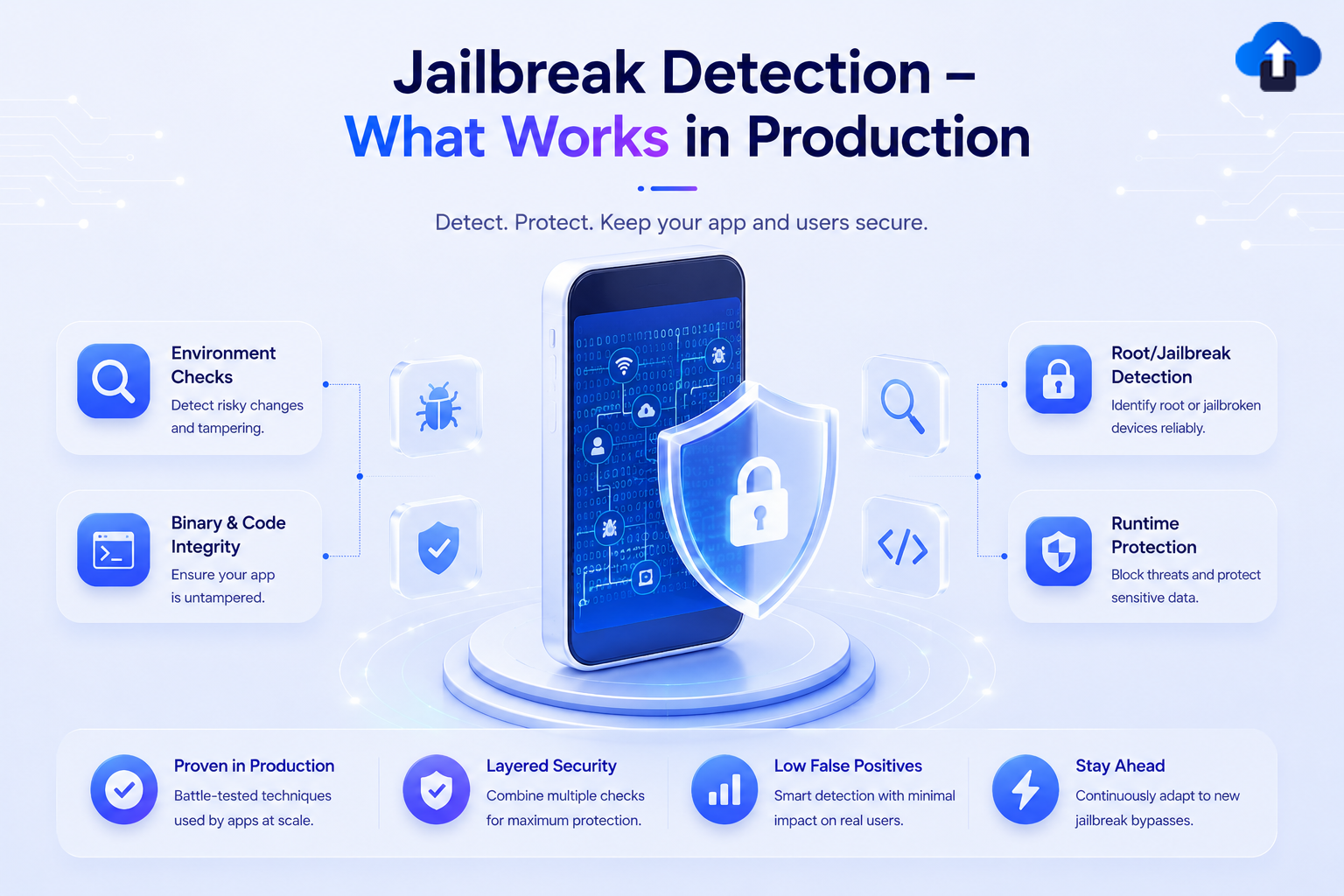
Introduction
Jailbreak detection (iOS) and root detection (Android) refer to techniques an app uses to identify whether it’s running on a device where the user has deliberately removed the operating system’s built-in security sandbox. On a jailbroken or rooted device, an attacker can read your app’s private storage, hook into your running process with tools like Frida or Xposed, bypass certificate pinning, extract API keys, and patch business logic (like in-app purchase validation) directly in memory.
For fintech, banking, DRM, and anti-cheat apps, detecting this state isn’t optional; many payment SDKs and compliance frameworks (such as PCI DSS and banking regulator guidelines) explicitly require it. But here’s the part most tutorials skip: almost every jailbreak/root check you’ll find in a five-minute blog post is trivially bypassed by tools like Shadow, A-Bypass, or Magisk Hide/Zygisk DenyList that exist specifically to defeat them.
This blog covers what actually holds up in production: layered client checks combined with server-side device attestation, not just the checklist of individual detection snippets.
Problem Statement
Most teams implement jailbreak detection as a checkbox item: copy a RootBeer-style snippet, check for /Applications/Cydia.app, ship it, move on. This fails in production for three concrete reasons:
Important: No client-side check can be made 100% tamper-proof. The device belongs to the attacker; your code runs entirely within their control. The goal of jailbreak detection is raising the cost of bypass and generating a trustworthy risk signal — not building an unbreakable wall.
This reframes the engineering problem: instead of “how do I block all jailbroken devices,” the real question is “how do I combine enough independent signals, verified server-side, that spoofing all of them becomes economically not worth it for an attacker?”
Concept A: iOS Jailbreak Detection Techniques
Modern jailbreaks (checkra1n, unc0ver, Dopamine, palera1n) all leave detectable side effects, even when combined with tweaks like Shadow or A-Bypass that try to hide them. Production apps stack multiple independent checks across different subsystems.
Filesystem & Path Checks
   import Foundation


   /// Checks for files and directories commonly present on jailbroken devices.
   /// Weak alone, but cheap and worth combining with stronger signals.
   func hasJailbreakFilesystemArtifacts() -> Bool {
   let suspiciousPaths = [
       "/Applications/Cydia.app",
       "/Applications/Sileo.app",
       "/Applications/Zebra.app",
       "/Library/MobileSubstrate/MobileSubstrate.dylib",
       "/usr/sbin/sshd",
       "/etc/apt",
       "/private/var/lib/apt",
       "/bin/bash",
       "/usr/bin/ssh"
   ]


   for path in suspiciousPaths where FileManager.default.fileExists(atPath: path) {
       return true
   }
   return false
   }
Sandbox Escape Check (Write Outside the App Sandbox)
   /// A jailbroken device allows writing outside the app's sandbox container.
   /// This is one of the harder checks to spoof, because it tests *behavior*,
   /// not just a file's presence.
   func canWriteOutsideSandbox() -> Bool {
   let testPath = "/private/jailbreak_test_\(UUID().uuidString).txt"
   do {
       try "test".write(toFile: testPath, atomically: true, encoding: .utf8)
       try FileManager.default.removeItem(atPath: testPath) // clean up if it succeeded
       return true
   } catch {
       return false // Sandbox correctly denied the write — device is likely not jailbroken
   }
   }
Suspicious URL Scheme Check
   /// A jailbroken device allows writing outside the app's sandbox container.
   /// This is one of the harder checks to spoof, because it tests *behavior*,
   /// not just a file's presence.
   func canWriteOutsideSandbox() -> Bool {
   let testPath = "/private/jailbreak_test_\(UUID().uuidString).txt"
   do {
       try "test".write(toFile: testPath, atomically: true, encoding: .utf8)
       try FileManager.default.removeItem(atPath: testPath) // clean up if it succeeded
       return true
   } catch {
       return false // Sandbox correctly denied the write — device is likely not jailbroken
   }
   }
Dynamic Library Injection Check
   import Foundation


   /// Detects common tweak-injection dylibs loaded into the running process —
   /// this is what catches Frida/Substitute/Substrate-based runtime hooking,
   /// which is what actually matters for anti-tampering, not just "is it jailbroken."
   func hasSuspiciousLoadedLibraries() -> Bool {
   let suspiciousLibraries = [
       "FridaGadget", "frida", "cynject", "libcycript",
       "SubstrateLoader", "SSLKillSwitch", "MobileSubstrate"
   ]


   for i in 0..<_dyld_image_count() {
       guard let imageName = _dyld_get_image_name(i) else { continue }
       let name = String(cString: imageName)
       if suspiciousLibraries.contains(where: { name.contains($0) }) {
           return true
       }
   }
   return false
   }
Concept B: Android Root Detection Techniques
Android root detection is fundamentally the same idea, but Android’s more open filesystem gives you more (and different) signals to check and it’s the platform where Magisk with Zygisk DenyList makes naive detection almost useless without server backing.
Build Tags & System Properties
   import Foundation


   /// Detects common tweak-injection dylibs loaded into the running process —
   /// this is what catches Frida/Substitute/Substrate-based runtime hooking,
   /// which is what actually matters for anti-tampering, not just "is it jailbroken."
   func hasSuspiciousLoadedLibraries() -> Bool {
   let suspiciousLibraries = [
       "FridaGadget", "frida", "cynject", "libcycript",
       "SubstrateLoader", "SSLKillSwitch", "MobileSubstrate"
   ]


   for i in 0..<_dyld_image_count() {
       guard let imageName = _dyld_get_image_name(i) else { continue }
       let name = String(cString: imageName)
       if suspiciousLibraries.contains(where: { name.contains($0) }) {
           return true
       }
   }
   return false
   }
Su Binary & Root Management App Checks
   import java.io.File


   /** Checks common install paths for the su binary across major root solutions. */
   fun hasSuBinary(): Boolean {
   val suPaths = arrayOf(
       "/system/bin/su", "/system/xbin/su", "/sbin/su",
       "/system/su", "/system/bin/.ext/.su", "/data/local/su",
       "/data/local/xbin/su", "/data/local/bin/su"
   )
   return suPaths.any { File(it).exists() }
   }


   /** Checks for known root-management and Magisk-related packages. */
   fun hasRootManagementApps(context: android.content.Context): Boolean {
   val rootPackages = listOf(
       "com.topjohnwu.magisk",
       "eu.chainfire.supersu",
       "com.koushikdutta.superuser",
       "com.noshufou.android.su",
       "com.thirdparty.superuser"
   )
   val pm = context.packageManager
   return rootPackages.any { pkg ->
       try {
           pm.getPackageInfo(pkg, 0)
           true
       } catch (e: android.content.pm.PackageManager.NameNotFoundException) {
           false
       }
   }
   }
Runtime su Execution Check
/**
   * Attempts to actually execute `su` and read a response.
   * Behavioral checks like this are harder to spoof via static
   * property/package patching rather than filesystem checks alone.
   */
   fun canExecuteSuCommand(): Boolean {
   return try {
       val process = Runtime.getRuntime().exec(arrayOf("which", "su"))
       val result = process.inputStream.bufferedReader().readLine()
       !result.isNullOrEmpty()
   } catch (e: Exception) {
       false
   }
   }
Important: Every check above can be individually defeated by Magisk’s Zygisk DenyList, which hides root from specific app processes at the kernel-hook level. This is exactly why production apps never rely on client-side heuristics alone.
Pros and Cons of Client-Side Detection
Comparison Table Detection Method Reliability
Solution & Implementation: A Layered Production Architecture
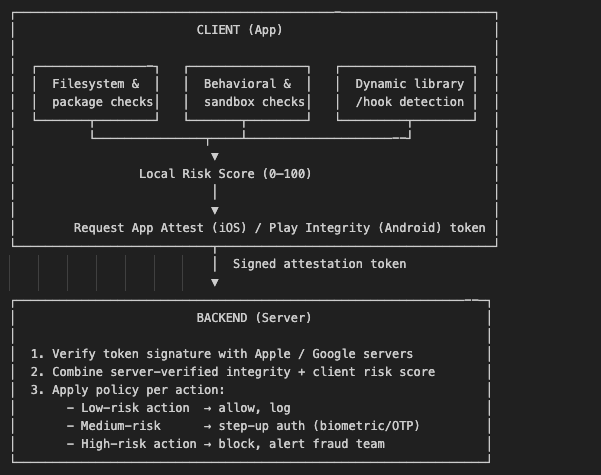
The pattern that actually survives production traffic is defense in depth with a risk score, not a single boolean gate. Client heuristics run fast and locally; server-side attestation confirms the device’s integrity cryptographically; your backend decides the response based on the combined signal and the sensitivity of the action being performed.
iOS: Requesting an App Attest Assertion
   import DeviceCheck
   import CryptoKit


   /// Generates a device attestation key and sends it to your backend
   /// for verification against Apple's servers — this is the signal
   /// that cannot be spoofed by client-side hooking alone.
   func attestDevice(completion: @escaping (Result<Data, Error>) -> Void) {
   let service = DCAppAttestService.shared
   guard service.isSupported else {
       completion(.failure(NSError(domain: "AppAttest", code: -1)))
       return
   }


   service.generateKey { keyId, error in
       guard let keyId = keyId, error == nil else {
           completion(.failure(error!))
           return
       }


       // Your backend generates this challenge and returns it to the client
       let challenge = "server-generated-nonce".data(using: .utf8)!
       let clientDataHash = Data(SHA256.hash(data: challenge))


       service.attestKey(keyId, clientDataHash: clientDataHash) { attestation, error in
           guard let attestation = attestation, error == nil else {
               completion(.failure(error!))
               return
           }
           // Send `attestation` + `keyId` to your backend for verification
           completion(.success(attestation))
       }
   }
   }
Android: Requesting a Play Integrity Verdict
 import com.google.android.play.core.integrity.IntegrityManagerFactory
 import com.google.android.play.core.integrity.IntegrityTokenRequest


 /**
 * Requests a signed integrity token from Google Play services.
 * The token is verified server-side against Google's API — it
 * cannot be forged by patching client code, since the signature
 * Check happens outside the device entirely.
 */
 fun requestIntegrityToken(context: android.content.Context, nonce: String) {
  val integrityManager = IntegrityManagerFactory.create(context)


  val request = IntegrityTokenRequest.builder()
      .setNonce(nonce) // server-generated, single-use nonce
      .setCloudProjectNumber(YOUR_CLOUD_PROJECT_NUMBER)
      .build()


  integrityManager.requestIntegrityToken(request)
      .addOnSuccessListener { response ->
          val integrityToken = response.token()
          // Send integrityToken to your backend for verification
          sendTokenToBackend(integrityToken)
      }
      .addOnFailureListener { exception ->
          // Fall back to local heuristic score with lower trust weight
          handleIntegrityFailure(exception)
      }
}
Combined Client Risk Score
   /**
   * Combines all local heuristics into a single weighted score.
   * This score is sent alongside the Play Integrity token — the
   * backend never trusts the client score alone, but uses it to
   * fine-tune the policy decision (e.g., trigger step-up auth).
   */
   fun computeLocalRiskScore(context: android.content.Context): Int {
   var score = 0
   if (hasTestKeysBuildTag()) score += 25
   if (hasSuBinary()) score += 30
   if (hasRootManagementApps(context)) score += 30
   if (canExecuteSuCommand()) score += 15
   return score.coerceIn(0, 100)
   }
Important: Never crash or hard-block purely on a client-side score. Use it to decide how much you trust the request, and let the server-verified attestation make the final call for sensitive actions like payments, key generation, or DRM-protected playback.
Key Takeaways
- No single client-side check is production-grade: Combine 5–10 independent signals across filesystem, behavior, and runtime hooking detection.
- Client detection alone is a speed bump, not a wall: Treat it as a risk signal, not a security boundary.
- Server-side attestation is the actual trust anchor: Apple’s App Attest and Google’s Play Integrity API provide cryptographically signed verdicts that can’t be patched from inside the device.
- Design for graceful degradation, not hard crashes: Immediate crashes hand attackers a fast oracle to iterate their bypass against; risk-scored, step-up responses don’t.
- Re-check periodically, not just at launch: Detection at app start alone misses runtime hooking injected after your checks have already passed.
- Match the response to the action’s sensitivity: A rooted device shouldn’t necessarily block someone from reading news content, but it should block a funds transfer or DRM playback key request.
Conclusion
Jailbreak and root detection are one of those topics where the five-minute tutorial version and the production version are almost unrelated engineering problems. Copying a Cydia. Appexistence check gives you a false sense of security that’s often worse than having no check at all, since it invites teams to treat “detection” as done. What actually holds up under real attacker pressure is a layered architecture: fast local heuristics for early signal, genuine behavioral and hook-detection checks for tamper resistance, and critically, server-verified device attestation through Apple’s App Attest and Google’s Play Integrity API as the authoritative trust signal your backend actually acts on.
Build detection as a risk-scoring pipeline, not a boolean gate, and you’ll have something that survives contact with real bypass tooling rather than being defeated by the first public Frida script.
References
- OWASP MASTG Testing Jailbreak Detection (MASTG-TEST-0088)
- OWASP MASTG Testing Root Detection (MASTG-TEST-0045)
- OWASP MASTG Implementing Root Detection Best Practices (MASTG-BEST-0030)
- Apple Developer DeviceCheck & App Attest
- Apple Developer Establishing Your App’s Integrity
- Android Developers Play Integrity API Overview
- Android Developers Play Integrity API Standard Request
- Magisk Official Documentation (topjohnwu)










