


.png)


Introduction
Every iOS app has a Bundle ID, a reverse-domain string like com.yourcompany.appname that uniquely identifies it across Apple's entire ecosystem. It is the key that links your:
- Xcode project to the Apple Developer portal
- App ID to provisioning profiles and certificates
- App to its extensions (Widget, Notification Service, Watch, Share Sheet)
- App to App Groups, iCloud containers, and Push Notification channels
- Binary uploaded to App Store Connect to its listing in the App Store.
Get the Bundle ID wrong or fail to manage multiple ones properly, and you get broken provisioning, data leaking between environments, extension crashes, and failed App Store submissions.
Most teams start with one Bundle ID and evolve organically until the structure collapses. This guide gives you a deliberate architecture from the start.
What Is a Bundle ID, and Why Does It Matter So Much?
A Bundle ID is the value of the CFBundleIdentifier key inside your app's Info.plist. Apple uses it as the permanent, unique identifier of your app.
  <!-- Info.plist -->
  <key>CFBundleIdentifier</key>
  <string>com.yourcompany.myapp</string>
Why is it permanent
Once an App ID is registered on the Apple Developer portal and an app is submitted to the App Store, the Bundle ID can never be changed. A new Bundle ID = a new app listing. This is why getting it right from the start matters enormously.
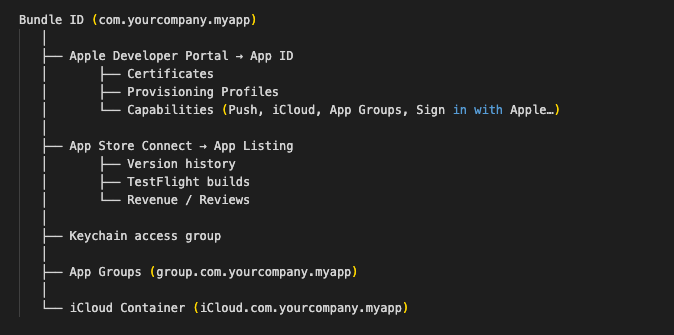
What the Bundle ID controls
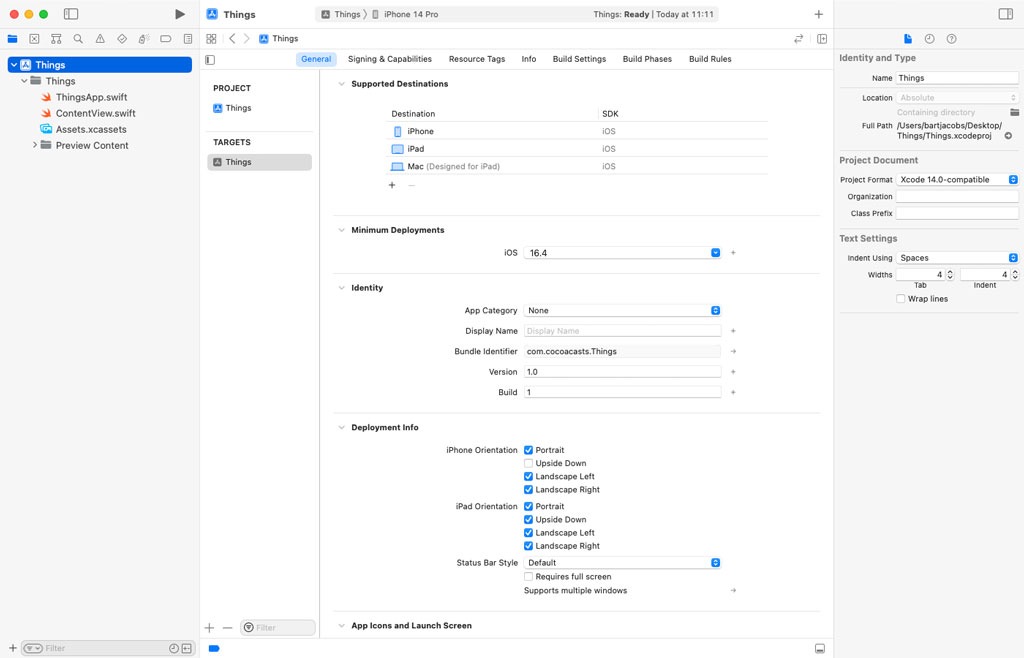
The Bundle ID Naming Convention
Standard Reverse-Domain Format

Naming Rules Apple Enforces
Important: Never use underscores in a Bundle ID. They are silently accepted by Xcode but rejected during App Store submission with `ITMS-90189: Redundant Binary Upload`.
Recommended Structure at a Glance
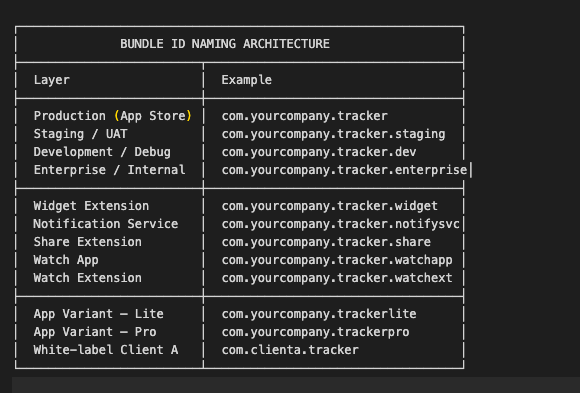
Managing Bundle IDs Across Environments (Dev / Staging / Production)
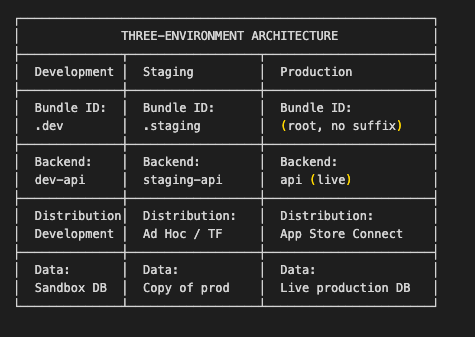
The most critical use of multiple Bundle IDs is environment separation. Without it, a developer build can overwrite a QA build on a test device, or worse, a debug build can connect to your production backend.
The Three-Environment Model
Implementing with Xcode Build Configurations + .xcconfig
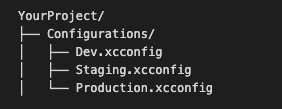
The cleanest way to manage multiple Bundle IDs in one Xcode project is via .xcconfig files, one per environment — combined with Xcode Build Configurations.
Step 1: Create the xcconfig files
Dev.xcconfig
  // Dev.xcconfig
  BUNDLE_ID_SUFFIX        = .dev
  PRODUCT_BUNDLE_IDENTIFIER = com.yourcompany.tracker$(BUNDLE_ID_SUFFIX)
  API_BASE_URL            = https://dev-api.yourapp.com
  APP_DISPLAY_NAME        = Tracker DEV
Staging.xcconfig
  // Staging.xcconfig
  BUNDLE_ID_SUFFIX        = .staging
  PRODUCT_BUNDLE_IDENTIFIER = com.yourcompany.tracker$(BUNDLE_ID_SUFFIX)
  API_BASE_URL            = https://staging-api.yourapp.com
  APP_DISPLAY_NAME        = Tracker Staging
Production.xcconfig
  // Production.xcconfig
  BUNDLE_ID_SUFFIX        =
  PRODUCT_BUNDLE_IDENTIFIER = com.yourcompany.tracker
  API_BASE_URL            = https://api.yourapp.com
  APP_DISPLAY_NAME        = Tracker
Step 2: Assign xcconfig files to Build Configurations in Xcode

Step 3: Reference the variable in Info.plist
  <!-- Info.plist -->
  <key>CFBundleIdentifier</key>
  <string>$(PRODUCT_BUNDLE_IDENTIFIER)</string>


  <key>CFBundleDisplayName</key>
  <string>$(APP_DISPLAY_NAME)</string>
Step 4: Read the API URL from code
  Xcode → Project (not Target) → Info → Configurations
  Debug   → Dev.xcconfig
  Staging → Staging.xcconfig
  Release → Production.xcconfig


  // Config.swift — reads from Info.plist at runtime
  enum Config {
    static var apiBaseURL: URL {
        guard let urlString = Bundle.main.infoDictionary?["API_BASE_URL"] as? String,
              let url = URL(string: urlString) else {
            fatalError("API_BASE_URL not set in Info.plist")
        }
        return url
    }


  static var bundleID: String {
        return Bundle.main.bundleIdentifier ?? ""
    }
  }
Important: Never hardcode environment URLs in source code. Always drive them through `.xcconfig` → `Info.plist` → runtime lookup. This keeps secrets out of code and makes environment switching instant.
Managing Bundle IDs for App Extensions
App extensions, Widgets, Notification Service extensions, Share extensions, and watch apps each require their own unique Bundle ID that is a sub-bundle of the main app.
The Extension Bundle ID Rule
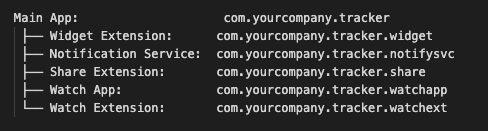
Important: Apple enforces that every extension's Bundle ID starts with the main app's Bundle ID as a prefix, followed by a dot and a unique suffix. A widget with Bundle ID `com.yourcompany.widget` (without `tracker` in it) will be rejected during submission.
Configuring Extension Bundle IDs Per Environment
Each extension needs its own xcconfig variable so the environment suffix propagates correctly:
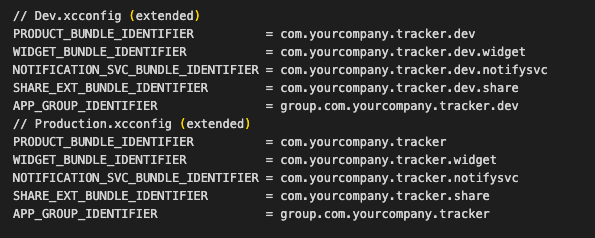
  In each extension, target Build Settings → Product Bundle Identifier, reference the variable:
  Widget Target → Build Settings → PRODUCT_BUNDLE_IDENTIFIER =    $(WIDGET_BUNDLE_IDENTIFIER)
App Groups: The Glue Between Main App and Extensions
Extensions cannot directly access the main app's data. They communicate via App Groups, a shared container identified by a group.[bundle-id].
  // Shared data access via App Group
  // Used by BOTH the main app AND the widget extension


  let sharedDefaults = UserDefaults(
    suiteName: "group.com.yourcompany.tracker"  // must match App Group ID in   entitlements
  )


  // Writing from main app
  sharedDefaults?.set("John Doe", forKey: "loggedInUserName")


  // Reading from Widget
  sharedDefaults?.string(forKey: "loggedInUserName") // → "John Doe"
  <!-- YourApp.entitlements -->
  <key>com.apple.security.application-groups</key>
  <array>
    <string>group.com.yourcompany.tracker</string>
  </array>
Important: The App Group identifier used in code must exactly match the one registered in the Apple Developer portal App ID AND the `.entitlements` file for both the main app and the extension. One character difference = extension cannot read shared data.
Managing Bundle IDs for Multiple App Variants
Many teams ship multiple versions of the same app: a Lite and a Pro version, or white-label builds for different clients. Each variant needs its own independent Bundle ID and App Store listing.
Variant Architecture Using Targets

Each target has its own:
- Bundle ID
- App Icon
- Info.plist
- Entitlements file
- Provisioning profile
- App Store Connect listing
Setting Bundle ID per target:
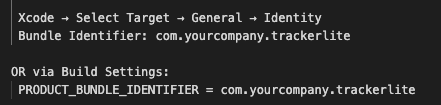
Sharing Code Between Variants Using Swift Flags
  // Use Active Compilation Conditions to gate features per variant
  // Set in Build Settings → Active Compilation Conditions:
  //   Tracker target:     FULL_VERSION
  //   TrackerLite target: LITE_VERSION


  func showPremiumFeature() {
    #if FULL_VERSION
    // show full feature
    presentPremiumViewController()
    #elseif LITE_VERSION
    // show upgrade prompt
    presentUpgradePrompt()
    #endif
  }
  # In xcconfig for each target:
  # TrackerLite.xcconfig
  SWIFT_ACTIVE_COMPILATION_CONDITIONS = LITE_VERSION
  PRODUCT_BUNDLE_IDENTIFIER           = com.yourcompany.trackerlite
  APP_DISPLAY_NAME                    = Tracker Lite
Registering Bundle IDs on the Apple Developer Portal
Every unique Bundle ID must be registered as an App ID on the Apple Developer portal before you can create a provisioning profile for it.
Step-by-Step Registration
Step 1:

Step 2:

Step 3:

Step 4:

Step 5:
Enable required capabilities:
- Push Notifications
- App Groups
- Sign in with Apple
- iCloud (if needed)
Step 6:
Register your bundle ID:
Repeat for each Bundle ID:
 com.yourcompany.tracker.staging
 com.yourcompany.tracker.dev
 com.yourcompany.tracker.widget
 com.yourcompany.tracker.notifysvc
 com.yourcompany.trackerlite
Generating Provisioning Profiles Per Bundle ID
Each registered App ID needs its own provisioning profile for each distribution method:
Common Bundle ID Mistakes and How to Fix Them
Using the Same Bundle ID for All Environments
Problem: Debug builds on a tester's device overwrite the QA build. QA build overwrites the App Store build. Keychain data, UserDefaults, and App Groups are shared across all environments.
Fix: Use the xcconfig pattern from Section 4. Separate Bundle IDs = separate installs on the same device.
App Group Identifier Mismatch Between Environments
Problem: Widget shows no data in development, but works in production. Root cause: the App Group for .dev wasn't registered, or the code hardcodes the production App Group string.
Fix:
  // Wrong — hardcoded production group
  let defaults = UserDefaults(suiteName: "group.com.yourcompany.tracker")


  // Correct — read from Info.plist (driven by xcconfig)
  let groupID = Bundle.main.infoDictionary?["APP_GROUP_ID"] as? String ?? ""
  let defaults = UserDefaults(suiteName: groupID)
  <!-- Info.plist -->
  <key>APP_GROUP_ID</key>
  <string>$(APP_GROUP_IDENTIFIER)</string>
Hardcoding Bundle IDs in Code for Deep Links / Universal Links
Problem: Universal Links and custom URL schemes configured in code stop working when the Bundle ID changes per environment.
Fix:
  // Wrong — hardcoded
  let bundleID = "com.yourcompany.tracker"


  // Correct — always read from Bundle
  let bundleID = Bundle.main.bundleIdentifier ?? ""


  // For URL scheme registration — set in Info.plist via xcconfig
  // Info.plist:
  // <key>CFBundleURLSchemes</key>
  // <array><string>$(URL_SCHEME)</string></array>
  //
  // xcconfig:
  // URL_SCHEME = trackerdev    (Dev)
  // URL_SCHEME = tracker       (Production)
Forgetting to Update Capabilities After Changing Bundle ID
Problem: After creating a new App ID (.staging), capabilities like Push Notifications and App Groups are not enabled for it, so the staging build silently fails to receive push notifications.
Fix the checklist after creating any new App ID:
- Enable Push Notifications on the new App ID
- Enable App Groups and add the environment-specific group
- Enable iCloud container if used
- Enable Sign in with Apple if used
- Enable Associated Domains if Universal Links are used
- Regenerate provisioning profile for new App ID
- Re-download and assign a new profile in Xcode
Using a Wildcard App ID in Production
Problem: A wildcard App ID (com.yourcompany.*) is convenient but blocks Push Notifications, App Groups, iCloud, Sign in with Apple, and several other modern capabilities.
  Wildcard App ID: com.yourcompany.*
  Push Notifications — NOT supported
  App Groups        — NOT supported
  iCloud            — NOT supported
  Basic signing     — Supported
  In-App Purchase   — Supported (via SKPaymentQueue)
Fix: Use Explicit App IDs for every app that uses any capability. Only use wildcard App IDs for simple utility apps with no capabilities.
Bundle ID Management Manual vs. Automated
CI/CD Building Multiple Bundle IDs in One Pipeline
  # GitHub Actions / Bitrise / CircleCI example
  # Build Dev, Staging, and Production in a single pipeline


  # --- DEVELOPMENT BUILD ---
  xcodebuild archive \
  -project YourApp.xcodeproj \
  -scheme "YourApp-Dev" \
  -configuration Debug \
  -destination "generic/platform=iOS" \
  -archivePath build/dev/YourApp-Dev.xcarchive


  # --- STAGING BUILD ---
  xcodebuild archive \
  -project YourApp.xcodeproj \
  -scheme "YourApp-Staging" \
  -configuration Staging \
  -destination "generic/platform=iOS" \
  -archivePath build/staging/YourApp-Staging.xcarchive


  # --- PRODUCTION BUILD ---
  xcodebuild archive \
  -project YourApp.xcodeproj \
  -scheme "YourApp" \
  -configuration Release \
  -destination "generic/platform=iOS" \
  -archivePath build/prod/YourApp.xcarchive


  # Export Production for App Store
  xcodebuild -exportArchive \
  -archivePath build/prod/YourApp.xcarchive \
  -exportOptionsPlist ExportOptions-AppStore.plist \
  -exportPath build/output/
OTA Distribution for Dev/Staging Builds
Rather than distributing .dev and .staging builds via TestFlight (which requires App Review for staging), many teams use an over-the-air (OTA) distribution tool for instant installation:

This keeps the Dev/Staging Bundle IDs entirely separate from TestFlight and App Store, with zero risk of overwriting the production listing.
Pre-Release Bundle ID Audit Checklist
Run this checklist before every App Store submission or major release:
NAMING
- Bundle ID is a reverse-domain format with no underscores
- Production Bundle ID has no environment suffix (.dev, .staging)
- All extension Bundle IDs start with the main app's Bundle ID as a prefix
APPLE DEVELOPER PORTAL
- All Bundle IDs (main app, all extensions, and all variants) are registered.
as Explicit App IDs - Every required capability is enabled on each App ID
- Provisioning profiles are regenerated AFTER the last capability change
- Profiles are not expired (< 1 year old)
XCODE BUILD SETTINGS
- PRODUCT_BUNDLE_IDENTIFIER in Build Settings matches the portal App ID
- xcconfig files are assigned to the correct Build Configurations
- Extension targets reference their own Bundle ID variable from xcconfig
- App Group identifiers match across the main app and all extension entitlements
ENTITLEMENTS
- .entitlements file capabilities match what is enabled on the portal App ID
- App Group ID in entitlements matches the group.xxx string used in code
- aps-environment = production in the Release entitlements (if Push is used)
ENVIRONMENT SAFETY
- Dev and Staging Bundle IDs are DIFFERENT from Production
- Dev and Staging App Groups are DIFFERENT from the Production App Group
- Hardcoded Bundle IDs or App Group strings do NOT exist in source code
- API base URLs are driven through xcconfig, not hardcoded
MULTI-VARIANT
- Each app variant has its own Bundle ID registered on the portal
- Each variant has its own App Store Connect listing (if published)
- Variant-specific features are gated via Swift Active Compilation Conditions
CI/CD
- Each scheme archives with the correct Bundle ID for its environment
- ExportOptions.plist references the correct method (appstore / ad-hoc)
- Fastlane match (or equivalent) manages profiles for all Bundle IDs
Key Takeaways
- The Bundle ID is permanent: Plan your naming scheme before your first App Store submission and never change the production Bundle ID.
- One Bundle ID per environment: Dev, Staging, and Production must have separate Bundle IDs so they co-exist on a device without overwriting each other or sharing data.
- Use `.xcconfig` files: Drive Bundle IDs, App Group identifiers, and API URLs through build configuration files, not hardcoded values in source code.
- Extension Bundle IDs must be sub-bundles: Always prefix the extension Bundle ID with the main app's Bundle ID followed by a dot and a unique suffix.
- App Groups must be environment-specific: group.com.yourcompany.tracker.dev and group.com.yourcompany.tracker must be registered separately so dev and prod data never mix.
- Register every Bundle ID on the portal first: You cannot create a provisioning profile for an App ID that is not registered.
- Wildcard App IDs block key capabilities: Push Notifications, App Groups, iCloud, and Sign in with Apple all require an Explicit App ID.
- Automate with fastlane match: Team-wide certificate and profile sync eliminates the most common signing errors during onboarding and CI/CD.
- OTA distribution tools handle Dev/Staging distribution cleanly: Keeping those Bundle IDs completely outside the TestFlight/App Store pipeline.
Conclusion
Managing multiple Bundle IDs is not complicated once you understand the underlying model, but the cost of getting it wrong is high: failed submissions, data leaking between environments, extension crashes, and certificate chaos.
The solution is a deliberate architecture applied from day one:
- Plan your naming scheme (reverse-domain, environment suffixes, extension sub-bundles)
- Register every App ID on the Apple Developer portal with all required capabilities.
- Configure Xcode with .xcconfig files so Bundle IDs switch automatically with the build scheme
- Automate certificate and profile management with fastlane match
- Audit before every release using the checklist in Section 11
With this architecture in place, switching between environments, adding a new extension, or onboarding a new team member becomes a predictable, error-free operation rather than a debugging session.
References
- Apple App Extensions Programming Guide
- Apple Configuring App Groups
- Apple Bundle ID Format
- Fastlane Match
- Apple Xcode Build Configuration Files








