


.png)


.png)
Introduction
You've built a great mobile app, connected it to a third-party API, and shipped it to production. Two weeks later, you get a surprise invoice from your cloud provider — or worse, your API key shows up on a public GitHub repository.
This is not a hypothetical. It happens to developers every week.
Securing API keys in mobile apps is one of the most overlooked yet critical aspects of mobile development. Unlike server-side applications where secrets stay on the server, mobile apps run on user devices. The compiled binary is downloadable, decompilable, and analyzable by anyone with the right tools.
In this guide, you'll learn exactly why hardcoding API keys is dangerous, what attackers actually do with them, and — most importantly — how to protect your keys using practical, production-ready strategies across iOS, Android, and cross-platform frameworks.
The Problem: Why API Keys in Mobile Apps Are a Security Risk
Before jumping to solutions, let's understand the actual threat.
What Happens When You Hardcode an API Key
When you write something like this in your code:
// Android - DON'T DO THIS
val apiKey = "sk-abc123yourapikey456xyz"
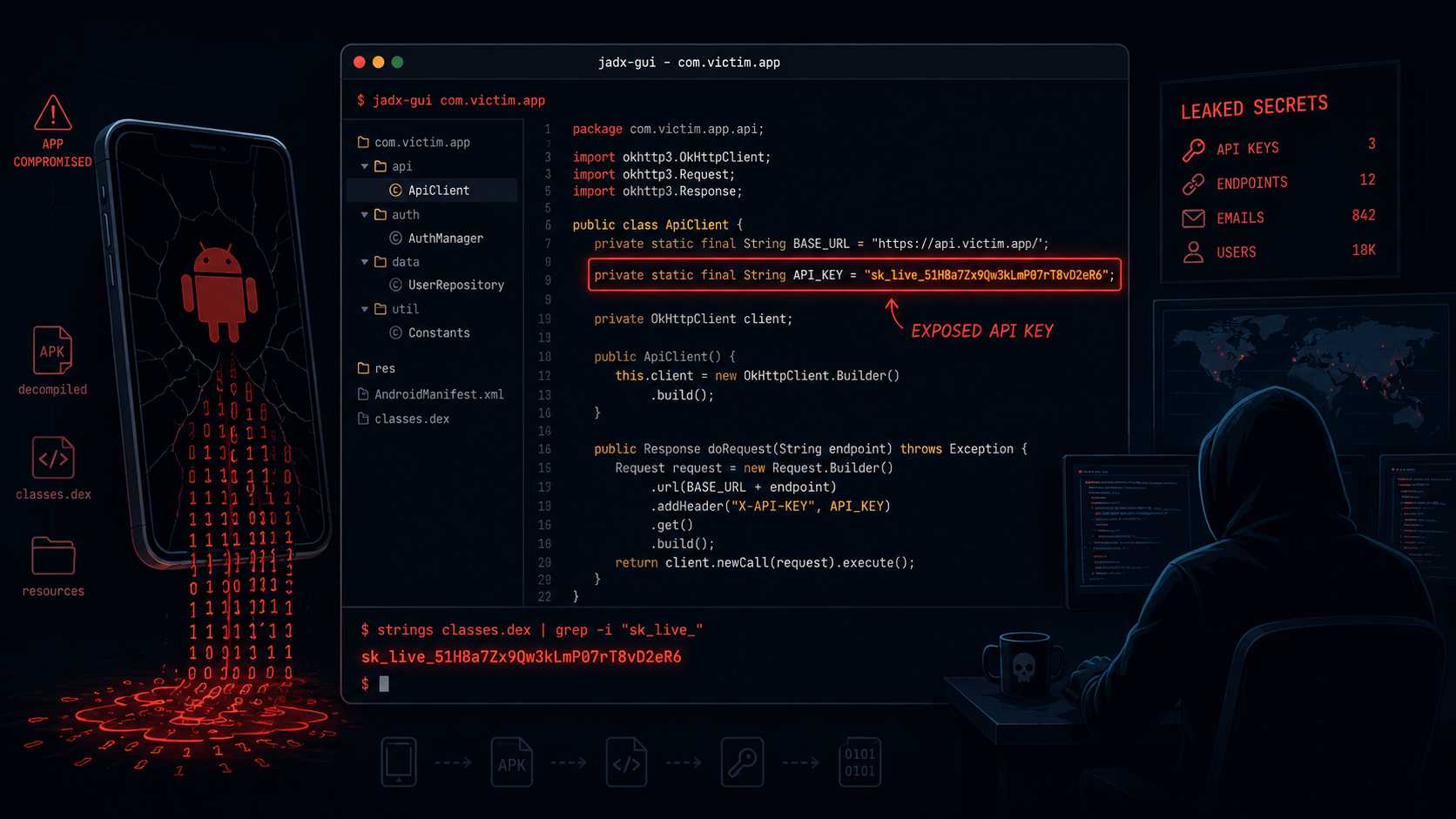
...that string gets compiled into your APK or IPA. Anyone who downloads your app from the Play Store or App Store can extract that key using tools like:
- apktool — decompiles Android APKs
- jadx — converts Android bytecode back to readable Java
- class-dump — extracts headers from iOS binaries
- strings command — literally lists readable strings from any binary
The extraction process takes under five minutes for someone who knows what they're doing.
Real Consequences of Key Exposure
These aren't edge cases. AWS estimates billions of dollars in fraudulent usage come from exposed credentials annually.
Common Mistakes Developers Make
1. Committing Keys to Version Control
One of the most common mistakes. Even if you delete the key from your repo later, git history is permanent — and public repos are indexed by bots within seconds of a push.
Fix: Add .env and config files to .gitignore immediately. Use git-secrets or truffleHog to scan your repo history for exposed credentials.
2. Storing Keys in BuildConfig or Info.plist Without Obfuscation
Android's BuildConfig and iOS's Info.plist are common "solutions" that aren't really solutions. Both are extractable from compiled binaries.
Fix: These can be used as part of a layered strategy but should never be your only protection.
3. Trusting Client-Side Validation Alone
Thinking that because your app is in a private distribution channel, it's safe. Enterprise apps, TestFlight builds, and even internal apps can be extracted and analyzed.
Fix: Always assume the client is compromised. Design your security around that assumption.
4. Using a Single Key for Everything
Using one API key across dev, staging, and production means a single leak exposes everything.
Fix: Create separate API keys per environment. Rotate them regularly.
Strategy 1: Never Store Secrets on the Client — Use a Backend Proxy
This is the gold standard and the most important strategy in this entire guide.
Instead of calling third-party APIs directly from your app, route all sensitive calls through your own backend. Your backend holds the API keys, and your mobile app only talks to your server.
Mobile App → Your Backend API → Third-Party Service
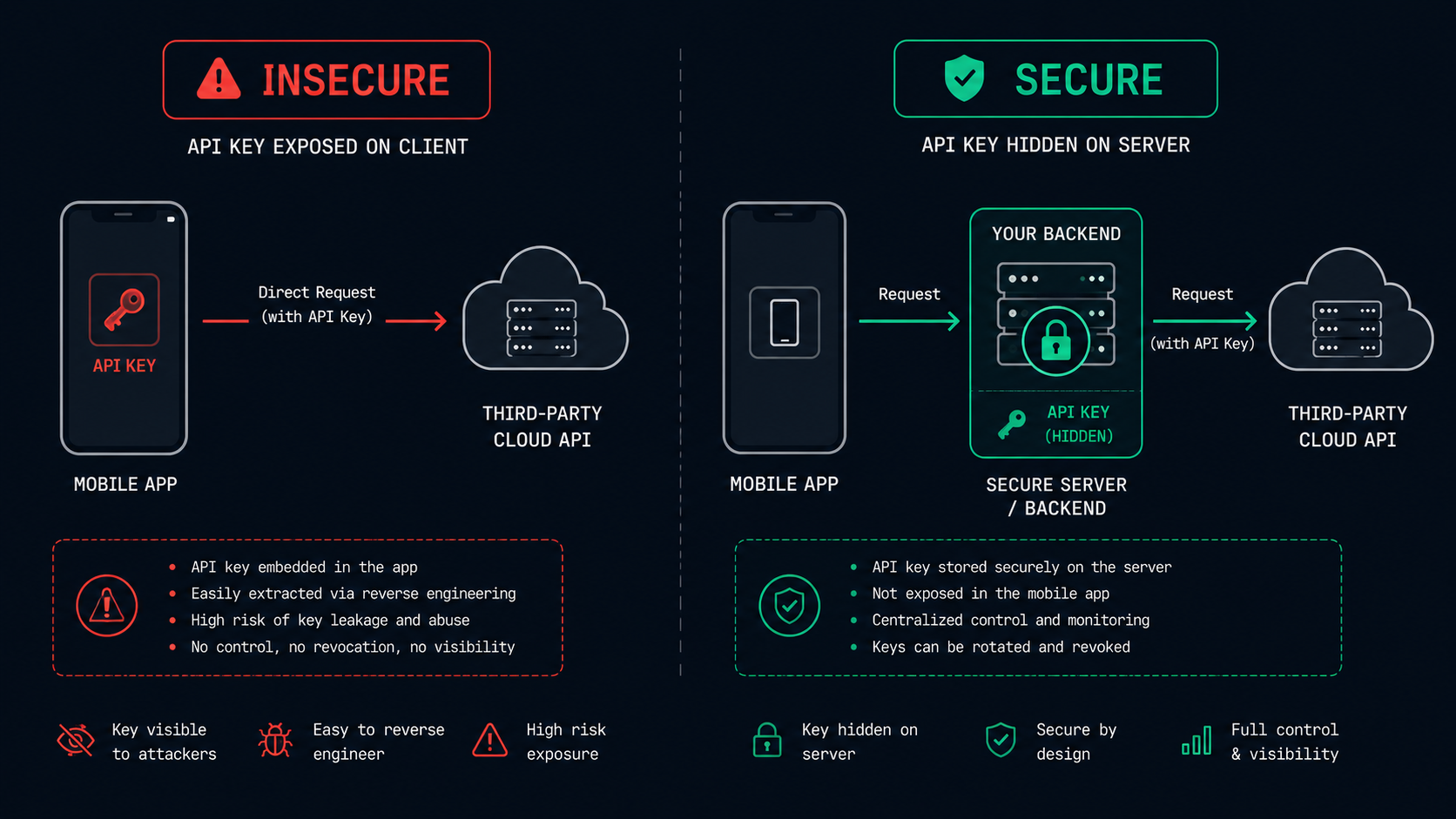
Your backend authenticates your mobile app (using user auth tokens or app attestation), makes the API call using the stored secret, and returns the response.
Why This Works
- Your API key never leaves your server
- You can rate-limit, audit, and monitor all API usage
- You can invalidate user sessions without rotating keys
- You maintain a single source of truth for secrets
Quick Example: Backend Proxy in Node.js (Express)
// server.js -- Your backend proxy
import express from 'express';
import { authenticateUser } from './middleware/auth.js';

const app = express();

// API key lives ONLY on the server
const THIRD_PARTY_API_KEY = process.env.THIRD_PARTY_API_KEY;

app.get('/api/data', authenticateUser, async (req, res) => {
 try {
 const response = await fetch('https://api.thirdparty.com/data', {
 headers: {
 'Authorization': `Bearer ${THIRD_PARTY_API_KEY}`,
 'Content-Type': 'application/json',
 },
 });
 const data = await response.json();
 res.json(data);
 } catch (err) {
 res.status(500).json({ error: 'Service unavailable' });
 }
});
Your mobile app simply calls /api/data with the user's auth token — no third-party key ever touches the client.
Strategy 2: Use Platform-Specific Secure Storage
When some client-side secret storage is unavoidable (e.g., session tokens, refresh tokens, non-critical config), use the platform's secure storage APIs.
iOS — Keychain Services
The iOS Keychain is encrypted hardware-backed storage. Never store sensitive strings in UserDefaults.
// Store a secret securely
import Security

func storeSecret(_ secret: String, forKey key: String) {
 let data = secret.data(using: .utf8)!
 let query: [CFString: Any] = [
 kSecClass: kSecClassGenericPassword,
 kSecAttrAccount: key,
 kSecValueData: data,
 kSecAttrAccessible: kSecAttrAccessibleWhenUnlockedThisDeviceOnly
 ]
 SecItemDelete(query as CFDictionary) // Remove existing entry
 SecItemAdd(query as CFDictionary, nil)
}

// Retrieve the secret
func retrieveSecret(forKey key: String) -> String? {
 let query: [CFString: Any] = [
 kSecClass: kSecClassGenericPassword,
 kSecAttrAccount: key,
 kSecReturnData: true,
 kSecMatchLimit: kSecMatchLimitOne
 ]
 var result: AnyObject?
 SecItemCopyMatching(query as CFDictionary, &result)
 guard let data = result as? Data else { return nil }
 return String(data: data, encoding: .utf8)
}
Android — EncryptedSharedPreferences
Android's EncryptedSharedPreferences from the Jetpack Security library wraps standard SharedPreferences with AES-256 encryption backed by the Android Keystore.
// build.gradle -- Add dependency
// implementation "androidx.security:security-crypto:1.1.0-alpha06"

import androidx.security.crypto.EncryptedSharedPreferences
import androidx.security.crypto.MasterKey

val masterKey = MasterKey.Builder(context)
 .setKeyScheme(MasterKey.KeyScheme.AES256_GCM)
 .build()

val sharedPreferences = EncryptedSharedPreferences.create(
 context,
 "secure_prefs",
 masterKey,
 EncryptedSharedPreferences.PrefKeyEncryptionScheme.AES256_SIV,
 EncryptedSharedPreferences.PrefValueEncryptionScheme.AES256_GCM
)

// Store
sharedPreferences.edit().putString("auth_token", userToken).apply()

// Retrieve
val token = sharedPreferences.getString("auth_token", null)
Strategy 3: Environment Variables and Build-Time Injection
For keys that need to exist at build time (e.g., SDK initialization keys), inject them via environment variables rather than hardcoding them.
Android — Using local.properties and BuildConfig
# local.properties -- Add to .gitignore!
MAPS_API_KEY=your_maps_key_here

// build.gradle
android {
 defaultConfig {
 // Read from local.properties
 def localProps = new Properties()
 localProps.load(new FileInputStream(rootProject.file("local.properties")))
 buildConfigField "String", "MAPS_API_KEY", "\"${localProps['MAPS_API_KEY']}\""
 manifestPlaceholders = [mapsApiKey: localProps['MAPS_API_KEY']]
 }
}

// Usage in code
val apiKey = BuildConfig.MAPS_API_KEY
Important: This approach stores the key in the compiled binary. It should be used in combination with API key restrictions (IP/bundle ID restrictions), not as a standalone solution.
iOS — Using .xcconfig Files
# Config/Debug.xcconfig -- Add to .gitignore!
API_BASE_URL = https://dev.yourapi.com
ANALYTICS_KEY = your_dev_key_here
Reference in Info.plist:
<key>AnalyticsKey</key>
<string>$(ANALYTICS_KEY)</string>
Read in Swift:
let key = Bundle.main.infoDictionary?["AnalyticsKey"] as? StringStrategy 4: Restrict API Keys at the Provider Level
Even if a key is extracted, you can limit the damage through restrictions. Most API providers support this.
Always configure restrictions. A leaked restricted key has far less blast radius than an unrestricted one.
Strategy 5: Obfuscation as a Defense-in-Depth Layer
Obfuscation is not security — but it's a legitimate layer that raises the cost of extraction.
Android — ProGuard / R8
Enable R8 (the default obfuscator in modern Android) in your build.gradle:
buildTypes {
 release {
 minifyEnabled true
 shrinkResources true
 proguardFiles getDefaultProguardFile('proguard-android-optimize.txt'), 'proguard-rules.pro'
 }
}
For aggressive obfuscation of sensitive string constants, consider splitting keys across multiple variables and assembling them at runtime:
// Slightly harder to grep in decompiled code
private fun getKey(): String {
 val p1 = "sk-ab"
 val p2 = "c123"
 val p3 = "xyz"
 return "$p1$p2$p3"
}
This is still reversible by a determined attacker — combine it with other strategies.
iOS — Obfuscation Libraries
Consider using open-source tools like GuernikaKit or manual bitwise operations to obscure string literals. Note that Apple's App Store review catches malicious obfuscation — keep it clean and documented.
Strategy 6: Certificate Pinning and App Attestation
If your app communicates with your own backend, certificate pinning prevents man-in-the-middle attacks, and platform attestation verifies the app's integrity.
App Attestation
- iOS: Use Apple's App Attest API to cryptographically verify that requests come from genuine, unmodified App Store builds.
- Android: Use Play Integrity API to verify that your app hasn't been tampered with.
These APIs let your backend reject requests from rooted devices, emulators, or modified APKs — significantly reducing the risk of automated abuse.
Step-by-Step Implementation Guide
Here's a practical implementation roadmap you can follow today:
Step 1 - Audit your current codebase
Run grep -rn "api_key\|secret\|token\|password" ./ on your project. If you find hardcoded strings, that's your starting point.
Step 2 - Set up environment-based config
Create .env files for each environment (dev, staging, prod). Add them to .gitignore immediately. Use your CI/CD platform (GitHub Actions, Bitrise, Fastlane) to inject values as environment variables at build time.
Step 3 - Build a backend proxy for critical keys
Identify which API keys have the highest risk (billing impact, data access). Migrate those calls to a backend proxy first. Start with a simple Express or FastAPI server if you don't have one.
Step 4 - Migrate runtime secrets to secure storage
Replace any UserDefaults or plain SharedPreferences usage for tokens with iOS Keychain or Android EncryptedSharedPreferences.
Step 5 - Add API key restrictions
Log in to each API provider and configure bundle ID, package name, or IP restrictions. Set spending limits and usage alerts.
Step 6 - Enable obfuscation in release builds
Turn on R8 for Android and check that Swift's release optimizations are enabled. Test the release build thoroughly.
Step 7 - Integrate secret scanning into CI
Add truffleHog, gitleaks, or GitHub's built-in secret scanning to your pipeline to catch accidental commits before they reach remote.
Best Practices Summary
- Assume the client is always compromised. Design your security model from that assumption.
- Use a backend proxy for all high-value API keys - this is non-negotiable in production.
- Separate keys by environment and rotate them on a schedule (quarterly at minimum).
- Never commit secrets to version control - not even in private repos.
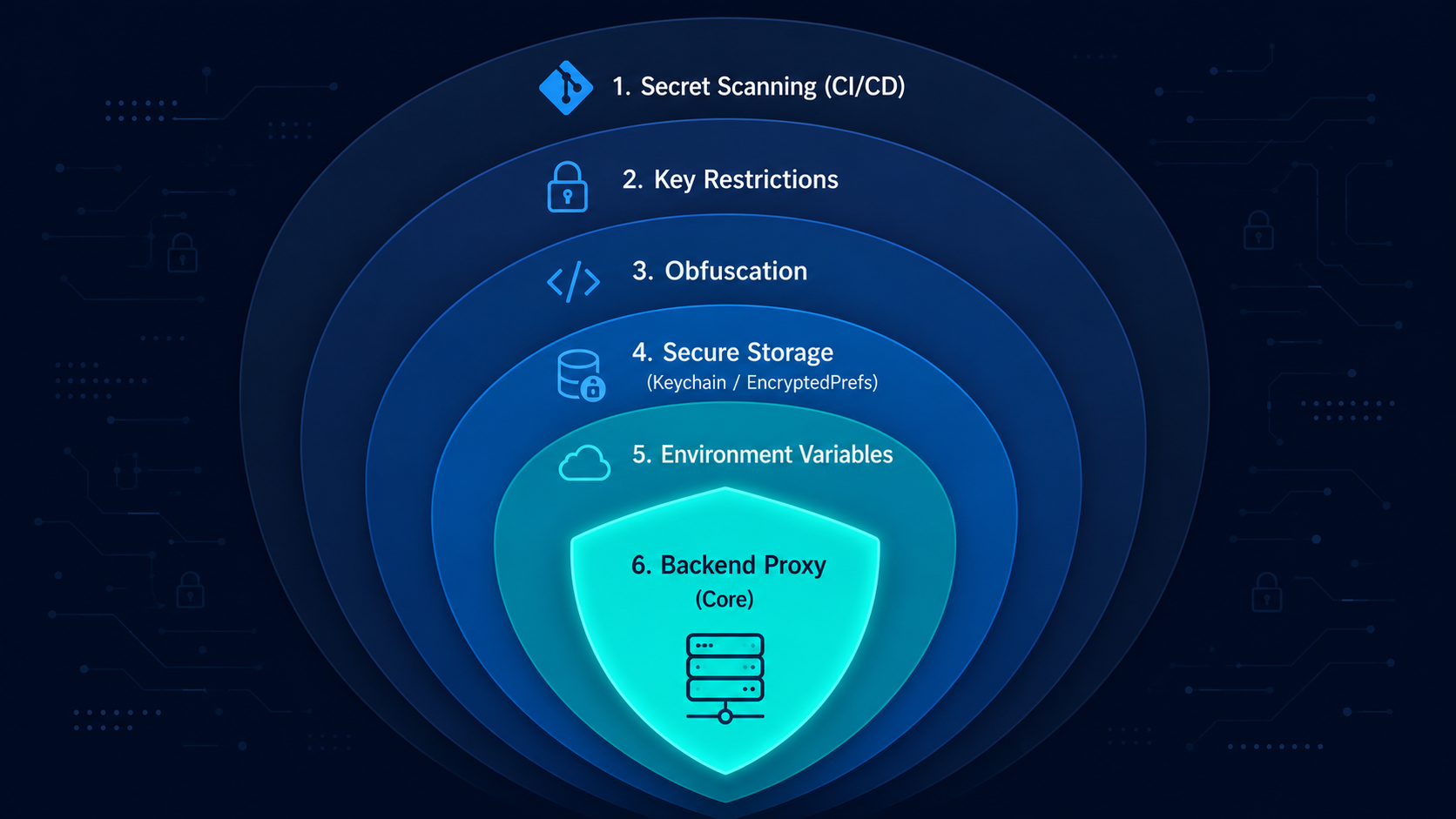
- Layer your defenses: env injection + secure storage + key restrictions + obfuscation together are far stronger than any single approach.
- Set up billing alerts on all API accounts so you're notified immediately if usage spikes.
- Implement App Attestation before you launch, not after your first incident.
- Audit regularly. Use automated secret scanning in every pull request.
Key Takeaways
- Mobile app binaries are publicly accessible and decompilable - any secret embedded in them is exposed
- The backend proxy pattern is the only truly secure way to protect third-party API keys
- Use iOS Keychain and Android EncryptedSharedPreferences for any secrets that must live on-device
- Inject build-time config via environment variables - never hardcode in source files
- API key restrictions (bundle ID, IP, scope) limit damage even when keys are leaked
- Obfuscation is a useful layer but never a substitute for proper secret management
- Platform attestation (App Attest, Play Integrity) strengthens server-side verification
- Automate secret scanning in your CI/CD pipeline to catch accidental leaks early
Conclusion
Securing API keys in mobile apps isn't a one-time task - it's an ongoing practice that requires layered thinking. No single technique is a silver bullet. The real protection comes from combining backend proxies, platform-native secure storage, environment-based configuration, key restrictions, and continuous monitoring.
The good news? Most of these strategies don't require complex infrastructure. A simple Express backend, a few config changes, and a CI secret scanner get you 90% of the way there.
Start with the audit. Find your exposed keys. Move the most critical ones behind a proxy this week. Then layer in the rest over the coming sprint. Your future self — and your users — will thank you.
FAQ
Q1: Is it ever safe to include an API key directly in a mobile app?
For truly non-sensitive, public-facing keys like a Google Maps embed key (where the real restriction is the bundle ID, not the key value itself), client-side inclusion with proper restrictions is acceptable. For any key with billing impact or data access, always use a backend proxy.
Q2: What's the difference between obfuscation and encryption for API keys?
Obfuscation hides strings by making code harder to read (renaming, splitting), but the original value is always recoverable at runtime. Encryption is cryptographically secure but requires a key to decrypt — and storing that decryption key on the client just moves the problem. Neither replaces the backend proxy approach for high-value keys.
Q3: How do I manage API keys in CI/CD pipelines like GitHub Actions?
Use your CI platform's built-in secrets management. In GitHub Actions, go to Settings > Secrets and Variables > Actions and store keys there. Reference them in your workflow as ${{ secrets.YOUR_API_KEY }} — they're never logged or exposed in build output.
Q4: Can attackers bypass App Attestation or Play Integrity?
Both can be bypassed by sophisticated attackers using physical device modifications or exploits. They raise the bar significantly and deter the vast majority of automated abuse, but they're not 100% foolproof. Treat them as a strong deterrent, not an absolute guarantee.
Q5: How often should I rotate API keys?
Rotate keys at least quarterly as a standard practice. Rotate immediately when: a developer leaves the team, a repo is made public accidentally, a security alert is triggered, or your monitoring shows unexpected usage spikes. Many platforms support key rotation without downtime by allowing two active keys during the transition.
Official Resources (From Verified Sources):
- Keychain Services
- Establishing your app’s integrity
- Play Integrity API
- Security
- Mobile Application Security









