


.png)


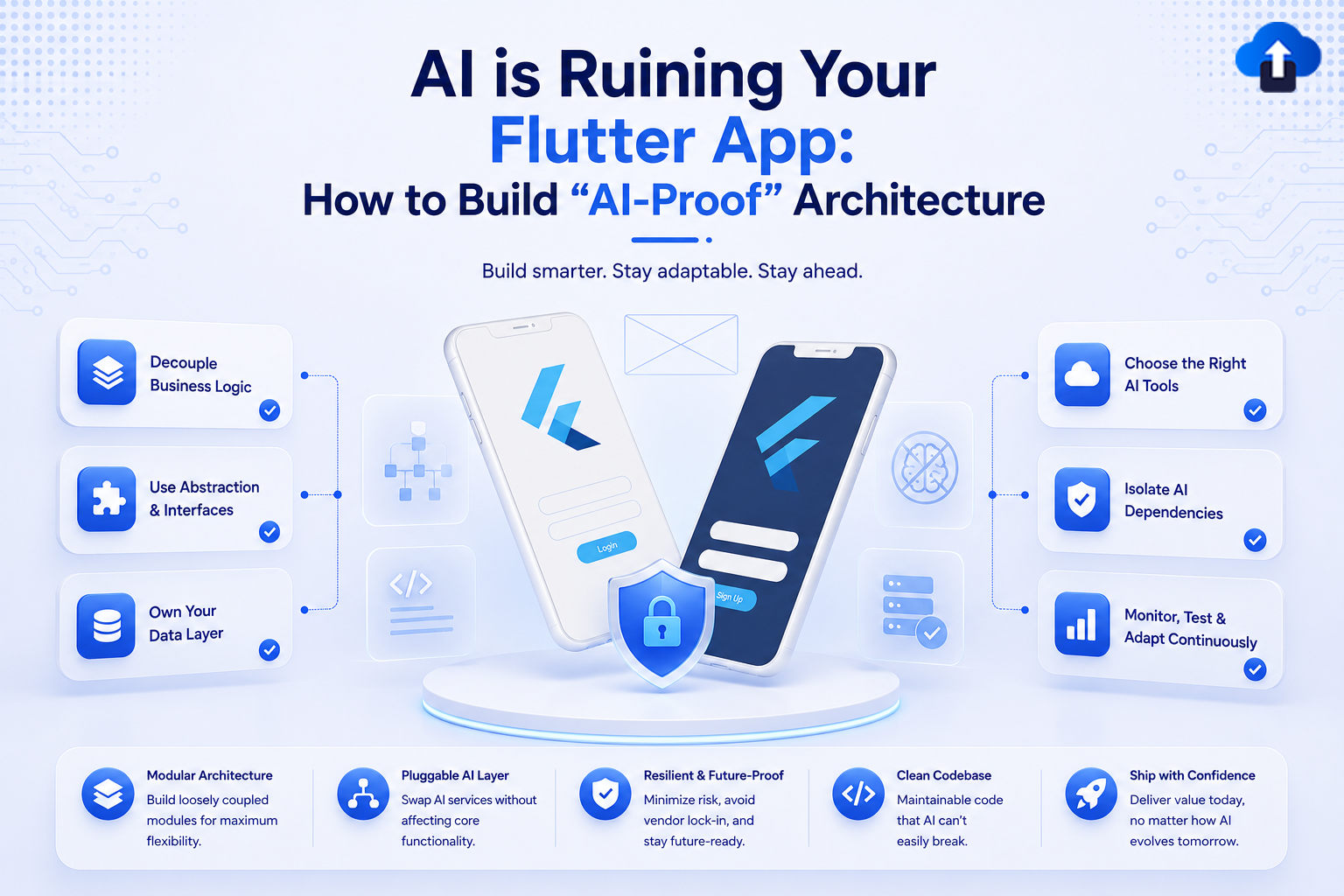
There's a quiet crisis happening in Flutter codebases right now, and most teams don't realize it until the damage is already done. AI-assisted development tools — Copilot, Cursor, ChatGPT, Gemini — have made it faster than ever to write Flutter code. They autocomplete widget trees, generate state management boilerplate, and spit out entire screens in seconds. The problem isn't that this code is always wrong. The problem is that it's almost always architecturally naive.
The code AI generates tends to work in isolation. It satisfies the immediate prompt. It compiles, renders, and passes a basic smoke test. But it doesn't understand your app's data flow, its navigation contracts, its injection graph, or its domain boundaries. Paste enough AI-generated code into a growing Flutter project, and you end up with something that technically runs but is structurally incoherent — a patchwork of patterns, duplicated logic, and invisible coupling that becomes impossible to test or extend.
This isn't an argument against using AI in Flutter development. It's an argument for building architecture that can survive it. When your structure is strong enough, AI-generated code has a well-defined place to live. It fills in the blanks without breaking the skeleton. That's the goal of what we're calling "AI-proof" architecture: not a system that resists automation, but one that channels it productively.
The Core Concept: Structural Integrity as a First-Class Concern
Most Flutter architecture discussions center on state management. BLoC vs. Riverpod vs. Provider vs. GetX — the debates are endless and often miss the more fundamental question: regardless of which state solution you use, is your app's structural contract clear enough that a new developer (or an AI tool) can add code without breaking invisible invariants?
AI-proof architecture is the practice of making your structural rules so explicit, so enforced by code rather than convention, that violations become compile-time or lint-time errors rather than runtime surprises. It borrows ideas from Domain-Driven Design, Clean Architecture, and layered dependency rules — but adapts them specifically to Flutter's widget-centric, reactive paradigm.
The central insight is that AI generates code at the file level. It sees what's in your prompt, what's in the currently open file, maybe a few imported symbols. It does not see your architecture. So your job as an architect is to make the architecture visible, enforceable, and hard to violate accidentally. When a developer pastes AI-generated code into a well-structured project, the type system, the folder conventions, and the dependency rules should immediately surface anything that doesn't belong.
Key components of this approach include:
- Strict layer separation enforced by package boundaries or linting rules, not just folder names.
- Explicit contracts via abstract interfaces between your domain and data layers.
- Feature-first module structure that keeps AI-generated code naturally scoped.
- Dependency inversion applied consistently so AI-generated implementations slot into defined interfaces.
- Observable state boundaries that prevent business logic from bleeding into widget trees.
Why It Matters
The consequences of ignoring architecture in an AI-assisted workflow compound quickly. In a manual workflow, bad architectural decisions tend to slow down individual developers visibly — you feel the resistance of tangled code as you write it. With AI tooling, you can generate five hundred lines of structurally problematic code in ten minutes without feeling any friction at all. The debt accumulates faster than any single developer could create it manually.
This matters across every dimension of your development practice, not just code quality in the abstract.
- Scalability: Feature teams working in parallel will consistently step on each other when there are no enforced module boundaries. AI-generated code accelerates this by producing plausible-looking but architecturally misplaced implementations.
- Testability: When business logic leaks into widgets — which AI tools love to do, because it's the path of least resistance — unit testing becomes impossible without a full widget test harness.
- Maintainability: AI tools generate code that matches patterns they were trained on. If your existing code is inconsistent, they'll hallucinate a blend of patterns that fits nothing exactly.
- Onboarding: A new developer using AI assistance on a poorly structured project will amplify existing problems rather than learning correct patterns.
- Performance: AI-generated widget trees often rebuild excessively because the generated code doesn't respect const constructors, selector patterns, or RepaintBoundary placement.
Architecture Breakdown
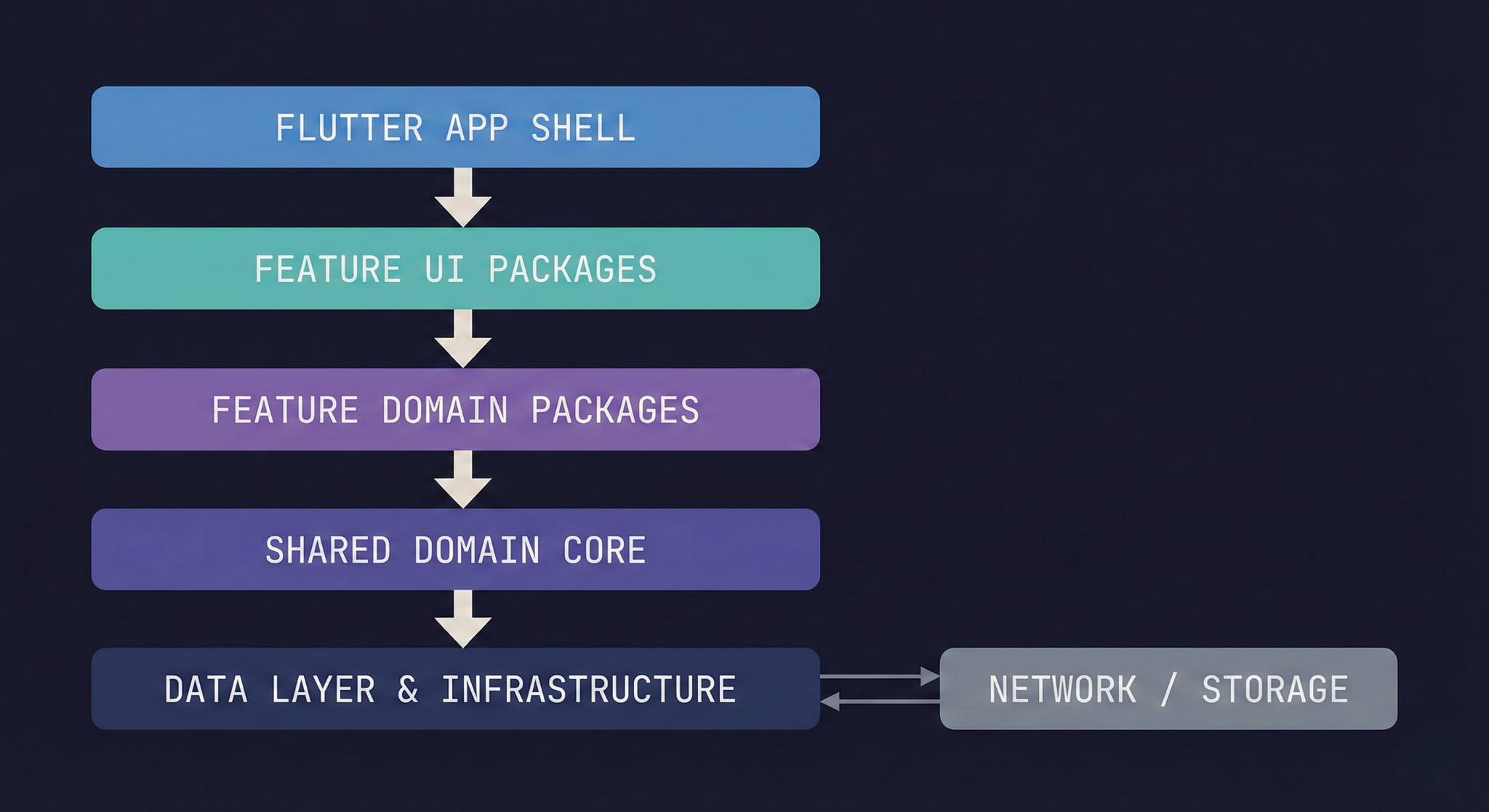
The architecture we're describing is a layered, feature-modularized Flutter project where each layer has a defined responsibility and dependencies only flow inward — from the UI layer toward the domain core, never the reverse. This is not a novel idea, but its application to AI-assisted development requires a few specific adaptations.
The key adaptation is making layer membership explicit through package structure rather than folder convention. A folder named domain/ is a suggestion. A Dart package named feature_auth_domain with a controlled pubspec.yaml is a hard boundary. When AI-generated code tries to import something from a layer it shouldn't touch, the analyzer will tell you immediately.
Each layer in this diagram corresponds to a Dart package or a tightly scoped library. The arrows represent allowed dependency directions. No upward dependencies are permitted — domain packages don't know about UI packages, and the shared domain core knows nothing about networking.
Breaking this down by layer:
- App Shell: Composes feature modules, handles top-level routing, provides root-level dependency injection.
- Feature UI Packages: Contain widgets, view models, and navigation logic scoped to one feature.
- Feature Domain Packages: Define entities, use cases, and repository interfaces — no Flutter imports beyond optional foundation.dart.
- Shared Domain Core: Cross-feature entities, value objects, and shared interfaces.
- Data Layer: Implements repository interfaces defined in the domain. Knows about networking and local storage. Never imported by UI or domain packages.
Implementation Deep Dive
Setting up this architecture requires deliberate project scaffolding decisions early, and a clear migration path if you're working with an existing app. The following steps describe a greenfield setup, but each step has an equivalent refactoring action for existing projects.
- Initialize a mono-repo structure using Melos or manual pubspec.yaml path dependencies. Each feature gets at minimum a _domain and _ui package. Data implementations live in a separate _data package or a shared infrastructure layer.
- Define repository interfaces in the domain package. Every data operation your feature performs is expressed as an abstract class. This is the contract that AI-generated data implementations must satisfy.
- Configure package:lint or custom_lint rules to enforce import restrictions. Use avoid_relative_imports and custom rules to prevent cross-layer imports. Tools like dcm (Dart Code Metrics) can enforce architectural rules as part of your CI pipeline.
- Set up dependency injection at the app shell level. Use get_it with modular registration files, one per feature. Each feature module exposes a setupFeatureDependencies() function that the shell calls during initialization. AI-generated code slots into this pattern naturally — it just needs to provide a concrete implementation of an existing interface.
- Establish a view model pattern that separates widget state from business state. Your UI layer should contain lightweight view models that transform domain state into render-ready data. Widgets observe view models, not use cases directly.
- Add architecture fitness functions to your CI pipeline. These are automated checks that verify layer dependency rules haven't been violated. A simple Dart script that parses import statements and checks them against allowed patterns is enough to catch most AI-introduced violations before they merge.
A minimal repository interface definition looks like this:
// feature_auth_domain/lib/src/repositories/auth_repository.dart
abstract interface class AuthRepository {
  Future<Result<User, AuthFailure>> signIn(Credentials credentials);
  Future<Result<void, AuthFailure>> signOut();
  Stream<AuthState> get authStateChanges;
}
The data package implements this. The UI package uses it through injection. AI can generate either side without understanding the other, and the type system ensures correctness.
Advanced Patterns
Once the foundational layer structure is in place, several more sophisticated patterns significantly improve the architecture's resilience to AI-generated additions. These patterns reduce the surface area of decisions that need to be made at code-generation time.
The most valuable advanced pattern is the result type. Rather than using exceptions for expected failure cases, domain operations return a Result<T, E> type that forces callers to handle both success and failure explicitly. AI tools generating UI code will be forced by the type system to handle errors rather than ignoring them.
The second pattern worth institutionalizing is command segregation — separating read operations (queries) from write operations (commands) at the use case level. This maps naturally to Flutter's reactive model and makes it trivially clear whether an AI-generated use case should return a Stream, a Future, or trigger a side effect.
Additional optimization points for advanced resilience:
- Sealed classes for domain events and states make exhaustive pattern matching mandatory — the compiler enforces that every state is handled in the UI.
- Value objects for primitive obsession prevent AI-generated code from passing raw String or int where typed domain values are required.
- Module-level barrel files (feature_auth_domain.dart) that explicitly export only the public API of each package, hiding internal implementation details from AI context windows.
- Router contracts defined in a shared navigation package prevent AI-generated screens from navigating to routes they shouldn't know about.
- Freezed-generated immutable models make accidental mutation impossible and provide consistent serialization patterns that AI tools can extend without inventing new approaches.
Real-World Use Cases
Large team with multiple feature squads working in parallel. This is the highest-risk scenario for AI-assisted development. Each squad uses AI tooling to accelerate their feature work, but without enforced module boundaries, they'll gradually introduce cross-feature imports, duplicate shared utilities, and create implicit coupling through shared mutable state.
With the modular architecture described here, each squad works exclusively within their feature packages. The domain interfaces define what they can depend on externally. AI tools working within a feature package have a naturally bounded context — they can see the interfaces they need to implement and the contracts they need to satisfy, but they can't reach into other features' internals because the package boundaries prevent it.
The trade-offs in this scenario center on the overhead of maintaining multiple packages. The tooling setup is non-trivial, and Melos adds a learning curve for developers unfamiliar with mono-repo tooling. The payoff is that AI-generated code stays contained.
- Benefit: Parallel development without architectural drift.
- Cost: Higher initial scaffolding complexity and slower package resolution in large projects.
- Mitigation: Use Melos scripts to automate common cross-package operations.
Rapid prototyping that needs to become production code. Many teams use AI tools to generate a prototype quickly, then face the challenge of hardening it for production. In this scenario, the architecture we've described functions as a refactoring target — you migrate the prototype's logic into the layered structure systematically.
The key is that the domain interfaces defined during this migration act as specifications. You can generate data implementations from them using AI tools with high confidence because the interface is the complete specification. The risk here is that prototypes often have hardcoded data, inline business logic, and no clear separation of concerns — migrating these requires architectural judgment that AI cannot provide.
- Benefit: A clear migration path that AI can assist with, not obstruct.
- Cost: Domain modeling requires human architectural decisions before AI assistance becomes reliable.
Common Mistakes
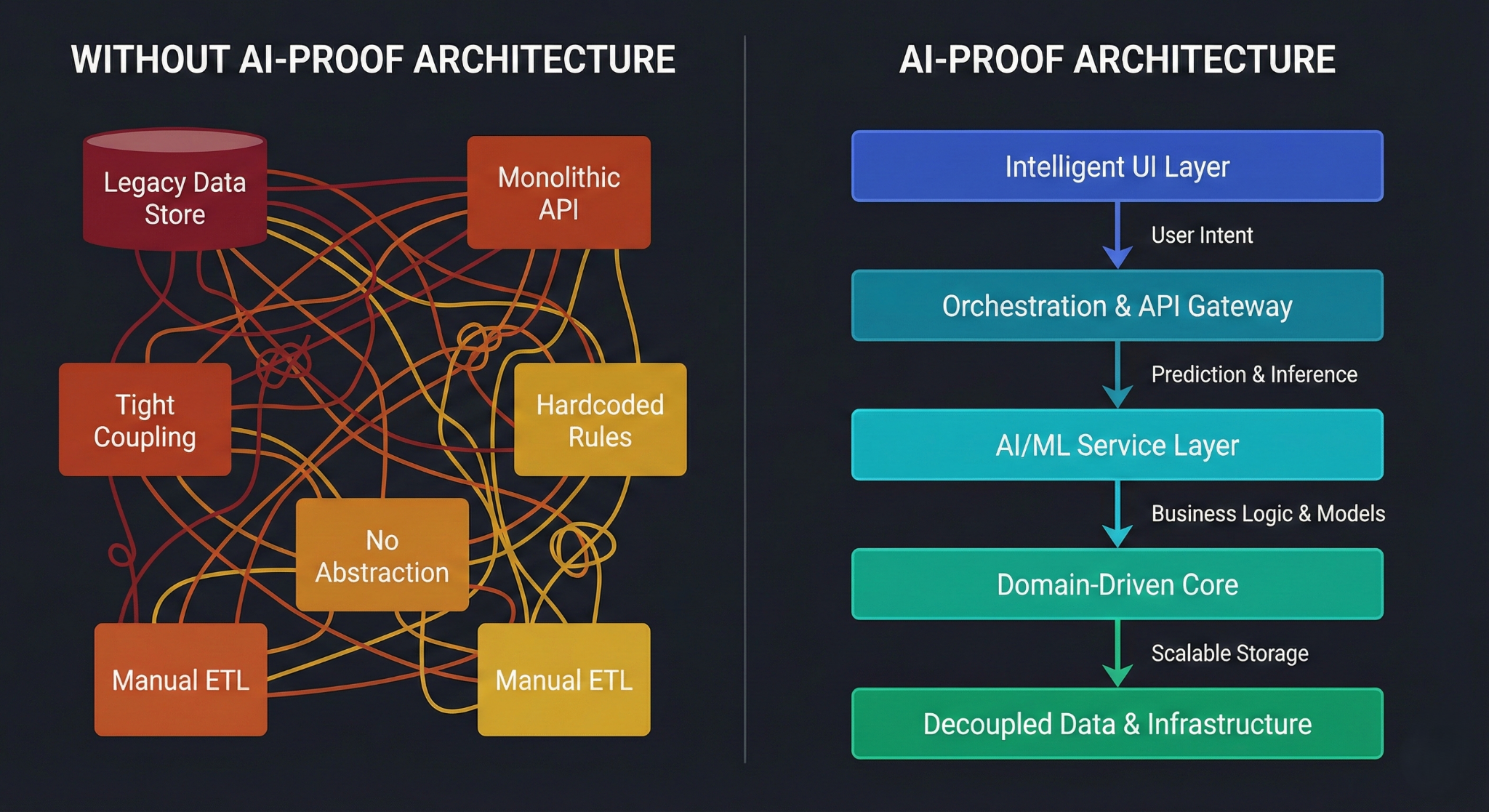
Even well-intentioned teams make predictable errors when trying to establish AI-resistant architecture in Flutter. Understanding these failure modes makes it easier to avoid them.
The most common mistake is treating folder structure as equivalent to package structure. A lib/features/auth/domain/ folder is navigational convention. It provides no enforcement. Anyone — human or AI-generated code — can import across those boundaries with a relative path. Only package boundaries with explicit dependency declarations in pubspec.yaml provide real enforcement.
The second most common mistake is inconsistent abstraction depth. Teams define repository interfaces for data operations but then directly couple UI components to third-party packages, bypassing the abstraction entirely. AI tools will follow whatever pattern they see in the codebase, so inconsistency breeds more inconsistency.
Additional mistakes that consistently degrade AI-proof architectures:
- Using BuildContext deeply in business logic — AI tools regularly generate use cases or services that accept BuildContext because they've seen it used that way in tutorials.
- Skipping the fitness function CI step — without automated enforcement, architectural rules become optional and erode under delivery pressure.
- Designing domain entities to match API response shapes — this couples the domain to a specific backend contract and forces AI-generated code to conflate mapping logic with business logic.
- Over-engineering shared utilities — a core package that every feature depends on becomes an architectural dumping ground where AI tools deposit any code that doesn't fit neatly elsewhere.
- Neglecting const correctness — AI-generated widget trees frequently omit const constructors, and without lint rules enforcing them, rebuild performance degrades invisibly over time.
Best Practices
The practices that make Flutter architecture genuinely AI-resistant are not about complexity — they're about explicitness. The more your architecture communicates its own rules through code rather than documentation, the less a developer or an AI tool can violate those rules without triggering an immediate, visible signal.
Start by establishing a project template or starter that already implements the layered package structure, lint rules, and CI checks before any feature code is written. When AI tools see an established pattern in the starter code, they replicate it. A well-structured starter is the highest-leverage investment you can make in AI-assisted development hygiene. Flutter's own testing best practices documentation provides a useful reference for structuring testable code that aligns naturally with the domain/UI separation described here.
The second most important practice is code review focused explicitly on architectural placement, not just correctness. A function can be correct and in the wrong layer simultaneously. Reviewers should ask "does this belong here?" as consistently as they ask "does this work?" When AI-assisted code reaches review, this question is especially important because the code will often look correct while being architecturally misplaced.
The best practices for maintaining AI-proof Flutter architecture over time:
- Treat architectural violations in CI as build failures, not warnings. Layer import violations that don't block merges will be ignored under pressure.
- Define and document the public API of each feature package explicitly — what it exports, what it depends on, and what it never touches.
- Use sealed classes for every domain state and event to force exhaustive handling in the UI and prevent AI-generated widgets from silently ignoring error or loading states.
- Run flutter analyze with custom lint rules as part of every PR pipeline, not just on main branch merges. Dart's analyzer documentation covers configuring custom rules that can enforce architectural patterns.
- Keep use cases single-responsibility — one public method, one domain operation. AI tools can extend a library of focused use cases without introducing hidden coupling between operations.
- Document AI usage guidelines in your contributing guide — specify which layers AI assistance is appropriate for (data implementations, test stubs, widget scaffolding) and which require human architectural judgment (domain modeling, use case design, navigation contracts).
Conclusion
AI-assisted development isn’t something teams can ignore—it's already being used and will only improve. In Flutter, where much of the work is repetitive (UI widgets, state handling, boilerplate), AI can generate code quickly—but often without solid architectural consistency.
The real risk isn’t bad code, but fast generation of code that looks correct yet breaks structure, making it hard to review and maintain.
To stay effective:
- Use clear architecture (feature modules, clean layers, domain interfaces)
- Enforce rules through types, linting, and CI checks (not just documentation)
- Make structure machine-readable and enforceable








