


.png)


The Problem That Started It All
You've probably seen the headlines: malicious Android apps disguising themselves as popular tools, spyware distributed through shady APK sites, fraudulent apps that appear, get removed, and reappear under a fresh package name within hours. The Android ecosystem — with its openness as both its greatest strength and a persistent security challenge — has long given bad actors the ability to operate in the shadows.
Until now, there was no universal, mandatory system that tied an Android app back to a verified, accountable human being or organization. A developer could sign an APK, distribute it outside the Play Store, and remain completely anonymous. That is changing.
Google's Android Developer Verification program is the most significant structural change to Android app distribution in years. If you distribute Android apps — whether through Google Play, your company website, or any third-party channel — this affects you.
What Is Android Developer Verification?
Android Developer Verification is a system designed to link real-world entities — individuals and
organizations — to their Android applications. At its core, it does three things:
- Confirms who you are (identity verification)
- Connects your apps to your verified identity (package name registration)
- Makes you accountable for every app distributed under your name
Once fully enforced, all apps must be registered by verified developers to be installable on certified Android devices. "Certified Android devices" is key here — this covers the vast majority of consumer Android phones and tablets, not just Play Store downloads.
Why Google Is Doing This (And Why You Should Care)
The motivation is straightforward: deterrence through accountability.
When a bad actor knows their identity is cryptographically linked to their apps, the calculus for spreading
harm changes dramatically. It becomes significantly harder to:
- Repeatedly distribute malicious apps after removal
- Operate anonymously across multiple accounts
- Evade enforcement actions by simply changing a package name
For legitimate developers, this program offers a real benefit: a more trustworthy ecosystem. When users see that an app comes from a verified developer, it builds confidence. It levels the playing field and helps genuine developers stand out from the noise.
The Three Distribution Paths: Which One Are You?
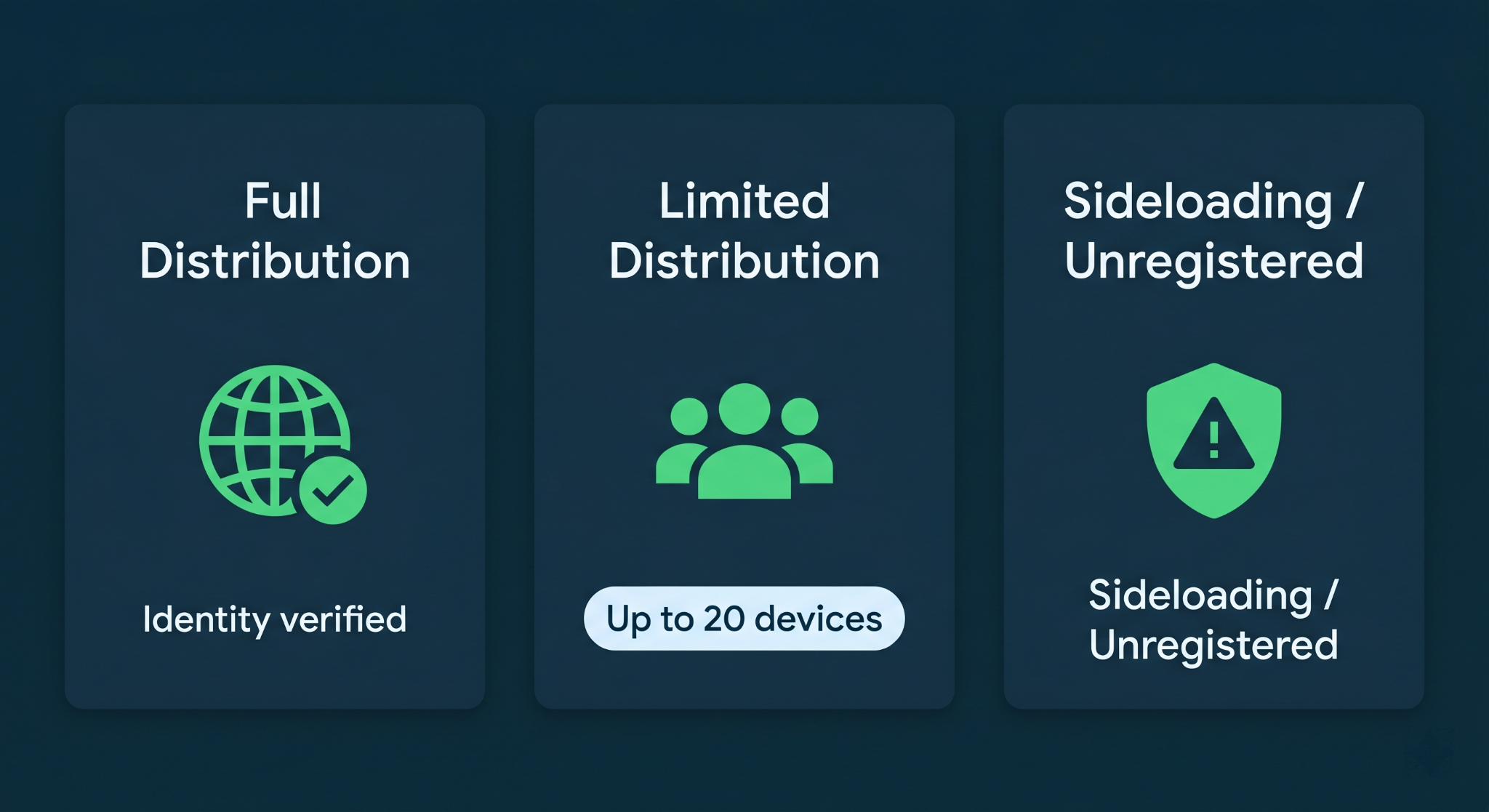
Google has structured the verification system around three distribution scenarios. Understanding which path applies to you determines exactly what you need to do.
1. Full Distribution (Professional Developers & Organizations)
This is the path for professional developers and companies who distribute apps widely — whether through Google Play, their own website, enterprise channels, or third-party stores.
- Identity verification is required
- No limits on distribution
- Users experience no change from today's familiar install flow
If you're building commercial apps, enterprise software, or distributing to a public audience, this is your path.
2. Limited Distribution (Students, Hobbyists, Personal Projects)
This tier is designed for developers who don't need wide-scale distribution — perhaps you're building an app for personal use, a class project, or sharing something with a small group of friends.
- No identity verification required
- Distribution limited to up to 20 devices
- Users receive an invitation to install from a known developer
This is a thoughtful middle ground that keeps the ecosystem accessible for learners and hobbyists without removing accountability at scale.
3. Sideloading Unregistered Apps (Development & Testing)
This is the path for developers who haven't yet completed verification, or are in active development before they're ready to register.
- No identity verification required
- Distribution is possible through any non-store channel
- Users go through an advanced flow with extra safeguards — designed to give them "critical time and space to break the cycle of potential coercion"
- The ADB workflow remains unchanged — your local debugging process is not affected
This is important for developers to know: your day-to-day development process using Android Studio and ADB is not disrupted.
The Enforcement Timeline: What Happens When
Google has been deliberate about giving the developer community time to prepare. Here is the full rollout schedule:
The critical date for most developers is September 2026. If your app is not registered by a verified developer before then, users in the initial enforcement regions will encounter installation blocks. Global enforcement follows in 2027.
Registration is open now. There is no good reason to wait.
Step-by-Step: How to Complete Verification
Step 1 — Choose Your Console
Your starting point depends on how you currently distribute your apps.
The Android Developer Console (ADC) is a new platform specifically for developers who distribute outside of Play. If you already have a Play Console account, you use that — Google is adding new verification functionality directly inside it.
Step 2 — Verify Your Identity
This is the most involved step. You'll provide information and documentation to confirm who you are.
- For individuals: Government-issued ID and personal information
- For organizations: Business documentation, and your organization's website must be verified through Google Search Console
If your organization doesn't already have its domain verified in Search Console, do that first. It's a prerequisite.
Step 3 — Register Your Package Names
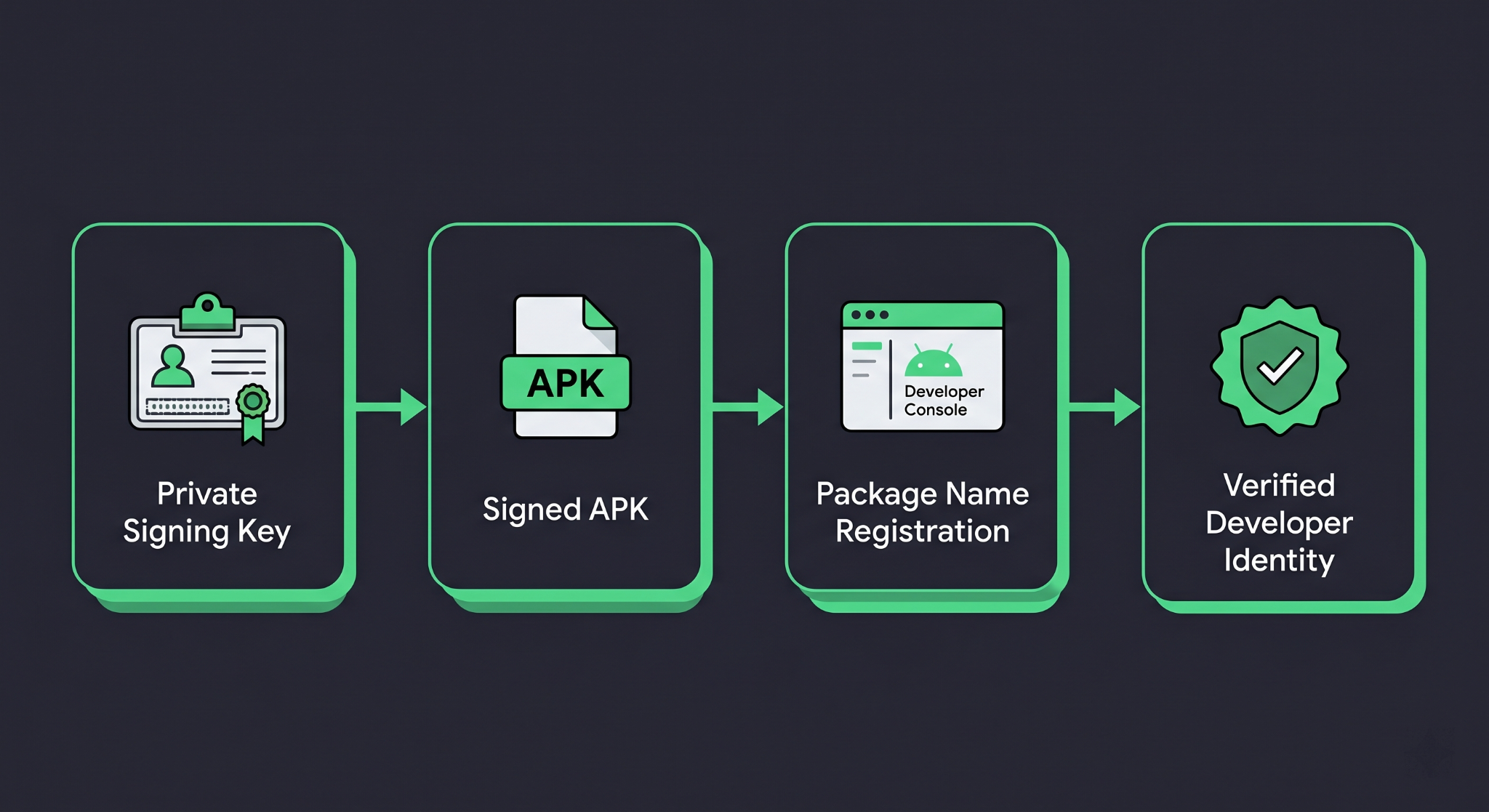
This step creates a verifiable, cryptographic link between your app and your developer account. You prove ownership by providing the APK signed with your private key.
This is where Android's app signing infrastructure becomes central to the verification process.
App Signing: The Technical Foundation of Verification
To understand package name registration, you need to understand how APK signing works. Every Android APK must be signed with a private key before distribution. The corresponding public certificate is embedded in the APK and can be verified by anyone.
Here is a simplified view of how you sign an APK using the standard jarsigner / apksigner flow, and how your signing key ties into the verification system:
// build.gradle.kts (app module)
android {
    signingConfigs {
        create("release") {
            storeFile = file("my-release-key.jks")
            storePassword = System.getenv("KEYSTORE_PASSWORD")
            keyAlias = System.getenv("KEY_ALIAS")
            keyPassword = System.getenv("KEY_PASSWORD")
        }
    }

    buildTypes {
        release {
            signingConfig = signingConfigs.getByName("release")
            isMinifyEnabled = true
            proguardFiles(
                getDefaultProguardFile("proguard-android-optimize.txt"),
                "proguard-rules.pro"
            )
        }
    }
}
Security note: Never hardcode your keystore credentials in build.gradle. Always read them from environment variables or a local.properties file that is excluded from version control.
When you submit an APK for package name registration, the verification system reads your app's signing certificate. This cryptographically binds the package name com.yourcompany.yourapp to your verified developer identity. Nobody else can register that same package name with a different key.
Generating a Keystore (If You Don't Have One)
If you're distributing outside of Google Play and have been signing APKs manually, here's how to generate a release keystore using keytool:
keytool -genkey -v \
  -keystore my-release-key.jks \
  -keyalg RSA \
  -keysize 2048 \
  -validity 10000 \
  -alias my-key-alias
Keep your keystore file and credentials in a secure location. If you lose your signing key, you lose the ability to update your registered app. There is no recovery path.
Verifying Your APK's Signature
You can inspect the signing certificate of any APK using apksigner, included in the Android SDK build tools:
apksigner verify --print-certs my-release-app.apk
This outputs the certificate details, including the SHA-256 fingerprint of your signing key — which is what the Android Developer Verification system reads when you register your package name.
Real-World Scenarios: How This Plays Out
Scenario A: The Enterprise Developer
Your company builds an internal HR app that's distributed via MDM (Mobile Device Management) directly to employee devices, never touching the Play Store.
Your path: Android Developer Console → Full distribution → Identity verification for your organization → Register your app's package name and signing key.
Without completing this, your app will fail to install on employees' certified Android devices after enforcement begins.
Scenario B: The Indie Developer on Google Play
You publish a productivity app on the Play Store. You've never distributed it elsewhere.
Your path: Your existing Play Console account handles everything. Google is adding the new verification workflow directly inside Play Console. Stay alert for notifications from Google and complete the verification steps when prompted. You will not need to create a new account.
Scenario C: The Student Building a Side Project
You're learning Android development and want to share an app with a few classmates. You have no plans to publish on the Play Store.
Your path: Limited distribution account (launching August 2026). No identity verification required. You'll be able to invite up to 20 devices to install your app.
What Happens If You Don't Comply?
After enforcement begins:
- Users in enforcement regions will see installation blocks when attempting to install your unregistered app
- The experience for installing unregistered apps will include additional friction and warnings designed to give users pause
- Your users in Brazil, Indonesia, Singapore, and Thailand will be affected first (September 2026), followed by global rollout
Apps distributed through channels that require verification — such as compliant app stores — will check developer registration status.
Best Practices and Common Mistakes
Do not wait until enforcement begins. Registration is open now (March 2026). Verification, especially for organizations, can take time due to document review. Start today.
Protect your signing key like it's a password to your bank account. If you're using Google Play App Signing (which you should be for Play-distributed apps), Google holds the upload key, but your signing key is managed by Google. For apps distributed outside Play, you are solely responsible for your keystore security.
Use Play App Signing for Play-distributed apps. This feature lets Google manage your app signing key, protecting you from key loss. Your upload key can be rotated if compromised. This is the recommended approach.
Verify your organization's domain in Search Console before starting. Organizations need a verified website. Don't let this be a bottleneck when you're ready to complete your verification.
Keep your package name consistent and well-named. Once you register com.yourcompany.yourapp, that registration is tied to your signing key. Follow reverse-domain naming conventions from day one. Use your actual domain if you own it.
Document your signing key details internally. Store the keystore location, password, key alias, and a SHA-256 fingerprint in your company's secure credential management system. Losing this information after registration breaks your ability to update your app.
Frequently Overlooked Detail: ADB Is Not Affected
One concern circulating in developer communities is whether this system affects local development. It does not. Google has explicitly confirmed that the ADB workflow and experience stays the same. Running your debug APK directly to a device plugged into your laptop via Android Studio is entirely unaffected by this verification system. This is strictly about distribution to end users, not development iteration.
Conclusion
Android Developer Verification isn’t just bureaucracy—it’s about trust and accountability in the Android ecosystem. It helps reduce abuse, builds user confidence, and supports legitimate developers.
What developers should do:
- Choose your distribution path (Play Console or other)
- Complete identity verification
- Secure your app signing & keystore
- Register package names early
⏱️ Enforcement starts September 2026, and registration is already open.








