

Traditional mobile interfaces are built around predefined screens and navigation flows. Developers decide which widgets appear, how users interact with them, and how information is presented.
This approach works well for predictable application workflows. However, it becomes less flexible when applications need to respond dynamically to user requests.
Consider a travel application.
A user asks:
"Plan a three-day trip to Goa with a budget of ₹15,000."
A conventional application might return a text-based AI response containing hotel recommendations, travel suggestions, and estimated costs.
But what if the application could generate an interactive interface containing:
- A trip summary card.
- A date selector.
- A list of recommended hotels.
- A budget slider.
- Interactive location cards.
- A button to confirm the itinerary.
Instead of displaying only generated text, the application could construct an interface based on the user's request.
This is the idea behind Generative UI (GenUI).
Flutter GenUI introduces an approach where an AI agent can dynamically compose interfaces using a predefined collection of Flutter widgets.
What is Flutter GenUI?
Flutter GenUI is an SDK that connects Flutter applications with AI agents to generate interactive user interfaces dynamically.
Instead of allowing an AI model to generate arbitrary Flutter code, the SDK uses a structured JSON-based representation of UI components.
The application defines which widgets are available, and the AI agent selects and configures those components according to the user's request.
The important distinction is that AI generates the interface configuration, while Flutter remains responsible for rendering the actual widgets.
This makes the approach more controlled than dynamically executing AI-generated source code.
Understanding the GenUI Architecture
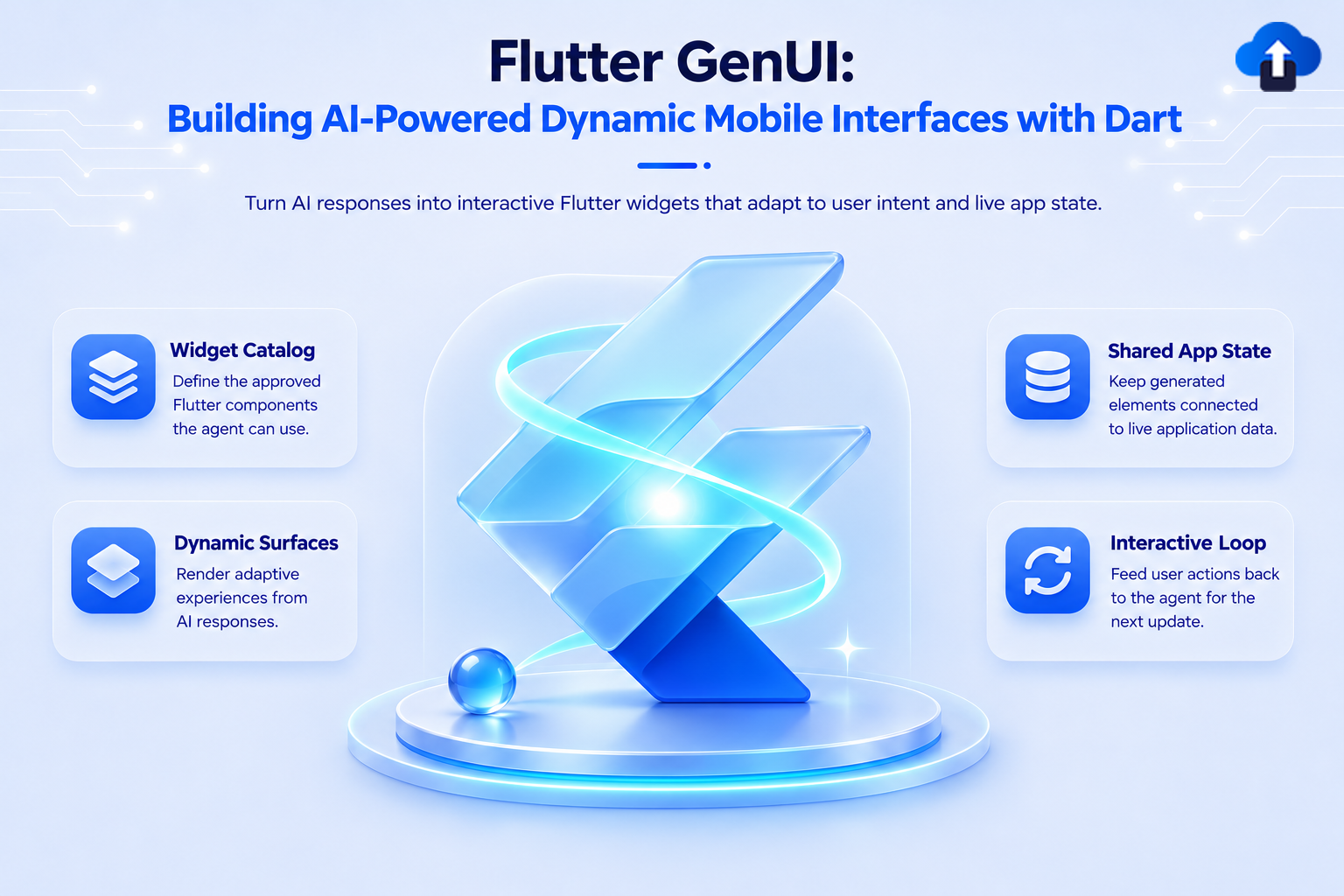
The architecture consists of four important components:
1. AI Agent
The agent understands the user's request and determines which UI components should be displayed.
2. Widget Catalog
The catalog defines the widgets that the AI agent is allowed to use, including their properties and rendering logic.
3. SurfaceController
This component manages generated UI surfaces and coordinates the widget catalog and dynamic interface state.
4. DataModel
The DataModel stores dynamic UI state. Widgets can bind to values in this model and update when the underlying data changes.
The overall interaction looks like this:
User Request → AI Agent → Structured UI Response → GenUI Controller → Flutter Widgets → User Interaction → Updated Data → AI Agent
Step 1: Create a Flutter Project
Start with a standard Flutter application.
flutter create genui_demo
cd genui_demo
Add the required packages:
dart pub add genui firebase_ai
The GenUI package provides the generative UI orchestration layer, while firebase_ai provides the Firebase AI Logic integration.
Important: The Flutter GenUI SDK is experimental and its package APIs may change. Verify the current package versions and examples before adopting it in a production application.
Step 2: Configure Firebase
Create a Firebase project and configure Firebase for your Flutter application.
Follow the official Firebase Flutter setup instructions.
Initialize Firebase:
import 'package:flutter/material.dart';
import 'package:firebase_core/firebase_core.dart';
import 'firebase_options.dart';
Future<void> main() async {
  WidgetsFlutterBinding.ensureInitialized();
  await Firebase.initializeApp(
    options: DefaultFirebaseOptions.currentPlatform,
  );
  runApp(const MyApp());
}
Firebase AI Logic can be used to connect the application to a supported generative model.
Step 3: Define the Widget Catalog
The widget catalog is one of the most important parts of GenUI.
It determines which components an AI agent can generate.
For example, a travel application might expose:
- Text components.
- Destination cards.
- Date pickers.
- Budget selectors.
- Confirmation buttons.
The application should expose domain-specific components instead of allowing unrestricted UI generation.
A simplified conceptual catalog might look like:
final catalog = Catalog([
  // Register application-specific CatalogItems.
  // Each item defines a component schema
  // and a Flutter widget builder.
]);
Each CatalogItem defines the component name, supported properties, schema, and builder function.
The exact registration API should follow the installed GenUI package version.
Step 4: Initialize the SurfaceController
The SurfaceController coordinates the generated interface.
final surfaceController = SurfaceController(
  catalogs: [catalog],
);
The controller uses the registered catalogs to determine which widgets can be rendered.
This is particularly important for production applications because the application controls the available UI building blocks.
Step 5: Configure the AI Agent
The AI agent needs to understand the available components and the rules for generating interfaces.
GenUI provides PromptBuilder to help construct the required instructions.
final promptBuilder = PromptBuilder.chat(
  catalog: catalog,
  systemPromptFragments: [
    '''
    You are a travel planning assistant.
    Generate interactive interfaces using only
    the components available in the widget catalog.
    When users request a travel plan, provide:
    - Trip summary
    - Destination information
    - Budget information
    - Interactive controls
    '''
  ],
);
The prompt should explain when to generate UI, which components to use, and how to structure the response.
Avoid giving the model unnecessary component definitions. Large prompts can consume significant context and increase inference costs.
Step 6: Connect the AI Model
The following example demonstrates the Firebase AI Logic model initialization pattern.
import 'package:firebase_ai/firebase_ai.dart';
final model = FirebaseAI.vertexAI().generativeModel(
  model: 'gemini-3.5-flash',
  systemInstruction: Content.system(
    promptBuilder.systemPromptJoined(),
  ),
);
The model receives the instructions generated from the catalog and your application-specific prompt.
The model response must then be streamed through the GenUI transport adapter.
Step 7: Connect the Conversation
GenUI uses a Conversation abstraction to coordinate the controller and transport.
late final A2uiTransportAdapter transportAdapter;
transportAdapter = A2uiTransportAdapter(
  onSend: (message) async {
    // Send the message to your AI model.
    //
    // Generate a response stream and forward
    // the response chunks to the adapter.
    //
    // transportAdapter.addChunk(chunk);
  },
);
final conversation = Conversation(
  controller: surfaceController,
  transport: transportAdapter,
);
Step 8: Render the Generated Interface
Once the conversation and controller are configured, the application can render generated UI using GenUI's Surface widget.
Conceptually:
Surface(
  controller: surfaceController,
  surfaceId: 'travel-planner',
)
The generated interface is rendered using the widgets registered in the catalog.
When users interact with supported components, their state can be synchronized through the DataModel and communicated back to the AI agent.
How Data Binding Works
One of the useful features of GenUI is its centralized data model. Consider a budget selector.
When a user changes the budget, the updated value can be stored in the DataModel.
Other widgets bound to the same value can automatically reflect the change.
This creates a reactive interaction between the generated UI and the underlying application state.
For example, changing the budget could update:
- Recommended hotels.
- Estimated travel expenses.
- Available activities.
The application can then send the updated context to the AI agent to generate a revised itinerary.
Production Use Cases
Flutter GenUI can be useful in applications where the interface depends heavily on user intent.
Travel applications: Generate itineraries, booking forms, and destination recommendations.
E-commerce: Create product comparison interfaces and dynamic filtering experiences.
Financial applications: Generate spending summaries, budget controls, and financial planning interfaces.
Education: Generate interactive quizzes, learning paths, and assessment forms.
Customer support: Generate troubleshooting steps, forms, and contextual action buttons.
Best Practices
Keep the Widget Catalog Controlled: Never allow the AI model to generate arbitrary executable Flutter code. Expose only approved widgets with clearly defined properties.
Treat generated UI configurations as untrusted input.
Validate:
- Component identifiers.
- Property types.
- Required fields.
- Data formats.
- URL schemes.
- Component limits.
Handle Network Failures: AI requests can fail because of network issues, rate limits, or provider errors. Provide loading states, retry options, and a fallback interface.
Optimize Token Usage: Large widget catalogs and lengthy prompts increase token consumption. Expose only the components required for the current workflow.
Keep Business Logic Outside Generated UI
The AI should help construct the interface, but critical business operations should remain in application-controlled services.
For example, a payment confirmation should always pass through validated business logic rather than relying on an AI-generated button configuration.
Common Pitfalls to Avoid:
- Assuming GenUI can generate unrestricted Flutter source code.
- Treating experimental SDK APIs as stable production contracts.
- Exposing sensitive application operations directly to the model.
- Ignoring malformed or incomplete model responses.
- Registering too many widgets without a clear purpose.
- Building interfaces that are not accessible.
- Depending on AI for deterministic business calculations.
- Ignoring latency and inference costs.
Conclusion
Flutter GenUI introduces a different way of thinking about mobile interface development.
Instead of designing every possible screen in advance, developers can define a controlled widget catalog and allow an AI agent to compose interfaces according to user intent.
However, the real engineering challenge is not simply generating widgets. It is building a secure, predictable, and maintainable interaction between AI-generated configurations and application-controlled Flutter components.
For developers exploring AI-powered mobile applications, GenUI is an interesting architecture to experiment with, particularly for conversational workflows, dynamic forms, and personalized user experiences.
Since the SDK is experimental, production adoption should include version pinning, integration testing, strict validation, and fallback UI.
References
- Flutter GenUI Documentation
- Flutter GenUI Getting Started
- GenUI Components and Concepts
- Firebase AI Logic for Flutter