


.png)


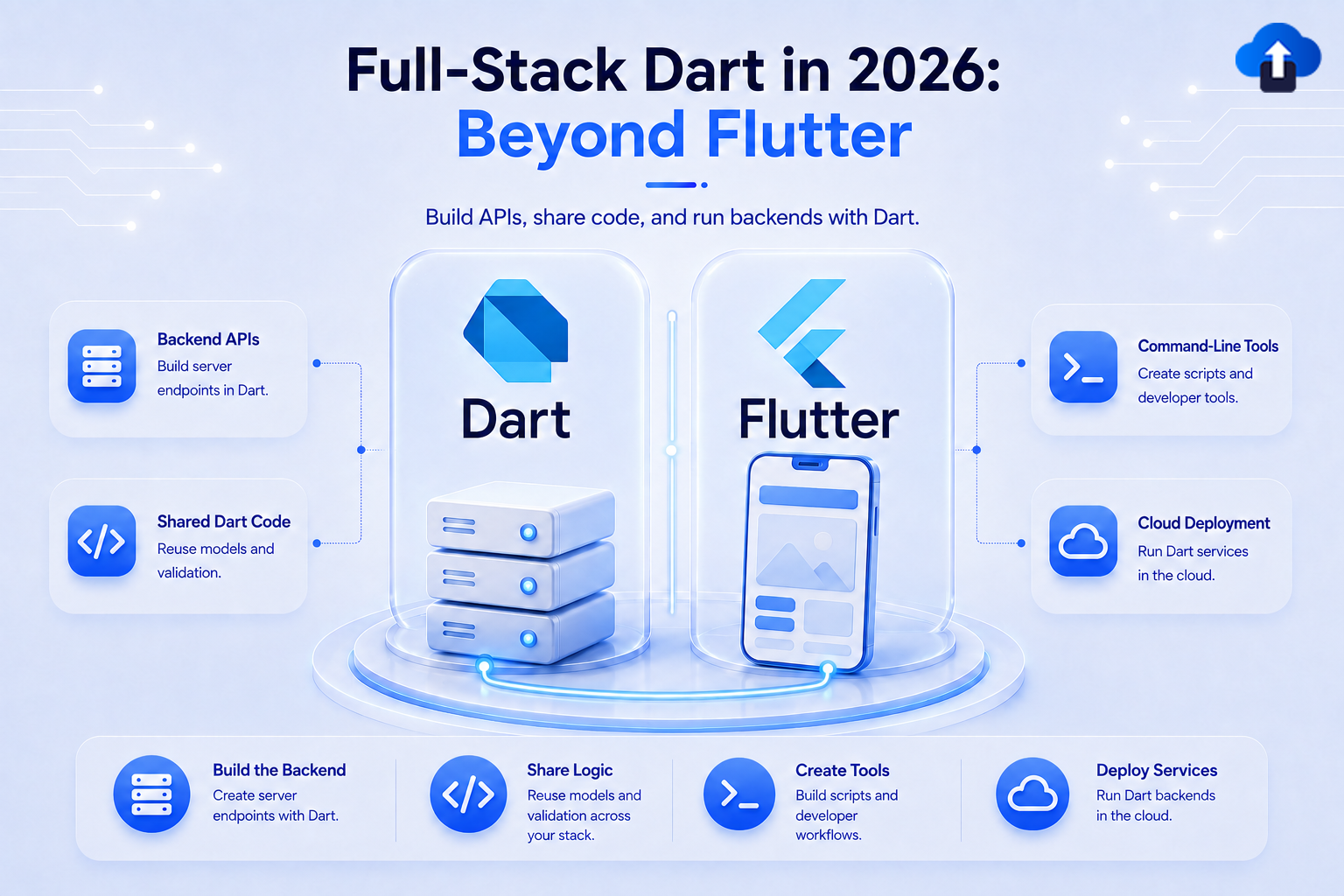
The Problem Most Flutter Developers Hit
You have spent months building a polished Flutter mobile app. The architecture is clean, the animations are smooth, and the codebase feels well-organized. Then someone asks: "Can we also build a website for this product? Something with a blog and a landing page?"
That single question sends most Flutter developers into an uncomfortable situation. You know Dart deeply. You understand how to build UIs with widgets, manage state, and structure a project. But the moment you open a web project — whether React, Vue, or Next.js — you are a beginner again. A different language, a different mental model, a different toolchain entirely.
This tension has been one of the unspoken frustrations in the Flutter community for years. Flutter does technically support the web as a build target, but as we will explore shortly, it was never the right tool for content-focused websites. There was a missing piece.
In 2026, that missing piece finally has a proper name: Jaspr.
And alongside it, another door has opened: Firebase now supports Cloud Functions written in Dart, making it possible — at least experimentally — to handle your entire stack in a single language. Mobile app, website, and backend, all in Dart.
This post breaks down both developments clearly, explains what they mean for Flutter developers, and points you to the right resources to go deeper.
Part 1 — Jaspr: Web Development That Finally Speaks Dart

What Jaspr Is
Jaspr is an open-source web framework for Dart, created by Kilian Schulte. It brings a component model and developer experience that will feel immediately familiar to anyone who has built Flutter apps, while producing real, standards-compliant HTML and CSS for the browser.
The most significant validation of Jaspr's production-readiness happened in 2026 when Google chose Jaspr to completely rebuild and power the official flutter.dev and dart.dev documentation websites — two of the most visited developer documentation sites in the world, covering over 3,900 pages of content. These are not toy examples or experiments. When you read the official Flutter documentation, you are reading a website that Jaspr built and serves.
For Flutter developers who have been watching Jaspr from a distance, this endorsement removes all doubt about whether the framework is ready to be taken seriously.
You can read the official announcement from the Google Open Source Blog here: Jaspr — Why Web Development in Dart Might Just Be a Good Idea
Why Flutter for Web Is Not the Right Answer Here
This is the first question most Flutter developers ask when they hear about Jaspr, and it deserves a clear explanation because the distinction matters a lot.
Flutter does support the web as a build target, and it does so in a technically impressive way. It renders your entire UI using the Canvas API — the same approach a game engine might take — so every pixel looks exactly the same whether you are on Android, iOS, or a browser. That consistency is powerful for certain types of applications.
But that rendering approach comes with two significant drawbacks for websites:
The first is performance on the first load. Before a single pixel of your Flutter web app appears in the browser, the entire Flutter engine needs to download and initialize. For an interactive product dashboard or a complex web tool, users often accept this cost because they plan to stay on the page. For a blog post or a marketing page, it is a dealbreaker. A visitor who clicked a link from a search result will not wait several seconds for an engine to boot.
The second is search engine visibility. When a search engine crawler visits a Flutter web page, it sees a blank canvas element. There are no HTML headings, no paragraph tags, no structured content for the crawler to read and index. This makes Flutter for web fundamentally incompatible with SEO — and SEO is the lifeblood of documentation sites, blogs, and marketing pages.
Jaspr solves both problems. It renders actual HTML elements — headings, paragraphs, lists, links — directly in the page. Search engines read it like any other website. The initial load is fast because the browser gets real content immediately, not a JavaScript engine waiting to boot. And crucially, the developer writing all of this is working in Dart, with a component API that mirrors Flutter's widget system closely enough that the transition feels natural rather than foreign.
The clearest mental model is this: use Flutter for web when you are building an interactive web application where the user will spend extended time and interaction matters. Use Jaspr when you are building a website — documentation, a blog, a company page, anything where content, speed, and discoverability are the primary goals.
How Jaspr Handles Rendering — Three Strategies, One Framework
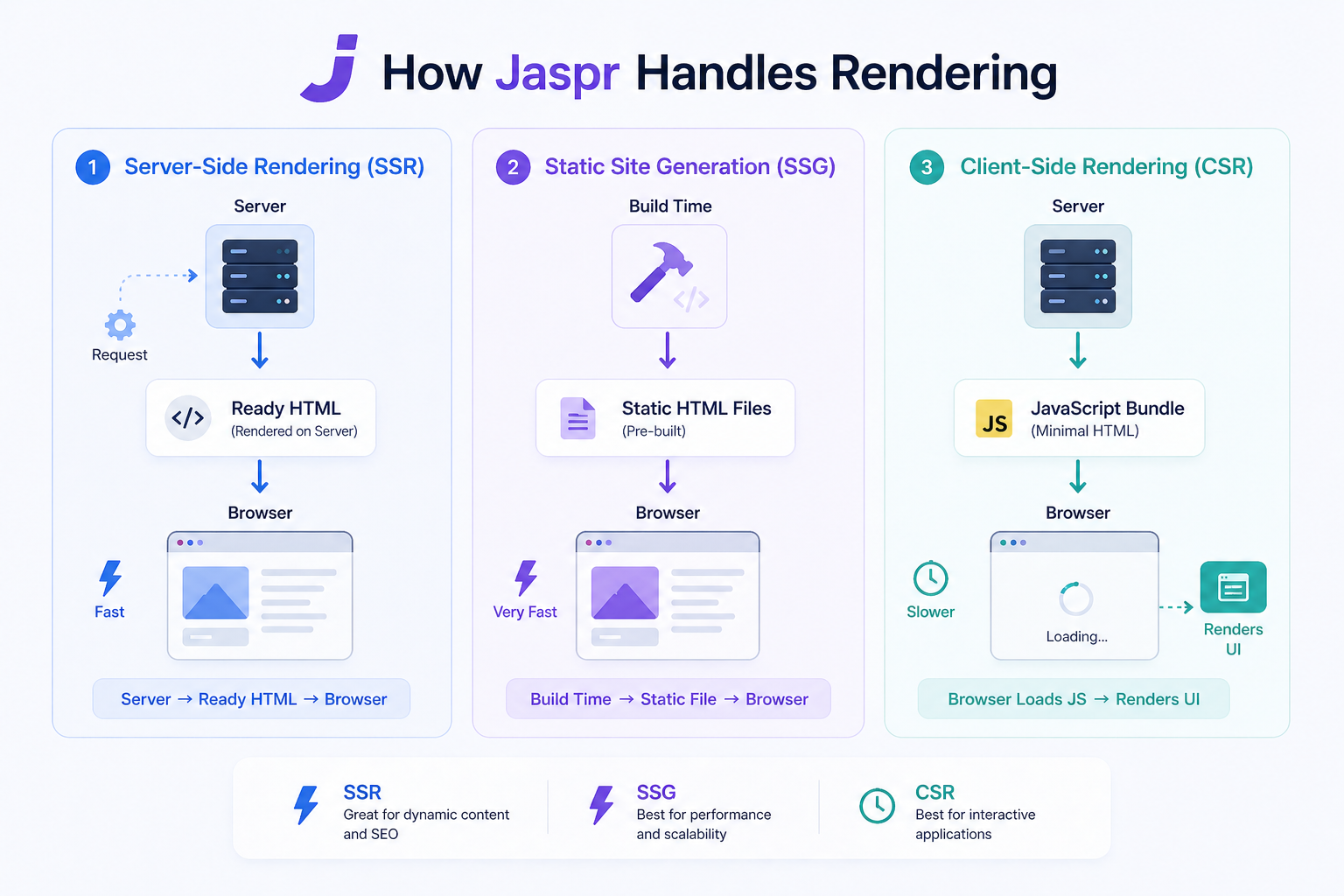
One of the things that distinguishes Jaspr from simpler tools is that it handles three different rendering strategies within a single unified framework, and you can choose the right one per page or even per component.
Server-Side Rendering (SSR) is the approach where the server processes your Dart components, generates complete HTML, and sends that HTML to the browser. The browser receives ready-to-display content immediately, which means fast first-paint times and full SEO visibility. After the initial HTML loads, Jaspr then "hydrates" the page on the client side, attaching event listeners and enabling interactivity without a full re-render. This is ideal for pages with dynamic content that changes based on the user or context.
Static Site Generation (SSG) takes things a step further. Instead of rendering on demand for each request, your entire site is pre-built at compile time into static HTML files. These files can be deployed to a CDN and served instantly from the edge, closest to wherever your visitor is in the world. Load times are near-instant. Hosting costs are minimal. This is the mode that powers most documentation sites and blogs, including the current flutter.dev. It is the best choice when your content does not change based on who is viewing it.
Client-Side Rendering (CSR) is the mode most familiar to Flutter web developers. The page is rendered entirely in the browser using compiled Dart-to-JavaScript (or WebAssembly). There is no server rendering involved. This is appropriate for highly interactive sections of a page — think live editors, interactive diagrams, or real-time dashboards — where the content is generated dynamically based on user input rather than served as static content.
What makes Jaspr genuinely useful is that you are not forced to pick one of these strategies for an entire project. A documentation site might use SSG for most pages, SSR for a search results page, and CSR for an interactive playground component embedded within a page. All three strategies coexist within the same framework and the same codebase.
In the JavaScript ecosystem, achieving this combination typically requires assembling multiple tools: React as the component library, Next.js or Astro for SSR and SSG, and careful configuration to get them to work together cohesively. Jaspr bundles all of it. The reduced toolchain complexity is a real advantage, especially for teams where everyone already knows Dart.
The Developer Experience: Hot Reload, Debugging, and Compilation
If there is one feature that Flutter developers love more than anything else, it is hot reload — the ability to change code and see the result in the running app within milliseconds, without losing application state. It feels like magic the first time you use it, and working without it afterwards feels slow and frustrating.
Hot reload is not actually a Flutter feature. It is a Dart feature, specifically of the dartdevc development compiler, which compiles Dart to JavaScript in an incremental and modular way. Jaspr inherits this fully. When you change a component in a Jaspr project, the browser updates immediately. Your scroll position, your form inputs, your UI state — all preserved across the reload.
For debugging, Jaspr allows you to debug Dart source code directly in Chrome DevTools. You can set breakpoints, step through logic, and inspect variable values in the browser's developer tools, all in readable Dart rather than compiled JavaScript. This is the kind of workflow that used to require special plugins and fragile source map configuration in the JavaScript world. In Jaspr, it works out of the box because the Dart toolchain handles the source mapping automatically.
For production builds, Jaspr uses two different compilers depending on your target:
dart2js compiles Dart to highly optimized, tree-shaken JavaScript. Tree-shaking means that code in your packages that you never actually use is removed from the final bundle, keeping file sizes small. This is the default production target and produces excellent results for most use cases.
dart2wasm compiles Dart to WebAssembly — a low-level binary format that runs in the browser at near-native speed. WebAssembly support in Jaspr is newer but represents the direction the framework is heading for performance-critical sections. For Flutter developers already familiar with Dart's strong typing and ahead-of-time compilation, the mental model maps naturally.
There is also a developer experience feature called component scopes — inline hints in your editor that indicate whether a given component will run on the server, the client, or both. When building a full-stack app with SSR, it is easy to accidentally call a browser API like window or document from a server component, or try to access a server-only Dart library from client code. Component scopes make this boundary visible in your editor before you ever run the code.
What You Can Build With Jaspr
Jaspr's production use case at flutter.dev gives a clear signal of what it is built for, but the range of applicable projects is broader than just documentation sites.
Documentation websites are the most direct fit. The jaspr_content plugin handles Markdown files as content sources, automatic routing, and page generation. It is the same approach that powers the flutter.dev rebuild. If your product has technical documentation that needs to be searchable and fast, Jaspr is a strong candidate.
Marketing and landing pages benefit from Jaspr's fast load times and SEO visibility. A product's homepage is often the first thing a potential user or customer sees, and first impressions depend heavily on how quickly the page loads and whether it ranks well in search results.
Blogs and content sites are well-served by Jaspr's static site generation mode. Pre-built HTML pages served from a CDN load in milliseconds and rank well in search because every word of content is visible to crawlers.
Flutter developer portfolios are an underrated use case. If you have a Flutter portfolio, rebuilding it with Jaspr means you stay in Dart while getting a fast, SEO-indexed website that showcases your Flutter projects more effectively than a Flutter-rendered canvas.
Teams with existing Flutter apps get perhaps the biggest benefit. Shared Dart packages allow you to define your data models, validation logic, and business rules once and import them in both the mobile Flutter app and the Jaspr website. No duplicated logic. No type mismatches between the app and the web. This kind of code sharing was theoretically possible before but awkward in practice — Jaspr makes it a natural part of the workflow.
For a complete introduction to building with Jaspr, the official documentation and playground are the best starting points:
Part 2 — Dart + Firebase Cloud Functions: Your Backend, Finally in Dart
What Has Changed
Firebase Cloud Functions have existed for years, but they have always required you to write your serverless backend in JavaScript, TypeScript, or Python. For Flutter developers, this meant that the moment you needed server-side logic — sending a transactional email, processing a payment webhook, running a scheduled database cleanup — you had to step out of Dart entirely.
In 2026, Firebase introduced experimental support for writing Cloud Functions in Dart. This is a significant moment for the ecosystem, not because Dart is necessarily better than JavaScript for this use case, but because it closes the last remaining gap in a fully Dart-native development workflow.
The word experimental is important and should not be glossed over. This feature is in an early, unstable state. The API can change between releases. Breaking changes will happen without deprecation periods. This is not yet suitable for production systems that need to be reliable and maintainable over time.
That said, it is absolutely the right time to learn it, experiment with it in side projects, and build familiarity — because the direction is clear and the investment you make now will pay off when it stabilizes.
Requirements to use Dart Cloud Functions:
- Dart SDK 3.9 or higher
- Firebase CLI 15.15.0 or higher
Understanding How Dart Cloud Functions Work
Firebase Cloud Functions are serverless, meaning you write individual functions rather than managing a server. Each function is triggered by a specific event: an HTTP request, a new document written to Firestore, a file uploaded to Cloud Storage, a message published to a Pub/Sub topic, and many others. Google's infrastructure handles scaling, availability, and execution — you only write the logic.
With JavaScript or TypeScript, this has been the standard approach for years. The Dart version follows the same model and supports the same trigger types. The key difference is that your function code is written in Dart, compiled ahead of time, and the resulting binary is what Firebase deploys and executes.
This matters more than it might initially seem. Because Dart compiles ahead of time to native machine code, Dart Cloud Functions have the potential for significantly lower cold-start latency compared to interpreted JavaScript functions. Cold starts — the delay a serverless function experiences the first time it is invoked after being idle — are one of the most common complaints with traditional Node.js-based Cloud Functions. Dart's compiled nature addresses this at a fundamental level.
The Real Power: Shared Models Across Your Entire Stack
The most compelling reason to use Dart Cloud Functions is not the language itself — it is what it enables in terms of code architecture across your project.
Consider a typical Flutter app that uses Firebase. You define a data model — let us say an Order with fields for customer ID, items, total, and status. You write that model in Dart for your Flutter app, with serialization logic to convert it to and from Firestore documents. Then, in your Cloud Functions, you write the same model again in JavaScript or TypeScript, with its own serialization logic. Now you have two separate definitions of the same data structure in two different languages. Any time the structure changes — adding a field, renaming a status, changing a data type — you have to update it in two places, and the compiler cannot warn you if you miss one.
With Dart Cloud Functions, you can create a shared Dart package that contains your data models, validation logic, and any business rules that apply across your mobile app, your Jaspr website, and your backend functions. All three import from the same package. A change to the model is a change in one place, and the Dart type system will surface any incompatibilities across all three consumers at compile time.
This is not a new concept in software engineering — it is exactly what the JavaScript ecosystem discovered when Node.js made it possible to share code between frontend and backend. But Dart brings stronger type safety and better tooling to this pattern than JavaScript ever did. The practical impact on a small team or a solo developer building a full product is substantial.
What Dart Cloud Functions Currently Support
While the feature is experimental, it already covers the most commonly needed function trigger types:
HTTP functions are triggered by HTTPS requests to a specific endpoint URL. These are the simplest to work with and the easiest to test locally. They behave like any web endpoint: receive a request, run logic, return a response.
Firestore triggers fire when documents in your database are created, updated, or deleted. These are ideal for workflows that need to react to data changes — sending a welcome email when a new user document is created, updating a summary counter when an order document is added, or cleaning up related data when a document is deleted.
Scheduled functions run on a time-based schedule (like a cron job). Common uses include nightly data aggregation, sending weekly digests, or purging old records from your database.
Authentication triggers fire when Firebase Authentication events occur — user signup, user deletion, or before a sign-in token is issued. These are commonly used for custom claims (adding a user role to their auth token) or triggering onboarding workflows.
For the most current and accurate list of what is supported — and what has changed since this was written — refer to the official Firebase documentation:
Since this feature is experimental and the API surface is actively evolving, the official documentation is the authoritative source, and it will always be more up to date than any blog post.
Testing Before You Deploy
One of the most important aspects of working with Cloud Functions — in any language — is thorough local testing before deployment. The Firebase Local Emulator Suite exists precisely for this purpose. It runs local emulations of Firestore, Authentication, Cloud Functions, and other Firebase services on your development machine, so you can trigger functions, inspect their output, and iterate without deploying to production infrastructure.
For Dart Cloud Functions in their current experimental state, local testing is even more important. Since the API may change, catching issues in a local emulator is far preferable to discovering them in a live environment.
For setup details and instructions on running the emulator with Dart functions, see: Firebase Local Emulator Suite documentation
The Bigger Picture: What Full-Stack Dart Means in Practice
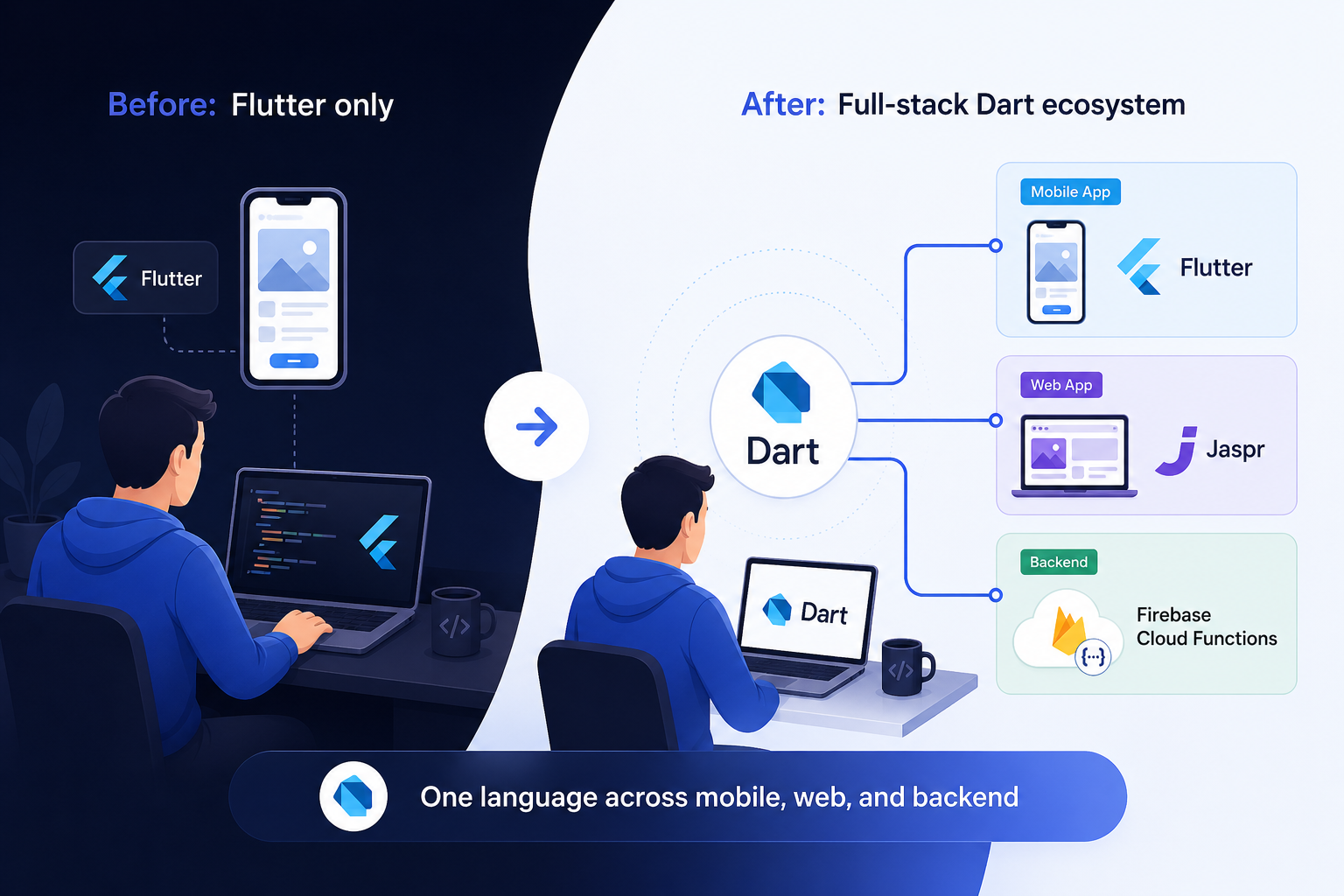
It is worth stepping back from the individual features to understand what this combination actually means for how Flutter developers can approach building products.
Before 2026, a Flutter developer building a product typically operated in a fragmented way. The mobile app was in Dart and felt like home territory. The website, if there was one, was in React or Vue — a different language, a different toolchain, a different set of patterns to learn and maintain. The backend was in Node.js or Python — yet another context. Data models were defined separately in each environment. Bugs caused by inconsistencies between the JavaScript model and the Dart model were a recurring annoyance.
Now, for the first time, there is a credible path to building all three of these layers in the same language, with shared code across them, using tools that are either already production-ready (Jaspr) or moving clearly in that direction (Dart Cloud Functions).
This does not mean every project should take this approach. JavaScript and TypeScript remain excellent choices for web and backend development, with mature ecosystems and deep community support. Python for Cloud Functions is stable and widely used. The argument for full-stack Dart is not that Dart is universally better — it is that for teams who are already invested in Dart and Flutter, the overhead of context-switching and maintaining parallel implementations of the same logic is a real cost, and that cost now has a way to be meaningfully reduced.
Smaller teams benefit most directly. A two-person startup building a Flutter mobile app, a marketing website, and a Firebase backend can now maintain all three in one language, with one set of shared models, one linting configuration, and one code review process. The cumulative time savings across a year of development are significant.
Best Practices to Keep in Mind
When working with Jaspr, the most important habit to develop is understanding the boundary between server and client components before you start a project. Jaspr's editor integration surfaces this boundary through component scope hints, but it helps to think about it architecturally too. Server components should contain content and structure. Client components should be limited to sections that genuinely require browser interaction — forms, toggle states, live data. Over-reaching for interactivity where static content would work just as well adds complexity without benefit.
If you are building anything content-heavy — a blog, documentation, a company website — start with Static Site Generation as your default mode and only introduce SSR or CSR for the sections where they are genuinely needed. The performance and simplicity benefits of pure SSG are significant.
Also be aware that Flutter packages will not work in Jaspr. The Jaspr ecosystem has its own packages for common needs, and the official package list is the right place to look for equivalents. Do not try to port Flutter UI packages — the rendering model is fundamentally different.
When working with Dart Cloud Functions, the single most important rule is to treat the feature as what it is: experimental infrastructure. This means you should not use it for anything that would cause serious problems if it broke or needed to be rewritten. Side projects, learning, internal tools, and proof-of-concept work are all appropriate. Production payment processing or critical notification systems are not appropriate targets yet.
Pin your Dart SDK version and Firebase CLI version explicitly. When an experimental feature updates, the API changes can be significant. Knowing which exact versions you were using when something worked is essential for debugging or rolling back.
The Firebase emulator is not optional — it is the primary development workflow. Running functions locally before deploying is faster, cheaper, and gives you far better debugging information than deploying and checking logs in the Firebase console.
Common Misunderstandings Worth Clearing Up
The most frequent point of confusion for Flutter developers encountering Jaspr is the belief that it is simply a better version of Flutter for web. It is not. They solve genuinely different problems for genuinely different use cases. Flutter for web remains the right choice when you need the Flutter UI framework running in a browser — shared widget code with mobile, a consistent design system, or a complex interactive application. Jaspr is the right choice when you are building a website and you want SEO, fast load times, and the ability to write in Dart. Choosing between them is not a matter of preference; it depends entirely on what you are building.
On the Cloud Functions side, the most important thing to understand clearly is the difference between "experimental" and "beta." Beta typically means a feature is complete but not yet locked into a stability guarantee. Experimental means it is still being actively designed, and fundamental aspects of the API may change or be removed entirely. Dart Cloud Functions are experimental. Plan and invest accordingly.
Conclusion
Dart is no longer just “the Flutter language.” With tools like Jaspr proving its strength in real-world web apps and growing support from Google via Dart Cloud Functions, it’s evolving into a full-stack ecosystem. For Flutter developers, this means new opportunities—Dart can now handle web and backend use cases, making its future far broader than before.








