


.svg)



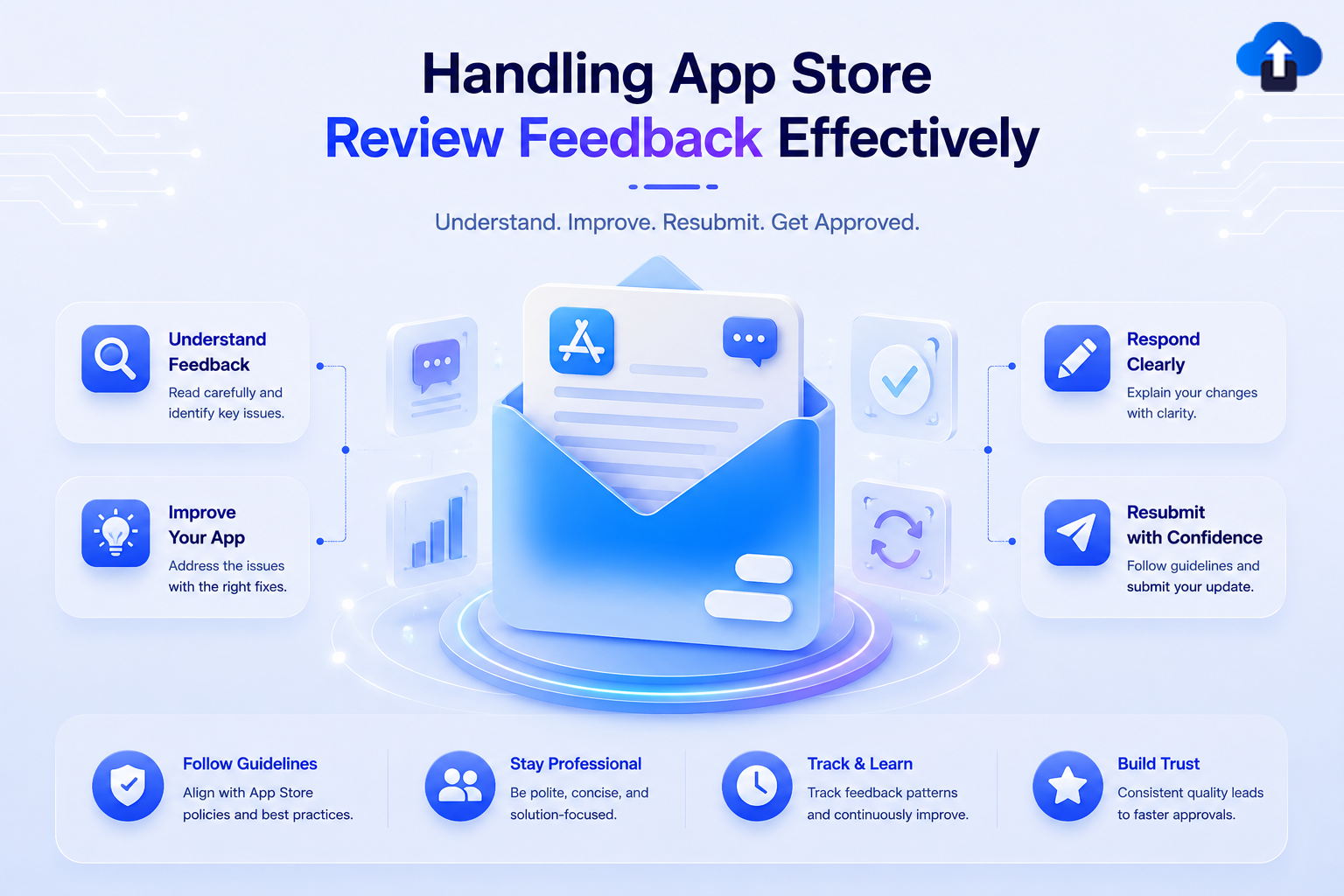
Introduction
App review feedback is the message a human or automated reviewer sends back when your build doesn’t clear Apple’s App Store Review Guidelines or Google Play’s Developer Program Policies. On iOS, this arrives in App Store Connect → Resolution Center as a threaded message tied to a specific guideline number (e.g., 4.3(a), 2.1, 5.1.1(v)). On Android, it surfaces in Play Console → Policy → App content / Policy status, sometimes as a warning, sometimes as a rejection of a specific release, and occasionally as an account-level strike.
Both platforms review millions of submissions, and both increasingly combine automated scanning (binary analysis, metadata scraping, privacy manifest checks) with human review for edge cases. That means the feedback you get is usually specific and actionable if you read it correctly. Most delays aren’t caused by the rejection itself; they’re caused by teams misreading it, resubmitting the same build unchanged, or replying emotionally instead of factually.
Problem Statement
Teams that struggle with review feedback tend to repeat the same three mistakes:
Important: Every rejection is tied to a specific, numbered guideline on iOS (e.g., Section 5, “Legal”) or a named policy on Android (e.g., “User Data policy”). Treat that number/name as the actual bug report; it tells you exactly which document to re-read before you touch any code.
This reframes the problem correctly: handling review feedback isn’t a negotiation; it’s a debugging exercise where the guideline text is your error message and the Resolution Center is your only communication channel with the person who can unblock you.
Concept A: Reading Apple App Store Review Feedback Correctly
Apple’s rejections follow a consistent format: a guideline reference, a short explanation, and for many categories, specific reproduction details (device, OS version, region, account used).
Anatomy of a Resolution Center Message
A typical rejection looks like this:
Guideline 5.1.1 - Legal - Privacy - Data Collection and Storage
We noticed that your app requests the user's location but does not.
sufficiently explain the use of this data in the purpose string
Shown to the user at the time of the request.
Review environment:
Submission ID: 8f2a1c4e-9b3d-4a7f-b112-...
Review date: [date]
Version reviewed: 2.4.0
Device: iPhone 15 Pro
OS: iOS 17.5
Next Steps:
Please revise the NSLocationWhenInUseUsageDescription string in
Your Info.plist to clearly explain why the app needs this data.
The guideline number, review environment, and next steps are the three things to extract before writing a single line of code.
Fixing the Actual Guideline Violation
   // Info.plist — before: vague, triggers 5.1.1 rejections
   // <key>NSLocationWhenInUseUsageDescription</key>
   // <string>This app needs your location.</string>


   // Info.plist — after: specific, states the actual feature-level reason
   // <key>NSLocationWhenInUseUsageDescription</key>
   // <string>We use your location to show nearby stores and calculate
   // accurate delivery times for your orders.</string>
   import CoreLocation


   /// Requesting location only at the moment it's needed — not at launch —
   /// is itself part of what reviewers check under Guideline 5.1.1.
   /// Requesting too early, before the feature that needs it is used,
   /// is a common secondary cause of the same rejection.
   func requestLocationWhenFeatureIsUsed(manager: CLLocationManager) {
   manager.requestWhenInUseAuthorization()
   }
Providing App Review Information Reviewers Actually Need
Many rejections under Guideline 2.1 (“App Completeness”) happen simply because the reviewer couldn’t get past a login screen or a paywall to test the core feature.
Demo Account: reviewer_demo@yourapp.com
Password: [rotate before every major submission do not reuse]
Notes to Reviewer:
"This app requires an active subscription to access premium recipes. The demo account above has an active subscription Pre-applied, so no purchase is required to review Section 3 (Recipe Library) and Section 4 (Meal Planner)."
Important: Rotate demo credentials before every submission and confirm the account still has the exact entitlements your reviewer notes describe. An expired demo account is one of the few rejection causes that is entirely within your control to prevent every time.
Concept B: Reading Google Play Console Review Feedback Correctly
Android’s review pipeline is more automated end-to-end, which means feedback often arrives faster but with less individualized explanation; you’re frequently pointed to a policy page rather than given a bespoke paragraph.
Policy Status and App Content
   // AndroidManifest.xml — a common trigger for "Permissions" policy
   // warnings: declaring a dangerous permission the app doesn't
   // actually use anywhere in the shipped code.


   // Before: unused permission left over from a removed feature
   // <uses-permission android:name="android.permission.READ_SMS" />


   // After: removed once the SMS-based OTP flow was replaced
   // with a standard email/OTP flow — matches Play's "Permissions
   // and APIs that Access Sensitive Information" policy.
Declared vs. Detected Behavior Mismatches
A large share of Play policy rejections come from the Data safety form not matching what the app binary actually does. Google’s automated scanners diff your declared data collection against observed SDK behavior.
   /**
   * Every third-party SDK that touches user data (analytics, ads,
   * crash reporting) must be reflected in the Play Console
   * "Data safety" form — mismatches here are flagged automatically,
   * even if the SDK's own default behavior changed after an update.
   */
   fun auditThirdPartySdkDataUsage(sdks: List<String>) {
   // Treat this as a release-blocking checklist item, not paperwork:
   // 1. List every SDK with network access (analytics, ads, crash reporting)
   // 2. Confirm what each SDK collects in its current version's docs
   // 3. Update the Data safety form to match — before submitting, not after
   }
Filing a Policy Appeal
If you believe a policy decision is a false positive (common with automated malware/permissions scans on obfuscated or minified builds), the Play Console provides a structured appeal form rather than a free-text thread.
Important: An appeal should include a specific, falsifiable e.g., “This permission is used in LocationWorker.kt line 42 to support the background delivery-tracking feature described in the app’s core functionality; here is a screen recording of the feature in use.” Vague appeals (“this is a false positive, please review again”) are the Android equivalent of Apple’s “please approve” replies; they rarely succeed.
Pros and Cons of Each Response Strategy
Comparison Table: Rejection Type vs. Recommended Response
Solution & Implementation: A Repeatable Response Process
The pattern that consistently reduces review turnaround time is a fixed intake-to-response pipeline, not an ad hoc scramble each time a rejection lands.
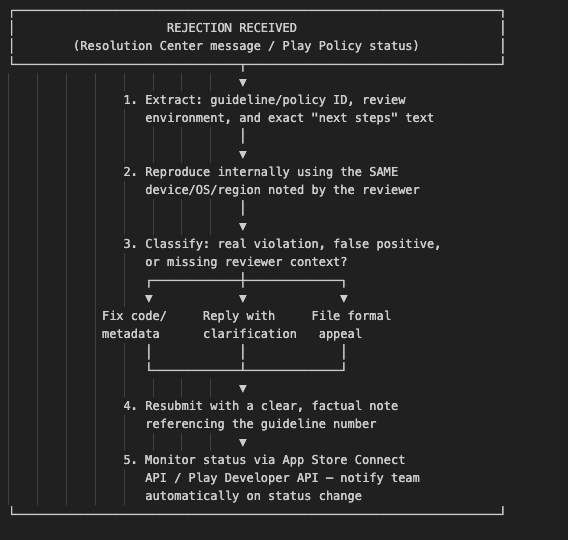
Automating Status Checks with the App Store Connect API
   import jwt
   import time
   import requests


   # Generates a short-lived JWT for App Store Connect API auth,
   # then polls the app's current review status so the team is
   # notified the moment it changes — no manual Resolution Center
   # Checking required.
   def generate_asc_token(key_id: str, issuer_id: str, private_key: str) -> str:
   payload = {
       "iss": issuer_id,
       "exp": int(time.time()) + 1200,  # max 20 minutes
       "aud": "appstoreconnect-v1",
   }
   headers = {"alg": "ES256", "kid": key_id, "typ": "JWT"}
   return jwt.encode(payload, private_key, algorithm="ES256", headers=headers)


   def get_app_review_status(app_id: str, token: str) -> dict:
   url = f"https://api.appstoreconnect.apple.com/v1/apps/{app_id}/appStoreVersions"
   headers = {"Authorization": f"Bearer {token}"}
   response = requests.get(url, headers=headers, params={"filter[appStoreState]": "IN_REVIEW,REJECTED,PENDING_DEVELOPER_RELEASE"})
   response.raise_for_status()
   return response.json()
Automating Status Checks with the Google Play Developer API
   /**
   * Polls the Play Developer API for the current release status of
   * a track (internal, closed, open, production). Combined with a
   * Cloud Function/Slack webhook, this turns a manual Play Console
   * Check into an automatic team notification.
   */
   fun checkReleaseStatus(packageName: String, track: String, androidPublisher:com.google.api.services.androidpublisher.AndroidPublisher) {
   val edit = androidPublisher.edits().insert(packageName, null).execute()
   val trackInfo = androidPublisher.edits().tracks()
       .get(packageName, edit.id, track)
       .execute()


   trackInfo.releases?.forEach { release ->
       // status values: "draft", "inProgress", "halted", "completed"
       println("Release ${release.name}: ${release.status}")
   }
   }
A Reusable Resolution Center Reply Template
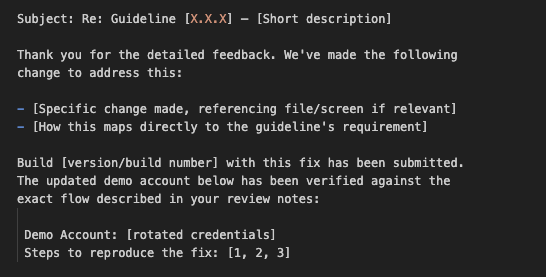
Please let us know if any further clarification would help.
Using this template consistently, with factual, specific, and tied directly to the guideline number, is what separates teams with a 24–48h turnaround from teams stuck in repeat-rejection loops for weeks.
Key Takeaways
- Read the guideline/policy number before writing any code: It tells you exactly which document and which part of your app to check first.
- Reproduce the issue in the reviewer’s exact environment (device, OS, region) before assuming it’s a false positive.
- Never resubmit an unchanged build hoping for a different outcome; it wastes a review cycle and can flag your account for extra scrutiny.
- Keep demo accounts current and entitlement-matched to your reviewer notes; this alone prevents a large share of 2.1-style rejections.
- Reply factually, not defensively: Reviewers respond to specific, verifiable claims, not reassurances.
- Escalate to a formal appeal only after ruling out an actual violation: Appeals are for genuine false positives, not a faster lane for real fixes.
- Automate status monitoring with the App Store Connect API and the Play Developer API so your team can react in minutes, not only when someone happens to check the console.
Conclusion
Handling App Store and Google Play review feedback well isn’t about being persuasive; it’s about treating the rejection as precise, actionable information and responding to exactly what it says. The guideline or policy number is your reproduction case; the review environment details are your test matrix; and the Resolution Center or Policy Status thread is the only channel that matters. Teams that build a repeatable intake-to-response pipeline consistently achieve clear review in one or two cycles by extracting, reproducing, classifying, fixing or clarifying, resubmitting, and monitoring. Teams that treat every rejection as a fresh crisis end up in the same loop, again and again, usually for the same handful of guidelines.
References
- Apple App Store Review Guidelines
- Apple Developer App Store Connect API Documentation
- Google Play Console Help Policy Status
- Google Play Console Help Data Safety Section
- Google Play Developer Program Policies
- Google Play Developer API Documentation








