


.svg)





Releasing a mobile app update can be stressful. Even after extensive testing, unexpected bugs can still make their way into production. A small issue may affect user experience, while a major bug can lead to crashes, lost revenue, and negative app reviews.
Many development teams have experienced the consequences of a bad release. The challenge is that once an update reaches every user, fixing the problem can take time. During that period, customer frustration continues to grow.
This is why phased rollouts have become a critical part of modern mobile release management. Instead of releasing updates to all users at once, teams can gradually deploy new versions and monitor performance before expanding the rollout.
In 2026, phased rollouts are considered one of the most effective ways to reduce deployment risk and improve app stability.
What Is a Phased Rollout?
A phased rollout is a deployment strategy that gradually releases an app update to a percentage of users rather than making it available to everyone immediately.
The goal is to identify issues early before they impact the entire user base.
How a Phased Rollout Works
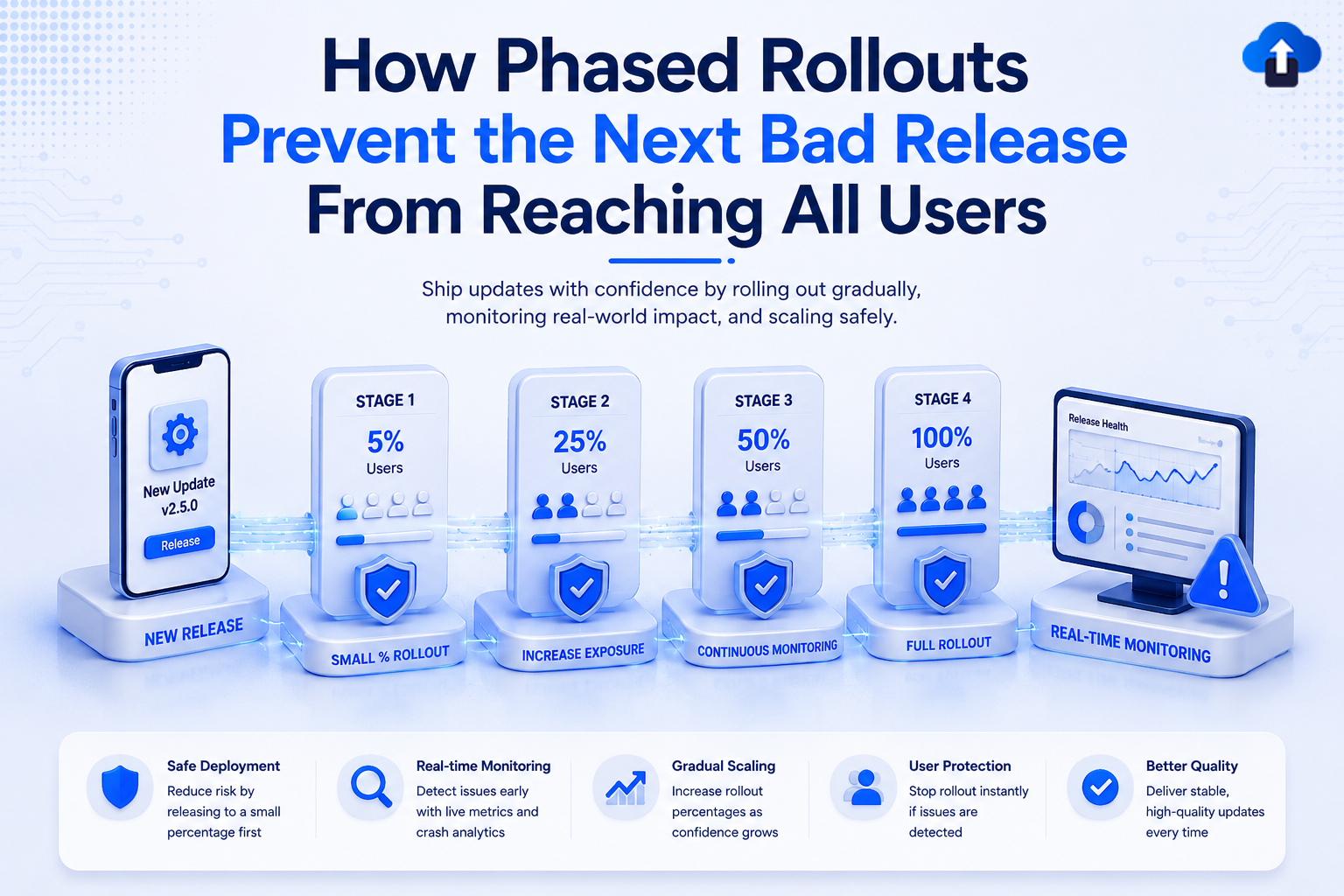
Instead of pushing an update to 100% of users, the release is distributed in stages.
A typical rollout might look like this:
- 5% of users
- 10% of users
- 25% of users
- 50% of users
- 100% of users
After each stage, teams monitor app performance and user feedback before moving to the next phase.
This approach creates multiple opportunities to detect and resolve problems before they become widespread.
Why Companies Use Phased Rollouts
No testing environment can perfectly replicate real-world usage.
Users interact with apps on different devices, operating systems, network conditions, and geographic regions.
A phased rollout exposes updates to a smaller audience first, allowing teams to validate performance under real-world conditions with significantly less risk.
The Risks of Releasing to Everyone at Once
On paper, a full deployment may seem faster and more efficient—you push the button once, and every user gets the latest features instantly.
However, this "all-or-nothing" approach is inherently high-risk and can create catastrophic challenges if something goes wrong.
Without a safety buffer, a single hidden bug can instantly escalate from a minor development oversight into a widespread engineering crisis.
Bugs Affect Every User Immediately
When an update reaches all users simultaneously, any hidden issue affects the entire customer base.
A broken login flow, payment issue, or navigation bug can quickly generate support tickets and negative reviews.
Recovering from these problems often requires emergency fixes and additional releases.
App Store Reviews Can Suffer
Users rarely wait patiently for a fix.
If an update causes crashes or functionality issues, many users will leave negative reviews before a solution is available.
Poor ratings can reduce app downloads and damage user trust.
Revenue Loss Can Escalate Quickly
For subscription apps, e-commerce platforms, and mobile services, a bad release can directly impact revenue.
Even a few hours of disruption may lead to missed sales opportunities and customer churn.
How Phased Rollouts Reduce Deployment Risk
Phased rollouts act as an indispensable safety mechanism between your internal development environment and a full-scale production deployment.
Instead of exposing your entire audience to a new build simultaneously, a phased strategy introduces the update to users in controlled, incremental stages.
This structural buffer transforms a high-stakes, stressful release day into a predictable, manageable, and highly safe process.
Early Detection of Hidden Issues
Some bugs only appear under specific conditions.
By releasing to a small percentage of users first, teams can identify problems before the update reaches the broader audience.
This significantly reduces the impact of unexpected issues.
Better Monitoring Opportunities
Smaller deployments make it easier to analyze performance metrics.
Teams can monitor:
- Crash rates
- Session stability
- API failures
- User engagement
- Device-specific issues
This data helps determine whether an update is ready for wider adoption.
Faster Decision-Making
If problems appear during an early rollout phase, teams can immediately pause or reverse deployment.
This prevents a minor issue from becoming a major incident.
Key Metrics to Monitor During a Phased Rollout
Phased rollouts are all about controlled risk. By limiting the initial blast radius of a new release, you give your team a safety net—but that net only works if your monitoring stack is actually tuned to catch the right signals.
Here is an expanded brief detailing exactly what to watch, how to measure it, and what specific warning signs should make you hit the pause button.
Crash-Free Sessions
Crash rates are often the first indicator that something is wrong with a new deployment. A sudden increase in crashes should trigger an investigation before expanding the rollout.
Monitoring the percentage of stable sessions helps ensure OS and device compatibility. Maintaining a high baseline prevents a broken update from reaching your entire user base.
User Retention
Retention metrics help determine whether users continue engaging with the updated version. A significant drop in return rates may indicate hidden usability or performance issues.
Comparing the rollout cohort against a control group reveals shifts in user behavior. Tracking core feature adoption ensures the update actually delivers its intended value.
Error Logs and Exceptions
Backend errors, API failures, and application exceptions provide valuable insight into release health. Even small increases in error frequency can signal larger underlying problems.
Monitoring API latency and server response codes prevents infrastructure overload. Catching these anomalies early stops minor technical debts from scaling into full outages.
Customer Feedback
User reviews and support tickets often reveal issues that automated monitoring tools miss. Teams should pay close attention to feedback from users receiving the update.
A sudden spike in ticket velocity helps identify edge-case bugs and broken user workflows. Listening to early cohorts allows you to adjust the UX before a global launch.
Best Practices for Successful Phased Rollouts
To make a phased rollout truly effective, simply enabling the feature is not enough; teams must implement a structured deployment process rooted in data-driven safeguards.
This requires establishing strict, automated graduation criteria based on stability and performance metrics rather than arbitrary calendar schedules to dictate when it is safe to expand traffic.
Start With a Small User Percentage
Many organizations begin with 1% to 5% of users. This provides enough data to identify issues while limiting potential impact.
Expanding too quickly can defeat the purpose of a phased rollout.
Define Clear Success Criteria
Before deployment, establish measurable goals.
Examples include:
- Acceptable crash rates
- Performance benchmarks
- User engagement targets
- Error thresholds
Having predefined criteria removes guesswork from rollout decisions.
Allow Time Between Stages
Rushing through rollout phases can hide problems. Each deployment stage should remain active long enough to collect meaningful data.
Patience often prevents costly mistakes.
Always Have a Rollback Plan
Even successful releases need a backup strategy. Rollback capabilities allow teams to quickly restore a stable version if issues emerge.
A phased rollout without rollback support leaves organizations vulnerable.
Phased Rollouts and OTA Updates
When phased rollouts are combined with Over-the-Air (OTA) updates, teams gain the ability to bypass traditional app store approval bottlenecks and deploy critical fixes or feature tweaks directly to users in near real-time
By applying a phased approach to OTA deployments, you can push background updates to a tiny fraction of your user base (such as 1% or 5%) to validate code stability and server performance before a global release.
Faster Recovery From Release Issues
OTA updates allow teams to distribute fixes without waiting for app store approval.
If an issue is detected during a phased rollout, developers can respond much faster. This reduces user impact and shortens recovery time.
Continuous Release Management
Modern mobile teams often release updates frequently.
Combining OTA deployment with phased rollouts creates a safer and more agile release process. Teams gain both speed and control.
Improved User Experience
Users benefit from fewer disruptive bugs and more stable app experiences.
Gradual deployments help ensure only high-quality updates reach the entire audience.
How AppsOnAir Supports Safer App Releases
AppsOnAir helps mobile teams manage app releases with greater confidence through OTA update capabilities and deployment controls.
By supporting controlled update distribution, rollout management, monitoring, and release visibility, AppsOnAir enables teams to detect issues early and respond quickly when problems occur.
This approach helps reduce deployment risk while maintaining a smooth experience for users.
For organizations that release updates frequently, phased rollouts combined with OTA updates can become a key part of a reliable mobile release strategy.
Common Mistakes to Avoid
One common mistake is increasing rollout percentages too quickly. Teams sometimes see positive early results and immediately release to all users, missing issues that appear later.
Another mistake is focusing only on crash rates. User experience issues, performance problems, and engagement declines can be just as important.
Some organizations also fail to define rollback procedures before deployment. Waiting until a problem occurs often delays recovery efforts.
Finally, many teams underestimate the importance of monitoring. A phased rollout only works when performance data is actively reviewed and acted upon.
Frequently Asked Questions
What is a phased rollout?
A phased rollout is a deployment strategy that gradually releases an update to a percentage of users instead of deploying it to everyone at once.
Why are phased rollouts important?
They reduce deployment risk by allowing teams to detect issues early before they impact the entire user base.
How much of the user base should receive an update first?
Many teams start with 1% to 5% of users and gradually increase distribution as confidence grows.
Can phased rollouts prevent all release issues?
No. However, they significantly reduce the number of users affected when problems occur.
Do phased rollouts work with OTA updates?
Yes. Combining phased rollouts with OTA updates creates a faster and safer release process by enabling rapid fixes and controlled deployments.
Final Thoughts
No release process can completely eliminate risk. However, phased rollouts provide one of the most effective ways to reduce the impact of deployment mistakes.
By gradually introducing updates, monitoring performance, and maintaining rollback capabilities, development teams can identify issues before they affect their entire user base. This leads to more stable applications, better user experiences, and greater confidence in every release.
As mobile apps become more complex and release cycles continue to accelerate, phased rollouts are no longer just a best practice. They are an essential part of modern mobile release management. Teams that embrace controlled deployments are far better positioned to deliver reliable updates without exposing every user to unnecessary risk.








