


.png)


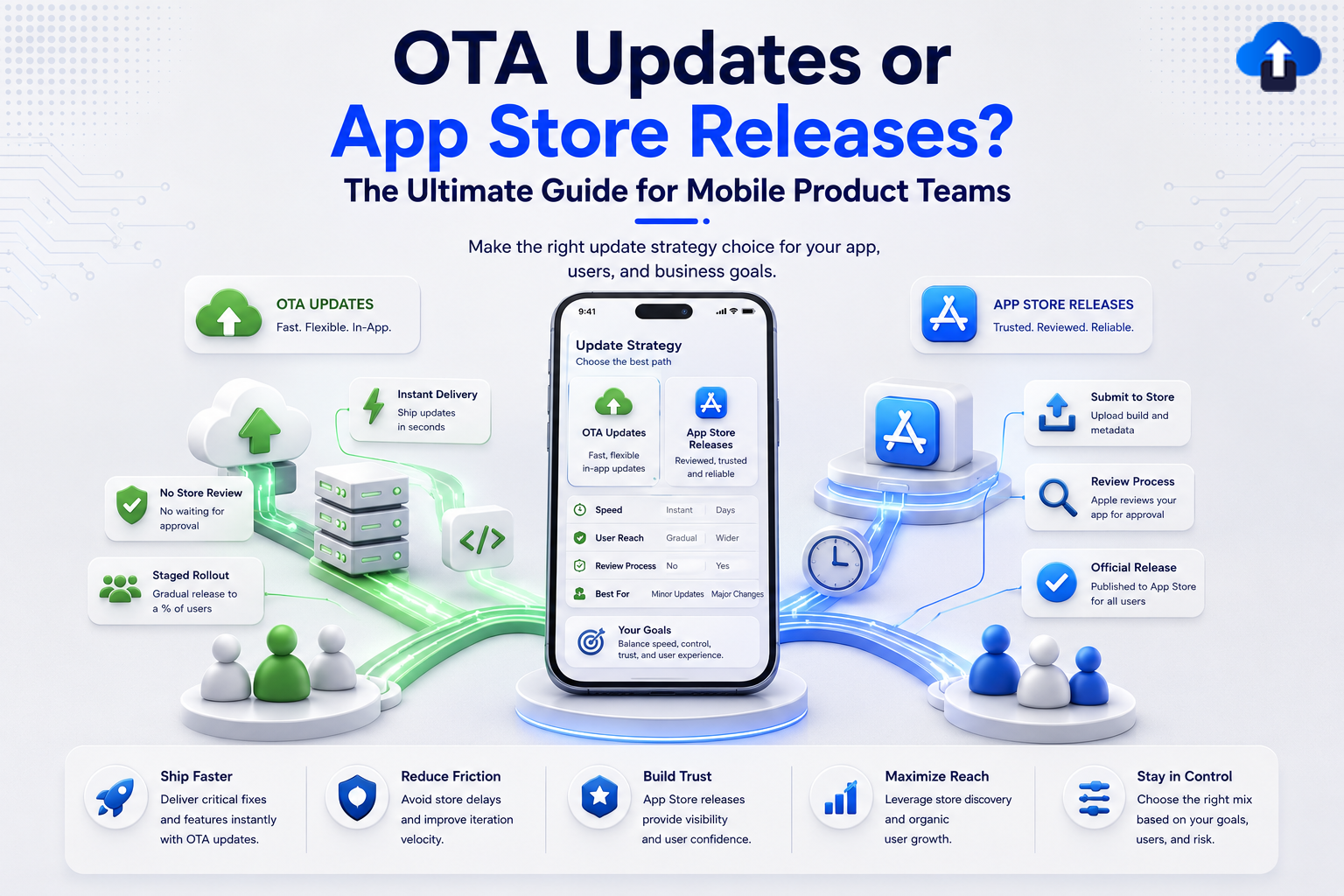
Your app just went live, and a critical bug is crashing it for thousands of users. The App Store review queue says: 1-3 business days. You wish there were a faster way; there is. But is it always the right one?
Introduction
Every mobile app team faces the same fundamental challenge: how do you get your latest changes in front of users as quickly, safely, and reliably as possible?
Two paths exist in mobile development: the App Store release, which is the standard, reviewed, and trusted route, and the OTA (Over-The-Air) update, which is a direct-to-device delivery mechanism that skips the review queue.
Both approaches are legitimate. Both are used by leading mobile teams. But they are built for different situations, and confusing the two can cost you time, user trust, or even your app’s store listing.
This guide breaks down both approaches clearly so you can make the right decision on every release.
What Is an OTA Update?
OTA stands for Over-The-Air. An OTA update is any update to your app that is delivered directly to the user’s device over the internet without going through an App Store submission or review process.
The term originally came from the telecom industry, where mobile carriers pushed firmware and OS updates to handsets wirelessly. In the mobile app world, OTA now refers to pushing changes to an installed app without requiring users to visit the App Store or Google Play.
How OTA Updates Reach Your Users
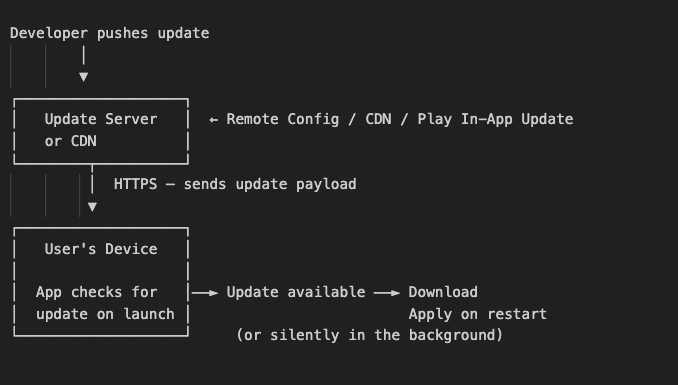
Sequence diagram OTA update delivery flow from the update server to the user’s installed app, showing the check, download, and apply steps.
What Can Be Updated via OTA?
Not everything in a native app can be updated over the air. There is a strict boundary:
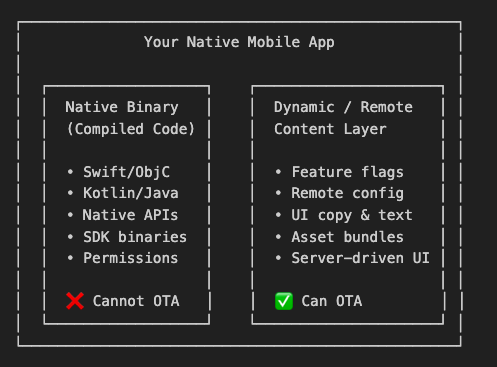
Sequence diagram OTA update delivery flow from the update server to the user’s installed app, showing the check, download, and apply steps.
Types of OTA Updates on iOS and Android
Sequence diagram OTA update delivery flow from the update server to the user’s installed app, showing the check, download, and apply steps.
What Is an App Store Release?
An App Store release is the standard method of distributing a mobile app. You submit a fully compiled, signed binary build to the Apple App Store or Google Play Store, it goes through a review process, and once approved, it becomes available for users to download or update.
This is the route all consumer apps must use to reach the general public through official store distribution.
Apple App Store Release Flow
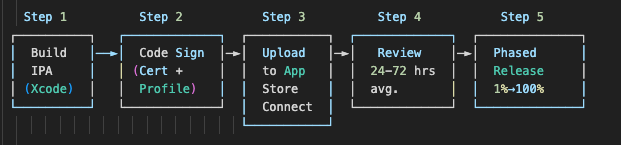
Sequence diagram OTA update delivery flow from the update server to the user’s installed app, showing the check, download, and apply steps.
Apple Review Timeline:
- Standard review: 24–72 hours on average
- Expedited review: Available for critical bug fixes (same-day approval not guaranteed)
- First-time app submissions may take longer
Google Play Store Release Flow
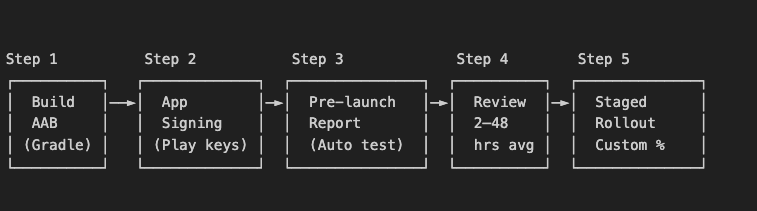
Google Play Review Timeline:
- App updates: 2-48 hours (usually faster for established apps)
- New apps: 3-7 days - Includes automated Firebase Test Lab checks before human review
Key Differences Between OTA and App Store Releases
Understanding the core differences helps you pick the right path without second-guessing every release.
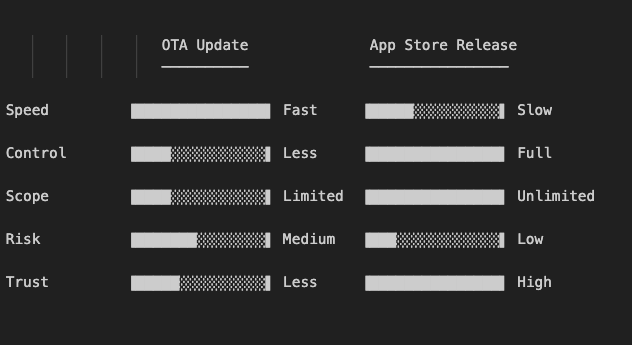
Comparison bar chart of five dimensions (Speed, Control, Scope, Risk, Trust) shown as horizontal bars for OTA vs. App Store releases side by side.
Detailed Comparison Table
OTA Updates Pros & Cons
Pros of OTA Updates
- Instant delivery: changes reach users in minutes, not days
- No review waiting period: skip the App Store queue for eligible changes
- Silent background updates: users get fixes automatically without any action
- Live production fixes: patch a crashing bug without waiting 48–72 hours
- Feature flag control: toggle features on or off instantly for all users or segments
- A/B testing made easy: serve different configurations to different user groups in real time
- Instant rollback: revert a bad update by changing server-side config no new submission
- Lower operational overhead: no code signing, no binary upload, no build pipeline for small changes
- Reduces version fragmentation: most users converge on the same behavior faster
Cons of OTA Updates
- Native code is off-limits: Swift, Kotlin, Objective-C, and Java changes always require a store release
- No new permissions via OTA: adding an iOS privacy permission or Android dangerous permission requires a full release
- Apple policy risk: Guideline 3.3.2 prohibits using OTA to add significant new features or change core app functionality; violations can get your app removed
- Requires internet connection: users must be online; offline users stay on the old version
- No new native SDKs: integrating a new native library always requires a full binary update
- Not visible to users: OTA changes do not appear in the store’s version history or“What’s New” section
- Silent changes can feel opaque: privacy-conscious users may distrust apps that update without visible changelogs
- Enterprise OTA is complex on iOS: requires Apple Developer Enterprise Program ($299/year) and MDM infrastructure.
Apple Policy Warning App Store Review Guideline 3.3.2:
Apple explicitly prohibits downloading or executing new native code outside of the review process. OTA updates are only allowed for configuration, content, and behavior changes never for delivering new native executable functionality. Violating this rule risks app removal and developer account suspension.
App Store Releases Pros & Cons
Pros of App Store Releases
- Unlimited update scope: native code, new permissions, new SDKs, major feature additions all supported
- User trust and visibility: changelogs, “What’s New,” version history give users full transparency\
- Apple and Google quality gate: review catches crashes, policy violations, and security issues before users see them
- Signed and verified distribution: every binary is code-signed, scanned, and verified by the store
- Required for compliance: HIPAA, GDPR, and enterprise security mandates often require store-only distribution
- Staged rollout control: both stores support gradual rollouts with pause and halt capability
- App Store Optimization (ASO): each release is a chance to refresh screenshots, keywords, and descriptions
- Works for all users: even offline users receive the update the next time they open the store
Cons of App Store Releases
- Slow turnaround: Apple averages 24-72 hours; a hard blocker during production incidents
- Unpredictable review outcomes: rejection for unexpected reasons can delay a critical fix by days
- Full rebuild for any change: a one-line copy fix still requires a complete signed binary upload and review
- Version fragmentation: users with auto-update disabled or on older OS versions stay on stale code
- Release overhead: certificate management, provisioning profiles, build pipelines, and store metadata all add friction
- No true rollback: reverting a broken release means publishing an older version through the full review cycle again
- Cannot respond to incidents in real time: a crashing version can affect users for 1–3 days before a fix reaches them
Which Is Better: OTA or App Store?
The honest answer: neither is universally better. They solve different problems at different speeds.
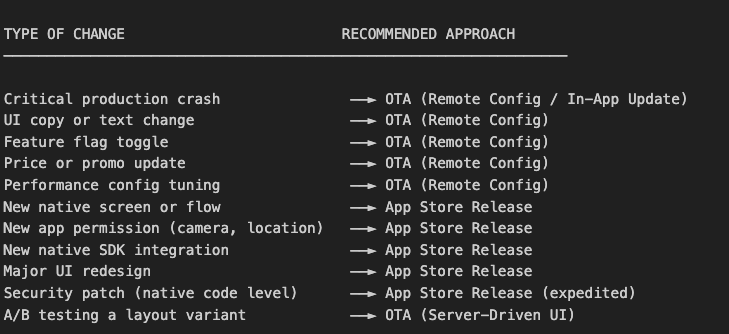
Decision matrix two-column layout mapping change types to recommended update strategy (OTA vs. App Store release), with color coding for fast/slow routes.
Which Is Easier to Use?
The winning strategy is hybrid:
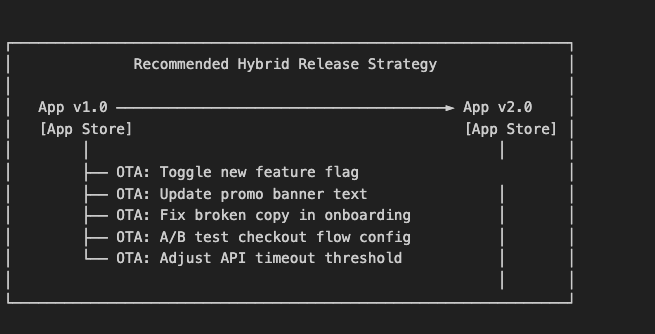
Hybrid release timeline a horizontal app version line showing App Store releases at major milestones and OTA updates filling the gaps in between.
Use the App Store for major milestones. Use OTA to stay agile between those milestones.
User Checklist Choosing Your Update Strategy
Use this checklist before every release to pick the right path.
Identify the Type of Change
- Does the change modify native compiled code (Swift, Kotlin, ObjC, Java)?
- Does the change add a new permission (camera, location, contacts, microphone)?
- Does the change integrate a new native SDK or framework?
- Does the change make the app behave like a fundamentally different product?
- Does the change require App Store metadata updates (screenshots, keywords)?
If you checked any of the above → App Store Release required.
- Is the change limited to text, copy, or UI labels?
- Is the change a feature flag toggle (enable/disable an existing feature)?
- Is the change a configuration value (timeout, threshold, limit)?
- Is the change an asset update (images, colors, server-driven layouts)?
- Is this a production fix that does not touch native code?
If you checked any of the above → OTA Update is safe and recommended.
Check Policy Compliance
- Does the OTA change stay within Apple Guideline 3.3.2? (No new native executable code delivered outside the review process)
- Does the OTA change stay within Google Play Distribution Policy?
- Is the OTA change an update to existing behavior, not a new major feature?
- Have you tested the OTA change in staging before pushing to production?
If the OTA change adds significant new functionality → reclassify as App Store Release.
Verify Your Release Readiness
For OTA Updates:
- Rollback plan is defined (ready to pause rollout or expedite a fix if needed)
- Rollback plan is confirmed (can revert values instantly if issues appear)
- Monitoring and alerting is in place to catch issues post-release
- Change is scoped to config, content, or behavior not native code
- Team is informed of what is changing and when
-
For App Store Releases:
- Build is archived and code-signed with the correct distribution certificate
- All metadata is updated (release notes, version number, screenshots if needed)
- Internal testing completed (TestFlight / Internal Track) before store submission
- Staged rollout plan is defined (recommended: start at 5–10%)
- Monitoring is in place for crash rates and user reviews post-launch
- Rollback plan is defined (ready to pause rollout or expedite a fix if needed)
Release Decision Summary Card
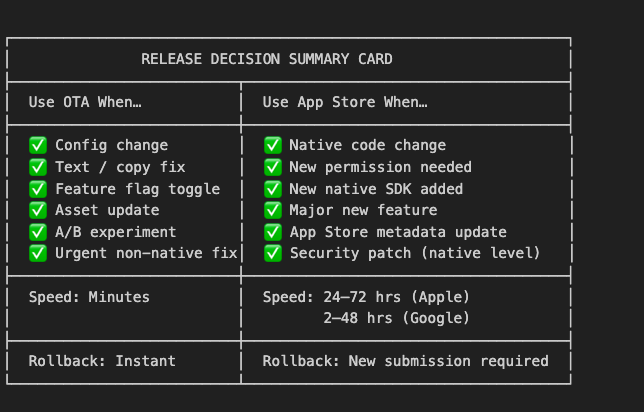
Release Decision Summary Card two-column visual card showing OTA use cases vs. App Store use cases, with speed and rollback indicators at the bottom.
Key Takeaways
- OTA updates are not a shortcut around App Store review: they are a legitimate tool for configuration, content, and behavior changes. Misuse risks your app’s store listing.
- App Store releases are required for any change involving native code, new permissions, new SDKs, or major new features with no exceptions.
- OTA is best for: production fixes (non-native), copy changes, feature flags, A/B tests, config updates, and asset refreshes.
- App Store is best for: native feature launches, permission additions, SDK integrations, and major UI overhauls.
- Rollback is OTA’s biggest advantage: you can revert a bad configuration change in seconds. A bad App Store release requires a full new submission cycle.
- Version fragmentation is the App Store’s biggest weakness: users who disable auto-update stay on old versions indefinitely.
- The smartest teams use both: App Store for major milestones, OTA for everything in between.
Conclusion
- OTA updates and App Store releases are not competing choices; they are complementary tools in a mature mobile release strategy.
- Choose OTA when speed matters and the change stays within Apple and Google’s policy boundaries. It is your fast lane for configuration, copy, flags, and production fixes that do not touch native code.
- Choose App Store releases when the change is native, structural, or significant enough to deserve a reviewed and versioned distribution through official channels.
The teams that ship great mobile products do not agonize over this choice on every release; they have a clear framework, a hybrid strategy, and the checklist to back it up. Now you do too.
Reference Links
Official Apple Resources
- Apple App Store Review Guidelines 3.3.2
- Apple Developer Enterprise Program
- Apple Phased Release for App Updates
- Apple Expedited App Review
- App Store Connect Help
Official Google Resources
- Google Play In-App Updates Developer Guide
- Google Play Staged Rollouts
- Google Play Distribution Policy








