


.png)


.png)
You uploaded to TestFlight. QA signed off. You shipped. Then your inbox exploded.
Push notifications broken. In-app purchases are failing. A crash nobody saw in beta.
Sound familiar? You are not alone, and the fix is simpler than you think.
What You Will Learn
By the end of this guide, you will know:
The 10 real differences between a TestFlight and an App Store build
Why push notifications silently fail on TestFlight when set up incorrectly
How in-app purchases behave differently in beta vs. production
How to detect at runtime whether your app is running from TestFlight
Practical code snippets you can drop into your project today
No fluff. No theory. Just the facts that save your next release.
The Myth: “TestFlight and App Store Builds Are the Same”
Most developers treat TestFlight as just a “beta version” of their App Store build. Same.ipa. Same bundle ID. Same certificate. So what could go wrong?
Quite a lot, actually TestFlight and App Store builds share the same code-signing pipeline, but they run in very different platform environments. The StoreKit environment is different. The receipt file is different. The APNs (push notification) behavior is different. Even the build expiry rules are different.
Miss one of these, and you are debugging a production incident that never showed up in beta.
Let’s go through every difference one by one.
Quick Glossary
What Is a TestFlight Build?
TestFlight is Apple’s official platform for distributing pre-release builds to testers. It is built directly into App Store Connect, which means you use the same dashboard for beta testing and App Store publishing.
Two types of testers and they work very differently:
Builds are installed through the TestFlight app, available on iOS, iPadOS, macOS, and tvOS.
What Is an App Store Build?
An App Store build is your production release. It is the exact same archive you upload to App Store Connect, reviewed by Apple’s App Review team, and made available to the public on the App Store.
The key word is production - this build connects to live services, real payment processing, and production push notification infrastructure.
The 10 Key Differences Explained
1. Who Can Get Your Build
The most obvious difference - and the one most developers already know.
Bottom line: TestFlight is a controlled, invite-only environment. The App Store is wide open.
2. App Review - Fast Lane vs. Full Review
Beta App Review is lighter than the full App Store review. Apple mainly checks that the build does not crash on launch, does not violate core policies, and contains enough functionality to be testable.
Plan accordingly: Even Beta App Review can take 24–48 hours. If your external beta is time-sensitive, submit a day early.
3. Build Expiry - The 90-Day Clock
This catches teams off guard more than almost any other difference.
The 90-day clock starts the moment you upload the build to App Store Connect - not when testers install it.
Pro Tip: Running a long beta? Upload a refreshed build every 60–70 days to reset the clock and keep all your testers active.
4. Code Signing - Surprise: They Are Identical
This is the difference most developers expect to find - and it is not really a difference at all.
Both builds use the exact same certificate and provisioning profile. You do not need a separate setup for TestFlight. The archive you export from Xcode for App Store submission is the same one distributed to TestFlight testers.
Key Insight: The “TestFlight build” and the “App Store build” are often the same binary. The difference is where Apple routes it after upload - beta or production.
5. Push Notifications (APNs) - The Silent Killer
This is one of the most misunderstood differences, and it causes silent push notification failures that are incredibly hard to debug.
TestFlight does NOT use the APNs sandbox. It uses APNs Production.
If your backend sends push notifications using the sandbox endpoint (api.sandbox.push.apple.com), TestFlight devices will never receive them - and you will get no error. The request succeeds on the server side, but the notification vanishes.
The correct APNs endpoints:
// ❌ WRONG -- Sandbox endpoint. Only used for Debug/Simulator builds.
let apnsHost = "api.sandbox.push.apple.com"

// ✅ CORRECT -- Production endpoint. Use for BOTH TestFlight and App Store.
let apnsHost = "api.push.apple.com"
For server-side HTTP/2 APNs requests:
# ✅ Production -- for TestFlight AND App Store
POST https://api.push.apple.com/3/device/<device_token>

# ❌ Sandbox -- Debug builds and Simulator ONLY
POST https://api.sandbox.push.apple.com/3/device/<device_token>
Rule of Thumb: If users are running your app - whether it is a TestFlight beta or a live App Store release - always use the APNs Production endpoint.
6. In-App Purchases - No Real Money in Beta
TestFlight runs in the StoreKit sandbox environment. This is great for testing - nobody gets charged real money. But it also means your in-app purchase behavior in TestFlight is not 100% identical to production.
How to check the StoreKit environment at runtime (StoreKit 2, iOS 16+):
import StoreKit

func checkStoreKitEnvironment() async {
 for await result in Transaction.currentEntitlements {
 if case .verified(let transaction) = result {
 switch transaction.environment {
 case .production:
 print("App Store build -- real purchases active")
 case .sandbox:
 print("TestFlight or Simulator -- sandbox purchases only")
 case .xcode:
 print("Xcode StoreKit local testing environment")
 @unknown default:
 break
 }
 }
 }
}
Warning: Never test in-app purchases on TestFlight using your real Apple ID. Always create a dedicated Sandbox Apple ID in App Store Connect under Users and Access → Sandbox Testers. Using your real Apple ID in the sandbox environment can corrupt your account’s purchase history.
7. Receipt File - Your Runtime Fingerprint
Every installed iOS app contains an App Store receipt. The filename of that receipt is different for TestFlight and App Store builds - and you can use this to detect your environment at runtime.
Detect TestFlight at runtime:
import Foundation

extension Bundle {
 /// Returns true only when the app is installed via TestFlight.
 /// Returns false for App Store builds and Debug builds.
 var isInstalledFromTestFlight: Bool {
 guard let receiptURL = appStoreReceiptURL else { return false }
 return receiptURL.lastPathComponent == "sandboxReceipt"
 }
}

// Usage example
if Bundle.main.isInstalledFromTestFlight {
 print("Running from TestFlight -- pointing to staging API")
} else {
 print("Running from App Store -- pointing to production API")
}
Important: This detection does NOT work in Debug builds or on the Simulator. Use #if DEBUG guards to handle the development environment separately.
Production-ready three-environment detection:
import Foundation

enum AppEnvironment {
 case debug
 case testFlight
 case appStore

 static var current: AppEnvironment {
 #if DEBUG
 return .debug
 #else
 guard let receiptURL = Bundle.main.appStoreReceiptURL else {
 return .appStore
 }
 return receiptURL.lastPathComponent == "sandboxReceipt"
 ? .testFlight
 : .appStore
 #endif
 }
}

// Wire it to your API config on app launch
func configureAPIEnvironment() {
 switch AppEnvironment.current {
 case .debug:
 APIClient.baseURL = "https://dev.api.yourapp.com"
 case .testFlight:
 APIClient.baseURL = "https://staging.api.yourapp.com"
 case .appStore:
 APIClient.baseURL = "https://api.yourapp.com"
 }
}
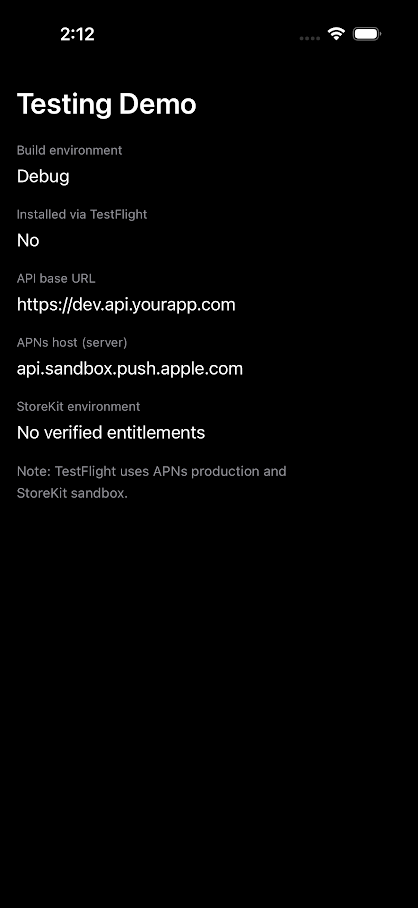
Drop configureAPIEnvironment() into your AppDelegate or App struct’s init() and your app automatically points to the right backend - no build schemes, no manual switching.
The solution was validated in an iOS simulator environment.
8. Version and Build Numbers
During a beta cycle you often keep the version string fixed (e.g., 2.0.0) while iterating on bug fixes. TestFlight supports this by just incrementing the build number with each upload.
Automate build number management in your CI pipeline:
# Increment build number automatically before archiving
xcrun agvtool next-version -all

# Or pin it to your CI pipeline's build counter (recommended)
xcrun agvtool new-version -all $BUILD_NUMBER
CI Best Practice: Set CFBundleVersion to your CI build number (e.g., GitHub Actions ${{ github.run_number }}). This guarantees uniqueness across every build, every branch, every time.
9. Crash Reporting and Diagnostics
TestFlight gives you crash data from every tester, automatically. No opt-in. No extra SDK. This is one of TestFlight’s biggest underrated advantages - your beta phase is your best chance to catch crashes before they hit millions of users.
Do This Now: Enable automatic dSYM uploads in your Xcode build settings (DWARF with dSYM File). Without them, crash logs show raw memory addresses - completely unreadable. With them, Apple resolves the full symbolicated stack trace for you, right in App Store Connect.
10. App Size and App Thinning
Both TestFlight and App Store builds go through Apple’s App Thinning pipeline. Apple strips out code and assets that are not needed for the target device and delivers a lean, device-specific build.
This means the download size your TestFlight testers see is a realistic preview of what App Store users will experience on the same hardware. Use this to your advantage - if your beta download size is ballooning, you will know before you ship.
Complete Comparison - At a Glance
FAQ - Quick Answers
Q1: Do I need a different certificate for TestFlight?
No. Both TestFlight and App Store builds use the same Apple Distribution certificate and App Store provisioning profile.
Q2: Will push notifications work on TestFlight?
Yes as long as your server uses theAPNs Production endpoint (api.push.apple.com). Using the sandbox endpoint will cause silent failures.
Q3: Can TestFlight testers make real purchases?
No. TestFlight runs StoreKit in sandbox mode. Testers need a Sandbox Apple ID, and no real money is ever charged.
Q4: How do I know if my app is running from TestFlight?
CheckBundle.main.appStoreReceiptURL?.lastPathComponent. If it equals "sandboxReceipt", the build is from TestFlight.
Q5: What happens when a TestFlight build expires?
After 90 days, testers can no longer install or open that specific build. Upload a new build to restore access.
Q6: Is my TestFlight download size the same as the App Store?
Yes - both go through App Thinning, so the size testers see is a reliable indicator of what App Store users will download.
Key Takeaways
Here is what to keep in mind every time you ship:
- Same certificate, different environment - signing is identical, but StoreKit and receipt behavior differ.
- APNs is Production for both - never send TestFlight push notifications to the sandbox endpoint.
- StoreKit is Sandbox in TestFlight - no real charges, but tested with a Sandbox Apple ID.
- Builds expire in 90 days - upload fresh builds during long beta cycles.
- sandboxReceipt = TestFlight - use this for reliable runtime environment detection.
- Increment build numbers - version can stay the same in TestFlight, but build number must go up.
- Crash logs are automatic in TestFlight - your beta phase is your best defect-catching window
Conclusion
TestFlight and App Store builds are closer than most people think - and farther apart than they realize.
The same archive powers both. But the moment that binary lands on a device, the environment around it changes: a different StoreKit server, a different receipt file, different crash log handling, a 90-day countdown clock. These are not edge cases. They are the details that separate a clean release from a midnight hotfix.
The next time something breaks “only in production,” come back to this guide and cross-check the list. The answer is almost certainly here.
Ship with confidence. Your users will feel the difference.
Further Reading and Official References
- TestFlight Overview - Apple Developer
- Distribute with TestFlight - App Store Connect Help
- Sending Notification Requests to APNs - Apple Developer
- Doing Basic Optimisation to Reduce App Size - Apple Developer
- Create a Sandbox Apple ID - App Store Connect Help
- App Store Receipt Validation - Apple Developer









