


.png)


A normal deep link works well when a user already has your mobile app installed. Someone taps a product, referral, invitation, or campaign link, and the app opens directly to the relevant screen.
The problem begins when the app is not installed. The user may be sent to the App Store or Google Play, install the app, and then open it only to land on the home screen. The original product, offer, referral, or invitation that motivated the installation has been lost.
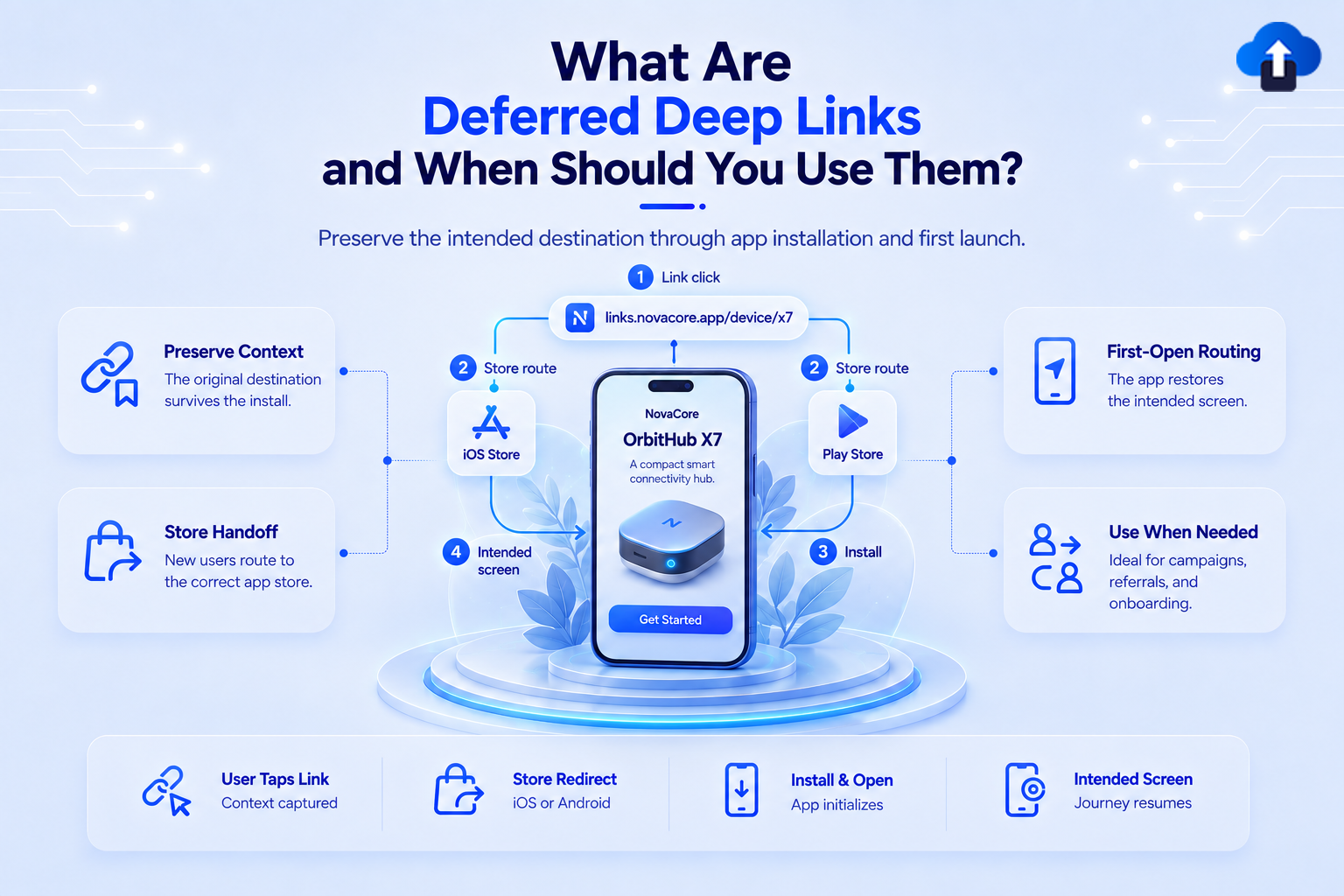
Deferred deep linking solves this problem by preserving the user's intended destination through the installation process. After the app is installed and opened, the user can continue toward the content connected to the original link.
At AppsOnAir, we built AppLink to support this type of journey across mobile apps. AppLink can preserve deep-link context when installation is required so users can continue toward the intended in-app destination after their first open.
What Is a Deferred Deep Link?
A deferred deep link is a link that can send a user to specific content inside a mobile app even when the app was not installed when the link was first clicked.
The word "deferred" refers to the delay between clicking the link and reaching the destination. The user first needs to install the app, so the original navigation is completed later.
For example, imagine someone clicks a link to a specific pair of shoes in an ecommerce app. If the app is installed, the product page can open immediately. If it is not installed, a deferred deep link can take the user through installation and then continue toward that same product after the app opens.
Deep Links vs. Deferred Deep Links
Regular and deferred deep links share the same goal: taking users to relevant app content. The difference is how they handle users who do not already have the application.
You do not need deferred deep linking for every link. It becomes valuable when the user's destination still matters after an installation has taken place.
How Deferred Deep Linking Works
Deferred deep linking connects events that happen before and after the app installation.
The exact technical implementation varies by platform and provider, but the overall user journey is straightforward.
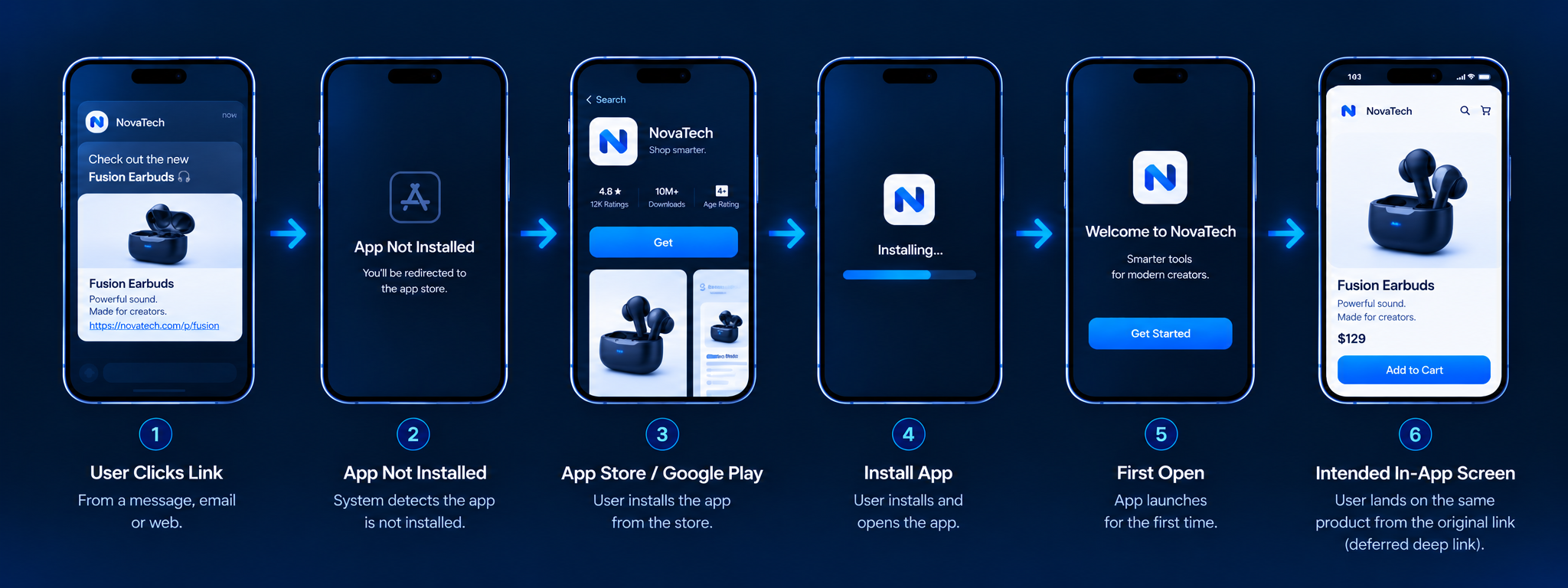
Step 1: The User Clicks a Link
A user first encounters a link in an email, social post, SMS, advertisement, website, or message from another user.
That link contains or references information about the intended destination. It could represent a product ID, referral code, campaign, invitation, article, or another part of the application.
Step 2: The App Is Not Installed
The deep linking system determines that the app cannot currently open on the device.
Standard platform links behave differently depending on the operating system. Android App Links use normal HTTPS URLs and send users without the app to the associated website. Apple Universal Links similarly open the web URL when the app is not installed.
A deferred deep linking solution adds an installation and context-preservation flow on top of this journey.
Step 3: The User Installs the App
The user is directed toward the appropriate app marketplace or installation experience.
The App Store or Google Play still handles the normal installation. Deferred deep linking does not bypass either marketplace or automatically install an application.
The important part is retaining enough information about the original click to understand why the user arrived.
Step 4: The App Opens for the First Time
After installation, the user launches the application.
The deep linking integration attempts to recover the context associated with the earlier click. The implementation can then identify the intended destination and pass the relevant information into the app.
Step 5: The User Continues the Original Journey
The application can now route the user toward the relevant screen.
If sign-up, authentication, permissions, or onboarding must happen first, those steps can still be completed before sending the user to protected content.
When Should You Use Deferred Deep Links?
Deferred deep linking is most valuable when losing the user's original context would weaken the experience or reduce the chance that they complete an important action.
Several common mobile journeys benefit from it.
Referral Programs
Referral links often contain information connecting a new user with the person who invited them.
Suppose an existing customer shares a referral link with a friend. The friend does not have the app, so they need to install it first.
Without deferred deep linking, the app may open normally after installation without knowing which referral started the journey. With the context preserved, the app can continue into the appropriate referral flow and apply the program's validation rules.
Ecommerce Product Links
Product links are another strong use case.
Someone may click a shoe, electronic device, or other product shared through social media but discover that the retailer's app is not installed.
After installing the application, sending that person to the generic homepage creates unnecessary work. A deferred link can continue toward the specific product they originally wanted to see.
Marketing and Acquisition Campaigns
Mobile marketing campaigns often promote specific offers rather than the application itself.
A campaign might advertise a limited-time discount, subscription plan, event, or product collection. If a new user installs the app from that campaign, the post-install experience should ideally continue the same message.
Deferred deep linking helps preserve that campaign context instead of turning every new install into the same generic app launch.
Invitations and Shared Content
Apps built around collaboration, communities, events, or shared content frequently use invitation links.
A user might receive a link to join a workspace, open a shared document, attend an event, or view another user's content.
If installation is required, the invitation should not disappear afterward. A deferred link can help return the user to the relevant invitation once the necessary account setup has been completed.
Personalized Onboarding
Different users may arrive because they want different things.
A user coming from a creator invitation may need a different first experience from someone who clicked a product campaign. Deferred deep link context can help the app understand the original intent and adapt the post-install journey accordingly.
This does not mean skipping essential onboarding. It means making onboarding lead naturally toward what brought the user to the app.
When Do You Not Need Deferred Deep Linking?
Not every mobile link requires deferred behavior.
If the destination only matters to people who already have the app, a normal deep link may be enough. Push notification links are a common example because notifications are normally being delivered to an already installed application.
Deferred deep linking may also be unnecessary when the website provides the complete experience and there is no reason to preserve a specific destination after installation.
The decision should depend on whether the post-install context has business or user value.
Deferred Deep Linking on Android and iOS
Both Android and iOS provide standard technologies for connecting websites and installed apps, but these technologies are not the same as a complete deferred deep linking system.
Android recommends verified App Links for web-to-app navigation. When the application is installed and the domain association is verified, matching URLs can open directly inside the app. If the app is missing, users can continue to the corresponding website.
Apple Universal Links use a similar HTTPS-based model. An installed app can handle associated website URLs directly, while users without the app are sent to the website in their browser.
Deferred deep linking adds the extra requirement of preserving intent across the installation boundary. Teams therefore need to design and test both the installed and not-installed paths rather than assuming standard platform links automatically restore the original destination after installation.
How AppsOnAir AppLink Supports Deferred Deep Linking
AppsOnAir AppLink provide a deep linking workflow that handles both users who already have the application and users who need to install it first.
Preserve Intent Through Installation
When a user clicks an AppLink without the application installed, AppLink can route them toward the store while preserving the intended destination for the post-install experience.
After installation and first open, the application can use the recovered link context to navigate toward the relevant product, referral, campaign, or other configured destination.
Use a Single Link Across Different User Journeys
AppLink supports routing users toward the app, store, or web destination according to the situation.
That means teams do not need to create a completely disconnected user journey for someone simply because the application was missing when the link was clicked.
Support Branded Links and Campaign Context
We also support custom branded domains and link metadata, allowing shared URLs to remain consistent with the brand while carrying the context required by the destination.
AppLink supports SDKs for Android, iOS, Flutter, and React Native, making deferred deep linking available across common mobile development stacks.
Common Mistakes With Deferred Deep Links
One common mistake is testing only the installed-app experience. Teams should separately test what happens when the app is missing, when installation completes, and when the user launches the app for the first time.
Another mistake is sending every post-install user directly to the final destination without considering authentication. A private invitation, account page, or personalized offer may require the user to sign in or complete onboarding first.
Teams should also create a safe fallback. Privacy settings, permissions, user actions, platform behavior, or implementation problems can sometimes prevent the original context from being recovered. The application should still provide a useful experience rather than leaving the user on an error screen.
Frequently Asked Questions
What is a deferred deep link?
A deferred deep link preserves a user's intended in-app destination when the app is not installed, allowing the journey to continue toward that content after installation.
What is the difference between a deep link and a deferred deep link?
A deep link opens specific content in an installed app. A deferred deep link extends that journey across installation so new users can still reach the intended content.
When should you use deferred deep linking?
Use deferred deep linking for referrals, acquisition campaigns, product links, invitations, shared content, and other journeys where the original destination remains important after app installation.
Do Universal Links automatically provide deferred deep linking?
No. Universal Links open associated app content when the iOS app is installed and otherwise open the website. Preserving the original destination through installation requires an additional deferred deep linking workflow.
Do Android App Links provide deferred deep linking automatically?
No. Android App Links route verified web URLs into an installed app and otherwise allow users to continue to the website. Post-install destination recovery requires additional handling.
Can deferred deep links work with onboarding?
Yes. The app can preserve the destination, complete required registration or onboarding first, and then continue the user toward the original content when appropriate.
Final Thoughts
Deferred deep linking is useful whenever installing an app would otherwise break the user's original journey. Instead of treating installation as the end of the link, it preserves the context needed to continue toward the product, referral, invitation, campaign, or content that caused the user to click.
That makes it particularly valuable for user acquisition. New users should not have a worse deep-linking experience simply because they had to install the application before continuing.
With AppsOnAir AppLink, we help mobile teams create that connection across the install boundary. By combining deep linking, store and web routing, branded links, and deferred destination recovery, teams can create a more consistent journey from the initial click to the intended in-app experience.








