


.svg)


.png)


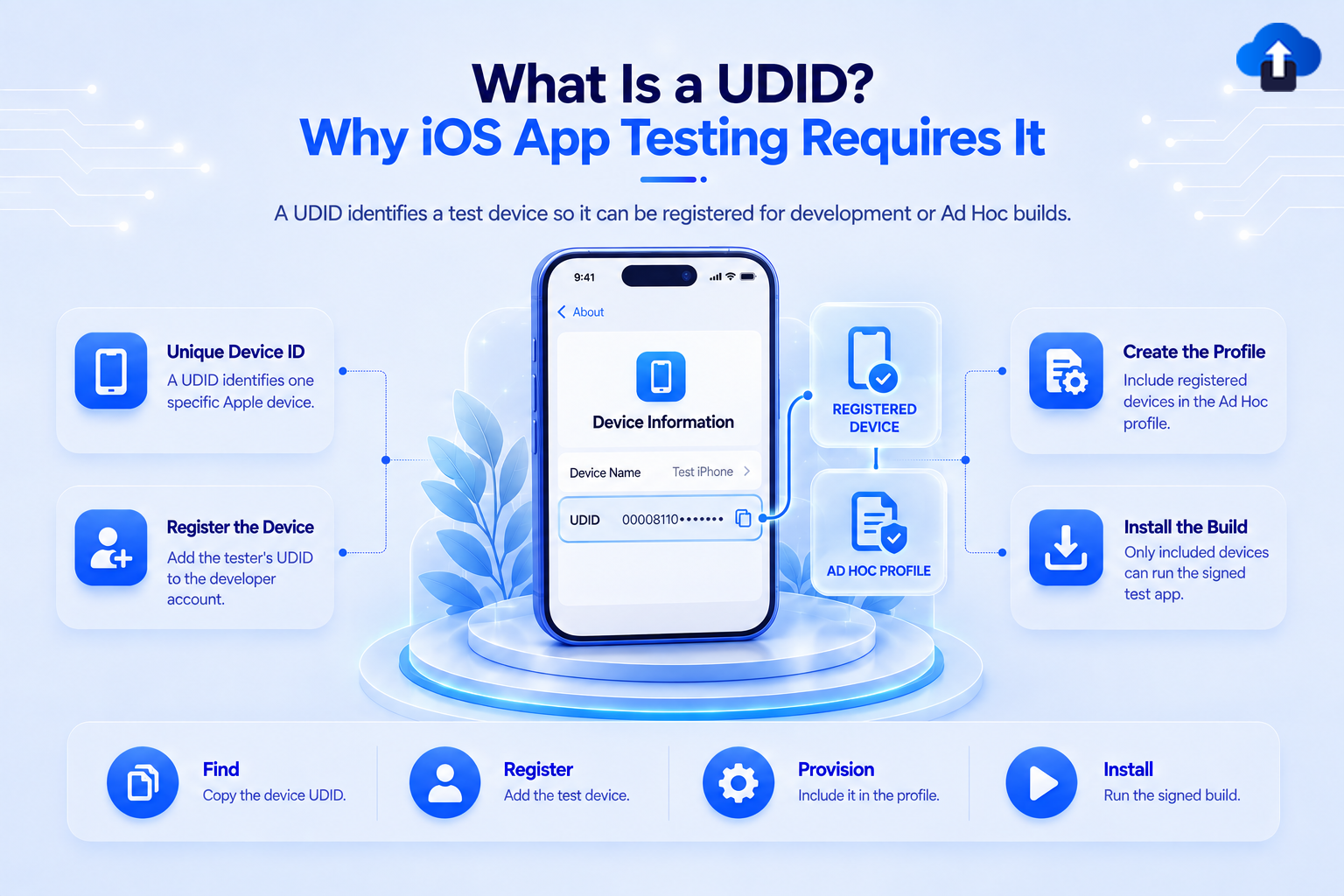
Testing an iOS app on a physical iPhone is more controlled than simply sending someone an installation file. For certain testing and distribution methods, Apple needs to know exactly which devices are allowed to run the app.
That is where the UDID, or Unique Device Identifier, becomes important. A UDID uniquely identifies an Apple device and can be registered with an Apple Developer account so that development or Ad Hoc builds are allowed to run on that specific device.
At AppsOnAir, we also provide a simple way for testers to retrieve their UDID before an iOS build is prepared for compatible OTA testing. Once the device is properly registered and included in the provisioning profile, the IPA can be distributed to that device through the appropriate testing workflow.
What Is a UDID?
A UDID is a unique identifier assigned to an Apple device such as an iPhone or iPad. Developers use this identifier when they need to register a physical device for development or Ad Hoc app testing.
Apple refers to the device ID as a UDID and requires the device name and identifier when a device is manually registered in the Apple Developer account.
Why Apple Uses Device Registration
Apple controls which applications can run on iOS devices outside normal App Store distribution.
When developers create certain development or Ad Hoc builds, the provisioning profile defines which registered devices are authorized to run that application. The UDID gives Apple and the development team a reliable way to identify those specific devices.
This prevents an Ad Hoc build intended for a limited testing group from becoming an unrestricted public installation.
Why Is a UDID Needed for iOS App Testing?
A UDID is required when an iPhone or iPad needs to be included in a development or Ad Hoc provisioning profile.
Apple states that a registered device is required to create these types of profiles. For Ad Hoc distribution, developers select the registered test devices that should be included when generating the provisioning profile.
The Provisioning Profile Controls Installation
A provisioning profile connects several parts of the iOS signing process, including the application, developer team, signing certificate, and permitted devices where applicable.
For an Ad Hoc build, the profile includes a specific set of registered devices. When the application is exported and signed, that provisioning information becomes part of the IPA.
If a tester's device is not included, the Ad Hoc build is not authorized to run on that device.
Does Every Type of iOS Testing Require a UDID?
No. Not every iOS testing method requires the tester to provide a UDID manually.
The requirement depends on how the application is being distributed.
Apple specifically describes TestFlight as an App Store Connect distribution method, while Ad Hoc distribution targets a limited number of registered devices.
This distinction is important because saying "iOS testing always requires a UDID" would be inaccurate. UDIDs are especially relevant to device-registered development and Ad Hoc testing workflows.
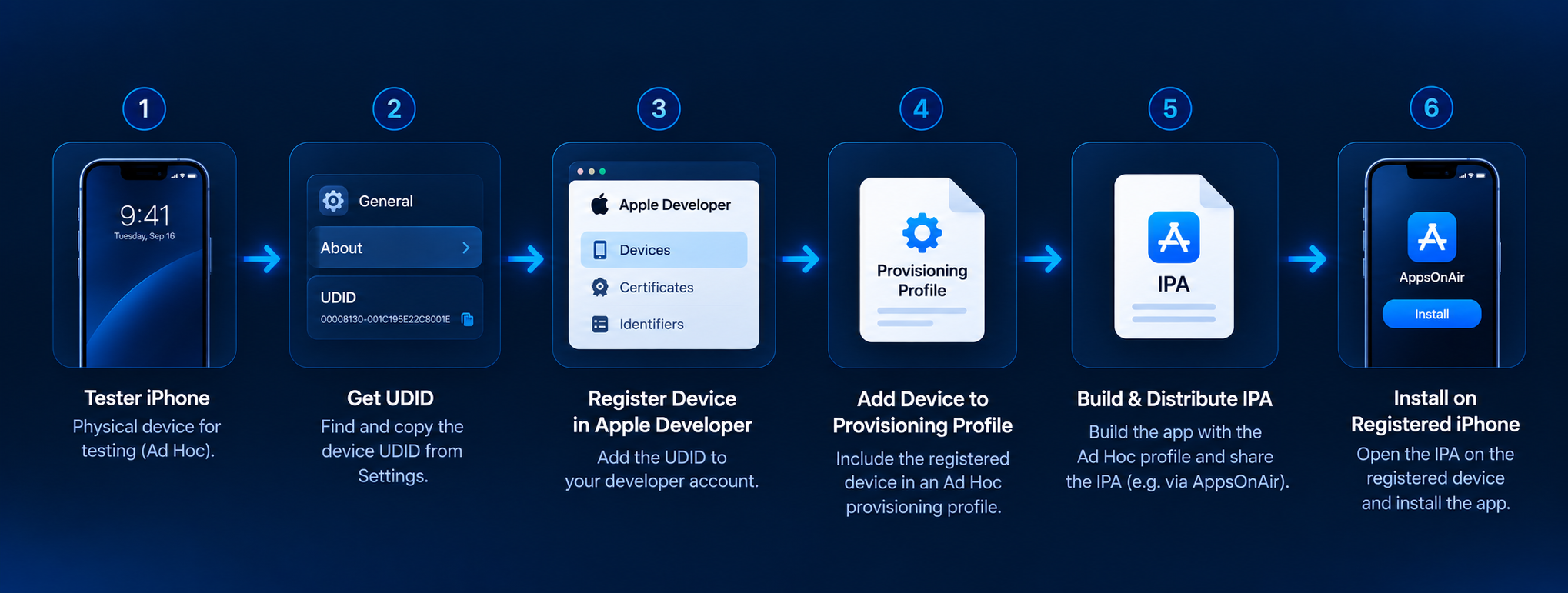
How UDID-Based iOS Testing Works
The complete flow involves more than simply collecting a device identifier.
The developer needs to register the device, create or update the provisioning profile, generate a correctly signed IPA, and then distribute that build to the tester.
Step 1: Get the Tester's UDID
The first step is identifying the device that will be used for testing.
Apple supports finding device identifiers through development tools such as Finder and Device Hub. Developers can also use services designed to simplify UDID retrieval for testers who may not have access to development tools.
Step 2: Register the Device
The developer adds the device to the Apple Developer account under Certificates, Identifiers & Profiles.
Apple requires a device name and UDID when registering an individual device manually.
Once registered and eligible, that device can be selected when creating the appropriate provisioning profile.
Step 3: Add the Device to the Provisioning Profile
For Ad Hoc distribution, the developer creates a profile containing the App ID, distribution certificate, and selected registered test devices.
Apple allows developers to choose which registered devices should be included in the Ad Hoc profile.
If another tester joins later, the team may need to update the profile to include the new device and prepare a new build using the updated provisioning setup.
Step 4: Build and Sign the IPA
The application is then archived and exported using the correct signing configuration.
The resulting IPA contains the provisioning information that determines which registered devices can install and run it.
Step 5: Send the Build to Testers
Once the IPA is ready, it can be shared with the intended testers using an appropriate distribution method.
The distribution platform makes the file easier to deliver, but it does not override Apple's provisioning rules.
What Happens If the UDID Is Not Registered?
If an Ad Hoc IPA was created without the tester's device included in the provisioning profile, that device is not authorized to run the build.
Simply obtaining the UDID after the IPA has already been created does not automatically fix the problem.
The developer needs to register the device and make sure the relevant provisioning profile includes it. The app can then be exported again using the updated profile.
Why Sending the IPA Again Is Not Enough
A common misunderstanding is that an installation problem can be fixed by simply resending the same IPA.
But if the original IPA was signed with a provisioning profile that does not contain the tester's device, sharing the identical file again will not add that device.
The authorization needs to exist in the provisioning configuration used to create the app package.
How Many iOS Test Devices Can Be Registered?
Apple currently allows Apple Developer Program members to register up to 100 devices per product family per membership year.
For example, the device list can contain up to 100 iPhones as well as separate limits for other product families such as iPads, Apple Watches, and Apple TVs.
Disabling a device during the membership year does not immediately restore that registration slot. Apple provides a device-list reset process when the new membership year begins.
This limit is another reason teams should manage registered testing devices carefully.
How AppsOnAir Helps With UDID-Based iOS Testing
With AppsOnAir, we simplify two parts of this testing workflow: retrieving the tester's UDID and distributing the correctly prepared IPA.
Get the Device UDID
Our Get UDID flow allows an iPhone or iPad user to open the UDID page in Safari, follow the on-screen process, retrieve the device identifier, and share it with the development team.
This can be easier for non-technical testers than asking them to connect their iPhone to a Mac and locate the identifier manually.
Distribute the Prepared IPA
Once the device has been registered and the IPA has been created with the correct provisioning setup, the build can be uploaded to AppsOnAir OTA Distribution and shared with the required testers.
The important distinction is that OTA Distribution handles build sharing and installation access. Apple's device registration, signing, and provisioning requirements still apply to an Ad Hoc iOS build.
Common Mistakes With UDIDs and iOS Testing
One common mistake is collecting the tester's UDID but forgetting to add that device to the provisioning profile used for the IPA. Having the identifier alone does not authorize installation.
Another mistake is assuming every iOS beta-testing workflow requires manual UDID collection. TestFlight manages testers differently and does not require developers to collect each tester's UDID manually.
Teams should also avoid treating OTA distribution as a way to bypass Apple provisioning. Distribution tools simplify how builds reach testers, but the underlying IPA still needs to be correctly signed for its chosen distribution method.
Frequently Asked Questions
What is a UDID on an iPhone?
A UDID is a unique device identifier used to distinguish a specific Apple device and register it for development or Ad Hoc app testing when required.
Why do developers need my UDID?
Developers need your UDID when your device must be registered and included in a development or Ad Hoc provisioning profile before the test app can run on it.
Does TestFlight require a UDID?
No. TestFlight manages beta testers through App Store Connect and does not require developers to manually collect and register each tester's UDID.
Can an iOS app be installed if my UDID is not registered?
An Ad Hoc build cannot run on an unregistered device that is missing from its provisioning profile. Other distribution methods, such as TestFlight or the App Store, work differently.
Can I use the same UDID for multiple test apps?
Yes. A registered device can be used for multiple development or Ad Hoc apps, provided each app is correctly signed and its provisioning profile includes that device.
How many iPhones can an Apple Developer account register?
Apple currently allows up to 100 registered iPhones per membership year, with separate limits for other supported device families.
Final Thoughts
A UDID is an important part of iOS testing when applications are distributed directly to registered devices. It tells Apple's provisioning system exactly which iPhones or iPads are authorized to run a development or Ad Hoc build.
The key is understanding when it is actually required. Development and Ad Hoc workflows rely on registered devices, while TestFlight and public App Store distribution do not require testers to manually provide their UDIDs.
With AppsOnAir, we help simplify this process by making it easier for testers to retrieve their UDID and for mobile teams to distribute correctly prepared IPA builds over the air. The device still needs to follow Apple's signing and provisioning requirements, but the path from registered test device to installed QA build becomes easier to manage.








