


.png)


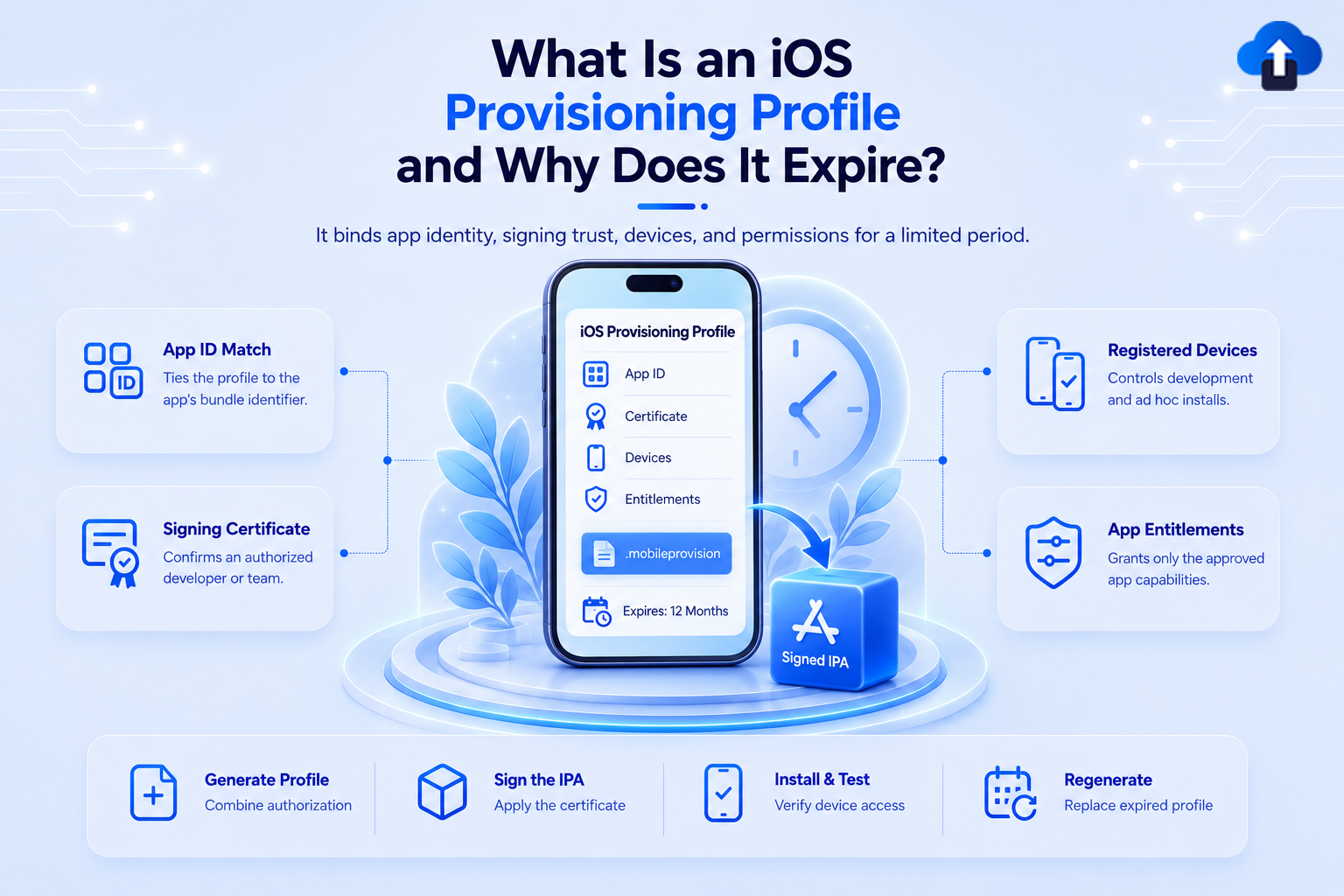
Building an iOS app is not enough to make it run on any iPhone. Apple also needs to verify which app is being installed, who signed it, which capabilities it can use, and for certain testing methods, which devices are allowed to run it.
An iOS provisioning profile connects these pieces together. It is part of Apple's code-signing system and authorizes an app for development, testing, or distribution under specific conditions.
Provisioning profiles also expire. Apple includes an expiration date inside each profile, and the validity period varies by profile type but is typically no more than a year. When a profile used for direct device testing expires, teams may need to regenerate the profile and sign the app again before testing can continue.
At AppsOnAir, provisioning profiles become especially relevant when teams distribute iOS IPA builds directly to testers through OTA Distribution. We simplify build sharing, but the IPA still needs to follow Apple's signing, device-registration, and provisioning requirements.
What Is an iOS Provisioning Profile?
An iOS provisioning profile is a file that authorizes an app to be developed, tested, or distributed using a specific App ID and signing configuration.
Apple describes provisioning profiles as a way to authorize an app to use certain services while confirming that the developer is known to Apple. Development profiles can also include the registered devices and development certificates allowed to use the app.
The profile is commonly stored as a .mobileprovision file.
What Does a Provisioning Profile Contain?
The exact contents depend on the profile type, but a provisioning profile can connect several important pieces of the signing process:
- An App ID associated with the application
- One or more signing certificates, depending on the profile type
- App entitlements and permitted capabilities
- Registered test devices for Development or Ad Hoc profiles
- An expiration date defining how long the profile remains valid
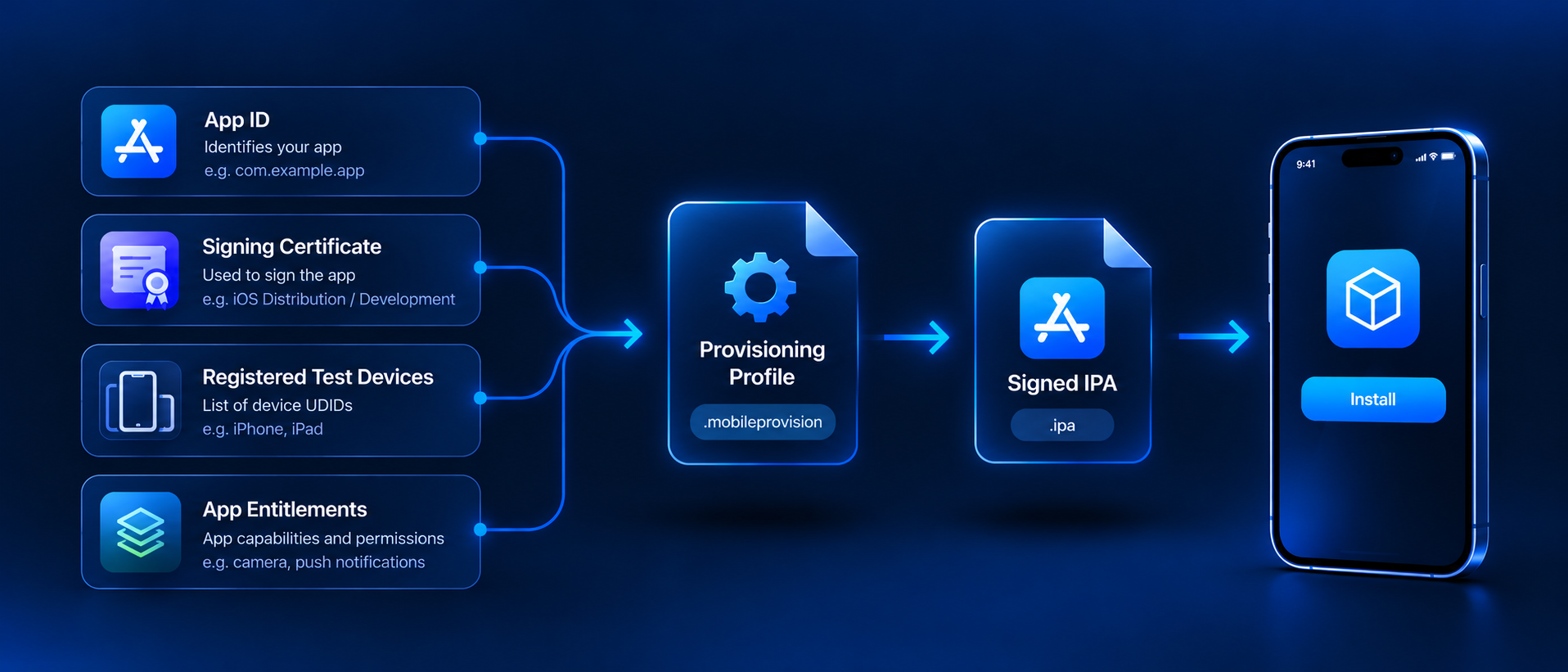
For example, an Ad Hoc provisioning profile contains an App ID, a distribution certificate, and the registered devices selected for testing.
You can think of it as a temporary authorization record describing which app, signed by whom, can run where and with which capabilities.
Why Does an iOS App Need a Provisioning Profile?
Apple's code-signing system is designed to make sure applications are associated with an authorized developer and use only the capabilities permitted for that application.
A provisioning profile provides the information needed to connect the app's identity with its signing credentials and entitlements.
It Connects the App to Its App ID
Every application has a bundle identifier, such as:
com.example.shoppingapp
A provisioning profile references an App ID that matches the application being signed.
If the application and provisioning profile do not match correctly, Xcode may fail to sign the build or the resulting application may fail to install.
It Connects the App to Signing Certificates
The app must also be signed with an appropriate certificate.
A development provisioning profile can contain one or more development certificates. An App Store Connect or Ad Hoc distribution profile uses a distribution certificate.
The certificate proves which developer or development team signed the application, while the provisioning profile defines the conditions under which that signed application is allowed to operate.
It Can Control Which Devices Can Run the App
Development and Ad Hoc profiles can include a list of registered devices.
Apple requires a registered device when creating these profiles. For Ad Hoc distribution, the development team selects the devices that should be allowed to run the test build.
This is why a tester's UDID matters in Ad Hoc testing. If their device is not included in the profile used to sign the IPA, the app is not authorized for that device.
Types of iOS Provisioning Profiles
Different provisioning profiles are used at different stages of the iOS app lifecycle.
Understanding the difference is important because device restrictions and distribution behavior are not the same for every profile.
Apple also provides other distribution models for specific programs and platforms, but these three cover the most common iOS development, testing, and App Store workflows.
Development Provisioning Profile
A development profile allows developers to run an app on registered devices while building and testing it.
It connects the App ID, development certificates, registered devices, and allowed app services. If Xcode automatic signing is enabled, Xcode can manage these profiles for the developer.
Ad Hoc Provisioning Profile
An Ad Hoc profile is used when a team wants to distribute an iOS test build directly to selected registered devices without using normal public App Store distribution.
The profile contains the selected test devices and a distribution certificate. The resulting IPA can only run within the restrictions defined by that provisioning setup.
App Store Connect Provisioning Profile
An App Store Connect provisioning profile is used when preparing an application for upload to App Store Connect.
Unlike Development and Ad Hoc profiles, it does not contain a specific list of tester devices. Apple handles the production distribution process after the app has been submitted through App Store Connect.
Why Do Provisioning Profiles Expire?
Every provisioning profile contains an expiration date that limits how long the authorization remains valid.
Apple's code-signing documentation states that the validity period varies by profile type but is typically no more than a year. Some specialized profile types have different validity periods.
Provisioning Is Temporary Authorization
A provisioning profile represents a specific combination of app identity, certificates, entitlements, and, in some cases, registered devices.
Those elements can change over time.
Developers may renew certificates, add or remove devices, enable new app capabilities, or change the application's signing configuration. A limited validity period prevents one old provisioning configuration from remaining valid indefinitely.
Signing Certificates Also Change
Provisioning profiles are linked to signing certificates.
If a certificate is revoked or replaced, the existing provisioning configuration may need to be updated. Apple allows profiles to be edited or regenerated when certificates, devices, or app services change.
This is why teams should treat certificates and provisioning profiles as related parts of the same signing lifecycle rather than separate setup tasks that are completed once.
What Happens When a Provisioning Profile Expires?
The effect depends on how the application is being distributed.
For development and direct device testing, an expired provisioning profile can prevent the signed application from continuing to work as expected under that provisioning authorization.
Apple specifically instructs developers to regenerate an expired profile, remove the expired profile from devices where appropriate, and resign the app using the regenerated profile.
Ad Hoc Test Builds Need Attention
An Ad Hoc IPA contains the provisioning information used when the build was signed.
If that profile expires, simply sharing the same old IPA again does not create a new authorization period.
The team needs to generate a valid provisioning profile and sign or rebuild the application with the updated profile before distributing the new IPA.
App Store Users Are Different
Apps downloaded from the App Store do not depend on an embedded provisioning profile in the same way as Development or Ad Hoc builds.
Apple verifies signing and provisioning as part of the App Store distribution process, and App Store downloads do not contain the provisioning profile embedded in direct-development builds.
This is why provisioning-profile expiration is especially noticeable during development, internal testing, and direct IPA distribution.
How to Renew an Expired Provisioning Profile
Apple refers to this process as regenerating the provisioning profile.
The basic workflow is straightforward.
Check the Existing Configuration
Before generating another profile, confirm that the App ID, signing certificate, required capabilities, and test-device list are still correct.
This is also a good opportunity to remove outdated assumptions from the previous testing setup.
Regenerate the Profile
In Certificates, Identifiers & Profiles, select the expired or invalid profile and regenerate it.
Apple then creates a new profile based on the current configuration.
Sign the App Again
The existing IPA does not automatically inherit the renewed profile.
The application needs to be signed using the regenerated provisioning profile. For testing workflows, the newly signed IPA can then be distributed again to the required devices.
Teams using Xcode automatic signing may have much of this provisioning management handled automatically when Xcode needs a compatible profile.
How AppsOnAir Fits Into iOS Provisioning and Testing
With AppsOnAir OTA Distribution, we help mobile teams share prepared IPA builds with QA teams, clients, and other testers through distribution links instead of manually transferring application files.
Provisioning Still Happens Before Distribution
OTA Distribution does not replace Apple's signing or provisioning system.
For an Ad Hoc IPA, testers' devices still need to meet the provisioning requirements of the build. The IPA must be signed correctly before it is uploaded for distribution.
Once that build is prepared, we handle the sharing side of the workflow.
Replace Expired Test Builds
If the provisioning profile inside an Ad Hoc build expires, the development team should regenerate the profile, prepare a newly signed IPA, and upload the updated build.
OTA Distribution can then provide testers with access to the valid replacement build and maintain the different uploaded versions in the distribution workflow.
This distinction is important: an AppsOnAir distribution-link expiration and an Apple provisioning-profile expiration are two separate things. Changing the sharing link does not renew the Apple provisioning authorization inside the IPA.
Common Mistakes With iOS Provisioning Profiles
One common mistake is treating the provisioning profile as a permanent file. Profiles have expiration dates and should be monitored alongside certificates and Apple Developer membership.
Another mistake is adding a new test device to the Apple Developer account but continuing to distribute an IPA signed with an older profile that does not contain that device.
Teams should also avoid assuming that generating a fresh distribution link fixes provisioning issues. If the IPA itself was signed with an expired or incorrect profile, the app needs to be prepared again with valid signing credentials.
Frequently Asked Questions
What is an iOS provisioning profile?
An iOS provisioning profile is a signing authorization file that connects an app's App ID, certificates, entitlements, and, for some profile types, registered test devices.
How long does an iOS provisioning profile last?
Validity varies by profile type. Apple states that provisioning-profile validity is typically no more than a year, although some specialized profiles use different periods.
Why does a provisioning profile expire?
Provisioning profiles are temporary authorizations tied to signing credentials, app configuration, entitlements, and sometimes devices. Expiration requires those permissions to be refreshed periodically.
What happens when an Ad Hoc provisioning profile expires?
The signed Ad Hoc build can no longer rely on that expired authorization. The profile should be regenerated and the app signed again before a replacement IPA is distributed.
Does renewing a provisioning profile update an existing IPA?
No. An existing IPA does not automatically receive the new profile. The app must be signed again using the regenerated provisioning profile.
Does an App Store app stop working when its provisioning profile expires?
Normal App Store downloads do not depend on an embedded provisioning profile in the same way as Development or Ad Hoc builds because Apple validates provisioning during App Store distribution.
Final Thoughts
An iOS provisioning profile is a core part of Apple's code-signing system. It connects the application, signing identity, allowed capabilities, and, when required, the devices that are authorized to run a test build.
Its expiration is therefore more than a date on a file. For Development and Ad Hoc workflows, an expired profile can interrupt installation or testing until the profile is regenerated and the app is signed again.
With AppsOnAir OTA Distribution, we simplify what happens after the IPA has been prepared by giving teams a faster way to share builds with testers and stakeholders. Apple's provisioning requirements still remain in place, so keeping certificates, devices, and provisioning profiles current is essential for keeping iOS testing workflows running without unexpected interruptions.








