


.png)


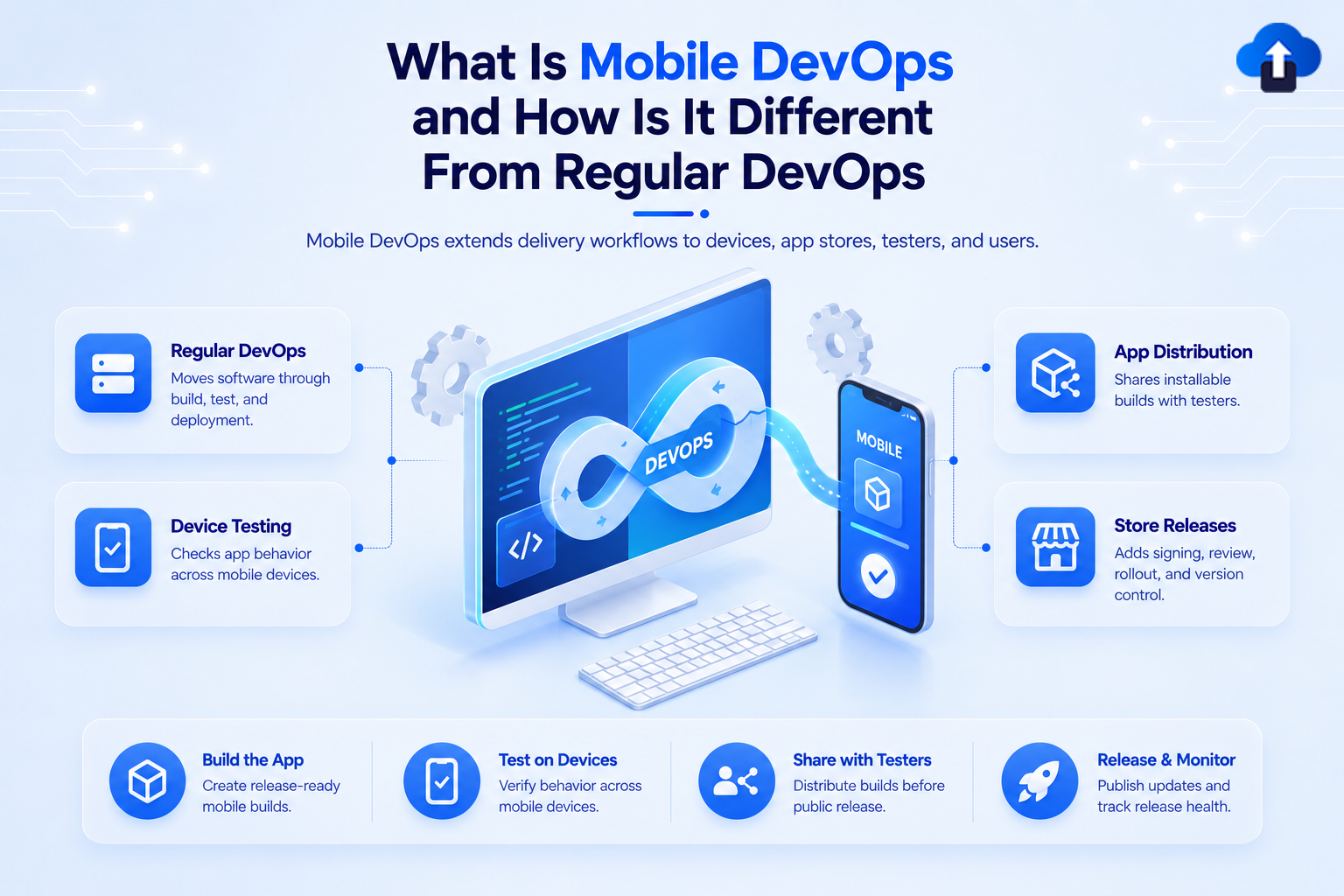
DevOps helps development and operations teams build, test, release, and monitor software through shared processes and automation. But shipping a mobile app adds challenges that do not exist in quite the same way for web applications or backend services.
Mobile DevOps applies DevOps principles to the mobile app lifecycle. It covers code integration, automated testing, build creation, device testing, beta distribution, app store releases, version management, monitoring, feedback, and post-release updates.
At AppsOnAir, we work across several of these mobile-specific stages, from distributing builds to testers and collecting in-app feedback to managing app versions and eligible over-the-air updates. The important difference is that mobile DevOps must continue managing software even after the build leaves the development team's infrastructure.
What Is Mobile DevOps?
Mobile DevOps is the use of DevOps practices, automation, and collaboration across the complete mobile application lifecycle. Its goal is to help teams build, test, distribute, release, monitor, and improve mobile apps more reliably.
Traditional DevOps already emphasizes continuous integration and continuous delivery. CI regularly builds and tests code, while CD automates the movement of tested software toward production environments.
Mobile DevOps Extends Beyond CI/CD
A mobile pipeline does not end when a successful build is created. That build still needs to work across real devices, operating system versions, app signing requirements, beta testers, and eventually an app marketplace.
For Android, production publishing commonly involves creating a release build and publishing an Android App Bundle through Google Play. For iOS, a build is uploaded to App Store Connect and an app version is submitted to App Review before public distribution.
That extra distribution layer changes how mobile teams need to think about delivery.
What Is Regular DevOps?
Regular DevOps connects software development and operations through practices such as source control, continuous integration, automated testing, continuous delivery, infrastructure automation, deployment controls, and monitoring.
For many web or backend systems, a successful deployment can replace the software running in a production environment. Once the new release is deployed, users normally interact with that production version the next time they access the service.
Automation Is at the Center of DevOps
A typical CI/CD workflow can automatically build and test code whenever changes are committed. After those checks pass, another workflow can deploy the application to a staging or production environment.
Deployment environments can also include approvals, protection rules, and other release gates before code reaches production.
Mobile DevOps uses many of the same ideas, but it has additional stages after the software artifact has been built.
Mobile DevOps vs. Regular DevOps
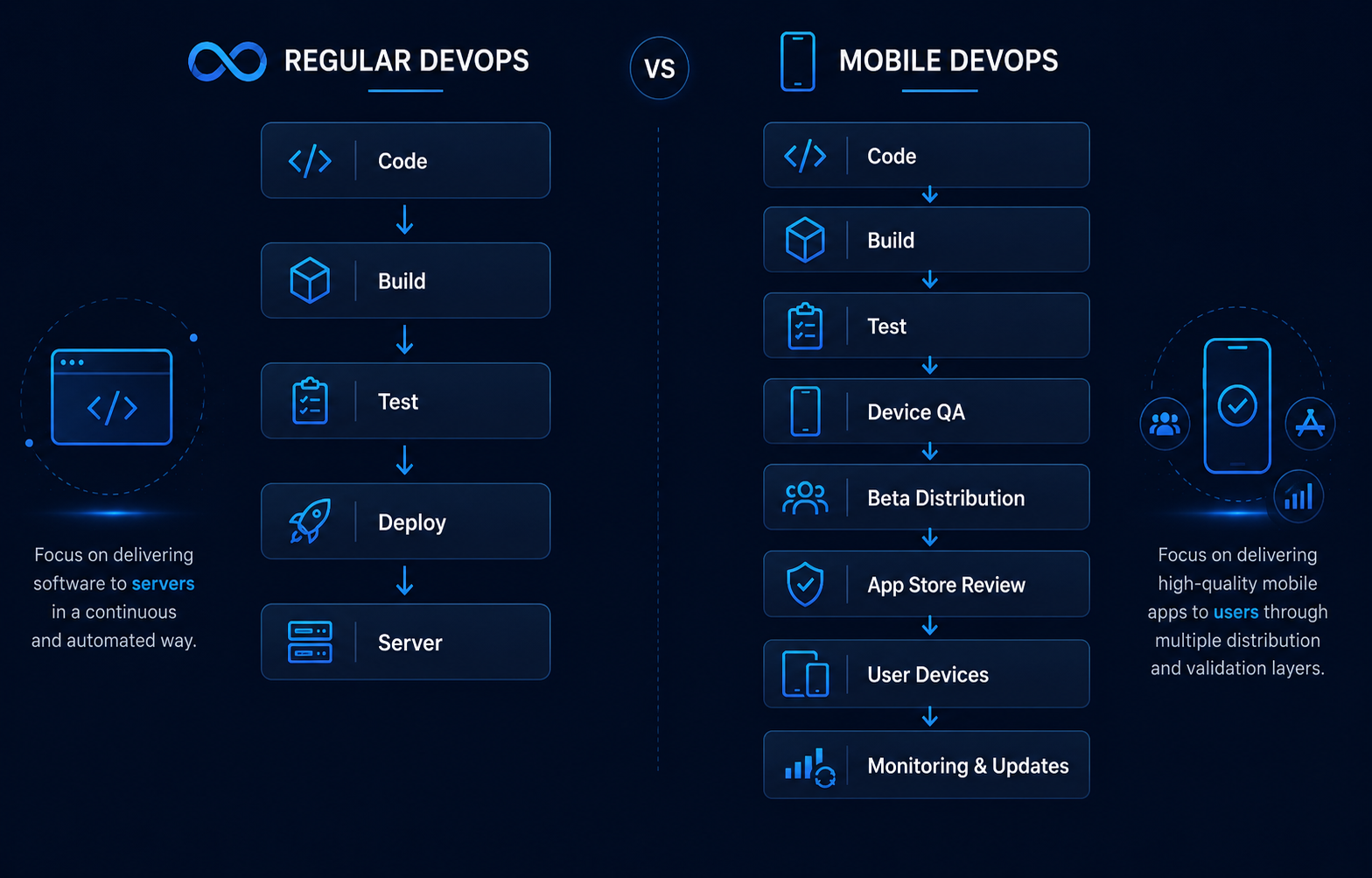
The clearest difference is control over the final delivery environment. A web team may control the server where its application runs, while a mobile team ships software to devices that remain in users' hands.
Users can also stay on older mobile versions even after a new version has been published. That makes version management, update adoption, device compatibility, and release distribution important parts of mobile operations.
Why Mobile DevOps Is More Complex
Mobile teams do not simply deploy code to infrastructure they control. They must account for external platforms, hardware differences, installed versions, and user-controlled update behavior.
These factors create several additional responsibilities inside the release pipeline.
Device and OS Fragmentation
A backend service normally runs in an environment selected and managed by the engineering team. A mobile application runs on many devices with different operating system versions, hardware capabilities, resolutions, and configurations.
A build that behaves correctly on one test device may expose problems somewhere else. Mobile QA therefore needs broader device coverage before a release is considered ready.
Android App Bundles highlight this device-specific nature of mobile delivery. Google Play processes the uploaded bundle and generates optimized APKs based on individual device configurations.
App Store Distribution Adds Another Release Stage
In regular continuous deployment, automation can sometimes move a tested change directly into production.
A mobile production release has another dependency. Apple reviews app versions submitted through App Store Connect, while Android releases must be prepared and published through the relevant distribution workflow.
This means "build succeeded" and "users have the update" are two different milestones.
Users Can Run Different Versions
When a website is updated, the organization normally controls which version the server serves. Mobile apps are installed on individual devices, so not every user upgrades at the same time.
One customer might run the latest version while another continues using a much older build. Backend changes must therefore consider compatibility with the app versions that are still active.
Mobile DevOps needs a strategy for minimum supported versions, optional updates, forced updates, and eventually retiring outdated builds.
Signing and Release Artifacts Matter
Mobile pipelines must generate platform-specific release artifacts with the correct signing and configuration.
Android App Bundles contain compiled code and resources that Google Play later processes into installable APKs for different devices.
These artifacts need to remain traceable so QA and engineering teams know exactly which version and build they are testing or distributing.
What Does a Mobile DevOps Pipeline Look Like?
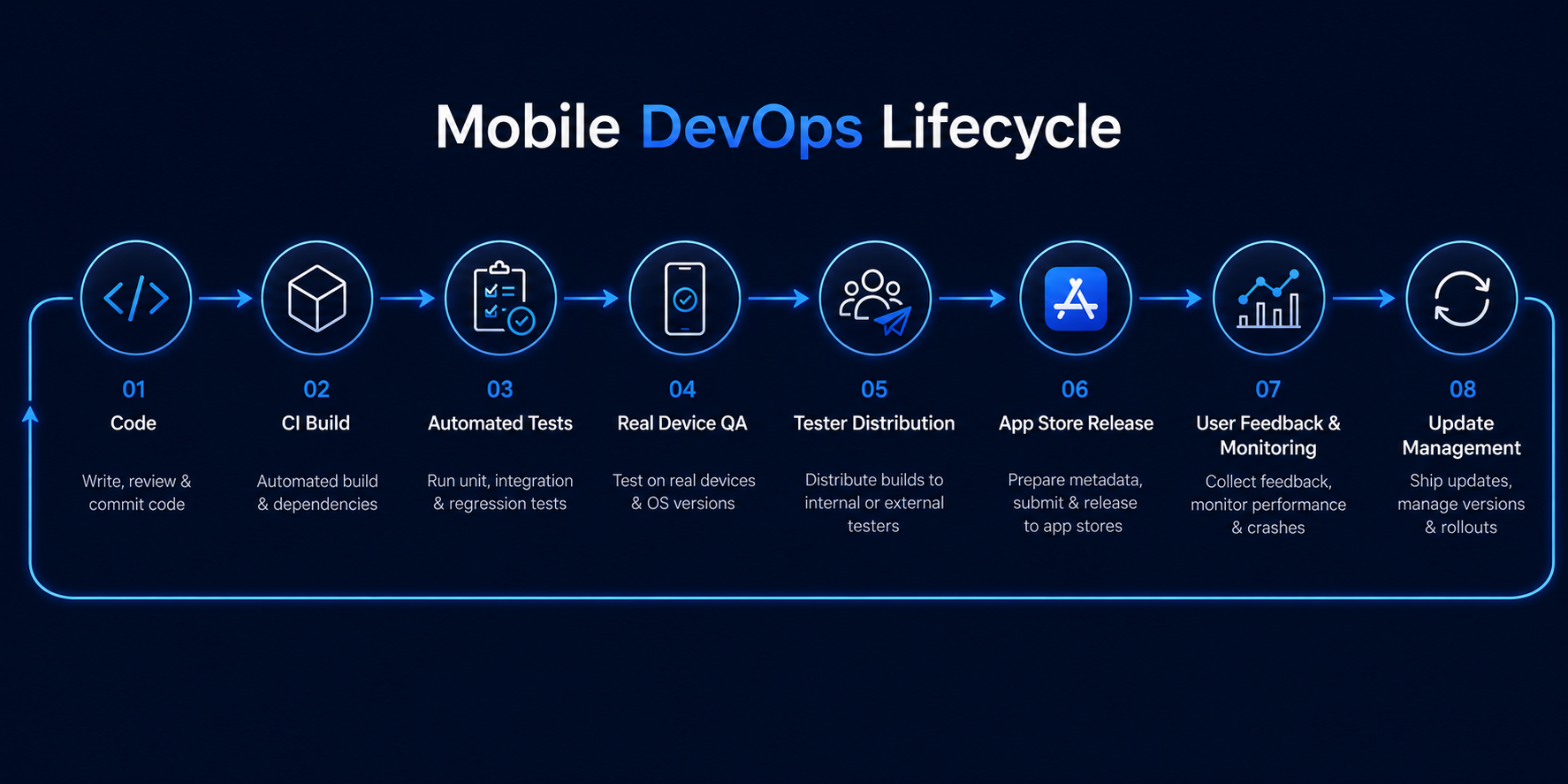
A practical mobile DevOps workflow connects development with testing, distribution, release, and post-release operations instead of treating each stage as a separate manual process.
Automation should remove repetitive work while keeping enough release controls to protect production users.
1. Code and Continuous Integration
Developers commit changes to a shared repository. CI workflows then build the project and run automated checks such as tests, linting, or security checks.
Continuous integration helps detect problems earlier and makes smaller, frequent changes easier to validate.
2. Generate Mobile Builds
After validation, the pipeline creates the platform-specific mobile artifact needed for testing or release.
This may include an Android APK or App Bundle and an iOS build depending on the stage of the pipeline.
3. Test Before Store Release
QA teams need access to builds before they reach public users. That can include automated tests, physical-device testing, cloud device testing, and hands-on testing by internal teams.
The goal is to catch issues before app-store submission becomes another dependency in the release process.
4. Distribute Builds to Testers
Mobile DevOps should make it easy to send release candidates to QA teams, clients, stakeholders, or beta testers.
Distribution should also keep build versions and release notes clear so testers know exactly which build they are reviewing.
5. Release Through the App Stores
Once the build is ready, teams prepare the public release through Google Play or App Store Connect.
For Apple platforms, developers select the appropriate build, add it to the submission, and send the app version for review.
6. Monitor and Manage the Released Version
Mobile DevOps continues after publication. Teams need to watch for crashes, user feedback, compatibility issues, backend problems, and adoption of the new version.
They also need a plan for what happens when a serious problem is discovered after the release has already reached users.
How AppsOnAir Fits Into a Mobile DevOps Workflow
Mobile DevOps includes several stages between creating a build and maintaining it after release. Our products focus on specific parts of that lifecycle rather than replacing the team's existing CI/CD pipeline.
Distribute Test Builds With OTA Distribution
OTA Distribution lets teams upload Android .apk and iOS .ipa builds and share them with testers or clients through links or QR codes. Build information and release notes stay attached to the distributed release.
For automated workflows, the AppsOnAir CLI can upload builds from a terminal or CI/CD pipeline, helping build distribution become part of the release workflow instead of a separate manual upload step.
Capture QA Feedback With AppRemark
AppRemark adds in-app bug reporting to the testing stage. Testers can capture and annotate screenshots, submit contextual feedback, and send device and app-version information to a centralized dashboard.
This helps connect testing with debugging by keeping the issue and its mobile context together.
Manage Released Apps With AppSync and CodePush
AppSync manages optional updates, forced updates, minimum-version behavior, and maintenance mode after the SDK has been integrated. Update rules can be controlled by platform and applied when the app launches.
For React Native applications, CodePush provides another release path for eligible JavaScript bundle and asset changes. Native code changes still require a full store release.
Together, these workflows address stages that traditional server-focused DevOps pipelines do not normally need to manage.
Common Mobile DevOps Mistakes
One common mistake is assuming that a successful CI build means the release process is complete. For mobile apps, device testing, distribution, app-store submission, user adoption, and version management still remain.
Another mistake is relying heavily on manual build sharing. When developers repeatedly upload files, send links, and explain which build testers should install, release information can become difficult to track.
Teams can also focus too heavily on release speed and ignore post-release controls. A strong mobile DevOps process should plan for outdated versions, urgent fixes, backend downtime, tester feedback, and problems discovered after launch.
Frequently Asked Questions
What is mobile DevOps?
Mobile DevOps applies DevOps practices to the entire mobile app lifecycle, including CI/CD, mobile builds, device testing, beta distribution, app-store releases, monitoring, feedback, version management, and updates.
How is mobile DevOps different from regular DevOps?
Mobile DevOps adds device testing, mobile signing, app-store distribution, installed-version management, and user-controlled update adoption to the normal DevOps practices of build, test, deployment, and monitoring.
Is CI/CD part of mobile DevOps?
Yes. CI/CD is a core part of mobile DevOps, but mobile pipelines extend beyond it to include device QA, build distribution, app-store submission, version adoption, and post-release app management.
Why are mobile deployments harder than web deployments?
Mobile deployments involve software installed on user devices, multiple operating systems and device types, app-store processes, signed binaries, and users who may remain on older versions after a new release.
Can mobile DevOps automate app releases?
Yes. Many build, testing, signing, distribution, and submission steps can be automated, although app-store policies and review requirements still affect how production releases ultimately reach users.
Final Thoughts
Mobile DevOps uses the same foundation as regular DevOps—automation, CI/CD, testing, collaboration, and monitoring—but applies it to a more distributed release environment.
A mobile pipeline needs to think beyond deployment. Teams must get builds onto real devices, collect useful feedback, publish through app stores, support different installed versions, and respond when problems appear after release.
At AppsOnAir, we help teams connect several of those mobile-specific stages through OTA Distribution, AppRemark, AppSync, and CodePush. The goal is not simply to ship mobile builds faster, but to make testing, distribution, updates, and post-release management part of one repeatable mobile delivery process.









