


.svg)





React Native Rendering, Virtualization & Performance Triage (2025–2026)
FlatList lag is not a mystery. It is a symptom.
Every dropped frame, every janky scroll, every blank flash during fast swipes has a root cause in code. FlatList is one of React Native's most used components and one of its most misused. Teams reach for it immediately, configure it minimally, and then wonder why the scroll experience degrades as their data grows.
This post breaks down why FlatList lags, what the JavaScript thread is doing during a scroll, and the specific optimizations that actually move the needle — with working code patterns for each.
The last two years of React Native performance work point to three patterns behind most FlatList lag:
- Re-render cascades triggered by unstable props and missing memoization
- Virtualization misconfiguration — window sizes, initial batches, and removal policies set to defaults that don't match real data
- Heavy renderItem functions doing layout work, data transformation, or image decoding inline on the JS thread
This is not a UI polish problem. FlatList lag directly impacts:
- JS thread frame budget (16ms per frame on 60fps, 8ms on 120fps)
- Interaction responsiveness and tap latency
- Memory consumption on low-end Android devices
- Perceived app quality in user reviews and retention metrics
- Bridge / JSI throughput under scroll load
If your FlatList has more than a few dozen items and has not been explicitly optimized, you are leaving performance on the table.
🔍 Why FlatList Lags: What's Actually Happening

FlatList is a wrapper around VirtualizedList, which is a wrapper around ScrollView with a virtualization layer on top. Understanding the stack tells you where the budget is spent.
The JavaScript Thread Is Your Bottleneck
React Native runs your component logic, state updates, and renderItem calls on the JavaScript thread. The UI thread handles actual rendering and compositing. The bridge (or JSI) ferries instructions between them.
During a fast scroll:
- JS thread calculates which items are in the viewport window
- It calls renderItem for newly visible items
- It serializes layout props and passes them across the bridge
- The UI thread renders and composites the result
If any step in that chain takes longer than your frame budget, frames are dropped. The most common culprit is renderItem doing too much work.
What VirtualizedList's Window Actually Means
VirtualizedList maintains a render window around the visible area. Items outside the window are unmounted to save memory. The window size is controlled by windowSize — a multiplier of the visible area height.
Default windowSize is 21 (10 viewport heights above, 10 below). For most apps, this is too large. It keeps too many items mounted, inflating memory and JS reconciliation cost.
Reducing windowSize reduces memory and reconciliation work — at the cost of more frequent blank-frame flashes during very fast scrolls. The right value depends on your item height and scroll velocity patterns.
Who Gets Hit First
These teams feel FlatList lag immediately in production:
- Apps rendering complex cards with nested views, images, and conditional content
- Feeds with dynamic item heights and no getItemLayout defined
- Teams passing inline functions or object literals as props to renderItem
- Lists inside Tab navigators that re-mount on every tab switch
- Android low-end device targets (sub-3GB RAM) with dense data
Lag Categories & Root Causes
FlatList performance problems fall into four categories. Each has a distinct fingerprint in the React DevTools Profiler and Flipper.
1. Re-render Cascades from Unstable Props
Symptom: React DevTools Profiler shows every visible item re-rendering on every scroll event, even items whose data has not changed.
Root cause: renderItem is defined inline as an arrow function, or item props include object literals created on each render. React sees new references on every render cycle and re-renders all children.
Fix:
// ❌ WRONG -- new function reference on every render
const MyList = ({ data }) => (
<FlatList
data={data}
renderItem={({ item }) => <ItemCard item={item} />}
/>
);
// ✅ CORRECT -- stable reference with useCallback
const MyList = ({ data }) => {
const renderItem = useCallback(
({ item }) => <ItemCard item={item} />,
[] // deps: add only what changes item rendering);
return <FlatList data={data} renderItem={renderItem} />;
};
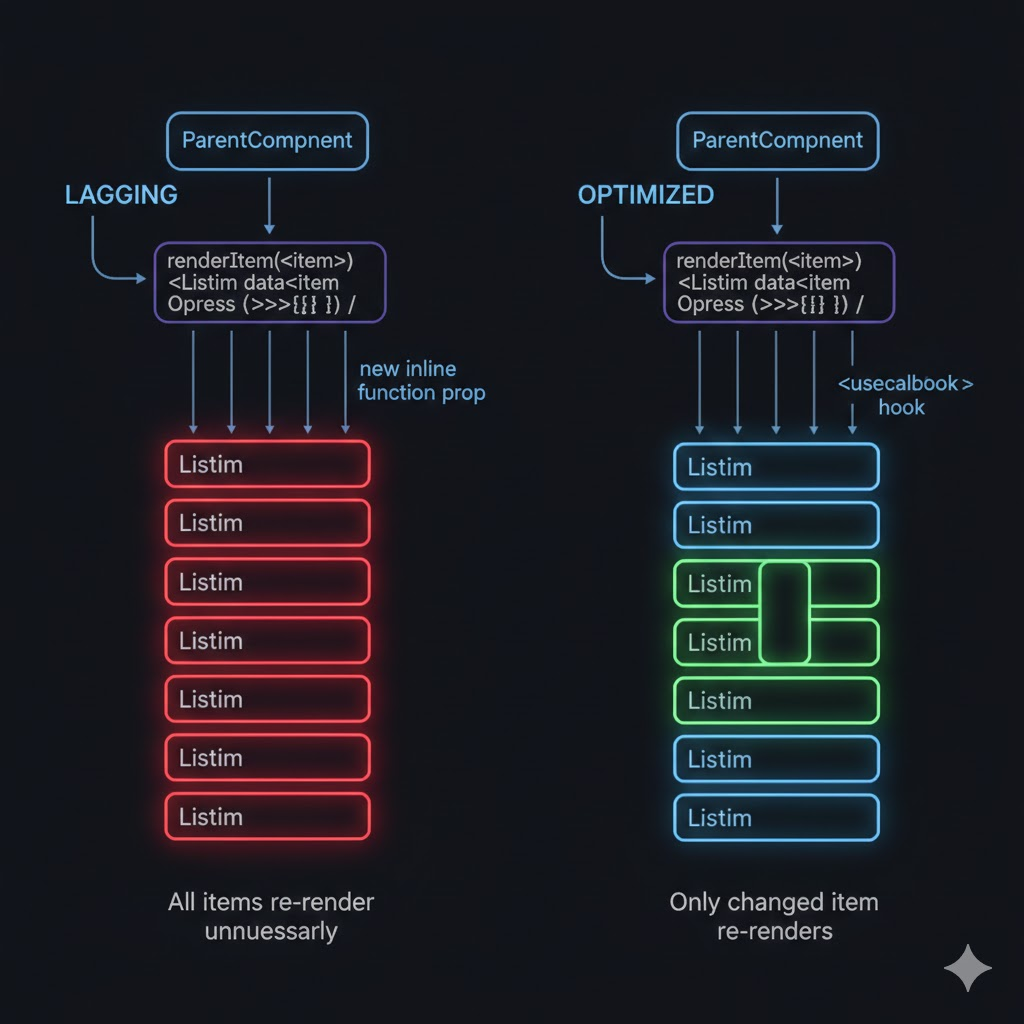
Also wrap the item component itself in React.memo to prevent re-renders when props haven't changed:
const ItemCard = React.memo(({ item }) => {
return (
<View style={styles.card}>
<Text>{item.title}</Text>
</View>
);
});
// Optional: custom equality check for complex props
const ItemCard = React.memo(({ item }) => { ... }, (prev, next) => {
return prev.item.id === next.item.id && prev.item.updatedAt === next.item.updatedAt;
});
2. Missing getItemLayout — Expensive Layout Measurement
Symptom: Scrolling to index is slow or wrong. Initial render is sluggish. Flipper shows layout passes spiking during scroll.
Root cause: Without getItemLayout, FlatList must measure every item's height dynamically by rendering it off-screen. This is expensive and blocks the JS thread.
Fix: Provide getItemLayout whenever your items have a fixed or calculable height:
const ITEM_HEIGHT = 80;
const SEPARATOR_HEIGHT = 1;
const getItemLayout = useCallback((data, index) => ({
length: ITEM_HEIGHT,
offset: (ITEM_HEIGHT + SEPARATOR_HEIGHT) * index,
index,
}), []);
<FlatList
data={data}
renderItem={renderItem}
getItemLayout={getItemLayout}
keyExtractor={(item) => item.id}
/>
For dynamic heights, consider pre-computing heights in your data model or using a caching layout manager rather than leaving measurement to FlatList.
3. Oversized windowSize and initialNumToRender
Symptom: High memory consumption, slow initial render on low-end devices, JS thread busy reconciling off-screen items during scroll.
Root cause: Default FlatList configuration was designed for general use, not optimized for your specific data density and device profile.
Fix: Tune the virtualization parameters explicitly:
<FlatList
data={data}
renderItem={renderItem}
keyExtractor={(item) => item.id}
// How many items to render on first mount
initialNumToRender={8}
// Render window = windowSize * visible height (reduce from default 21)
windowSize={5}
// How many items to render per batch while scrolling
maxToRenderPerBatch={5}
// Minimum scroll delta before triggering new render batch
updateCellsBatchingPeriod={50}
// Remove off-screen items from memory
removeClippedSubviews={true} // Android; use with caution on iOS
/>
Note: removeClippedSubviews can cause blank flashes on iOS if items have complex shadow or overflow styles. Test on both platforms before enabling globally.
4. Heavy renderItem — Inline Work on the JS Thread
Symptom: Profiler shows renderItem taking 10–40ms per item. Frames dropped during initial render and scroll acceleration.
Root cause: renderItem is doing data transformation, date formatting, string parsing, or conditional style calculation inline on every render pass.
Fix: Move all data transformation out of render into useMemo or the data preparation layer:
// ❌ WRONG -- transformation on every render
const renderItem = ({ item }) => (
<View style={[styles.card, item.isRead ? styles.read : styles.unread]}>
<Text>{formatDate(item.createdAt)}</Text>
<Text>{item.tags.filter(t => t.active).map(t => t.label).join(', ')}</Text>
</View>
);
// ✅ CORRECT -- pre-compute in data layer
const preparedData = useMemo(() =>
data.map(item => ({
...item,
formattedDate: formatDate(item.createdAt),
activeTagsLabel: item.tags.filter(t => t.active).map(t => t.label).join(', '),
cardStyle: item.isRead ? styles.read : styles.unread,
})),
[data]
);
const renderItem = useCallback(({ item }) => (
<View style={[styles.card, item.cardStyle]}>
<Text>{item.formattedDate}</Text>
<Text>{item.activeTagsLabel}</Text>
</View>
), []);
Image Handling in FlatList
Images are the single biggest source of FlatList lag that teams do not attribute to images. Every unoptimized image in a list item is:
- Decoded on the JS thread or native image thread per scroll
- Potentially re-decoded on re-render if not cached
- A source of layout recalculation if no explicit size is set
What You Should Do Now
1. Always set explicit image dimensions
// ❌ Forces layout measurement on every render
<Image source={{ uri: item.imageUrl }} style={{ flex: 1 }} />
// ✅ Fixed dimensions skip layout measurement
<Image source={{ uri: item.imageUrl }} style={{ width: 64, height: 64 }} />

2. Use a caching image library
React Native's built-in Image component does not cache aggressively on Android. Use a library that provides memory and disk caching:
// Option A: react-native-fast-image (most widely used)
import FastImage from 'react-native-fast-image';
<FastImage
source={{ uri: item.imageUrl, priority: FastImage.priority.normal }}
style={{ width: 64, height: 64 }}
resizeMode={FastImage.resizeMode.cover}
/>
3. Preload images before the list renders
// Preload top N images on data fetch
useEffect(() => {
const preloadUrls = data.slice(0, 10).map(item => ({ uri: item.imageUrl }));
FastImage.preload(preloadUrls);
}, [data]);
Best Practices & Trade-offs
Do not treat FlatList tuning as a last-minute fix before release.
- Add FlatList performance to your definition of done for any feature involving lists
- Include list scroll in your Maestro or Detox E2E test suite
- Measure JS thread frame rate with Flipper's Performance plugin on real devices — not simulators
4. Use keyExtractor Correctly — Always
A missing or unstable keyExtractor causes FlatList to use array index as key, which defeats reconciliation optimization and causes full re-renders on data changes:
// ❌ Index key -- breaks reconciliation on insert/delete
keyExtractor={(item, index) => index.toString()}
// ✅ Stable unique ID
keyExtractor={(item) => item.id}
5. Separate List State from Item State
List-level state changes (pagination, filters, sort) should not cause item-level re-renders. Structure your state so list metadata and item data are in separate contexts or selectors.
- Use Zustand or Jotai selectors to subscribe items only to their own slice of state
- Avoid storing list UI state (scroll position, active filters) in the same atom/slice as item data
6. Profile on Low-End Android, Not Simulator
The iOS simulator and Android emulator run on your Mac's CPU. They are not representative of production performance. Profile on:
- A mid-range Android device (2–3GB RAM, Android 10+) for baseline
- A low-end device (1–1.5GB RAM) if your app targets emerging markets
- Use Android GPU Overdraw visualization to catch over-layered views in list items
7. Consider FlashList for High-Density Lists
For lists with more than 200 items or complex item layouts, evaluate Shopify's FlashList. It replaces FlatList with a recycling-based renderer that reuses native views instead of unmounting and remounting them:
import { FlashList } from '@shopify/flash-list';
<FlashList
data={data}
renderItem={renderItem}
estimatedItemSize={80} // required -- replaces getItemLayout
keyExtractor={(item) => item.id}
/>
FlashList's recycling model eliminates the mount/unmount cost entirely. Trade-off: items must handle being populated with new data without remounting, which requires careful state initialization in item components.
Conclusion
FlatList lag is not inevitable. It is a configuration problem.
The defaults that ship with FlatList were designed to be safe and broadly applicable, not fast for your specific data shape, device target, and scroll behavior. Every production list that hasn't been explicitly tuned is running on those defaults — and feeling the cost.
What the 2025–2026 React Native ecosystem is signaling:
- New Architecture (JSI + Fabric) reduces bridge overhead but does not eliminate JS thread budget constraints
- FlashList is becoming the production default for high-density lists
- Image handling remains the most underestimated source of list lag
- Re-render cascades from unstable props are still the most common root cause
The scroll feels smooth in your dev build. On a real device, with real data, at real scroll velocity, the frame budget is unforgiving. For engineering teams, this is the moment to:
- Wrap renderItem in useCallback and item components in React.memo
- Provide getItemLayout for any list with fixed or calculable item heights
- Tune windowSize and maxToRenderPerBatch to your data density
- Profile on low-end Android hardware before shipping
- Evaluate FlashList for lists over 200 items
In 2026, FlatList performance is not a nice-to-have. It is a product quality decision made at the component level.
Happy scrolling. 🚀








