


.png)


Introduction
Shipping a mobile app used to mean one engineer manually walking through Xcode Organizer or Android Studio’s release wizard, clicking through App Store Connect or Play Console, and hoping nothing broke along the way. That process works fine for a hobby project shipping twice a year. It falls apart the moment a team ships weekly or daily across multiple platforms, flavors, and regions.
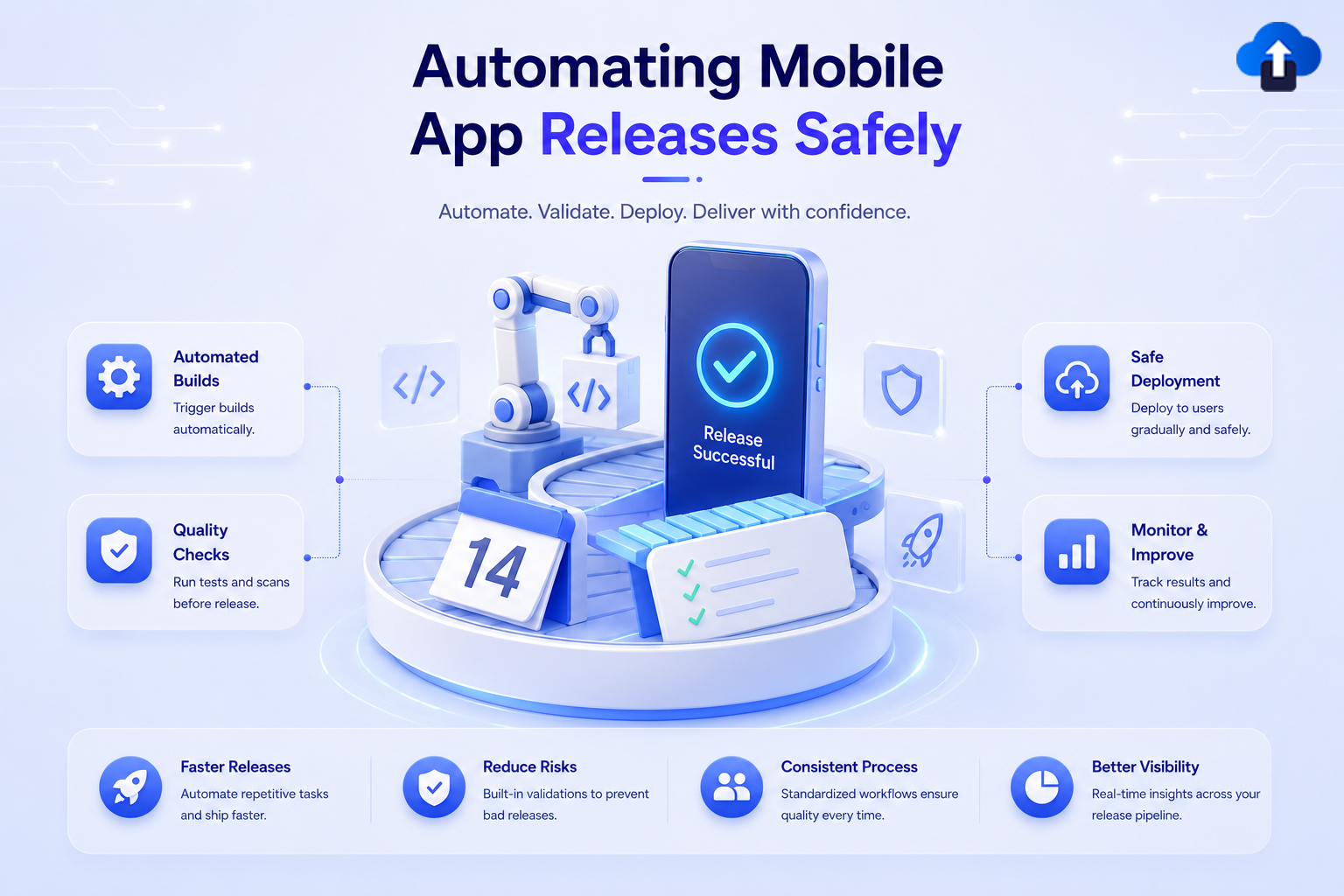
Automating mobile app releases means codifying every step build, sign, test, upload, and roll out into a repeatable pipeline that runs the same way every time, with built-in safety nets: staged rollouts, automated halts, and rollback paths. Done right, it turns release day from a stressful ritual into a routine, low-risk event.
This blog walks through how to build that pipeline safely, not just how to automate the button-clicking, but how to automate the judgment calls that used to require a human watching a dashboard.
Google Play App Signing flow diagram showing upload key and app signing key
Problem Statement
Manual mobile releases fail in predictable ways:
Important: The goal of release automation isn’t just speed; it’s reducing the blast radius of mistakes. A pipeline that ships broken builds to 100% of users faster is not an improvement. Safety and speed have to be designed together.
Concept A: The Anatomy of a Release Pipeline
A safe mobile release pipeline breaks into four stages, each with a distinct responsibility:
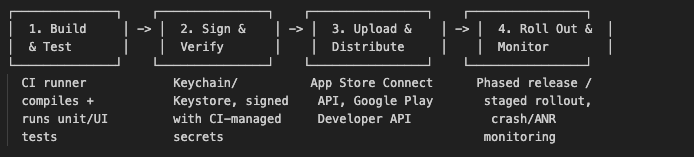
- Build & Test: Every release build comes from CI, never a laptop. The same commands run for every release, every time.
- Sign & Verify: Signing credentials live in a secrets manager (GitHub Actions Secrets, match’s encrypted git repo, or a KMS), never on disk in plaintext.
- Upload & Distribute: Builds are pushed via the App Store Connect API and the Google Play Developer API, not via manual browser uploads.
- Roll Out & Monitor: The build is released gradually, with automated gates tied to crash-free rate and ANR rate before it reaches 100% of users.
Every workflow run build, sign, upload, or rollout-guard shows up under your repository’s Actions tab, giving you a full audit trail of every release that ever shipped.
Concept B: Code Signing and Secrets Without the Pain
Code signing is where most “automated” pipelines quietly stay manual, because it’s the scariest part to get wrong. Here’s how to remove the human from the loop safely.
iOS:
- Use Fastlane match to store certificates and provisioning profiles in an encrypted git repository, decrypted only inside the CI runner.
- Never commit .p12 files or provisioning profiles directly to your app’s repo.
- Rotate the match encryption passphrase periodically and store it as a CI secret, not in a config file.
Android:
- Enable Google Play App Signing so Google holds your app signing key and you only manage an upload key if your upload key is ever compromised, Google can help you reset it without losing your app’s identity.
- Store the upload keystore as a base64-encoded CI secret, decoded at build time and never written to a persistent disk.
   # Decode the Android upload keystore from a CI secret at build time
   echo "$ANDROID_KEYSTORE_BASE64" | base64 --decode > release.keystore


   # Fastlane match — fetch iOS signing assets into the CI runner's keychain
   fastlane match appstore --readonly --keychain_name ci_keychain --keychain_password"$CI_KEYCHAIN_PASSWORD"
Important: Always run match (and any signing step) with --readonly in CI. CI runners should consume signing assets, never generate or overwrite them that responsibility stays with a human running match locally when certificates genuinely need to change.
Pros and Cons of Common Automation Approaches
Comparison Table: Release Automation Stacks
Solution / Implementation: A Safe Release Pipeline
Step 1: Define the Fastlane Lanes
   # fastlane/Fastfile


   platform :ios do
   desc "Build, sign, and upload a release build to TestFlight"
   lane :release do
   match(type: "appstore", readonly: true)
   build_app(
       scheme: "MyApp",
       export_method: "app-store"
   )
   upload_to_testflight(skip_waiting_for_build_processing: true)
   end
   end


   platform :android do
   desc "Build, sign, and upload an AAB to the internal track"
   lane :release do
   gradle(task: "bundleRelease")
   upload_to_play_store(
       track: "internal",
       aab: "app/build/outputs/bundle/release/app-release.aab",
       skip_upload_metadata: false
   )
   end
   end
Step 2: Wire It Into GitHub Actions
  # .github/workflows/release.yml
   name: Mobile Release


   on:
   push:
   tags:
       - 'v*.*.*'   # e.g. v2.4.0 — releases are tag-triggered, not push-to-main


   jobs:
   release-ios:
   runs-on: macos-14
   steps:
       - uses: actions/checkout@v4
       - uses: ruby/setup-ruby@v1
       with:
           bundler-cache: true
       - name: Release to TestFlight
       env:
           MATCH_PASSWORD: ${{ secrets.MATCH_PASSWORD }}
           APP_STORE_CONNECT_API_KEY: ${{ secrets.ASC_API_KEY }}
       run: bundle exec fastlane ios release


   release-android:
   runs-on: ubuntu-latest
   steps:
       - uses: actions/checkout@v4
       - uses: ruby/setup-ruby@v1
       with:
           bundler-cache: true
       - name: Decode signing keystore
       run: echo "${{ secrets.ANDROID_KEYSTORE_BASE64 }}" | base64 --decode > release.keystore
       - name: Release to Play Console (internal track)
       env:
           SUPPLY_JSON_KEY_DATA: ${{ secrets.PLAY_SERVICE_ACCOUNT_JSON }}
       run: bundle exec fastlane android release
Step 3: Promote Gradually With Staged Rollouts
Once a build passes internal testing, promote it in stages instead of releasing to everyone at once.
iOS Phased Release: App Store Connect can release an update to users automatically over 7 days, ramping from a small percentage up to 100%, and you can pause it at any point if issues appear.
   # Promote an Android release from 20% to 50% rollout via the Play Developer API
   fastlane run upload_to_play_store \
   track:"production" \
   rollout:"0.5" \
   skip_upload_apk:true \
   skip_upload_aab:true
Step 4: Automate the Safety Gate
This is the step most pipelines skip. Don’t just automate going out automate stopping.
   # .github/workflows/rollout-guard.yml
   name: Rollout Health Gate


   on:
   schedule:
   - cron: '0 * * * *'   # check hourly during an active rollout


   jobs:
   check-crash-rate:
   runs-on: ubuntu-latest
   steps:
       - name: Query crash-free rate from AppOnAir
       id: health
       run: |
           RATE=$(curl -s -H "Authorization: Bearer $APPONAIR_TOKEN" \
           "https://api.apponair.dev/v1/apps/$APP_ID/crash-free-rate?window=1h" | jq '.rate')
           echo "rate=$RATE" >> "$GITHUB_OUTPUT"
       - name: Halt rollout if crash-free rate drops below 99.5%
       if: steps.health.outputs.rate < 99.5
       run: |
           echo "Crash-free rate degraded — halting rollout"
           fastlane run upload_to_play_store rollout:"halt" track:"production"
           # Trigger a Slack/PagerDuty alert here
Integrate AppOnAir’s crash and ANR monitoring as the source of truth for this gate it gives you near-real-time crash-free and ANR-free rates per release version, so the pipeline can halt a rollout within the hour instead of waiting for the next day’s aggregated Play Console report.
Key Takeaways
- Manual releases don’t scale every step that depends on a specific engineer’s laptop is a future outage waiting to happen.
- Code signing must be automated but never regenerated in CI: use match --readonlyand Google Play App Signing so CI only consumes, never creates, signing assets.
- Always release in stages: iOS phased release and Android staged rollout exist specifically to limit blast radius; don’t skip straight to 100%.
- A safe pipeline includes an automated halt mechanism tied to real crash/ANR metrics, not just a “push and hope” upload step.
- Trigger releases from git tags, not branch pushes, so every release is deliberate and traceable to an exact commit.
- Real-time monitoring (via AppOnAir or Play Console/App Store Connect Vitals) is what makes a staged rollout actually safe a staged rollout with no monitoring is just a slower way to ship the same bug.
Conclusion
Automating mobile releases isn’t about removing humans from the process, it's about removing humans from the repetitive, error-prone parts of the process so they can focus on the judgment calls that actually matter: deciding whether a rollout is healthy enough to continue. A well-built pipeline turns release day into a non-event: tag a commit, let CI build and sign it, watch the staged rollout climb automatically while a health gate stands ready to hit the brakes.
Start small automate the build and signing first, then layer in staged rollouts, then wire up an automated health gate. Each layer you add removes one more way a Friday afternoon release can go wrong.
References
- Android Developers Play App Signing
- Android Developers Understanding Android App Bundle
- Google Play Console Help Roll out a release gradually
- Apple Developer Release a Version Update in Phases
- GitHub Docs Understanding GitHub Actions
- Fastlane Documentation match
- Fastlane fastlane/fastlane GitHub Repository








