

Firebase Cloud Messaging (FCM) is Google's push delivery infrastructure for Android and iOS. If
you are shipping a mobile app in 2026, you need to understand what changed in 2024, how the delivery pipeline actually works, and where things break in production.
What FCM Is and What Changed in 2024
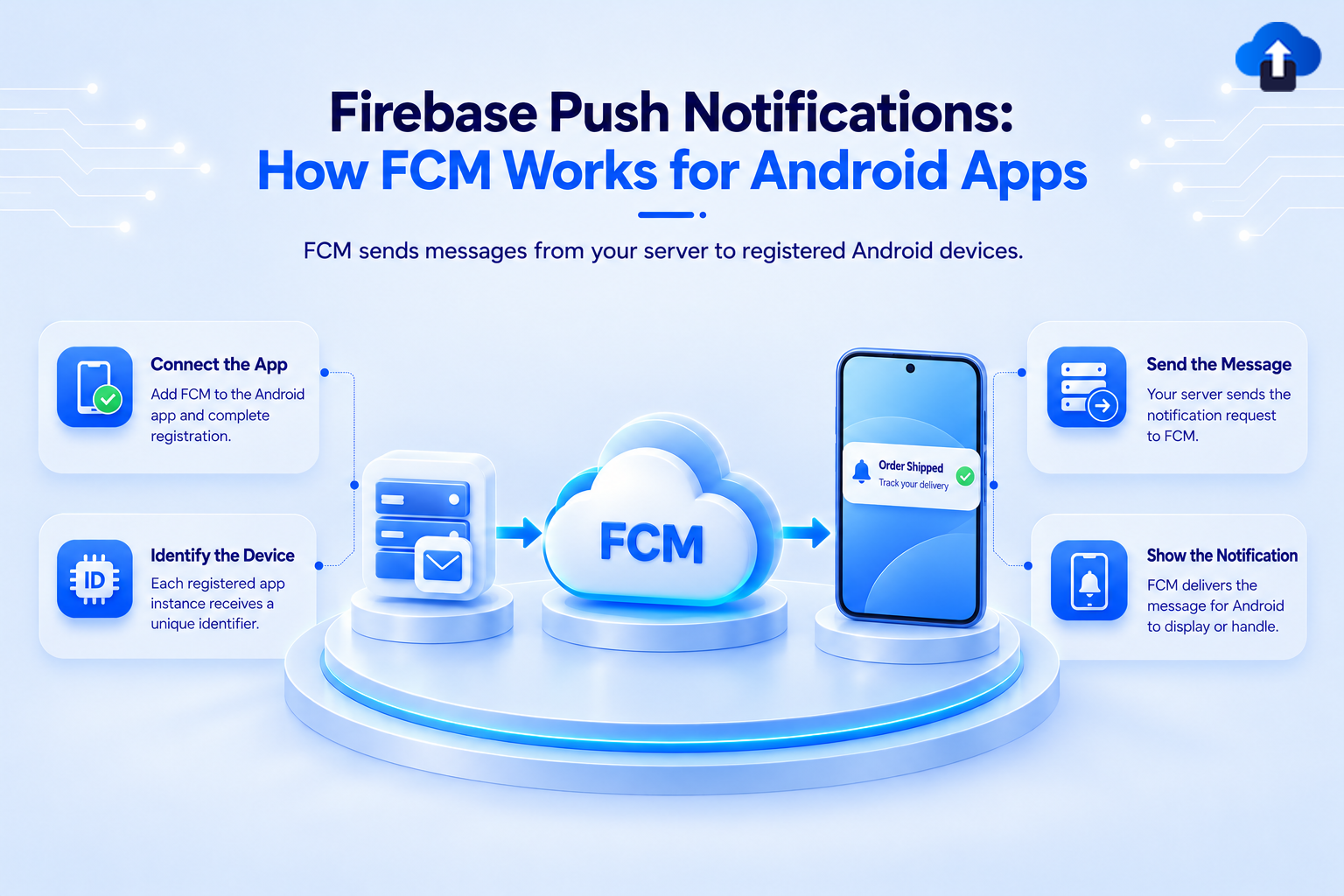
FCM is the successor to Google Cloud Messaging (GCM), which Google shut down in 2019. FCM handles the server-to-device push delivery layer: your backend sends a message to FCM, FCM routes it to the target device.
The important 2024 change: Google shut down the FCM Legacy HTTP API on June 20, 2024.
The simpler API key-based authentication model is gone. The FCM HTTP v1 API is now the only supported path, and it requires OAuth 2.0 authentication via a service account.
What this means for your server:
- Replace static API keys with a Google service account JSON credential file
- Generate short-lived OAuth 2.0 access tokens from that service account (tokens expire every 60 minutes)
- Update your send code to the v1 payload format and endpoint
If any part of your server-side push stack was written before mid-2024 and has not been audited, verify it is not still referencing the legacy endpoint. Sends to that endpoint silently fail.
Architecture: Registration Token, FCM Server, Device
The FCM delivery path has three actors:
1. Your app: registers with FCM on install and receives a registration token (a device-scoped identifier)
2. Your backend: stores the registration token and sends messages to the FCM v1 API using OAuth 2.0
3. FCM: receives the message and routes it downstream to the target device over a persistent connection
FCM differs from APNs (Apple Push Notification service) in one important way: Firebase handles device registration and token issuance directly. With APNs, you get a raw device token from the OS and send it to Apple's servers yourself. With FCM, the Firebase SDK on the device manages registration and gives you an abstraction token. This means FCM can route to Android devices (and iOS devices via APNs under the hood) from a single API surface.
Registration Tokens
A registration token uniquely identifies an app instance on a device. The Firebase SDK generates one automatically on first launch.
Tokens change when:
- The app is uninstalled and reinstalled
- The user clears app data from Settings
- The app is restored from a backup on a new device
When a token changes, your server holds a stale token. Sends to it return an UNREGISTERED or INVALID_ARGUMENT error from FCM - at which point you must delete the stored token.
// Kotlin: listen for token refresh in FirebaseMessagingService
override fun onNewToken(token: String) {
    super.onNewToken(token)
    // Send the new token to your backend and replace the stored value
    sendTokenToServer(token)
}
This callback fires whenever FCM issues a new token. If you miss it, that device stops receiving notifications until the next app launch that re-fetches the token.
Android 13+ POST_NOTIFICATIONS Permission
Android 13 (API 33) made POST_NOTIFICATIONS a runtime permission. Apps targeting SDK 33 or higher must request it explicitly — notifications are suppressed without it.
The critical constraint: if a user denies the permission twice, the system permanently suppresses the permission dialog for your app. The user can only re-enable notifications from Settings. Your app cannot re-prompt.
The correct approach is to explain the value of notifications during onboarding, before the first prompt. A cold-open dialog with no context gets denied, and you lose that user permanently.
// Kotlin -- request POST_NOTIFICATIONS at the right moment in onboarding
if (Build.VERSION.SDK_INT >= Build.VERSION_CODES.TIRAMISU) {
    requestPermissions(
        arrayOf(Manifest.permission.POST_NOTIFICATIONS),
        NOTIFICATION_PERMISSION_REQUEST_CODE
    )
}
Do not request permission at app launch. Request it at the point in the onboarding flow where the user has already seen why notifications matter for your app.
Notification Message vs Data Message
FCM supports two message types, and the difference in behavior is significant:
Notification messages carry a "notification" payload with "title" and "body". When the app is backgrounded or killed, the system handles display automatically — your code is not called. The user taps the notification to open the app.
Data messages carry only a "data" payload (key-value pairs). They always go to your onMessageReceived handler, regardless of app state. Your code is responsible for displaying any UI.
When to use each:
- Use notification messages for user-visible alerts where default system display is sufficient
- Use data messages when you need to control display, process content before showing anything, or handle the message silently (background sync, cache invalidation)
- Use a combined payload (both `notification` and `data` fields) when you want system-handled display in the background but access to the data payload when the user taps
Message Handling in Code
Foreground: when the app is in the foreground, `onMessageReceived` fires for all message types:
// Kotlin: FirebaseMessagingService
override fun onMessageReceived(remoteMessage: RemoteMessage) {
    val title = remoteMessage.notification?.title
    val body = remoteMessage.notification?.body
    val data = remoteMessage.data
    // Build and show a notification manually when in foreground
    showNotification(title, body, data)
}
Background/killed state: for notification messages, the system displays the notification automatically. For data messages in the background, `onMessageReceived` is still called but your app has limited execution time. For the killed state, data message delivery is not guaranteed unless you use high-priority messages.
Common Troubleshooting
Notifications not appearing in background on API 26+: The most common cause: missing or invalid notification channel. Android 8.0+ requires every notification to be assigned to a channel. Notifications sent without a valid channel ID are silently dropped. Create channels at app startup before sending any notification.
val channel = NotificationChannel(
    "default",
    "General Notifications",
    NotificationManager.IMPORTANCE_DEFAULT
)
getSystemService(NotificationManager::class.java)
    .createNotificationChannel(channel)
Token not delivered to server: If onNewToken is never called, verify your FirebaseMessagingService is correctly declared in AndroidManifest.xml with the com.google.firebase.MESSAGING_EVENT intent filter. Missing the manifest declaration means the service is never invoked.
FCM v1 auth errors (401/403): The service account JSON is misconfigured or the account lacks the Firebase Cloud Messaging API role. Verify the service account has the roles/firebase.sdkAdminServiceAgent or equivalent role in Google Cloud IAM, and that the JSON file you are loading corresponds to the correct project.
Using FCM with AppsOnAir
If you are using AppsOnAir for app distribution, push notification setup is handled at the platform level. Upload your FCM service account JSON once in the AppsOnAir portal — the platform manages OAuth 2.0 token generation and refresh automatically. The AppsOnAir Push Notification SDK handles registration token capture and delivery to the platform on the device side, so you do not need to implement `onNewToken` routing to your own backend separately. Sends routes through the AppsOnAir API, targeting your existing distribution groups and segments directly.
Conclusion
FCM is a mature and reliable delivery layer, but it has sharp edges: the 2024 legacy API shutdown caught many teams unprepared, Android 13 permission handling has permanent consequences if mishandled, and silent failures from misconfigured channels or stale tokens are common. Understanding the registration token lifecycle, the difference between notification and data messages, and the correct foreground versus background handling paths will prevent the majority of production push issues.