


.png)


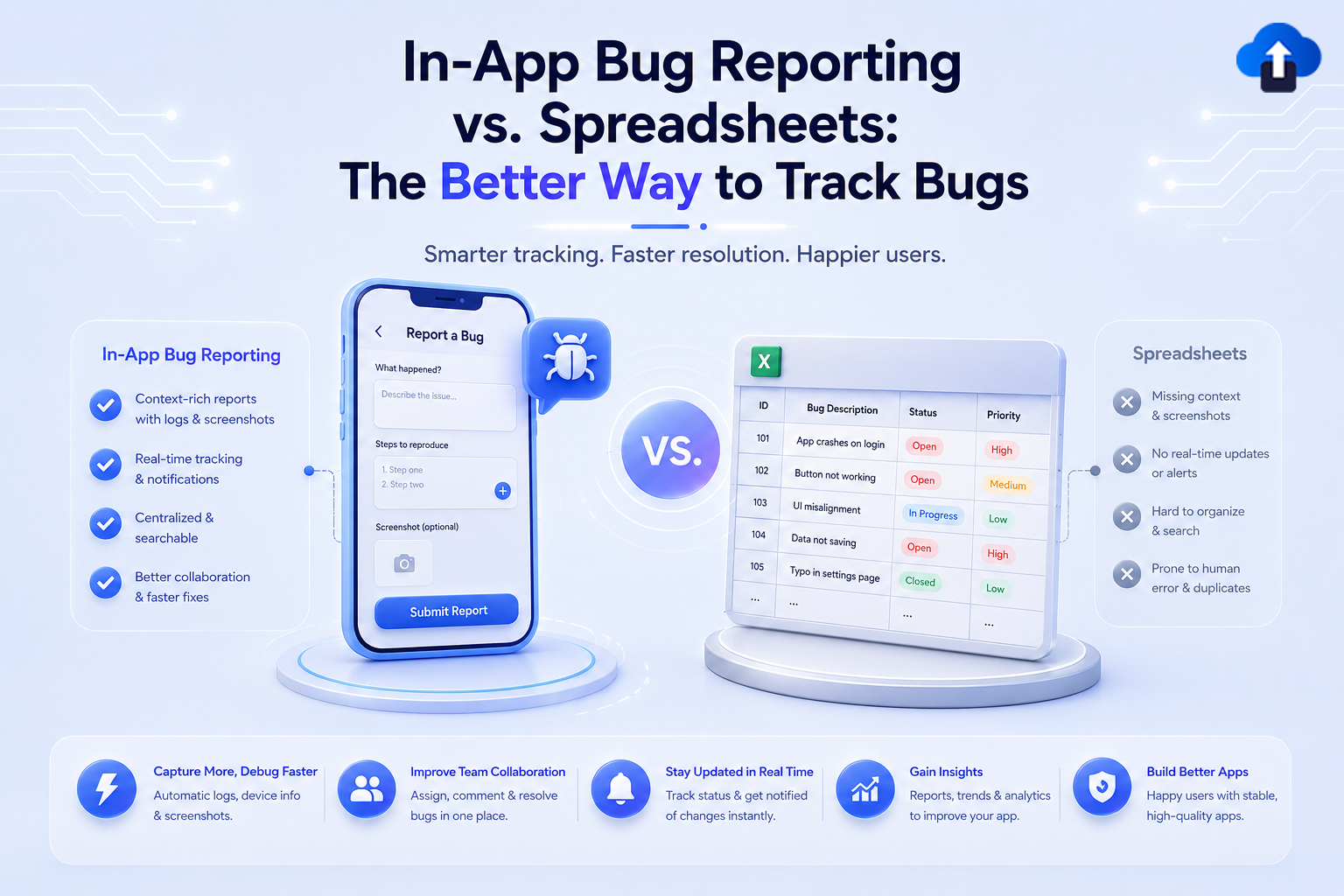
Finding a bug is only the first step. The real challenge is reporting it with enough information for developers to understand what went wrong, reproduce the problem, and fix it without spending hours asking follow-up questions.
Many mobile teams still use spreadsheets to track bugs. A tester finds an issue, takes a screenshot, opens a spreadsheet, adds a new row, describes the problem, and manually fills in details. This approach can work for a small project, but it becomes difficult to manage as testing grows.
In-app bug reporting offers a different approach. Instead of moving between the app, screenshots, spreadsheets, and messages, testers can report issues directly from the application. This creates a faster and more contextual bug reporting workflow.
What Is In-App Bug Reporting?
In-app bug reporting is a process that allows testers or users to report problems directly from inside a mobile application. A bug reporting tool can capture information about the issue while the user is still experiencing it.
Depending on the tool, a report can include screenshots, comments, app version information, operating system details, and other technical context. This reduces the amount of information testers need to collect manually.
AppsOnAir AppRemark, for example, provides an in-app feedback and bug reporting SDK. Users can report issues using options such as shake-to-capture or an in-app trigger, annotate screenshots, add notes, and send the information to a centralized dashboard.
How In-App Bug Reporting Works
The basic workflow is simple. A tester encounters a problem while using the application and activates the reporting interface without leaving the app.
The tester can then describe the issue and add visual context. With AppRemark, screenshots can be annotated with drawings or text, while device details and app version information are included with the submitted feedback. Reports are then available through the AppsOnAir dashboard for the team to review.
This reduces the number of separate steps between discovering a bug and giving developers the information they need.
How Spreadsheet Bug Tracking Works
Spreadsheet bug tracking normally uses columns for information such as bug title, description, priority, status, assigned developer, date reported, and testing notes.
The method is familiar and inexpensive to start. Almost everyone understands how to enter information into a spreadsheet, so teams can begin tracking bugs without setting up a dedicated system.
Why Teams Start With Spreadsheets
Spreadsheets make sense when a project is very small. A few testers may only have a limited number of issues to report, making a simple shared sheet easy enough to manage.
Teams can also customize columns based on their own process. They might add fields for severity, affected screen, operating system, app version, or testing status.
The problem is that most of this information still needs to be collected and entered manually.
Where Spreadsheet Bug Tracking Becomes Difficult
As the number of reports increases, spreadsheets can become harder to maintain. Testers may describe similar problems differently, forget important fields, upload screenshots separately, or leave device information incomplete.
A developer might see a description such as "button does not work" without knowing which app version, operating system, device, or screen state produced the problem. The team then has to go back to the tester and ask for more information.
This does not mean spreadsheets are bad tools. It means they were not specifically designed to capture mobile app bugs at the moment they happen.
In-App Bug Reporting vs. Spreadsheets
The main difference between in-app bug reporting and spreadsheet bug tracking is how much context is captured during the reporting process.
Spreadsheets depend heavily on manual input. In-app reporting tools can collect much of the relevant information while the tester is still inside the application.
Faster Bug Submission
With spreadsheet bug tracking, a tester may need to leave the app, save a screenshot, locate the spreadsheet, create a new row, and enter the issue details.
An in-app reporting workflow removes several of those steps. The tester can start the report from the app, explain the issue, attach or capture visual information, and submit it.
Reducing these steps is especially useful during active QA sessions where testers may discover many issues in a short period.
Better Context for Developers
A useful bug report needs more than a title. Developers often need to understand the environment in which the problem occurred.
AppRemark organizes submitted feedback with screenshots, notes, device information, and app version details in the AppsOnAir dashboard. Its documentation describes AppRemark as a way to collect bug feedback with detailed context and streamline communication around reported issues.
Having that information attached to the original report can reduce the need for testers to remember and manually enter every technical detail.
Clearer Visual Bug Reports
Some mobile bugs are difficult to describe with text alone. A tester might need several sentences to explain that a button is overlapping another element or that an image is appearing in the wrong position.
A screenshot can communicate the same issue much faster. Annotation makes the screenshot even more useful because the tester can point directly to the affected area.
AppRemark supports screenshot annotation, allowing reporters to draw, highlight, and add remarks to screenshots before submitting feedback.
More Consistent Reporting
Spreadsheet quality depends on how carefully each tester completes every column. One tester might provide detailed information while another enters only a short description.
In-app bug reporting can create a more consistent process because reports go through the same reporting interface. Standard information and supporting context can stay connected to the issue instead of being scattered across spreadsheet cells, screenshot folders, emails, and chat conversations.
Consistency becomes increasingly important when several testers, developers, and product team members are working on the same mobile application.
When Are Spreadsheets Still Useful for Bug Tracking?
Spreadsheets can still be useful for very small projects, temporary testing, or teams that only need to record a limited number of simple issues.
They may also work well for high-level summaries. For example, a team could use a spreadsheet to track release-level QA progress or create a simple overview for stakeholders.
The limitation appears when the spreadsheet becomes the main tool for capturing detailed mobile bugs. As reports become more technical and frequent, manual data entry can create unnecessary work.
The choice should therefore depend on the size and complexity of the testing workflow rather than assuming every team needs the same system.
How AppRemark Supports In-App Bug Reporting
AppsOnAir AppRemark is designed specifically for collecting feedback and bug reports from mobile applications. It supports Android, iOS, Flutter, and React Native integrations through its SDKs and plugins.
Report Bugs Without Leaving the App
Teams can configure AppRemark so users or testers can trigger feedback through a shake gesture or an in-app button. The reporter can then provide context while the issue is still visible.
This approach keeps the reporting process close to the actual user experience instead of requiring testers to recreate the problem later.
Keep Feedback in One Dashboard
Submitted feedback can be viewed in the AppsOnAir dashboard with related screenshots, annotations, notes, app version information, and device details such as the device model, OS, screen size, network status, battery level, and memory usage. AppRemark also provides status options such as open, closed, and rejected for managing submissions.
This gives QA teams and developers a centralized place to review reported issues instead of depending on multiple spreadsheet files and separate screenshot folders.
Common Mistakes When Tracking Mobile App Bugs
One common mistake is recording only what went wrong without recording the conditions surrounding the problem. A useful report should provide enough context for another person to understand what happened.
Another mistake is keeping screenshots, descriptions, and technical details in separate locations. When developers have to search through a spreadsheet, messaging tool, and file storage just to understand one bug, the reporting process becomes slower.
Teams should choose a workflow that makes bug reporting easy for testers while giving developers enough information to investigate the issue.
Frequently Asked Questions
What is the best way to track bugs in a mobile app?
For active mobile testing, an in-app bug reporting tool can provide a more direct workflow because testers can submit issues while using the application. Screenshots and technical context can also stay connected to the report.
Spreadsheets may still be suitable for small projects or basic tracking where only a few bugs are being recorded.
Is a spreadsheet enough for bug tracking?
A spreadsheet can be enough for simple projects with a small testing team. However, it becomes harder to manage when teams need screenshots, device information, app versions, detailed context, and a growing number of bug reports.
The larger the QA workflow becomes, the more useful a dedicated reporting system can be.
What information should a mobile bug report include?
A useful mobile bug report should clearly explain the problem and provide relevant context. This may include the affected screen, screenshot, app version, device information, operating system, and a description of what happened.
The goal is to give developers enough information to understand and reproduce the problem.
What is an in-app bug reporting SDK?
An in-app bug reporting SDK is a software component that developers integrate into an application to enable feedback or bug reporting features inside the app.
For example, AppRemark provides SDK support for mobile development environments including Android, iOS, Flutter, and React Native.
Can users annotate screenshots when reporting bugs?
This depends on the bug reporting tool. AppRemark allows users to annotate screenshots by drawing, highlighting, or adding remarks before submitting the feedback.
Visual annotation can make UI and design problems easier for developers and QA teams to understand.
Final Thoughts
Spreadsheets are simple and familiar, which makes them useful for basic bug tracking. But mobile QA often requires more context than a spreadsheet row can easily provide.
In-app bug reporting brings the reporting process closer to where the problem actually happens. Testers can provide visual and technical context without building every report manually, while developers receive more structured information for investigation.
For mobile teams looking to move beyond spreadsheet-based reporting, tools such as AppsOnAir AppRemark provide a more focused workflow for capturing, organizing, and managing app feedback. The better approach is not simply the tool with more features. It is the one that helps your team turn a discovered bug into useful information with the least unnecessary effort.








