


.png)


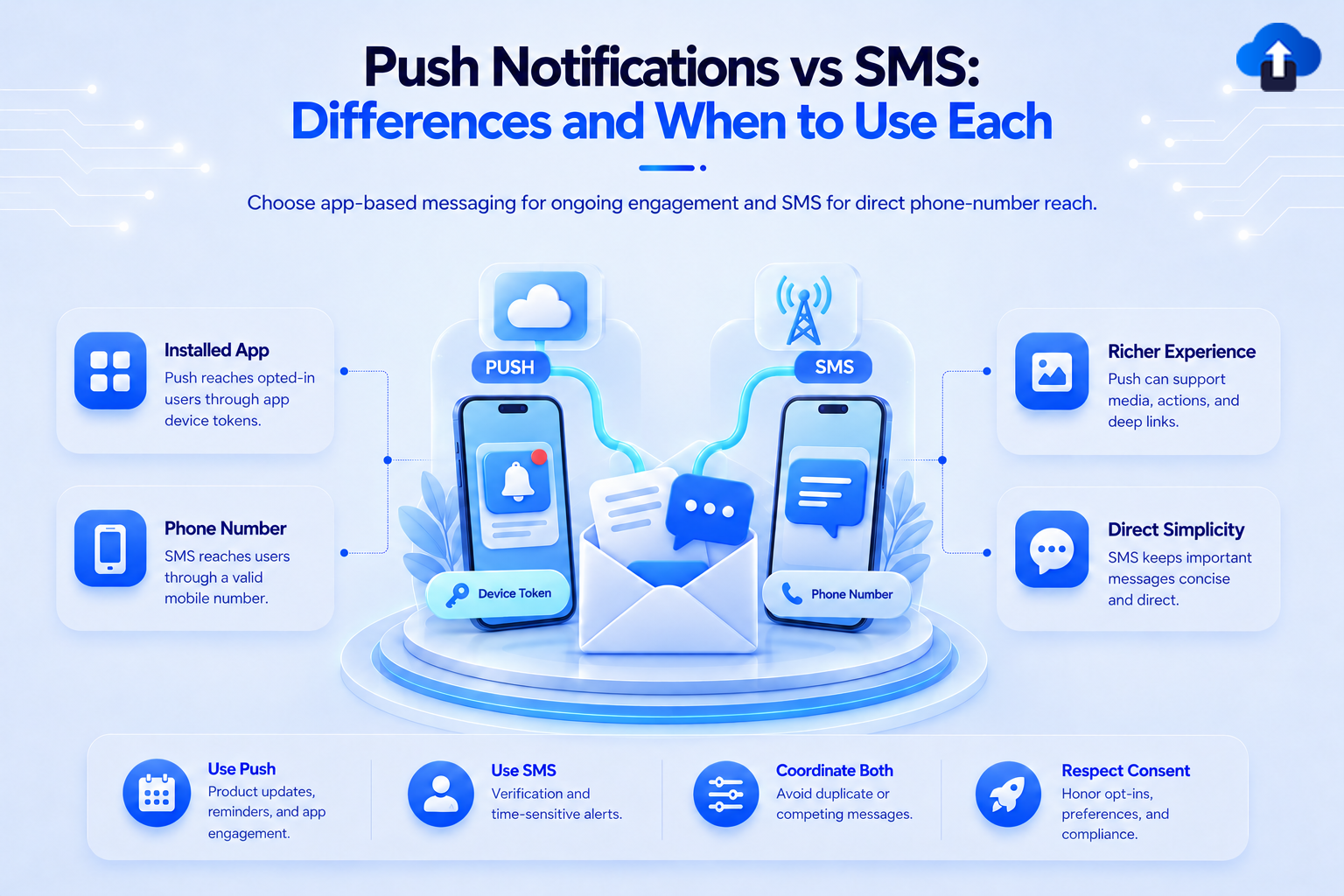
Push notification vs SMS is not a question of which channel is always better. The right choice depends on who you need to reach, how urgent the message is, whether they have your app, and what action you want them to take.
Push notifications connect users to an installed app. SMS reaches a phone number through a mobile network. This affects consent, cost, delivery, and the experience after a tap.
At AppsOnAir, we help mobile teams manage push notifications as part of the app experience. This guide explains where push fits, where SMS makes more sense, and how to use both without repeating the same message.
Push notification vs SMS: the short answer
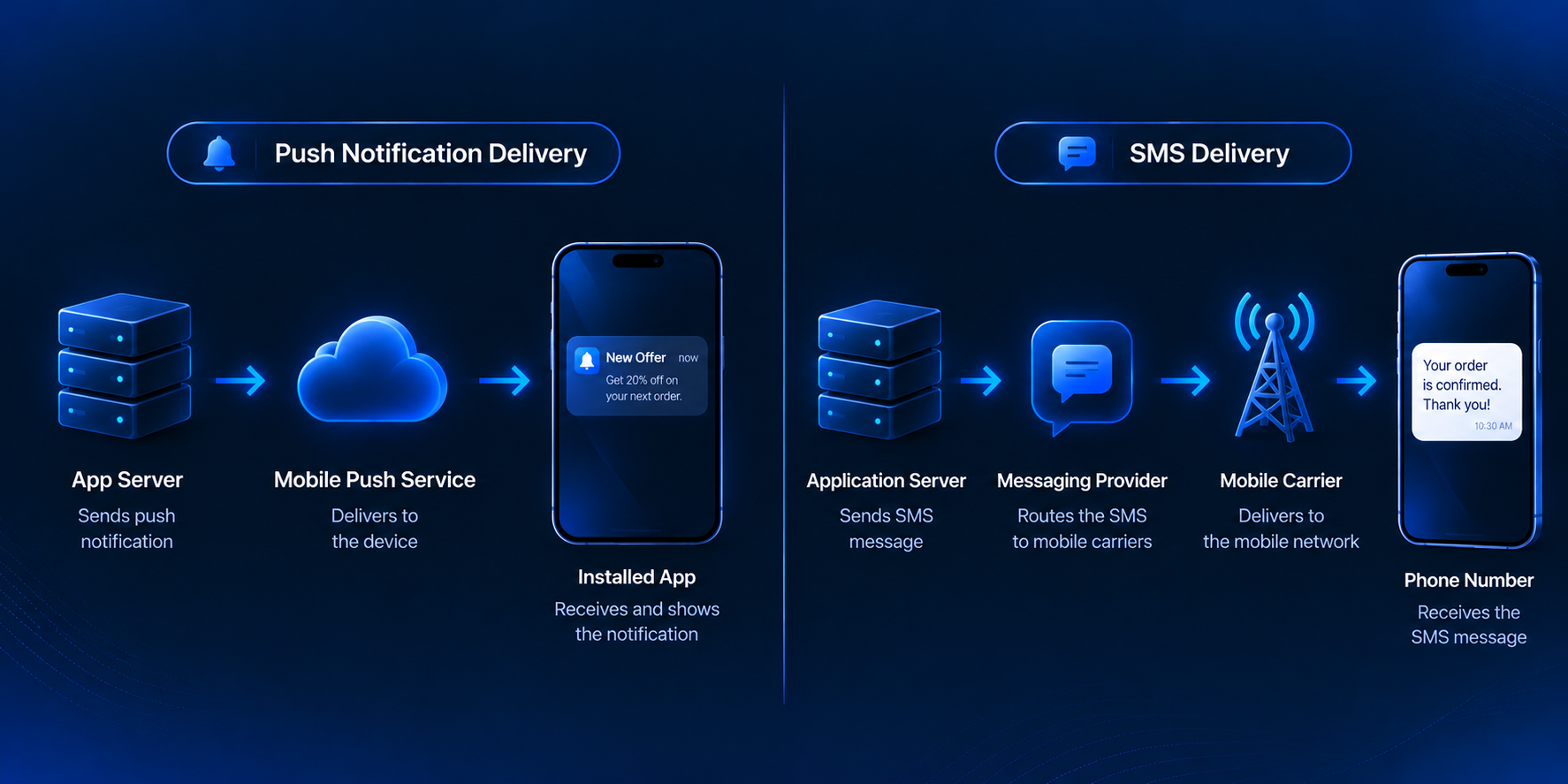
A push notification is an alert sent by an app to a device. The user needs the app installed and must allow notifications. A tap can open a relevant screen or action inside the app.
An SMS is a text message delivered to a phone number through a mobile carrier. The recipient does not need your app or an internet connection, but the device still needs cellular service.
Use push for regular, contextual communication with app users. Use SMS when app installation cannot be assumed, broader reach matters, or SMS is an approved fallback for an important message.
For a deeper introduction to mobile push, read What Are Push Notifications? A Simple Guide for Mobile App Teams.
Key differences between push notifications and SMS
1. Audience reach
The biggest difference in a push notification vs SMS decision is who can receive the message.
Push can reach people who installed your app, have a valid device token, and allow notifications. If the app is removed or notifications are disabled, that channel is unavailable. SMS does not require an app, so it can reach a consented user through a valid phone number. Teams should still reserve SMS for messages that justify its cost.
2. Consent and user preferences
Both channels require permission, but the process differs. For push, the user grants permission through the operating system. Apple recommends asking for notification permission in a context that helps users understand its value.
For SMS, teams collect a phone number and obtain consent based on the message type and applicable regional rules. They must also support required opt-out processes. Consent for one channel is not permission for another.
3. Cost structure
Push does not usually carry a mobile-carrier fee for each message, although teams still need a platform or infrastructure, integration, monitoring, and maintenance.
SMS providers normally charge per message segment. Long messages, international delivery, and certain character sets can increase the billable segment count. Twilio explains that a standard GSM-7 SMS segment supports up to 160 characters, while Unicode content can reduce that limit.
In a push notification vs SMS cost comparison, push generally suits frequent app communication. SMS is better used selectively when its additional reach or importance supports the cost.
4. Message format and flexibility
Push notifications can support titles, body text, images, buttons, sounds, badges, and platform-specific controls. The available options depend on the operating system, device settings, and notification payload.
SMS works well for short text, codes, status messages, and links. MMS or RCS may add richer content, but support and pricing vary. A plain SMS can be clearer when users only need a code or brief instruction.
5. What happens after the tap
Push is closely connected to the app experience. A deep link can open a specific order, booking, account alert, feature, or conversation inside the installed app.
An SMS link can open a mobile website or an installed app when the linking setup supports it. However, the result may differ depending on whether the app is installed. Choose and test the destination before writing the message.
6. Timing and urgency
Push works well for timely app moments such as delivery progress, a new message, a price change, or a reminder linked to user activity.
SMS can help when the recipient may not have the app or has disabled push. Teams often consider it for verification codes, appointment changes, service interruptions, or carefully defined fallback flows.
Neither channel guarantees immediate attention. Devices can be offline, networks can be delayed, and users may ignore alerts. Important workflows should plan for delivery failures.
7. Measurement and attribution
Push platforms can track sends, deliveries, opens, and later in-app actions. SMS providers can report message status, while tracked links and analytics connect clicks to later actions.
Compare both channels using the business outcome, not open rate alone. Measure a cart reminder by recovered checkouts and an appointment alert by confirmations.
When to use push notifications
Choose Push Notifications when the recipient uses your app and the message supports an in-app action or ongoing experience.
Strong use cases include:
- Order, booking, or delivery updates linked to an app screen
- Reminders based on user activity or preferences
- New messages, comments, or account activity
- Product announcements for relevant user segments
- Personalized recommendations and re-engagement campaigns
Push Notifications also works for frequent communication because teams can segment users without paying a carrier fee for every message. Frequency still needs control.
When to use SMS
Choose SMS when the recipient may not have the app, a phone number is the best available identifier, or the message has a valid reason to sit outside the normal app channel.
Common use cases include verification codes, important appointment changes, service notices, and messages for consented users beyond the installed app audience. SMS can also support onboarding before app installation. Later, routine messages can move to push while SMS remains available for selected important cases.
When to combine push notifications and SMS
Push and SMS can work together when each has a clear role. They should not deliver the same message at the same time by default.
A practical sequence may look like this:
- Send a push notification to eligible app users.
- Wait for an appropriate response window.
- Send SMS only to consented users when the message remains important and the fallback rule applies.
- Stop the sequence when the user completes the intended action.
For example, an app can send a push reminder before an appointment. If the user does not confirm and the appointment is close, the system may send an SMS according to the user's preferences and the team's rules.
The SMS vs push notification choice should also reflect channel preference. A user may want routine updates through push but reserve SMS for security or time-sensitive account changes.
How AppsOnAir supports mobile push notifications
AppsOnAir Push Notification helps mobile teams create, send, and track notifications for iOS and Android apps from one place.
Teams can target users by segment, language, platform, activity, or customer data. They can also create language variants and review what was sent, delivered, and opened after each notification.
This makes push a practical primary channel for regular app communication, while SMS remains available for use cases that require phone-number reach or a separate fallback path.
Common mistakes when choosing between push and SMS
Sending the same message through both channels
Duplicate messages create noise and increase SMS costs. Define the primary channel, fallback condition, waiting period, and exit action before launching the sequence.
Choosing a channel without checking eligibility
Before relying on push, check app installation, device-token status, notification permission, and recent activity. Before using SMS, confirm that the phone number and appropriate consent are available.
Ignoring the destination
Every push or SMS link should lead to the relevant screen or page. Test the experience for people with and without the app installed.
Comparing channels with one engagement metric
Opens and clicks provide limited context. Use conversions, confirmations, completed actions, opt-outs, delivery failures, and cost to evaluate the full result.
Frequently asked questions
Is a push notification the same as an SMS?
No. A push notification comes from an installed app and requires notification permission. An SMS is delivered to a phone number through a mobile carrier.
Which is cheaper, push notifications or SMS?
Push usually has a lower cost per additional message because it does not carry an SMS fee for each segment. However, it still requires a platform or infrastructure, integration, monitoring, and maintenance.
Which is better for urgent messages?
It depends on the recipient and workflow. Use push for urgent app-related actions when the user can receive it. Use SMS when phone-number reach or an approved fallback is necessary.
Can SMS work without an internet connection?
SMS does not require mobile data or Wi-Fi, but the device needs a supported cellular network. Delivery can still be delayed by carrier or device conditions.
Should a mobile app use both push notifications and SMS?
Yes, when each has a defined purpose. Push can handle regular app communication, while SMS can cover selected messages that require wider reach, verification, or a consented fallback.
Final thoughts
The push notification vs SMS decision should begin with the user and the message. Use push when communication belongs inside the app relationship. Use SMS when you need consented phone-number reach, an important fallback, or communication before app installation.
When using both, set clear priority and suppression rules to prevent duplicates. AppsOnAir Push Notification gives mobile teams one place to manage targeted notifications across iOS and Android and review results after each send. Explore AppsOnAir Push Notifications to build a more focused notification workflow.









