


.png)


Introduction
App size is one of the most underestimated growth levers in mobile engineering. It feels like a "nice to have" until you look at the data.
Google's own install-funnel research shows that for every 6 MB increase in APK size, install conversion rate drops by roughly 1%. Smaller apps install faster, update more often, survive on low-storage devices, and reach users on slow or metered networks who would otherwise abandon the download.
The catch is that most size-reduction advice is either vague ("remove unused code") or dangerous ("turn on shrinking and hope nothing breaks"). This guide is different: every technique here is measurable, reversible, and feature-safe. You will learn to cut size with confidence, verifying at each step that nothing has regressed.
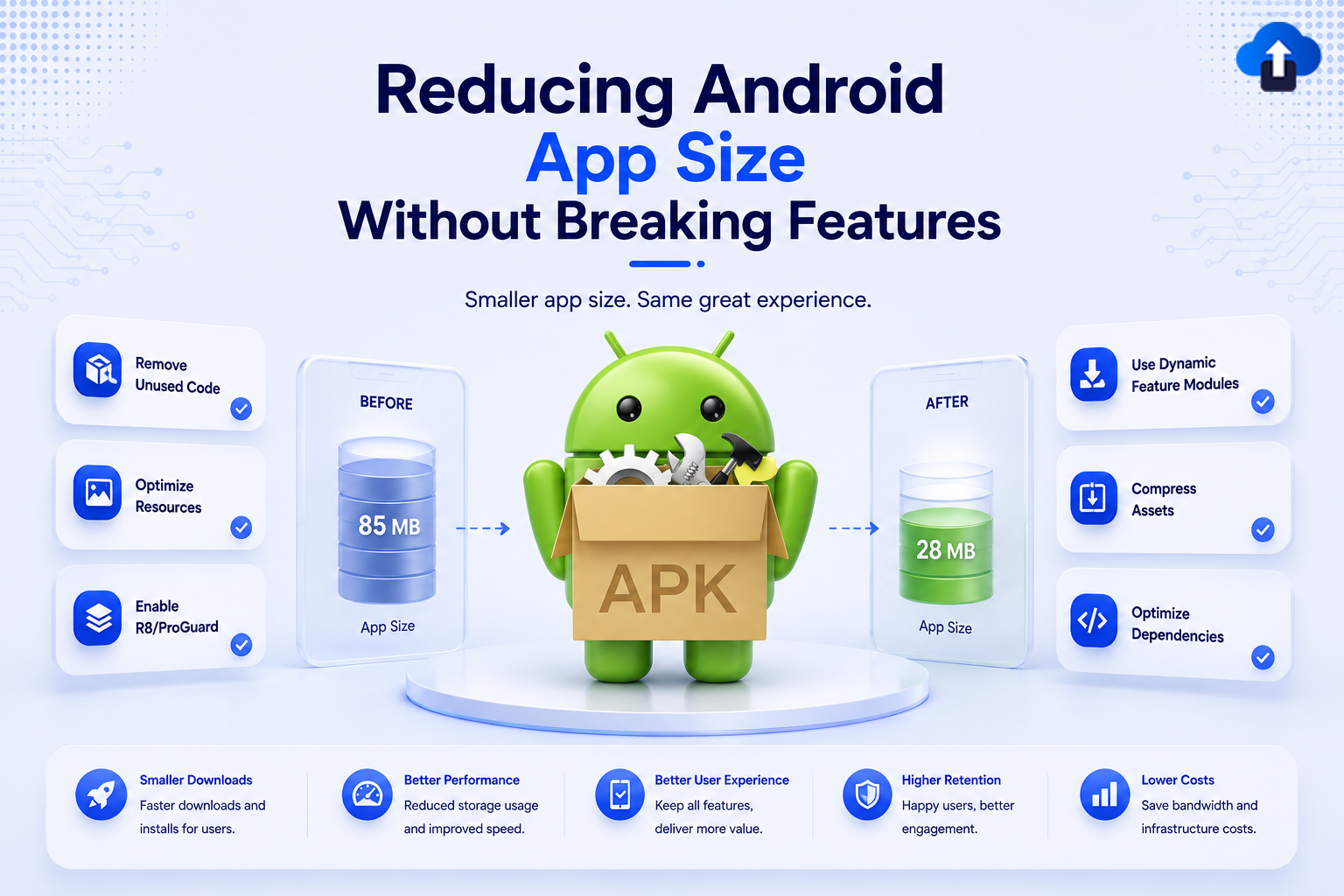
Custom Image Needed: Hero banner on a phone screen showing an app download shrinking from "148 MB" to "38 MB", tagline "Ship less. Reach more." Dimensions: 1200×628px.
Problem Statement
Why Do Android Apps Get So Large?
App bloat is rarely one big mistake; it is a hundred small ones accumulating release after release. The most common culprits:
- One APK for every device: A single "universal" APK ships ARM, ARM64, and x86 native libraries plus every screen-density image to every user, even though each device needs only one of each.
- Unused code and libraries: A large dependency pulled in for a single helper method drags its entire transitive graph along.
- Uncompressed or oversized images: PNGs where WebP would do, or 4K assets rendered on a 1080p screen.
- Duplicate and unused resources: Leftover layouts, drawables, and strings from removed features.
- Bundled content that few users need: Tutorials, high-res packs, or region-specific assets shipped to everyone up front.
Warning: Google Play enforces a 200 MB limit on the compressed download size of the base APK generated from your App Bundle. Apps that ignore size discipline eventually hit this wall, usually right before an important release.
The goal is not to be the smallest at any cost. It is to remove weight that delivers no value to the user on their specific device, which, done correctly, changes nothing they can see.
Step One: Measure Before You Cut
You cannot optimize what you have not measured. Android Studio ships with the APK Analyzer, which breaks down exactly what occupies space inside a built APK or App Bundle.
Open any built artifact via Build → Analyze APK…, then select your .apk or .aab.
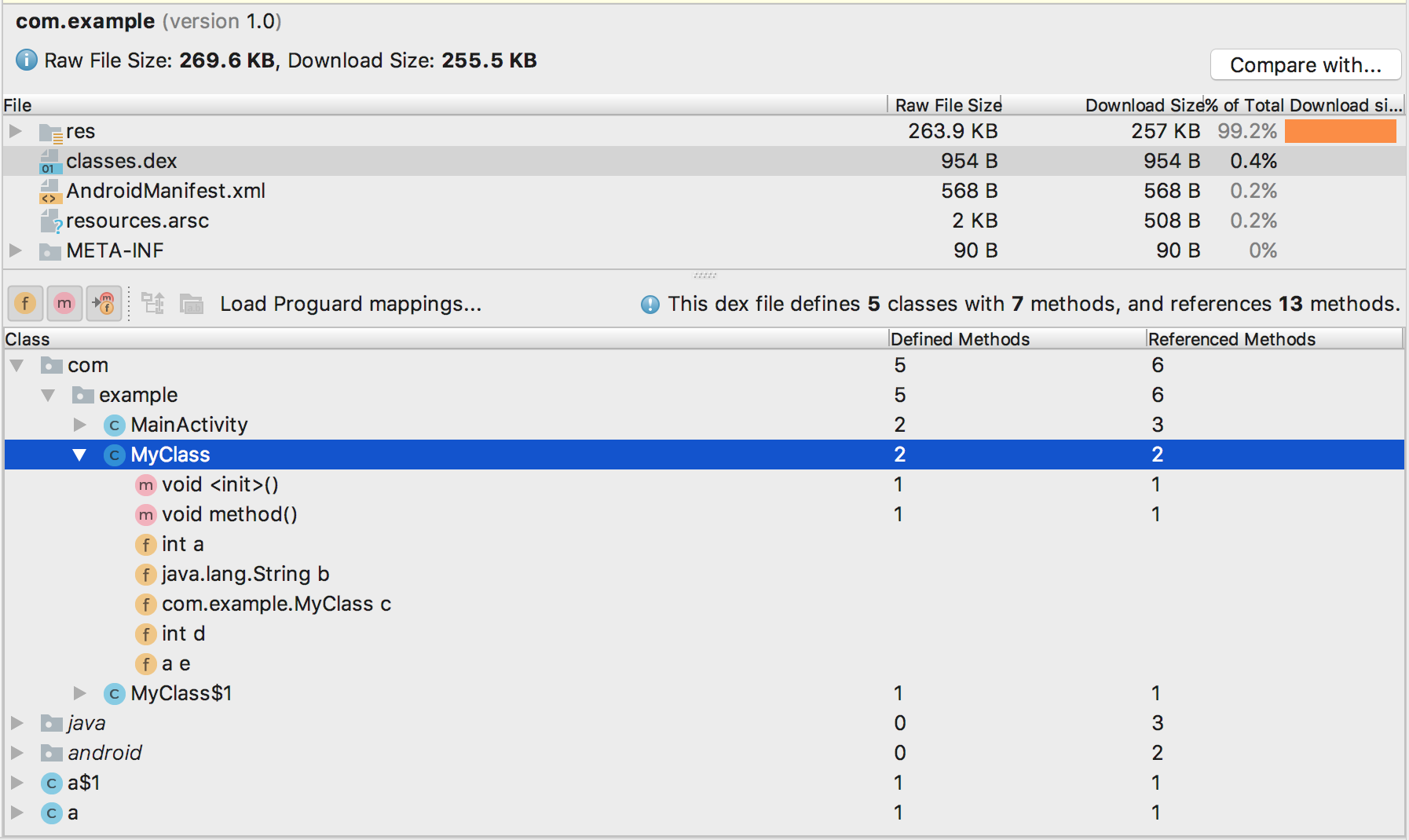
The analyzer shows two numbers per entry that you must learn to read:
- Raw File Size: The uncompressed size on disk.
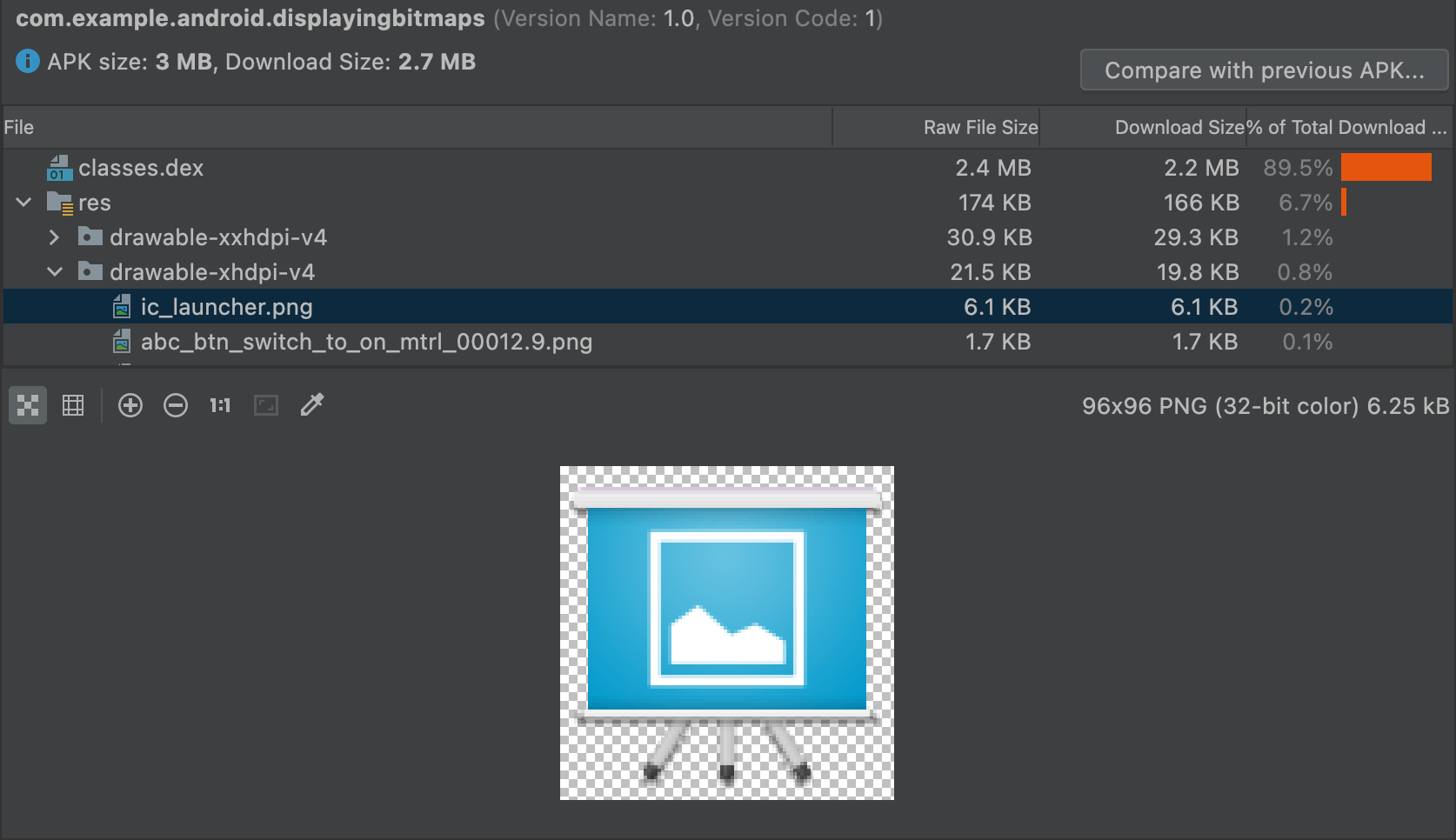
- Download Size: The compressed size users actually download. This is the number that matters.
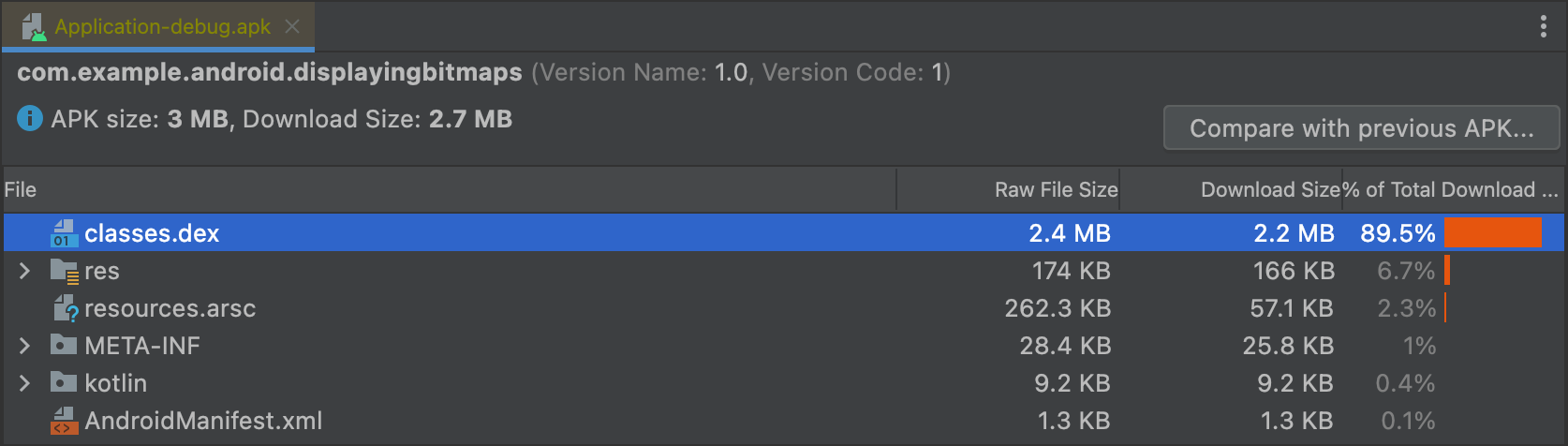
Drill into the tree to find your biggest offenders. Common surprises include classes.dex(your code), lib/ (native libraries), and res/ + assets/ (images and bundled content).
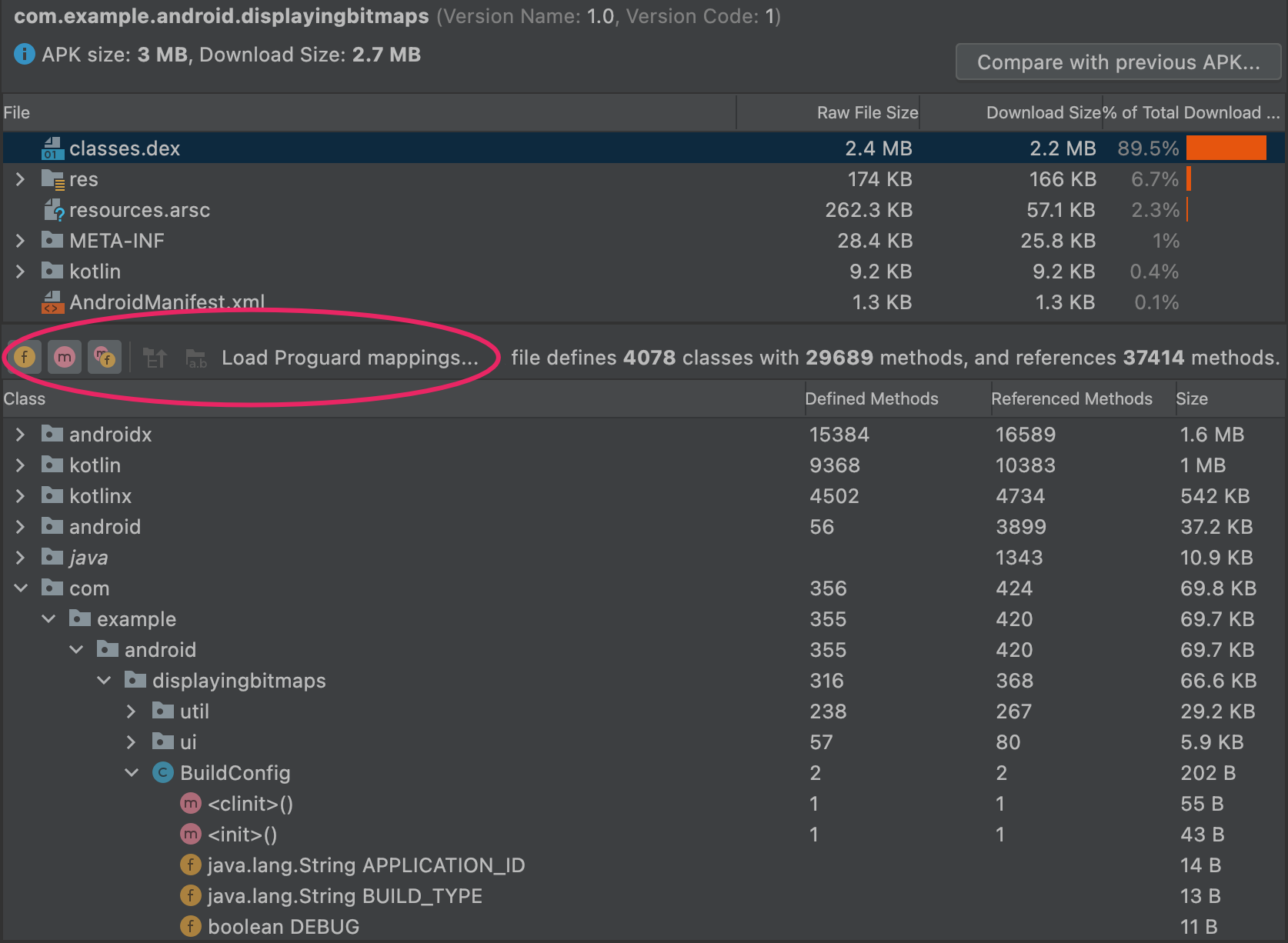
Best Practice: Before and after every optimization, use the analyzer's compare with previous APK feature. It produces a per-entry diff so you can prove a change shrank the app and catch any accidental growth.
Step Two: Ship an Android App Bundle (Biggest Single Win)
If you do only one thing from this guide, do this.
A traditional APK is one-size-fits-all: every user downloads every architecture, every screen density, and every language. The Android App Bundle (.aab) flips this model. You upload a single bundle; Google Play generates and serves an optimized split APK tailored to each device, the right CPU architecture, the right density, the right language, and nothing else.
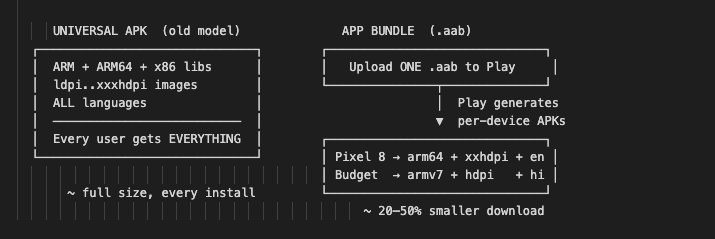
Switching costs almost nothing, with no code changes, and the App Bundle format has been required for all new apps on Google Play since August 2021. Build it from the command line:
   # Build a release App Bundle (.aab) instead of an APK
   ./gradlew bundleRelease


   # Output lands here:
   # app/build/outputs/bundle/release/app-release.aab
Want to see the exact per-device APKs Play will serve and their download sizes before you ship? Use Google's bundletool:
   # Build a release App Bundle (.aab) instead of an APK
   ./gradlew bundleRelease


   # Output lands here:
   # app/build/outputs/bundle/release/app-release.aab
Real-world impact: Teams routinely see a 20–50% smaller download from this single format change with zero feature loss, because each device simply stops downloading resources it never used.
Step Three: Shrink Code Safely with R8
R8 is the default code shrinker, optimizer, and obfuscator built into the Android Gradle Plugin. It does three jobs: removes unused code (tree-shaking), optimizes what remains, and obfuscates names to save bytes. Enable it for release builds:
  // app/build.gradle.kts
  android {
   buildTypes {
       release {
           isMinifyEnabled = true      // R8 code shrinking + obfuscation
           isShrinkResources = true    // remove resources no longer referenced by code


           proguardFiles(
               getDefaultProguardFile("proguard-android-optimize.txt"),
               "proguard-rules.pro"
           )
       }
   }
 }
  isMinifyEnabled = true turns on R8; isShrinkResources = true then strips drawables, layouts,    and strings that the shrunken code no longer references. They work as a pair.
The Catch and How to Stay Feature-Safe
R8 decides what is "unused" through static analysis. Anything reached only via reflection, JNI, or serialization can look unused and get removed which is exactly how "shrinking broke my app" happens. The fix is not to disable R8; it is to tell R8 what to protect using keep rules in proguard-rules.pro:
  # Keep model classes used by Gson/Moshi (accessed via reflection)
  -keep class com.example.app.model.** { *; }


  # Keep a class loaded reflectively by name
  -keep class com.example.app.PluginEntryPoint { *; }


  # Keep native methods (resolved by JNI, invisible to static analysis)
  -keepclasseswithmembernames class * {
    native <methods>;
  }
Warning: Never ship an R8-enabled build straight to production without testing it. Run your full QA pass and instrumented tests on the release build, not just debug. Most shrinking-related crashes surface the first time a reflective path executes.
Debugging a Shrinking Regression
When a release build misbehaves, the APK Analyzer lets you inspect the retrace mapping file and confirm which classes survived shrinking so you can pinpoint what R8 removed and add a precise keep rule.

Keep the generated mapping.txt for every release; it also lets you de-obfuscate production crash stack traces back to readable class names.
Step Four: Trim Resources, Images, and Native Libraries
Code is only half the story. For most consumer apps, images and assets dominate the size budget.
Convert Images to WebP
WebP delivers the same visual quality as PNG/JPEG at a 25–35% smaller size, with full transparency support. Android Studio converts in place right-click a drawable
→Convert to WebP…
You can verify the payoff instantly: the APK Analyzer previews any image and reports its exact byte cost.
Prefer Vectors for Icons
Replace multi-density PNG icon sets (ldpi…xxxhdpi up to five files each) with a single VectorDrawable. One small XML scales crisply to every screen density.
  <!-- res/drawable/ic_check.xml  one file replaces five PNG densities -->
  <vector xmlns:android="http://schemas.android.com/apk/res/android"
    android:width="24dp" android:height="24dp"
    android:viewportWidth="24" android:viewportHeight="24">
    <path android:fillColor="#00A86B"
        android:pathData="M9,16.2L4.8,12l-1.4,1.4L9,19 21,7l-1.4,-1.4z"/>
  </vector>
Strip Unused Resources and Locales
Tell Gradle to keep only the languages and densities you actually support, so bundled libraries do not drag in dozens of unused translations:
  // app/build.gradle.kts
  android {
    defaultConfig {
        // Keep only the locales your app ships  drops others from libraries
        resourceConfigurations += listOf("en", "hi", "es")
    }
  }
Reduce Native Library Weight
Native .so files are often the single heaviest section. Two safe wins:
  android {
    buildTypes {
        release {
            ndk {
                // Ship only 64-bit ARM if that covers your user base
                abiFilters += listOf("arm64-v8a")
            }
        }
    }
    packaging {
        // Do not compress .so twice; let Play handle extraction
        jniLibs.useLegacyPackaging = false
    }
  }
Note: Only restrict abiFilters if you are certain no users need the excluded architectures. With the App Bundle, you usually do not need this at all Play already serves each device only its matching ABI. Prefer the bundle over manual ABI filtering.
Step Five: Defer What Users Don't Need Yet
The lightest megabyte is the one you never ship at install time. Two Play delivery features let you move optional content out of the initial download and fetch it on demand invisibly to the user.
Play Feature Delivery (dynamic feature modules): Download a whole feature (code + resources) only when the user opens it.
Play Asset Delivery (PAD): Stream large assets (game levels, media packs, ML models) at or after install, up to multi-gigabytes, without the 200 MB base limit.
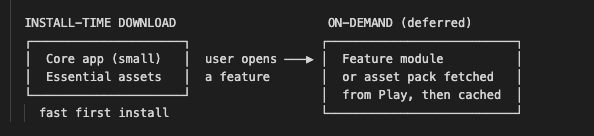
   // Request an on-demand feature module at runtime (Play Feature Delivery)
   val splitInstallManager = SplitInstallManagerFactory.create(context)
   val request = SplitInstallRequest.newBuilder()
   .addModule("premium_editor")   // module downloaded only when needed
   .build()


   splitInstallManager.startInstall(request)
   .addOnSuccessListener { /* module ready  launch the feature */ }
   .addOnFailureListener { /* fall back gracefully */ }
This is how you keep a feature-rich app small: the feature still exists, it simply arrives the moment it's needed instead of sitting in every install.
Comparison Table: Techniques by Impact and Risk
Recommended order: Start at the top. Techniques #1 and #3 are essentially free and risk-free; do them first. #2 delivers the next-biggest win once you've added keep rules and tested the release build. Reach for #4 only when large optional content justifies the engineering effort.
Key Takeaways
- Measure first, always. The APK Analyzer's download size column and compare tool turn optimization from guesswork into evidence.
- The App Bundle is the highest-leverage change: One format switch, no code edits, and every device stops downloading what it never used.
- R8 is safe when you guide it. Add keep rules for reflection/JNI/serialization paths and test the release build before shipping.
- Images are usually the heaviest section. WebP and vector drawables cut them with no visible quality loss.
- Defer, don't delete. Play Feature and Asset Delivery keep features intact while removing their weight from the initial install.
- Feature-safe means verified. Every technique here is reversible and provable with a before/after diff; you never trade functionality for size.
Conclusion
Reducing app size is not about stripping your product down; it is about removing waste your users were carrying for no reason. A device only ever needed one CPU architecture, one image density, and the languages its owner reads. Everything else was dead weight.
Work the steps in order: measure with the APK Analyzer, ship an App Bundle, enable R8 with proper keep rules, modernize your images, and defer optional content. At each step, diff before and after so every megabyte you remove is one you can prove was safe to remove.
The result is an app that installs faster, updates more reliably, reaches more devices, and does everything it did before. Ship less. Reach more.
References
- Reduce your app size (official guide)
- Analyze your build with APK Analyzer
- About Android App Bundles
- Shrink, obfuscate, and optimize with R8
- bundletool command reference
- Play Feature Delivery
- Play Asset Delivery
- Convert images to WebP in Android Studio
- VectorDrawable overview
- Support multiple languages and locales








