


.svg)


.png)


One of the biggest advantages of React Native is that some app changes can reach users without requiring a complete App Store or Google Play release. With CodePush, teams can deliver compatible JavaScript and asset updates over the air while keeping the installed native application binary unchanged.
But React Native CodePush updates have a clear boundary. JavaScript does not automatically mean everything in a React Native project can be changed remotely. Native modules, platform configuration, permissions, and other compiled components still require a new store build.
At AppsOnAir, we built CodePush specifically for this React Native OTA workflow. It allows teams to release JavaScript bundle and asset changes while keeping native-code updates inside the normal app-store release process.
What Is CodePush in React Native?
CodePush is an over-the-air update mechanism that allows a React Native application to download a newer JavaScript bundle and supported assets after the app has already been installed.
A normal React Native production build contains both a native application binary and a JavaScript bundle. CodePush updates the JavaScript side of that application without replacing the native binary installed from the App Store or Google Play.
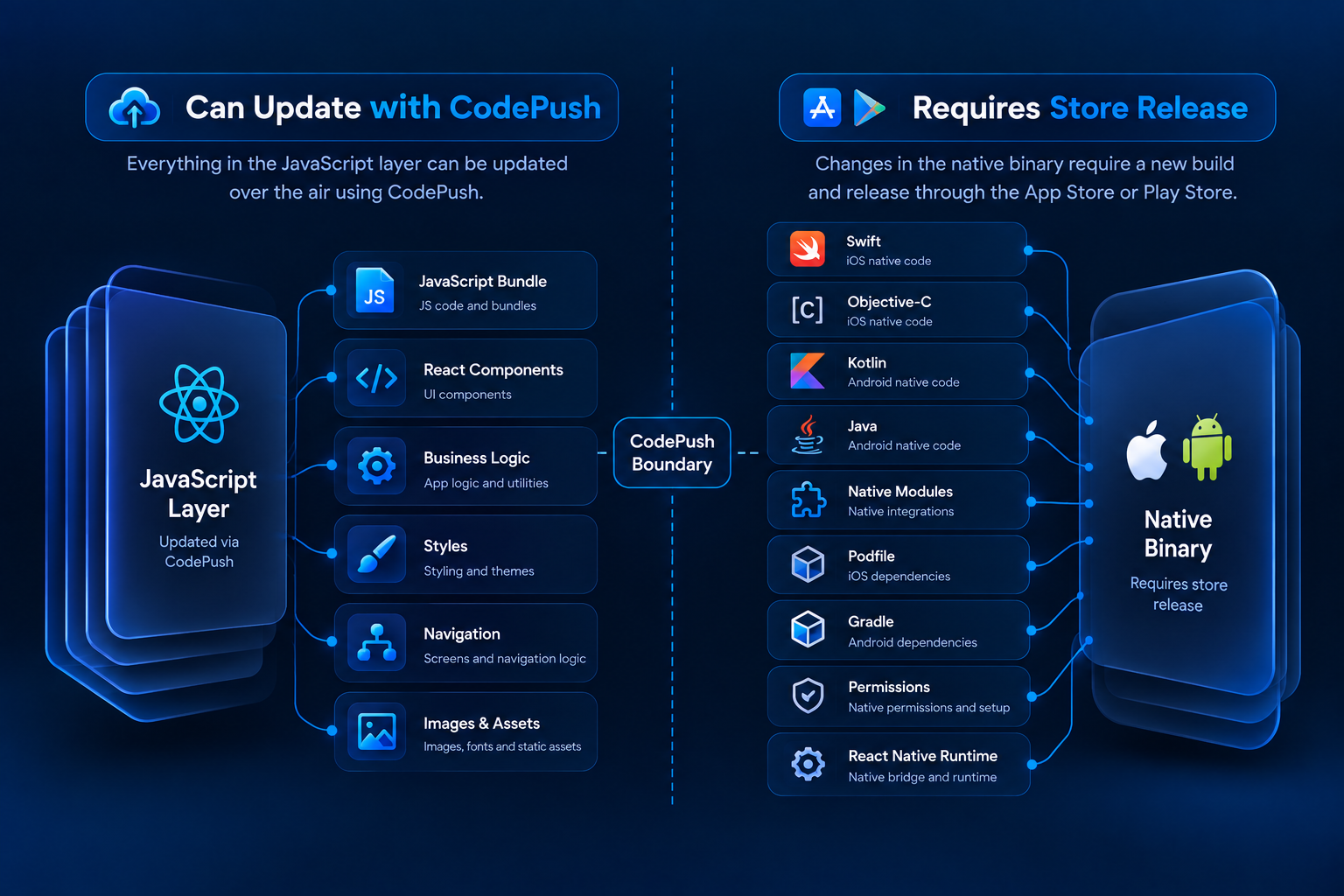
The JavaScript and Native Boundary
Understanding this boundary is the easiest way to decide whether a change can be delivered with CodePush.
The JavaScript layer includes much of the React Native application logic, screens, state management, styling, and JavaScript-controlled behavior.
The native layer includes compiled Swift, Objective-C, Kotlin, Java, platform configuration, native modules, and the React Native runtime packaged inside the application binary.
CodePush can update the first layer. It cannot replace the second.
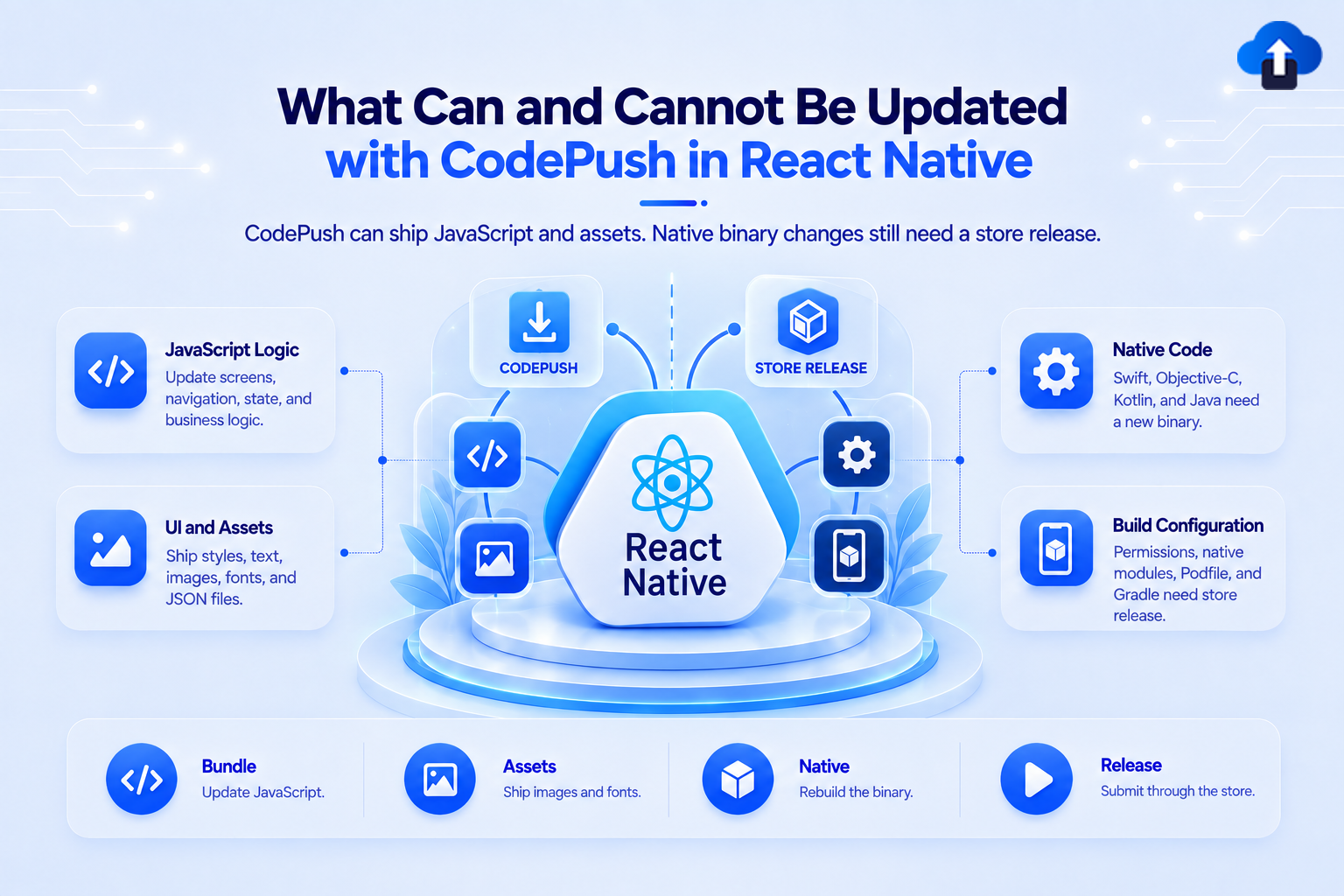
What Can Be Updated with CodePush?
CodePush is most useful when the change stays entirely inside the JavaScript bundle or supported application assets.
This makes it particularly valuable for production fixes and smaller application improvements that do not require changes to the native binary.
JavaScript Logic Can Be Updated
Business logic written in JavaScript or TypeScript is one of the clearest CodePush use cases.
For example, suppose a calculation inside a checkout flow is incorrect. If the problem exists entirely in JavaScript and the fix does not require a native dependency change, a new JavaScript bundle can be released through CodePush.
The same applies to many validation rules, state-management changes, API client behavior, and JavaScript-controlled application flows.
React Components and Screens
React Native screens and components are generally defined in JavaScript or TypeScript.
This means teams can often update screen structure, component behavior, labels, error messages, and other JavaScript-controlled UI without creating a new store binary.
However, the new component still needs to work with the native capabilities already present in the installed application.
UI Styles and Layout Can Be Updated
React Native styles are normally part of the JavaScript bundle.
Changes to spacing, colors, component positioning, responsive behavior, or other style definitions can therefore often be delivered through CodePush.
This makes OTA updates useful when a production release contains a visual problem that needs a quick correction.
Navigation Logic Can Often Be Updated
Navigation routes, screen transitions, and related JavaScript logic can also be updated when they rely only on capabilities already included in the native application.
For example, changing where an existing button navigates or correcting a JavaScript routing condition may fit within an OTA release.
If the new flow requires a native SDK or platform capability that does not exist in the installed binary, a store release becomes necessary instead.
Images and Assets Can Be Updated
CodePush also supports asset updates such as images and other resources included with the JavaScript bundle.
This can help when teams need to replace an incorrect image, update an asset used by a screen, or ship another compatible resource alongside a JavaScript change.
The key requirement is that the asset must fit within the application's existing native structure.
What Cannot Be Updated with CodePush?
The simplest rule is that CodePush cannot replace native code that has already been compiled into the installed mobile application.
If a change requires rebuilding the Android or iOS project, it normally needs a new binary and the relevant app-store release process.
Swift, Objective-C, Kotlin, and Java Changes
Changes to native iOS code written in Swift or Objective-C cannot be delivered as a JavaScript OTA update.
The same applies to Android changes written in Kotlin or Java.
These languages are compiled into the application binary before it is distributed to users. Changing that compiled code requires another native build.
Native Modules Cannot Be Added or Changed Through OTA
React Native applications frequently use native modules to access device functionality or third-party SDKs.
If a new JavaScript feature requires a native module that was not included in the installed application, CodePush cannot add the missing native implementation.
For example, adding a package may look like a JavaScript change at first. But if installation also requires pod install, Android Gradle configuration, or platform-specific native code, the change crosses the CodePush boundary.
Be Careful When Updating Dependencies
Not every npm package is JavaScript only.
A utility library that operates entirely in JavaScript may be compatible with an OTA update. A library that includes native iOS or Android components requires a new binary when those native components change.
Teams should therefore check the dependency itself rather than assuming that an npm installation can automatically be shipped through CodePush.
Native Configuration Requires a Store Build
Changes to files such as Info.plist, Android manifests, Podfiles, or Gradle configuration affect the native application package.
Examples include adding certain permissions, changing native SDK setup, modifying build settings, or adding new platform capabilities.
These changes need to be compiled into a new application binary before users can receive them.
React Native Upgrades Cannot Be Delivered Through CodePush
Upgrading the React Native framework itself changes more than JavaScript.
A React Native version change can affect the native runtime, Android and iOS dependencies, build configuration, and other compiled components. It therefore requires a new native build rather than an OTA JavaScript update.
The installed binary and the OTA bundle must remain compatible with each other.
Avoid the Version Compatibility Trap
One of the biggest risks in OTA updates is sending JavaScript that expects a native capability the installed binary does not have.
Imagine version 3.0 of the app adds a new native camera module. The JavaScript for that feature cannot safely be pushed to users still running a version 2.0 binary without that module.
The OTA release should therefore target only binary versions that contain the native capabilities required by the JavaScript bundle.
When Should You Use CodePush Instead of a Store Release?
CodePush is useful when the change is compatible with the native binary already installed on users' devices.
Typical examples include JavaScript bug fixes, text corrections, UI adjustments, business-logic changes, compatible API updates, and supported asset changes.
A store release should be used when the change affects native code, native dependencies, platform permissions, the React Native runtime, or another part of the application that must be compiled.
The question is not simply whether the change feels small. The important question is where that change lives technically.
How AppsOnAir CodePush Manages React Native OTA Updates
With AppsOnAir CodePush, we provide a dedicated OTA release workflow for React Native applications on Android and iOS. Releases can contain JavaScript bundle and asset changes while targeting compatible installed binary versions.
Target Compatible Binary Versions
When releasing an update, teams can define the binary versions that should receive it.
For example, a release can target one exact version, a range of patch versions, or a broader semantic-version range. This helps prevent an OTA bundle from being sent to an incompatible native binary.
Use Optional, Mandatory, and Gradual Releases
CodePush releases can be marked as mandatory when users need the update, or released normally when immediate installation is not required.
Teams can also roll an update out to only a percentage of eligible users and increase that percentage later. This provides another control layer before an OTA change reaches everyone.
Roll Back Problematic Updates
If an OTA release causes problems, CodePush supports rollback to a previous release.
Release contents themselves remain immutable after publication, so a broken bundle is handled by rolling back and then publishing a corrected update rather than editing the existing release in place.
AppsOnAir CodePush also supports both legacy and newer React Native architectures through the appropriate compatible SDK setup.
Common Mistakes with React Native CodePush Updates
One common mistake is assuming that every React Native change can be shipped OTA. React Native still contains a native application layer, and CodePush cannot replace that compiled binary.
Another mistake is updating the JavaScript side of a native module without confirming that the installed binary contains the compatible native implementation. This can create runtime errors or broken features.
Teams should also avoid sending every update directly to all users. Testing the OTA bundle first, targeting the correct binary versions, and using controlled rollout options can reduce production risk.
Frequently Asked Questions
What can CodePush update in React Native?
CodePush can update compatible JavaScript bundles and assets, including many React components, business-logic changes, styles, navigation logic, images, and JavaScript-only functionality.
Can CodePush update native code?
No. Swift, Objective-C, Kotlin, Java, native modules, and other compiled native changes require a new application binary and store release.
Can CodePush update images and assets?
Yes. CodePush supports asset updates such as images alongside JavaScript bundle changes, provided they remain compatible with the installed application.
Can CodePush add a new React Native library?
Only if the library is entirely JavaScript-based and requires no native changes. Libraries requiring CocoaPods, Gradle changes, native modules, or platform configuration need a new binary.
Can CodePush update the React Native version?
No. A React Native framework upgrade affects the native runtime and build dependencies, so it requires a new Android or iOS application build.
When should I use CodePush instead of an app-store release?
Use CodePush for compatible JavaScript and asset changes. Use a store release whenever the change modifies native code, native dependencies, platform configuration, permissions, or the React Native runtime.
Final Thoughts
The most important thing to understand about React Native CodePush updates is the boundary between the JavaScript bundle and the native application binary.
JavaScript logic, React components, styling, navigation behavior, and supported assets can often be delivered over the air.
Native modules, Swift, Kotlin, platform configuration, permissions, and framework upgrades still require a normal store release.
With AppsOnAir CodePush, we help React Native teams manage that JavaScript-side update path with binary-version targeting, controlled rollouts, mandatory updates, release history, and rollback support. When teams clearly understand what belongs inside an OTA release and what belongs inside a new binary, CodePush becomes a much safer and more useful part of the mobile release workflow.








