


.svg)



Imagine someone receives a link to a product, a referral reward, or an exclusive offer inside a mobile app. They tap the link, expecting to see that specific content, but the app is not installed on their device. What happens next depends on how the deep link has been configured.
A regular deep link may open a website or fail to reach the intended in-app destination. Deferred deep linking solves this problem by connecting the original link click with the experience after the user installs the app. Instead of arriving at a generic home screen, the user can continue toward the content that prompted the click.
At AppsOnAir, we built AppLink to support both regular and deferred deep linking across Android and iOS. It helps mobile teams route users to the appropriate destination, including when installation is needed before the intended in-app journey can continue.
What Happens When a Deep Link Is Clicked?
A deep link is a link that directs users to specific content inside a mobile application rather than simply opening the app's home screen.
For example, an ecommerce app might share a link to a particular product. If the app is already installed and the link is configured correctly, tapping it can open that product page directly.
However, when the app is missing, the operating system cannot open its content. The link must instead lead somewhere else, such as a website, app download page, or another configured fallback.
What Happens on Android?
Android App Links connect verified website URLs to an Android application. When the app is installed, supported links can open the corresponding in-app content.
If the app is not installed, the URL opens in the browser. The website can then display the relevant content or provide a path to download the app.
What Happens on iOS?
iOS Universal Links work in a similar way. They associate supported website links with an application, allowing installed users to open the relevant content inside the app.
Without the app, the link opens in the user's browser. Apple does not automatically preserve the original destination across installation simply because a Universal Link was clicked.
Regular Deep Linking vs. Deferred Deep Linking
The main difference is what happens to the user's original destination when installation is required.
Regular deep linking works when the application is already available. Deferred deep linking adds a way to recover the original destination after a new installation.
Deferred deep linking does not remove the installation step. It helps preserve the context behind the original click so the user can continue the intended journey afterward.
How Deferred Deep Linking Works After Installation
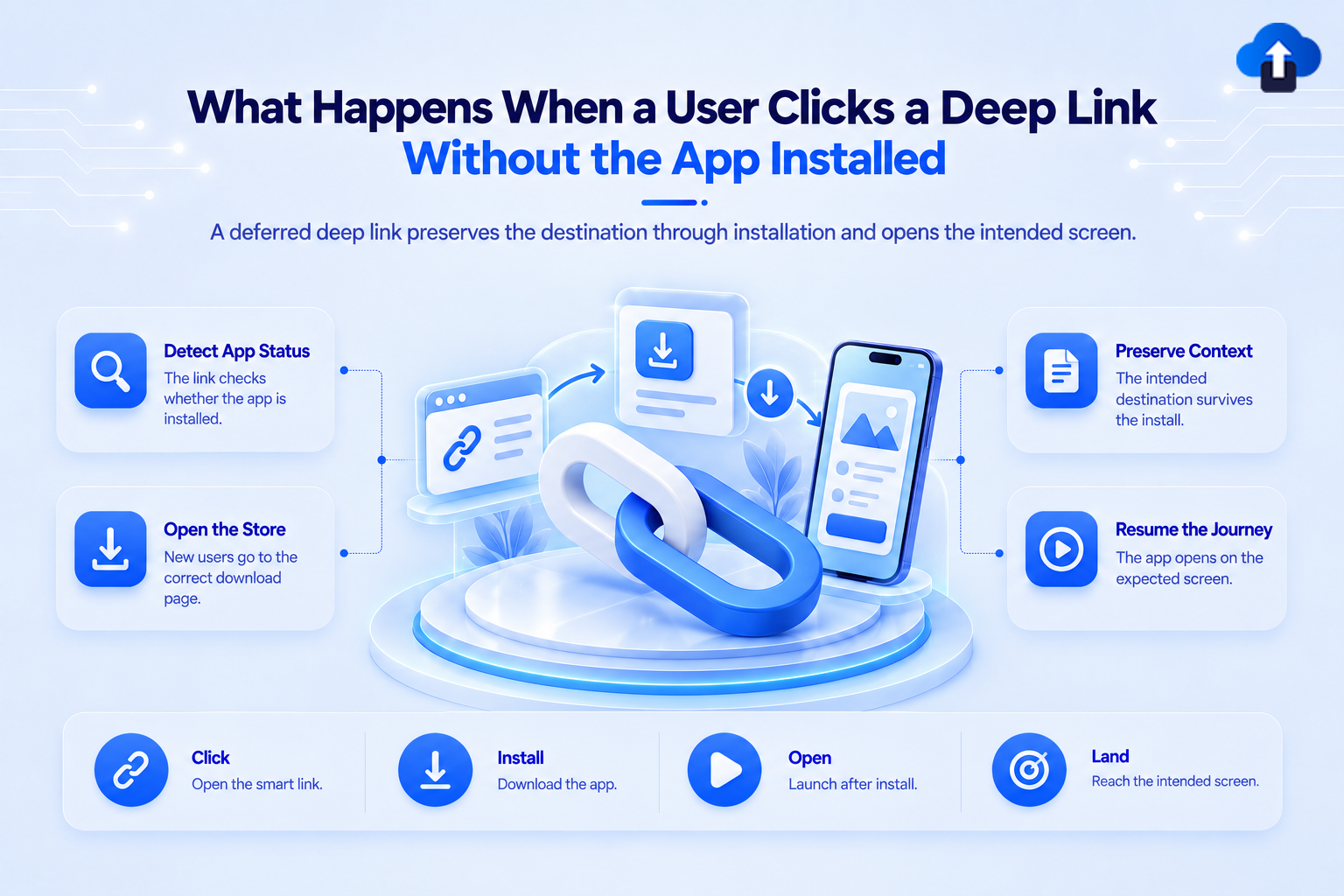
Deferred deep linking connects three important moments: the initial click, the application installation, and the first app launch.
A correctly configured flow needs to carry the intended destination through these stages without sending the user to unrelated content.
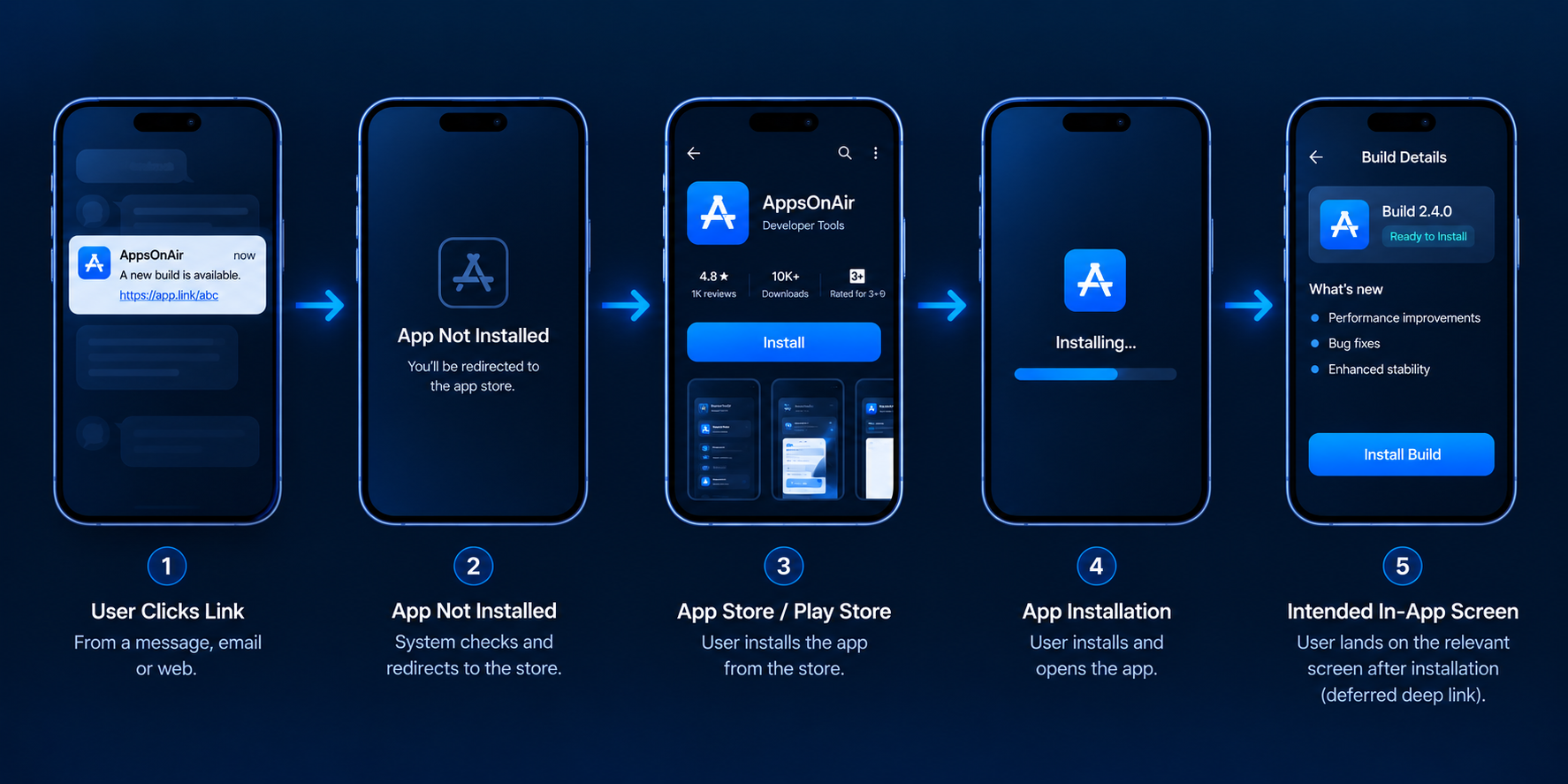
Step 1: The User Clicks a Shared Link
Suppose a user receives a referral link offering a reward after signing up for a mobile app.
When they tap the link, the deep linking system processes the URL and identifies the configured destination. It may contain information such as a referral code, product identifier, or campaign destination.
Step 2: The User Is Directed to Install the App
If the app is missing, the link can display an installation page or direct the user to the appropriate app store.
The user must still complete the normal installation process. Deferred deep linking does not bypass the App Store or Google Play, and it does not automatically install the application.
Step 3: The App Opens After Installation
Once installation is complete, the user launches the app.
The deferred deep linking integration attempts to recover the original destination information. The exact method depends on the platform, provider, permissions, and implementation.
Step 4: The User Reaches the Intended Content
If the original link context is recovered successfully, the application can navigate to the relevant product, referral screen, promotion, or other destination.
If authentication or onboarding is required, the app should complete those steps before opening protected content. This keeps the experience relevant without bypassing normal access controls.
Why Preserving the Original Destination Matters
When someone clicks a deep link, they usually have a specific goal. They may want to view a product, accept an invitation, claim a reward, or open content shared by a friend.
Sending that user to a generic home screen after installation interrupts the journey. They must then search for the content again, and some may not know where to find it.
Product and Campaign Links
An ecommerce brand might promote a particular product through a social media campaign.
If a new user installs the app after clicking the promotion, deferred deep linking can help direct them back to the product. The user does not need to search through the catalog to find the item they originally wanted.
Referral and Invitation Links
Referral programs often depend on information contained in the original shared link.
If that information is lost during installation, the new user may not receive the expected referral experience. Preserving it helps the app associate the user with the correct referral or invitation, subject to the program's validation rules.
Personalized Onboarding
Some links represent a particular onboarding journey, such as joining a workspace, accessing a course, or registering for an event.
Deferred deep linking helps the app understand why a user arrived. The onboarding process can then lead toward that destination rather than presenting the same starting experience to every new user.
How AppsOnAir AppLink Handles Users Without the App
With AppLink, we support deep linking across Android and iOS, including deferred deep linking for users who need to install the application first.
The platform allows teams to configure links that route users to the app, an app store, or a web destination based on the device and link settings.
Preserve the Intended Destination
AppLink supports deferred deep linking so users can install the application and continue toward the originally requested content on first launch.
For example, a user clicking a referral link can be directed to the App Store or Play Store, install the app, and then reach the intended referral screen when the original link context is successfully recovered.
Support iOS Deferred Deep Linking
On iOS, privacy protections can make it more difficult to associate the original link click with the later app installation.
For eligible integrations, our Advanced Deferred AppLink workflow uses a configured Get the App page and clipboard-based referral recovery. On iOS versions that require clipboard permission, the user may need to allow access. If permission is denied, the referral information may not be available.
This approach requires the relevant app-side and web-portal configuration.
Manage Links and Destinations
AppLink also supports custom domains, configurable platform-specific redirects, and link metadata. Teams can use these features to keep shared links consistent while managing where different users should be directed.
The result is a more connected installation and onboarding workflow without requiring users to manually find the original content after downloading the app.
Common Mistakes When Handling Deep Links Without Installation
One common mistake is assuming that every deep link automatically works after an app is installed. Regular deep linking and deferred deep linking serve different purposes, so the post-installation journey needs to be implemented and tested separately.
Another mistake is sending every new user to the home screen. This can disconnect the user from the product, invitation, or offer that originally motivated the installation.
Teams should also test what happens when users decline permissions, abandon installation, open the app later, or need to sign in first. A reliable fallback should keep the app usable even when the original destination cannot be recovered.
Frequently Asked Questions
What happens if a user clicks a deep link without the app installed?
If the app is not installed, a standard web-based deep link typically opens a website or configured fallback. A deferred deep link can direct the user to the app store and preserve the original destination for the first app launch.
What is deferred deep linking?
Deferred deep linking allows a user to click a link, install an app, and then reach the originally intended in-app content. It connects the initial link click with the post-installation experience.
Does a deep link automatically open the App Store or Google Play?
Not necessarily. Standard Universal Links and Android App Links generally open the associated website when the app is missing. Redirecting users to an app store requires an appropriate fallback or deep linking configuration.
Can a deep link work after the app is installed?
Yes. Deferred deep linking can recover the original link information after installation and direct the user to the intended screen. Successful recovery depends on the provider, platform, app integration, and applicable permissions.
What is the difference between deep linking and deferred deep linking?
Regular deep linking opens specific content in an installed app. Deferred deep linking extends that journey across installation so new users can reach the originally requested content after opening the app.
Does deferred deep linking work on both Android and iOS?
Yes, deferred deep linking can be implemented on Android and iOS. However, the underlying methods and reliability can differ because of platform restrictions, privacy protections, and permission requirements.
Final Thoughts
When a user clicks a deep link without the app installed, the journey should not end at a missing application. A properly configured fallback can guide them toward installation, while deferred deep linking can preserve the destination that made them click in the first place.
The important part is maintaining context. Whether the user wants to view a product, accept an invitation, or claim a referral reward, the experience after installation should connect naturally to their original goal.
With AppsOnAir AppLink, we help mobile teams manage this journey through platform-aware routing, configurable fallbacks, and deferred deep linking. By planning for both installed and new users, teams can create a more consistent path from the first click to the intended in-app experience.








