


.png)


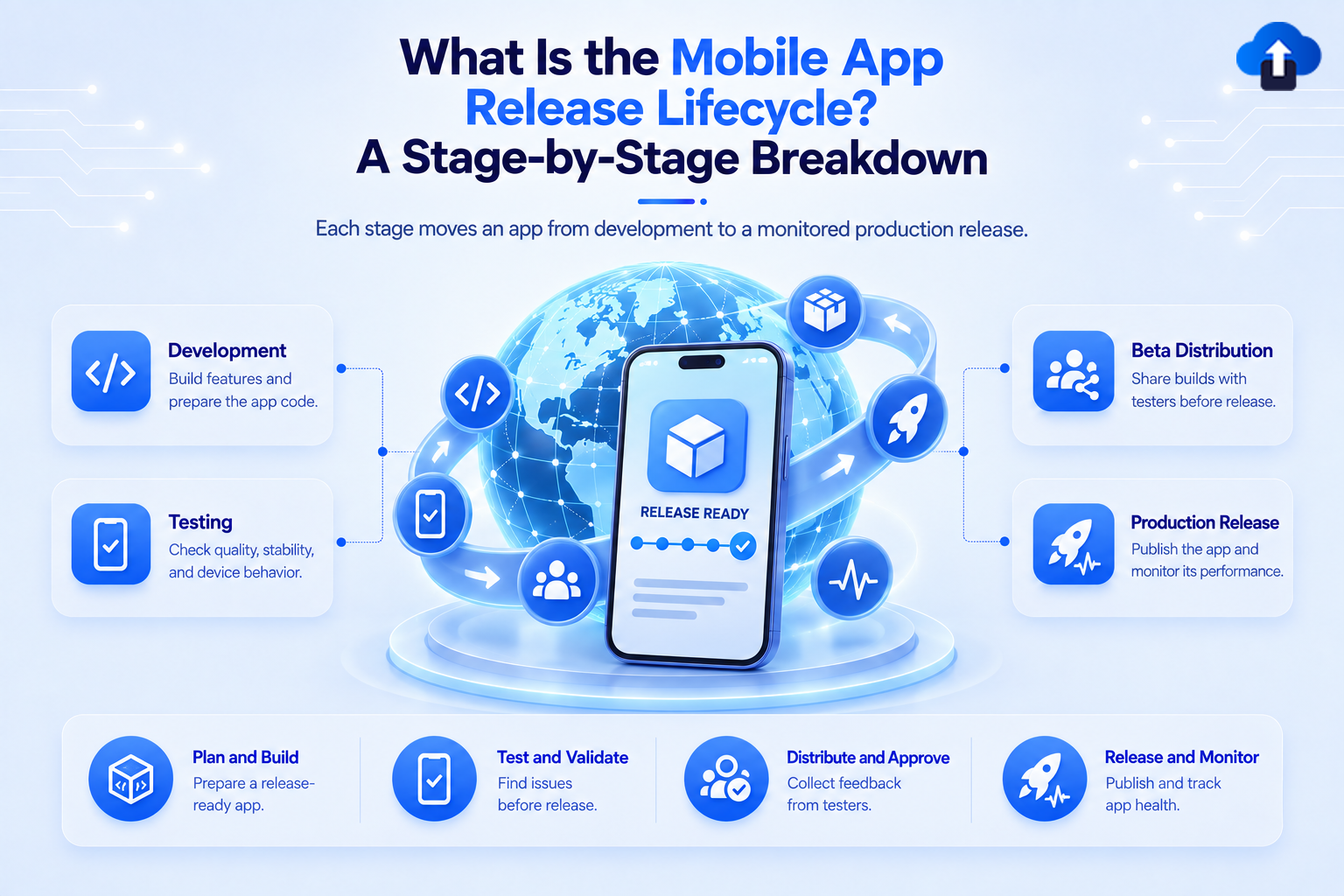
Releasing a mobile app is not a single action. A build needs to move through development, testing, internal distribution, store submission, production rollout, and post-release monitoring before the release can truly be considered complete.
The mobile app release lifecycle is the structured process that takes an app from completed code to a stable version running on users' devices. A clear lifecycle helps teams catch problems earlier, reduce release risk, and respond faster when something goes wrong after launch.
At AppsOnAir, we work across several stages of this lifecycle, including internal build distribution, in-app QA feedback, update management, and React Native OTA updates. The goal is to make the journey from build to production easier to control.
What Is the Mobile App Release Lifecycle?
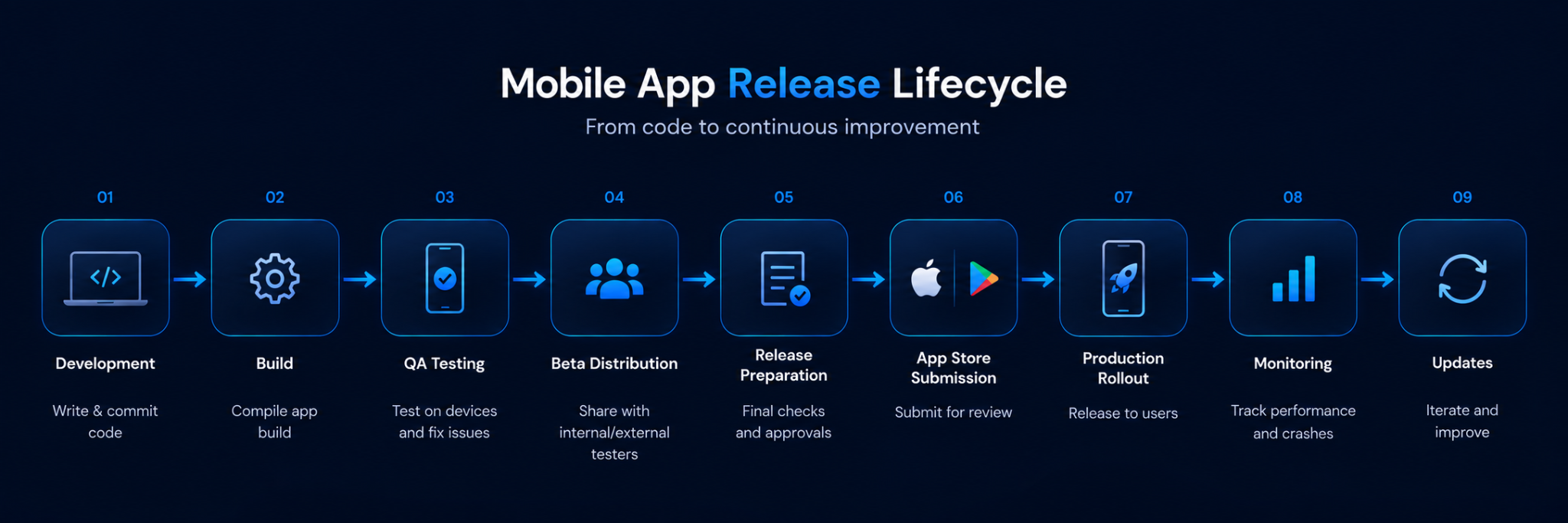
The mobile app release lifecycle is the sequence of stages an application passes through before and after reaching production users. It usually includes development completion, build creation, testing, beta distribution, release preparation, app store submission, rollout, monitoring, and future updates.
Unlike many web deployments, mobile releases also depend on app stores and software installed on user-owned devices. This means publishing a new version does not instantly move every user to that version.
Stage 1: Development and Release Planning
The lifecycle begins before the final build is created. Teams first decide what will be included in the release and make sure unfinished work does not accidentally enter production.
Developers complete features, fixes, configuration changes, and other planned work. Teams may also define release requirements such as supported operating systems, backend dependencies, feature flags, and minimum app versions.
Define the Release Scope
A clear release scope helps prevent last-minute additions from increasing risk.
Teams should know whether the release is a major feature update, a routine improvement, or a critical bug fix. The type of release can influence how much testing is needed and how quickly it should move through later stages.
Stage 2: Build the Mobile Application
Once the release code is ready, the team creates the actual mobile build.
For Android, this commonly means generating an Android App Bundle for Play distribution. For iOS, the team creates and uploads an application build that can later be tested or submitted through App Store Connect.
Keep Versions and Builds Traceable
Every release candidate should have a clear version and build identifier.
This allows developers and QA teams to know exactly which build contains a particular fix. It also prevents testers from accidentally validating an older release candidate.
Clear versioning becomes even more important when several builds are created while fixing issues discovered during QA.
Stage 3: Internal QA and Testing
The next stage is focused on finding problems before the release reaches a wider audience.
QA teams may test functionality, navigation, authentication, payments, notifications, deep links, device compatibility, network behavior, and other critical workflows.
Test Across Devices and OS Versions
Mobile applications run across different devices, operating systems, screen sizes, and hardware configurations.
Testing only on one developer's phone can therefore miss problems that appear elsewhere. Teams should prioritize the devices and OS versions most relevant to their users rather than assuming one successful test represents the entire mobile audience.
Bug reports should also include useful context such as screenshots, app version, device details, expected behavior, and reproduction steps when needed.
Stage 4: Distribute Builds to Beta Testers
After internal QA, teams often expand testing to a larger group.
This may include internal employees, external QA teams, clients, stakeholders, or selected beta users. The purpose is to test the release in more realistic conditions before production.
Apple provides TestFlight for distributing beta versions to testers before App Store release. Google Play provides internal, closed, and open testing tracks for pre-production testing with different tester groups.
Why Beta Testing Matters
Internal testing cannot reproduce every real-world condition.
Beta testers may expose device-specific problems, unusual user flows, confusing interfaces, network issues, or integration problems that were not discovered earlier.
Feedback from this stage should be reviewed before the build is treated as a final production candidate.
Stage 5: Prepare the Production Release
Once testing is complete, the team prepares the release for public distribution.
This stage can include checking version numbers, release notes, screenshots, store metadata, privacy information, signing configuration, and the final production build.
Perform a Final Release Check
Before submission, teams should confirm that the build being uploaded is the same build that completed the required QA process.
Production API configuration, analytics, crash reporting, payment configuration, feature settings, and other environment-specific values should also be checked.
A simple release checklist can prevent a tested staging configuration from accidentally reaching production.
Stage 6: Submit the App to the Stores
Mobile teams normally rely on Apple and Google to distribute production builds to users.
For iOS, the team selects an uploaded build in App Store Connect and submits the app version to App Review. Apple requires the necessary metadata and selected build before the submission can enter review.
Google Play allows releases to be prepared for testing tracks or production using the app's release artifacts.
Store Submission Is a Separate Release Stage
A successful CI build does not mean the application is already available to customers.
The release still needs to complete the platform's publishing workflow. Teams should account for this dependency when planning launch dates or urgent production updates.
Stage 7: Roll Out the Production Release
After approval, the new version can begin reaching production users.
Teams can make a release broadly available or use a gradual rollout strategy for updates.
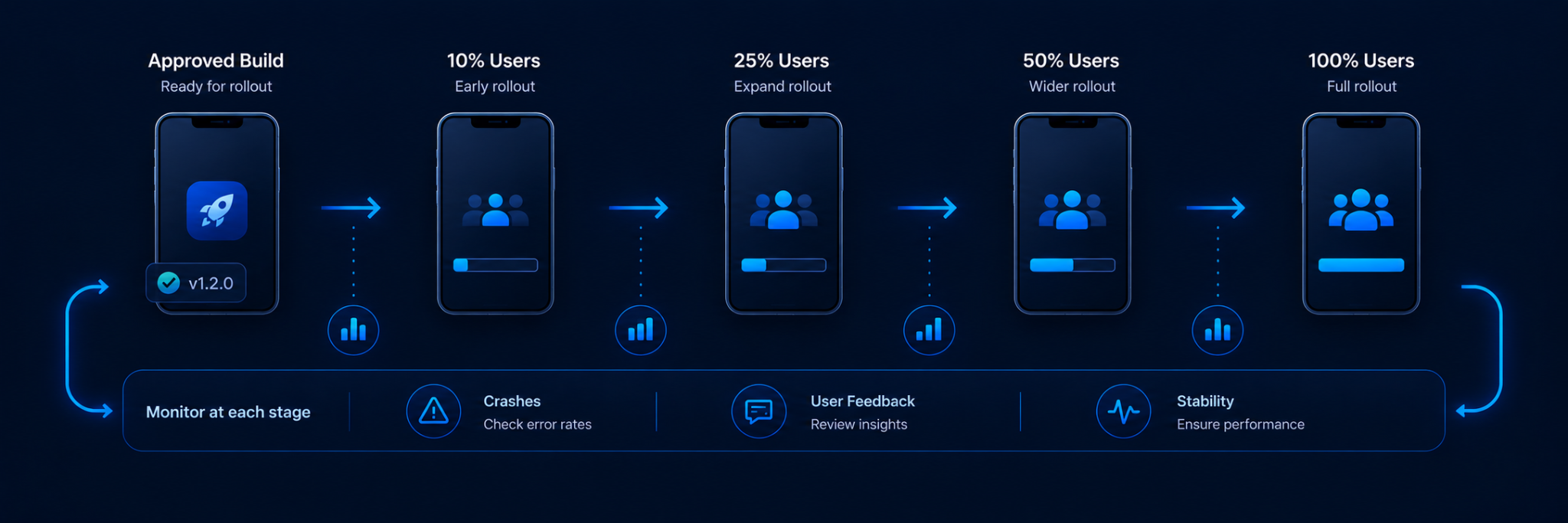
Both Apple and Google provide mechanisms for phased or staged release of app updates. Apple's phased release distributes eligible automatic updates gradually over seven days, while Google Play staged rollouts allow teams to release an update to a selected percentage of users and increase that percentage over time.
Why Gradual Rollouts Reduce Risk
A staged rollout gives teams an opportunity to observe how a release behaves with real users before everyone receives it.
If a serious issue appears, the team may be able to pause further rollout while investigating. Google Play specifically supports halting and later resuming staged rollouts.
This does not replace QA, but it creates another risk-control layer.
Stage 8: Monitor the App After Release
The release lifecycle continues after the app becomes available.
Teams should watch crashes, application errors, performance, user feedback, store reviews, backend failures, and adoption of the new version.
Pay Attention to Version Adoption
Not every user installs a new mobile version immediately.
Some may have automatic updates disabled, limited connectivity, or simply delay updating. Production systems may therefore need to support several active versions at the same time.
This is why minimum supported versions, optional updates, and forced-update strategies become part of post-release management.
Stage 9: Fix, Update, and Start the Cycle Again
Production monitoring eventually identifies bugs, improvement opportunities, or requirements for another release.
The team then decides how the change should be delivered.
A native code change normally requires another store build. Some types of configuration can be controlled remotely, while eligible React Native JavaScript and asset changes can use an OTA update system when that capability has already been integrated.
The release lifecycle then begins again with planning, development, testing, and controlled delivery.
How AppsOnAir Supports the Mobile App Release Lifecycle
Our products focus on different points between creating a mobile build and managing the application after release.
OTA Distribution for Pre-Release Builds
OTA Distribution helps teams share Android APK and iOS IPA builds with testers, clients, and stakeholders before public app-store distribution. Builds can be shared through links and notifications, making internal distribution part of the release workflow.
This is useful during QA, UAT, client review, and other pre-production stages where teams need to get a build onto real devices.
AppRemark for QA Feedback
AppRemark brings bug reporting directly into the mobile application. Testers can capture screenshots, annotate issues, add notes, and send feedback along with app-version and device information to a centralized dashboard.
That helps connect the testing stage with the debugging stage without relying entirely on manually assembled reports.
AppSync for Post-Release Version Management
AppSync helps teams manage optional updates, force updates, minimum-version behavior, and maintenance mode after the SDK has been integrated.
The update rule can be managed remotely, while the actual new binary is still distributed through the appropriate app store when a new native release is required.
CodePush for Eligible React Native Updates
For React Native applications, CodePush can deliver JavaScript bundle and asset changes over the air when they remain compatible with the installed native binary.
Native code changes still require a full app-store release. CodePush also supports rollout controls and rollback workflows for eligible OTA releases.
Common Mistakes in the Mobile App Release Process
One common mistake is treating app-store submission as the end of the release process. Teams still need to monitor the live application, watch adoption, and respond to production issues after approval.
Another mistake is distributing builds without clear version tracking. If QA, developers, and stakeholders are testing different builds, teams can easily approve a version that does not contain the latest fixes.
Teams should also avoid rushing directly from development into production. Internal QA, realistic device testing, beta distribution, and controlled rollout all provide opportunities to catch problems before they affect the full user base.
Frequently Asked Questions
What is the mobile app release lifecycle?
The mobile app release lifecycle is the process of moving an app through development, build creation, QA, beta testing, store submission, production rollout, monitoring, and future updates.
What are the main stages of a mobile app release?
The main stages are development, build creation, QA testing, beta distribution, release preparation, app-store submission, production rollout, monitoring, and post-release updates.
What happens after a mobile app is released?
After release, teams monitor crashes, performance, user feedback, backend behavior, and version adoption, then fix issues or prepare the next update when necessary.
Why should mobile apps use beta testing before production?
Beta testing exposes the app to more devices, users, and real-world conditions, helping teams discover compatibility, usability, and workflow issues before a public release.
What is a staged mobile app rollout?
A staged rollout releases an app update to only part of the user base first, allowing teams to monitor stability before gradually expanding the update to more users.
Does every mobile app fix require a new store release?
No. Native code changes generally require a new store build, but some remote configuration changes and eligible React Native JavaScript or asset updates can use other delivery mechanisms.
Final Thoughts
The mobile app release lifecycle is much more than building an app and uploading it to a store. A reliable process connects development, QA, beta distribution, store submission, controlled rollout, production monitoring, and future updates.
Each stage reduces a different type of risk. Testing catches problems before launch, beta distribution expands real-world coverage, staged rollout limits exposure, and post-release monitoring helps teams respond when production behaves differently from testing.
At AppsOnAir, we support several of these stages through OTA Distribution, AppRemark, AppSync, and CodePush. Together, they help mobile teams create a more connected path from pre-release testing to post-release app management while keeping the standard app-store lifecycle where a full binary release is required.









