


.png)


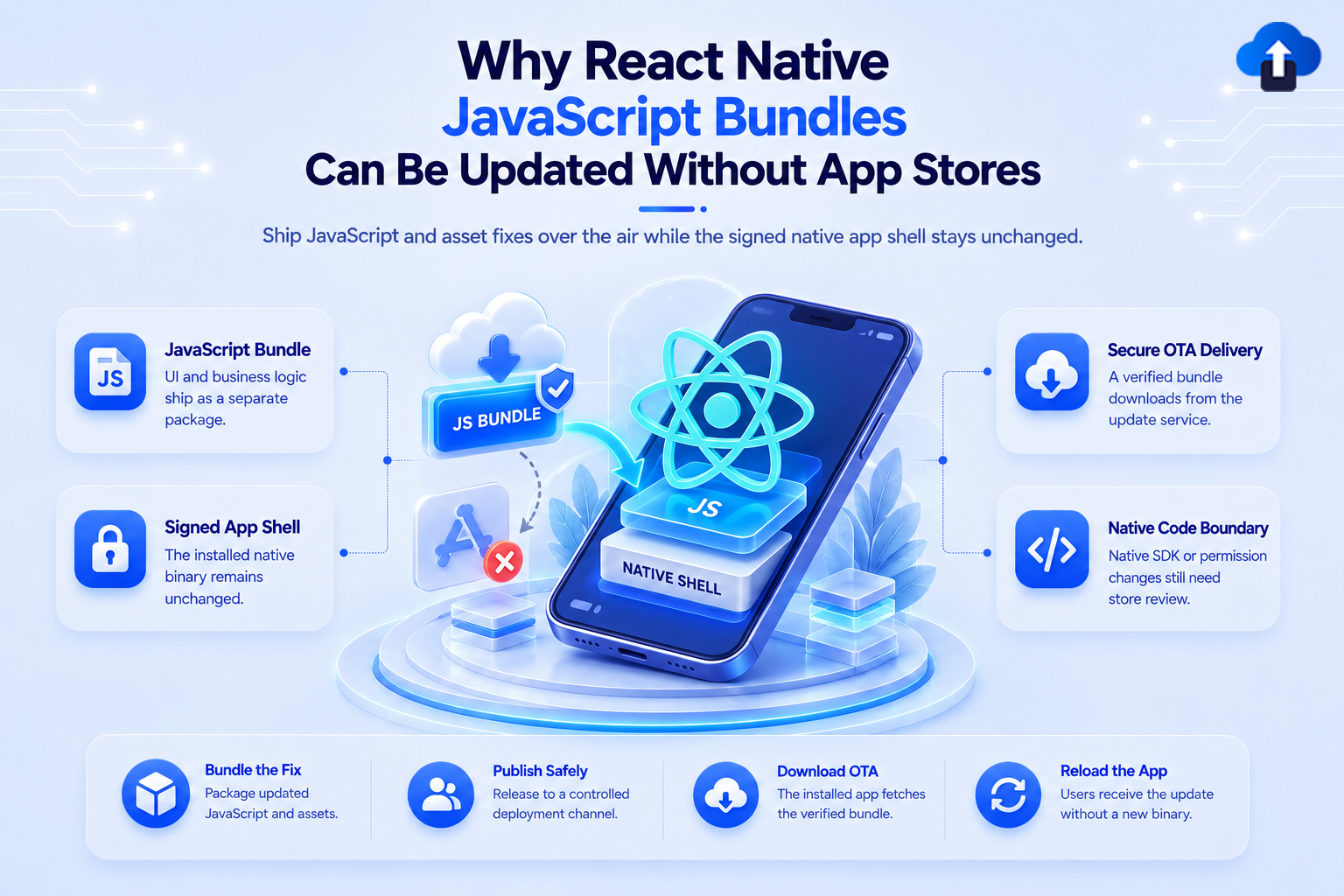
A React Native application combines two different layers: native mobile code and a JavaScript bundle that contains much of the application's interface and logic. That separation is what makes certain over-the-air updates technically possible.
Instead of rebuilding and redistributing the complete Android or iOS application every time compatible JavaScript changes, an OTA system can deliver a newer React Native JavaScript bundle to an already installed app. The native binary remains unchanged while the application loads the updated bundle.
At AppsOnAir, we use this architecture in CodePush to help React Native teams deliver eligible JavaScript and asset updates without requiring a new store binary for every compatible change. However, OTA updates still need to follow Apple and Google Play policies and cannot be treated as a way to bypass app-store rules.
What Is a React Native JavaScript Bundle?
A React Native JavaScript bundle is the packaged JavaScript or JavaScript-derived code that contains much of a React Native application's UI, application logic, navigation, state management, and other JavaScript-controlled behavior.
During a normal production build, React Native packages this code so the installed application can run without connecting to the development server.
On Android, the React Native Gradle Plugin creates a JavaScript-and-assets bundle for non-debuggable production variants. React Native's standard Google Play release process then includes the JavaScript needed by the app inside the Android App Bundle.
On iOS, React Native release builds similarly bundle JavaScript locally so the production application can run independently of the development environment.
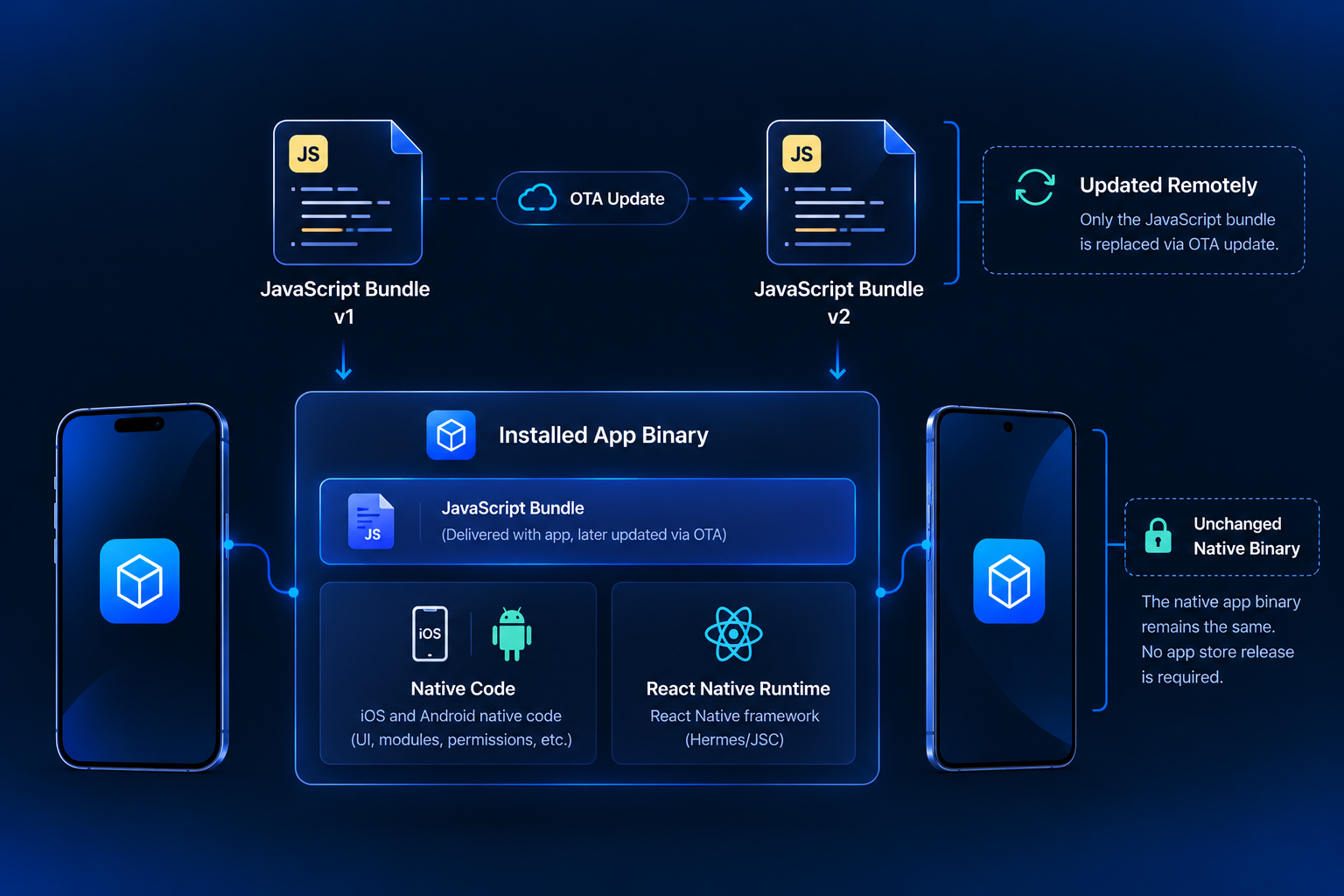
JavaScript Bundle vs. Native Binary
The easiest way to understand OTA updates is to separate the app into two layers.
CodePush works because it replaces compatible content in the JavaScript layer rather than rebuilding the native application binary.
Why Can the JavaScript Bundle Be Updated Separately?
React Native does not compile all application behavior directly into Swift, Objective-C, Kotlin, or Java.
Instead, the installed native application includes a React Native runtime capable of executing the JavaScript bundle. In modern React Native applications, Hermes is commonly used as the JavaScript engine, and release JavaScript can be compiled to Hermes bytecode ahead of time.
This creates a technical separation between the native runtime and the application code executed by that runtime.
The Native App Already Knows How to Run the Bundle
When the user installs the application from the App Store or Google Play, the native binary already contains the components needed to run compatible React Native code.
An OTA update does not need to reinstall that entire native environment.
Instead, the update service can provide another compatible JavaScript bundle. The application downloads the bundle, stores it locally, and loads it according to the OTA implementation.
This is fundamentally different from replacing an APK, AAB, or iOS application binary.
Native Code Remains Installed
Suppose an ecommerce application contains a checkout screen built using React Native.
A JavaScript bug causes the wrong validation message to appear when a coupon code fails. If correcting the issue only requires changing JavaScript logic, the underlying iOS or Android binary may not need to change.
The existing binary already contains the React Native runtime and any native capabilities the screen needs. Only the JavaScript instructions have changed.
That is the type of situation where an OTA update can be technically useful.
What Can Change Inside a JavaScript Bundle?
Many parts of a React Native application are implemented in JavaScript or TypeScript.
These changes may be suitable for OTA delivery when they remain compatible with the native binary already installed.
Business Logic
JavaScript-controlled calculations, validation, API handling, conditions, and application workflows can often be changed without touching native code.
For example, a developer might correct how a discount is calculated or change how an API response is displayed.
React Components and UI
React Native components are commonly defined in JavaScript or TypeScript.
Teams may therefore be able to update screen layouts, labels, component behavior, error states, or other JavaScript-controlled UI through a compatible OTA release.
Styling
React Native styles are also generally part of the JavaScript bundle.
Spacing, colors, layout rules, typography configuration, and other JavaScript-defined visual adjustments can often be included in an OTA update.
Compatible Assets
OTA systems can also package supported assets alongside the JavaScript update.
AppsOnAir CodePush, for example, supports JavaScript bundle changes and asset updates such as images and fonts.
Why Native Changes Still Need the App Stores
The JavaScript layer can only use the native functionality available in the installed binary.
If a change modifies that binary, an OTA JavaScript bundle cannot provide the missing native implementation.
Native Code Must Be Recompiled
Changes to Swift, Objective-C, Kotlin, or Java are compiled into the mobile application itself.
Adding or modifying that code means creating a new Android or iOS build.
The same applies to native modules. If a JavaScript feature expects a new native module that does not exist inside the user's installed version, replacing the JavaScript bundle cannot add that compiled capability.
Native Dependencies Require a New Build
Some React Native packages appear to be JavaScript dependencies but also contain native iOS or Android code.
If installing or upgrading a package requires CocoaPods, Gradle configuration, native linking, or another platform change, the application needs a new native binary.
The correct question is therefore not whether the change came from npm. It is whether the update changes anything in the native layer.
Does This Mean React Native Can Bypass App Store Review?
No. Technical ability to update a JavaScript bundle does not create a blanket exemption from App Store or Google Play policies.
This distinction is important when planning OTA updates.
Apple Places Restrictions on Downloaded Code
Apple's current App Review Guideline 2.5.2 says apps may not download, install, or execute code that introduces or changes app features or functionality.
That means teams using OTA mechanisms on iOS need to evaluate updates carefully against current Apple requirements. An OTA service should not be treated as a way to turn an already reviewed app into a materially different product after review.
Policies can also change, so teams should check the latest platform rules when defining their OTA strategy.
Google Play Also Sets Boundaries
Google Play states that apps distributed through Play may not replace or update themselves outside the Play update mechanism and may not download executable native code such as DEX, JAR, or .so files from external sources.
Google distinguishes interpreted languages such as JavaScript in some runtime scenarios, but dynamically loaded interpreted code must still comply with Google Play policies.
OTA capability therefore does not remove the responsibility to comply with store policies.
When Does a JavaScript OTA Update Make Sense?
The strongest use case is a change that stays within the capabilities already approved and included in the installed application.
Small fixes and compatible adjustments are easier to evaluate than changes that introduce entirely new native behavior.
JavaScript Bug Fixes
Imagine an incorrect condition prevents an existing screen from displaying the correct message.
If the fix changes only JavaScript and remains compatible with the installed native version, it may be a reasonable OTA candidate from a technical perspective.
UI and Content Corrections
A broken layout, incorrect label, or JavaScript-controlled interface problem may also fit the OTA model.
Teams still need to test the update as carefully as they would test a store release.
Compatible Application Logic
Changes to existing JavaScript-controlled workflows can sometimes be delivered without rebuilding the binary when they use capabilities that already exist in that binary.
The safest OTA strategy is to maintain a clear boundary between JavaScript changes and native changes.
How AppsOnAir CodePush Updates React Native Bundles
With AppsOnAir CodePush, we provide an OTA update workflow specifically for React Native applications on Android and iOS.
CodePush can distribute JavaScript bundle changes and compatible asset updates without replacing the installed native binary. Native code changes still require a full application-store release.
Target Compatible Native Versions
The JavaScript bundle still needs to match the native version installed on the device.
CodePush lets teams target releases according to compatible binary versions. This helps avoid sending JavaScript that expects native functionality unavailable in an older application binary.
Control the Rollout
Teams do not need to send every OTA release to all eligible users immediately.
CodePush supports controlled rollout behavior, allowing an update to reach a smaller portion of eligible users before wider delivery. Teams can also manage mandatory update behavior where appropriate.
Roll Back an OTA Release
If an OTA bundle introduces a problem, teams can roll back to a previous CodePush release rather than editing the already published release in place.
This adds another recovery option for JavaScript-level updates while leaving the installed native binary unchanged.
Common Mistakes With React Native JavaScript Updates
One common mistake is assuming that anything written in a React Native project can be delivered through OTA. Native modules, platform code, permissions, SDK changes, and React Native framework upgrades can still require another binary release.
Another mistake is ignoring compatibility between the JavaScript bundle and native binary. A bundle that expects a native capability introduced in version 5.0 should not automatically be delivered to users still running a 4.0 binary.
Teams should also avoid interpreting "without the app store" as "without app-store rules." OTA delivery remains subject to the current policies of the platforms where the app is distributed.
Frequently Asked Questions
What is a React Native JavaScript bundle?
A React Native JavaScript bundle packages the application's JavaScript or TypeScript logic, React components, styles, navigation, and other JavaScript-controlled behavior for use by the installed React Native app.
Why can React Native use OTA updates?
React Native separates much of the application logic into a JavaScript bundle that runs through a runtime already included in the native app, allowing a compatible bundle to be replaced without rebuilding the native binary.
Can CodePush update native React Native code?
No. Swift, Objective-C, Kotlin, Java, native modules, native dependencies, and platform configuration require a new native build.
Can React Native UI changes be updated over the air?
Many JavaScript-controlled UI and styling changes can technically be included in an OTA bundle if they remain compatible with the installed native binary and comply with platform policies.
Does CodePush completely bypass App Store review?
No. OTA delivery does not override Apple or Google Play policies. Teams must ensure remotely delivered changes remain compliant with the current rules of each platform.
Does a React Native version upgrade require a store release?
Yes. Upgrading React Native changes native runtime components and dependencies, so teams generally need to create and distribute a new Android or iOS binary.
Final Thoughts
React Native JavaScript bundles can be updated separately because much of the application logic exists outside the compiled native code. The installed binary already contains the React Native runtime needed to execute compatible JavaScript, so replacing that bundle does not necessarily require replacing the entire app.
That architecture makes React Native OTA updates useful for certain JavaScript fixes, UI adjustments, business-logic changes, and compatible assets. It does not make native builds obsolete, and it does not remove Apple or Google Play policy requirements.
With AppsOnAir CodePush, we help teams manage this JavaScript-side update path through bundle delivery, binary-version targeting, controlled rollouts, and rollback support. The key is knowing where the JavaScript layer ends, where the native binary begins, and when a change still belongs in a normal app-store release.








