


.png)


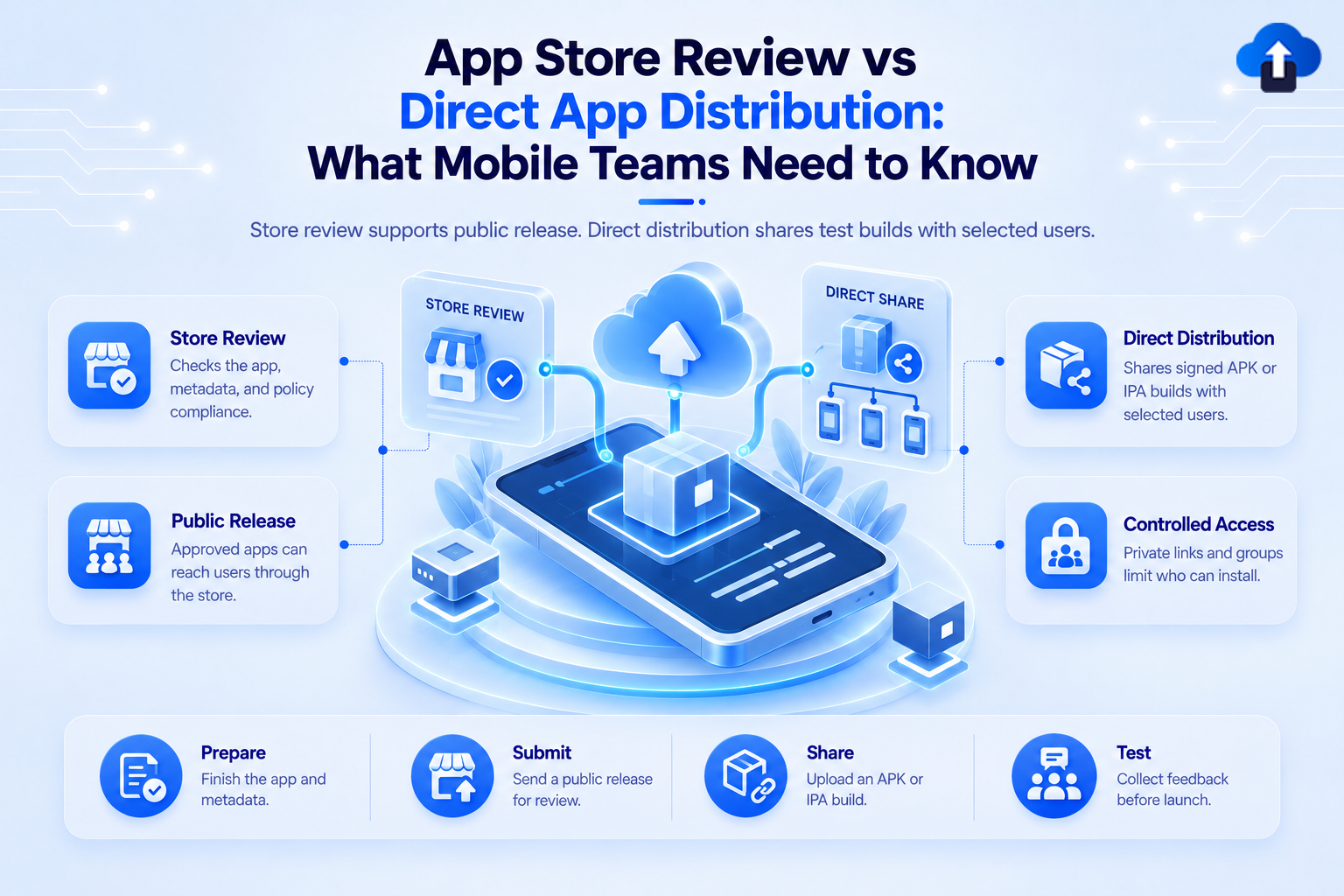
Getting a mobile build onto a device can happen in several ways. A production app may go through the App Store or Google Play, while a QA build might only need to reach internal testers, clients, or stakeholders for review.
This is where the difference between app store review and direct app distribution becomes important. Store distribution is designed for public or controlled marketplace releases. Direct distribution is mainly useful when a team needs to share a build before that public release process is necessary.
At AppsOnAir, we use OTA Distribution to help teams share Android and iOS builds directly with testers, clients, and internal stakeholders. It is intended to simplify pre-release distribution, not to replace the platform rules required for public production apps.
What Is App Store Review?
App Store review is the process a mobile app or update goes through before it can be distributed through an official marketplace such as Apple's App Store.
For iOS, developers upload a build to App Store Connect, select the build for the app version, provide the required information, and submit it to App Review. Apple reviews the submission before the version can be distributed through the App Store.
Google Play also processes app changes before publication and provides separate internal, closed, open, and production tracks for different stages of distribution.
Why App Stores Review Releases
App stores are not only file-hosting platforms. They also manage application discovery, production distribution, platform requirements, signing, store listings, updates, and policy enforcement.
For public mobile releases, that structure provides a standard way for users to discover, install, and update an application.
The trade-off is that the development team does not completely control the final delivery timeline. Submission, processing, and review become additional stages in the release process.
What Is Direct App Distribution?
Direct app distribution is the process of sending an installable mobile build to selected people without first publishing that build as a normal public app-store release.
A team may upload an Android APK or an appropriately prepared iOS IPA to a distribution service and share access with testers, clients, product managers, or other stakeholders.
The goal is usually not broad public distribution. It is to make pre-release testing and review faster.
Where Direct Distribution Fits
Direct distribution is especially useful during:
- Internal QA
- User acceptance testing
- Client review
- Stakeholder approval
- Pre-release demonstrations
- Testing multiple build versions
- Development and staging validation
Instead of waiting for the production publishing workflow every time a developer creates a new test build, the team can put the build directly into the hands of the people who need to evaluate it.
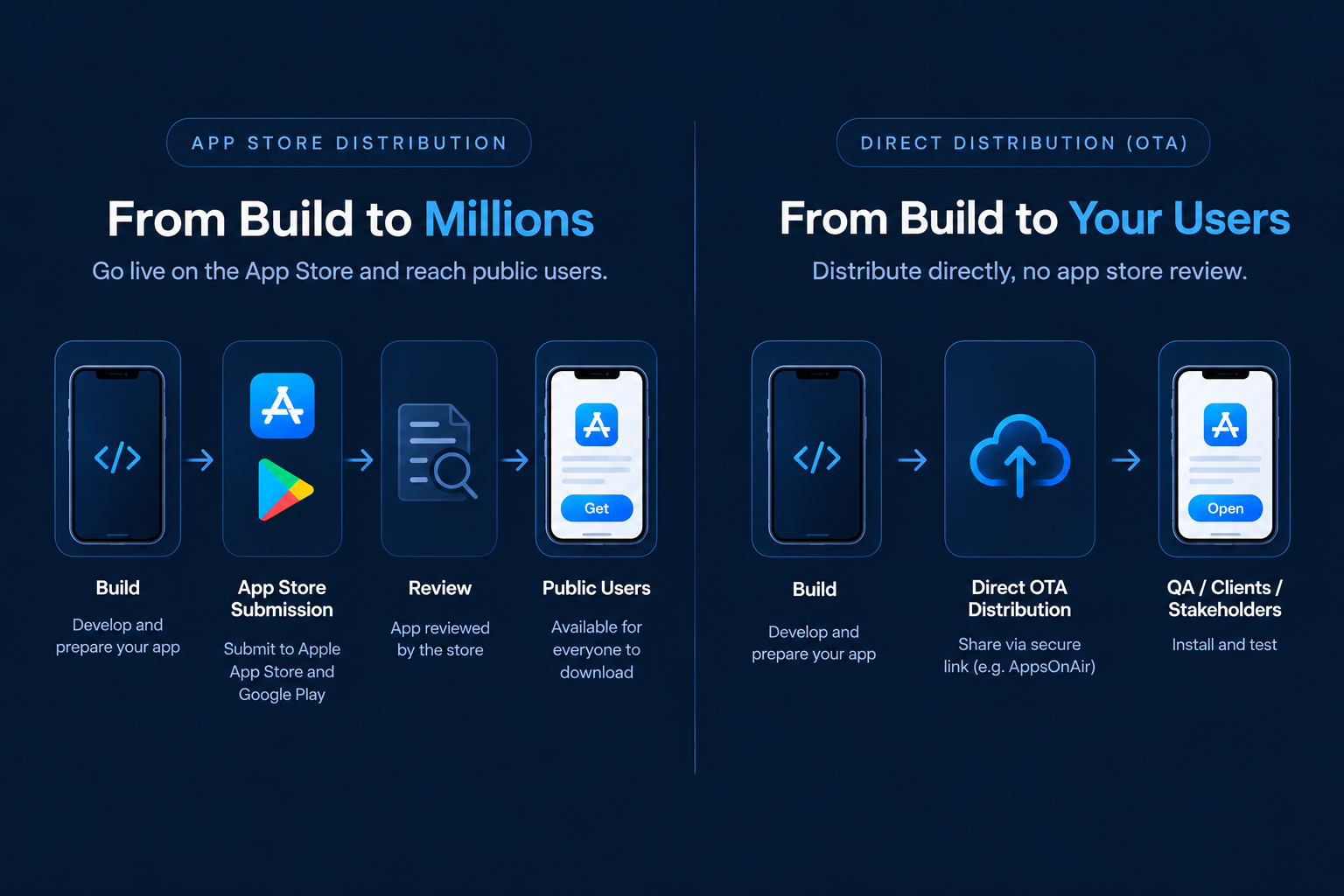
App Store Review vs Direct Distribution
The two approaches solve different problems.
App store distribution is normally the right path when an app needs to reach production users through the official marketplace. Direct distribution is more useful when a build only needs to reach a controlled testing or review audience.
The important point is that direct distribution is not simply a faster version of public store publishing. It is a different distribution method for a different stage of the release lifecycle.
When App Store Distribution Makes More Sense
If the application is ready for customers, app-store distribution usually provides the appropriate production path.
It gives users a familiar installation experience and gives the team a standardized mechanism for delivering future versions.
Public Product Launches
A consumer mobile application intended for broad public use normally belongs in the relevant app store.
On Apple platforms, developers choose a build, complete the required App Store information, and submit the version for review. Once approved, it can be released according to the selected availability settings.
Google Play similarly lets teams create production releases after the required setup and testing conditions have been met.
Production Updates
Official stores also handle normal production updates.
Google Play supports staged rollouts for updates, allowing a team to send a new version to a percentage of users before expanding the release.
This makes store distribution more suitable when the goal is managing a real production user base rather than simply getting a build to testers.
When Direct App Distribution Makes More Sense
During development, teams may create many builds before one is ready for production.
Sending every one of those builds through a full public-release workflow would add unnecessary friction.
Internal QA
QA teams often need several builds during the same testing cycle.
A developer may fix a bug in the morning, create a new build, and need testers to verify it the same day. Direct distribution lets the testing team receive that release without treating it as a public production submission.
Client and Stakeholder Review
Agencies and development teams frequently need to show a working application to a client before launch.
A direct install can make this easier because the stakeholder can experience the app on a real device instead of reviewing only screenshots or videos.
User Acceptance Testing
UAT often happens near the end of development but before the public launch.
Direct distribution gives selected users access to the release candidate while keeping it separate from the production store version.
Frequent Pre-Release Builds
Mobile teams may produce several release candidates while fixing final issues.
Direct distribution provides a simpler path for circulating these versions among the people responsible for approving the release.
Direct Distribution Works Differently on Android and iOS
Direct distribution is not identical across mobile platforms.
Android and iOS have different signing, installation, and security models, so teams need to understand the rules before building their distribution workflow.
Direct Android Distribution
Android applications can be shared as APK files outside the normal Google Play production process.
Google also provides its own internal testing and Internal App Sharing options. Internal App Sharing generates links for uploaded app bundles or APKs, with each link supporting up to 100 downloads and expiring after 60 days.
For broader public Android distribution, however, Google Play remains the normal marketplace route.
Direct iOS Distribution
iOS distribution is more restricted.
Apple supports Ad Hoc distribution for registered devices. Creating an Ad Hoc provisioning profile requires the target devices to be registered with the developer account.
Apple also provides TestFlight for beta testing. Internal testing can include up to 100 App Store Connect users, while external beta programs can include up to 10,000 testers. External TestFlight builds are subject to Apple's beta review process.
Large organizations with specific internal-use requirements may qualify for the Apple Developer Enterprise Program, but Apple limits that program to proprietary apps distributed privately to the organization's own employees.
This means an OTA distribution platform does not remove Apple's signing and provisioning requirements.
Direct Distribution Does Not Mean Ignoring Platform Rules
This is one of the most important distinctions for mobile teams.
Avoiding a normal public app-store submission for a QA build does not mean the platform's security and distribution requirements disappear.
iOS Builds Still Need Correct Provisioning
An IPA intended for direct testing must be prepared using an appropriate Apple distribution method.
For Ad Hoc testing, the devices need to be registered and included in the provisioning setup. Enterprise distribution has its own strict eligibility and internal-use rules.
The distribution tool delivers the build, but it does not override those requirements.
Direct Distribution Is Not Public Store Distribution
A testing link should not automatically be treated as a replacement for an App Store listing.
If the final goal is public consumer distribution, the team will normally still prepare the production build and follow the applicable App Store or Google Play release process.
Direct distribution belongs earlier in the lifecycle.
How Direct Distribution Can Improve the Release Workflow
The biggest advantage is not simply avoiding a review queue. It is reducing friction between creating a build and receiving feedback on that build.
A faster feedback loop can shorten the entire QA cycle.
Developers Share the Latest Build Faster
Instead of manually sending files to different testers, teams can distribute one controlled release and direct testers to the correct version.
This helps reduce confusion when several builds exist at the same time.
Testers Get Builds on Real Devices
A build that works in a simulator may behave differently on a physical device.
Direct distribution makes it easier to put release candidates onto real devices earlier, giving QA more opportunities to find device-specific problems before store submission.
Client Feedback Happens Before Production
If clients or stakeholders need to approve a release, they can review the actual build before it becomes publicly available.
That is much safer than publishing first and discovering approval issues afterwards.
How AppsOnAir OTA Distribution Supports Direct App Distribution
With AppsOnAir OTA Distribution, we let mobile teams upload Android APK and iOS IPA builds and share them with testers, clients, and other stakeholders without creating a normal public store release for every testing build.
Upload and Share Mobile Builds
Teams can upload APK and IPA files and generate links for distribution. Builds can be shared with the relevant people instead of manually sending application files between developers and testers.
We also support public or password-protected access, tester groups, version history, installation statistics, and configurable link expiration for controlled testing workflows.
Add Distribution to CI/CD
For teams that create builds frequently, OTA Distribution can also be connected to the release pipeline.
Our OTA Distribution CLI can upload Android and iOS builds from the terminal or CI/CD pipeline. This allows a successful testing build to move directly into the internal distribution workflow instead of requiring another manual AppsOnAir dashboard upload.
The platform handles sharing, while the underlying Android and iOS signing or provisioning requirements still need to be correctly configured.
Common Mistakes With App Distribution
One common mistake is using the same distribution method for every stage of the app lifecycle. Internal QA, client review, beta testing, and public production releases have different requirements.
Another mistake is assuming that direct distribution removes iOS provisioning restrictions. An IPA still needs to be signed and prepared for an appropriate Apple-supported distribution method.
Teams should also avoid sharing builds without clear version information. If testers receive several links without knowing which release is current, direct distribution can create the same confusion it was supposed to remove.
Frequently Asked Questions
What is direct app distribution?
Direct app distribution means sharing an installable mobile build directly with selected testers, clients, or internal users instead of publishing that build as a normal public app-store release.
Does direct app distribution require App Store review?
Not every direct testing workflow uses the normal public App Store review process, but iOS builds must still follow Apple's applicable signing, provisioning, and distribution rules.
Is direct app distribution suitable for production apps?
It is mainly useful for QA, UAT, client review, and internal distribution. Public consumer apps normally use the App Store or Google Play for production distribution.
Can an APK be distributed without Google Play?
Yes. Android APK files can be distributed outside Google Play, although installation, security settings, organizational policies, and distribution requirements still need to be considered.
Can an IPA be shared directly with any iPhone?
No. iOS direct installation depends on the distribution and provisioning method. For example, Ad Hoc distribution requires registered devices, while enterprise distribution is restricted to eligible organizations and internal employee use.
Is TestFlight the same as direct OTA distribution?
No. TestFlight is Apple's beta distribution service and runs through App Store Connect. Direct OTA distribution uses a separate build-sharing workflow, subject to the signing and provisioning rules of the platform.
Final Thoughts
App Store review and direct app distribution are not competing ways to accomplish exactly the same task. They belong at different points in the mobile app release process.
Direct distribution is valuable when developers need to get builds quickly to QA teams, clients, stakeholders, or UAT users. App-store distribution becomes important when that tested build is ready to reach production users through the official marketplace.
With AppsOnAir OTA Distribution, we help simplify the first part of that journey by making Android and iOS test-build sharing easier, more controlled, and easier to integrate into the release workflow. Once the build is ready for public production, the appropriate App Store or Google Play process still remains part of the final release.









