


.svg)




Shipping a Flutter app isn’t just flipping a build flag. The move from debug (JIT) to release (AOT) changes compilation, runtime checks, rendering behavior, and Android/iOS security rules.
This guide condenses the most critical production-only failure patterns—and how to prevent them.
1. The Production Paradox: JIT (Just - In - Time) vs AOT (Ahead - Of - Time)
Most production-only bugs originate from how Dart executes in different build modes .
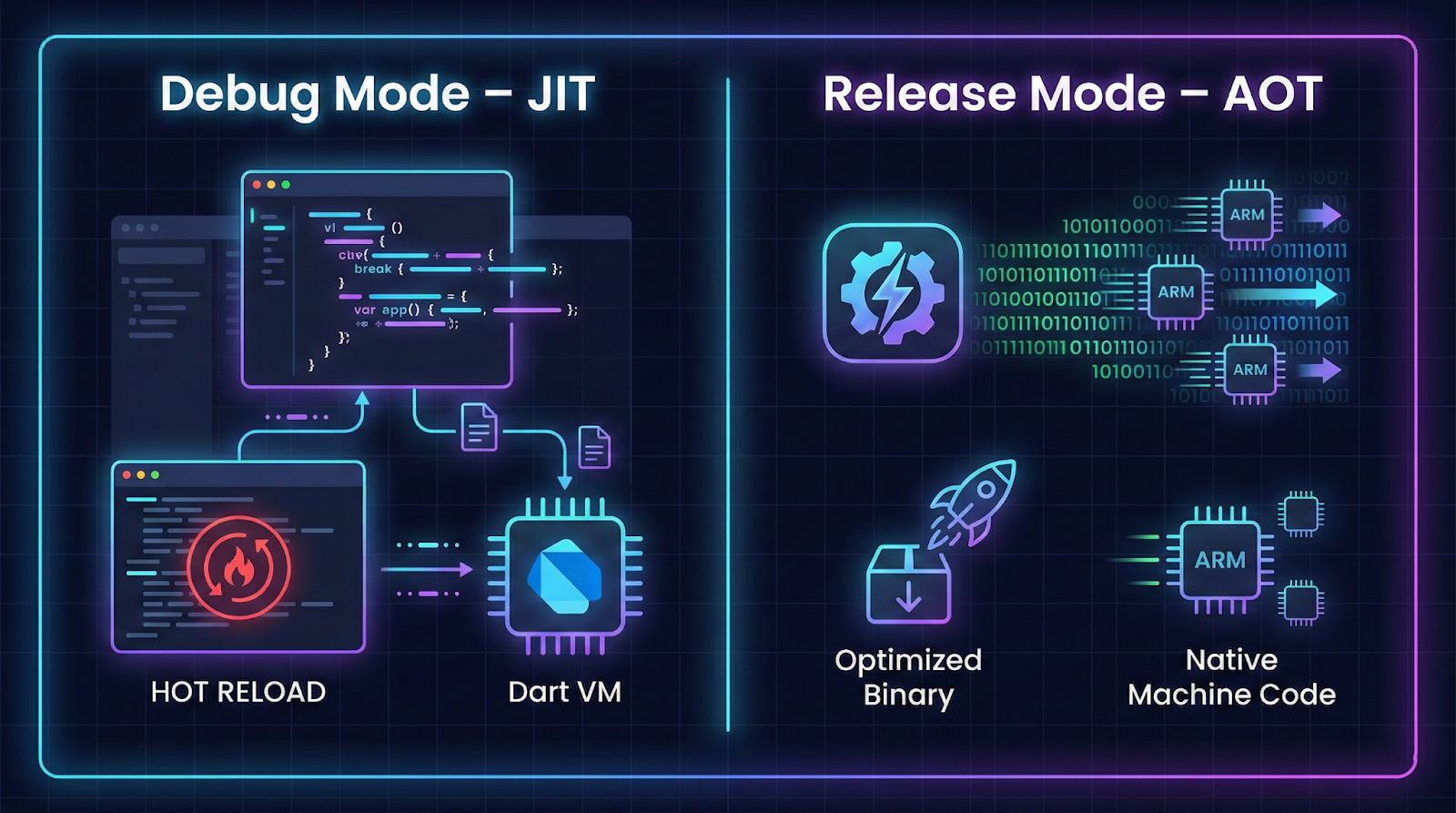
Debug Mode (JIT)
- Compiled on-device
- Hot Reload enabled
- Assertions active
- Larger binary
- Slower startup
Release Mode (AOT)
- Precompiled to native machine code
- No VM or JIT in binary
- Assertions stripped
- Smaller, faster binary
- Highly sensitive to reflection, dynamic calls, async edge casesI have perfected the table by correctly structuring it in markdown, adding bold headers, and ensuring clear column alignment.
- Key Risk: Code that “works” in JIT can fail when statically compiled in AOT.
2. The Assertion Vacuum & Grey Screen of Death
In debug mode, Flutter runs thousands of assertions. In release mode, they’re removed.
What Happens
- Debug → Red error screen with clear message
- Release → Silent failure, grey screen, or missing UI
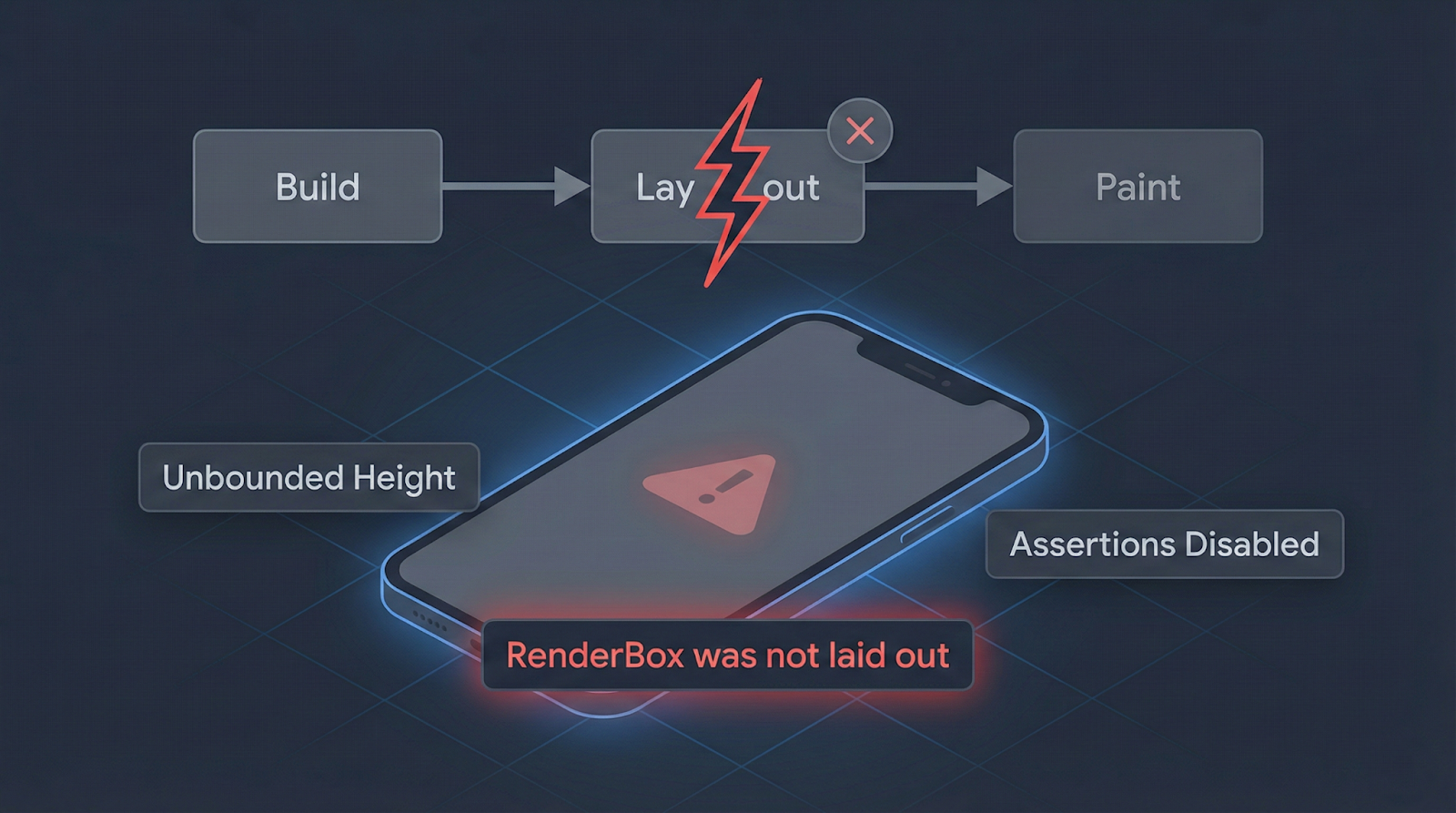
Common Layout Failures
Fix: Provide Constraints
Column(
  children: [
    Expanded(
      child: ListView.builder(
        itemCount: 20,
        itemBuilder: (_, i) => Text('$i'),
      ),
    )
  ],
);
Use:
- Expanded for scrollables
- Flexible for adaptive sizing
- SizedBox for explicit constraints
Always test complex layouts in Profile mode on physical devices.
3. Android Release Hazards: R8 & Minification
On Android, release builds run through R8, which shrinks and obfuscates code .
Many R8 crashes are triggered by reflection or native bridge calls. If you're integrating native code, explore our Flutter platform channels guide with real examples.
Why It Breaks
R8 removes code it believes is unused.
Problems arise when code is accessed via:
- Reflection
- Native SDK bridges (JNI)
- Payment SDKs
- Rich editors
Debug builds skip this step. Release builds don’t.
Solution: ProGuard Rules
android/app/proguard-rules.pro
#Flutter Wrapper
-keep class io.flutter.app.** { *; }
-keep class io.flutter.plugin.**  { *; }
-keep class io.flutter.util.**  { *; }
-keep class io.flutter.view.**  { *; }
-keep class io.flutter.**  { *; }
-keep class io.flutter.plugins.**  { *; }
-keep class androidx.lifecycle.** { *; }
#Flutter Additional
-ignorewarnings
-keep class * {
    public private *;
}
Ensure build.gradle includes:
release {
    minifyEnabled true
    proguardFiles getDefaultProguardFile(
        'proguard-android-optimize.txt'
    ), 'proguard-rules.pro'
}
Tip: Check missing_rules.txt after failed builds.
4. Gradle & Version Misalignment
Build inconsistencies often stem from improper version control. Learn how to manage release environments with our Flutter app version management guide.
Production builds fail when these are misaligned:
- Flutter SDK
- Android Gradle Plugin (AGP)
- Gradle Wrapper
- Kotlin version
- compileSdkVersion
Minimum Stable Stack (2026 Baseline)
5. Manifest & Permission Traps
Missing INTERNET Permission
Debug includes it by default. Release does not .
Permissions behave differently in release builds, especially on Android 13+. If you're targeting modern SDK levels, read our production-grade guide to handling permissions correctly in Flutter.
Add to:
android/app/src/main/AndroidManifest.xml
<uses-permission android:name="android.permission.INTERNET"/>
Without this:
- Debug works
- Production cannot call APIs
Android 13+ Media Permission Changes
Old:
READ_EXTERNAL_STORAGE
New:
READ_MEDIA_IMAGES
READ_MEDIA_VIDEO
If targeting SDK 33+, update permissions or uploads fail on modern devices.
6. Shader Jank & The Impeller Renderer
The Problem
Flutter’s legacy engine (Skia) compiles shaders at runtime.
First animation = visible frame drop.
The Solution: Impeller
- Precompiles shaders (AOT)
- Deterministic performance
- Default on iOS, stable on Android (2026)
Enable:
flutter run --enable-impeller
7. iOS 26 & JIT Blocking
Modern iOS security blocks JIT on physical devices .
Symptom
mprotect failed: 13 (Permission denied)
Why
Debug mode requires executable memory for JIT.
iOS 26 prevents this.
Fix
Use:
- Profile mode
- Release mode
Physical device testing is increasingly AOT-only.
8. Production Monitoring & Global Error Capture
Production bugs happen outside your machine. Observability is mandatory .
Crash reporting is reactive. To proactively capture issues, implement structured reporting using our Flutter in-app feedback and bug report guide.
Crash Monitoring Options
Regardless of tool, implement global error capture:
void main() {
  FlutterError.onError = (details) {
    reportError(details.exception, details.stack);
  };

  PlatformDispatcher.instance.onError = (error, stack) {
    reportError(error, stack);
    return true;
  };

  runZonedGuarded(() {
    runApp(const MyApp());
  }, (error, stack) {
    reportError(error, stack);
  });
}
This prevents silent crashes.
Tactical Debugging Workflow
When a bug appears only in production:
- Test in Profile mode on physical device
- Run flutter build apk --release early
- Inspect R8 logs
- Verify permissions in main manifest
- Run flutter clean if behavior is illogical
Use logging instead of dart:developerprint()
Key Takeaways
- Debug ≠ Release. JIT and AOT behave fundamentally differently.
- Assertions hide layout failures in debug.
- R8 can remove required native classes.
- AGP/Kotlin misalignment breaks release builds.
- Manifest mismatches cause silent API failures.
- Impeller eliminates shader jank.
- iOS is restricting JIT-based workflows.
- Production monitoring is non-negotiable.
FAQ
1. Why does my app work in debug but crash in release?
Most commonly due to R8 minification, missing permissions, or layout assertions being removed.
2. How do I simulate production behavior safely?
Use Profile mode on physical devices.
3. Should I disable minification to avoid crashes?
No. Add proper ProGuard rules instead.
4. Why does my animation lag only the first time?
Runtime shader compilation. Enable Impeller.
5. How early should I test release builds?
As soon as you integrate:
- Native SDKs
- Payment gateways
- Media permissions
- Reflection-based plugins
Conclusion
Production failures in Flutter are rarely random. They stem from:
- AOT compilation differences
- Removed assertions
- Android build optimizations
- OS-level security changes
- Missing observability
Production resilience also depends on understanding where the mobile ecosystem is heading. For broader insights, check out our Mobile Wrapped 2025 industry analysis.
The teams that ship stable apps don’t assume debug behavior equals release behavior. They test in AOT early, maintain ProGuard hygiene, enforce manifest correctness, and monitor everything.
If you want production resilience, treat release mode as a first-class environment not a final step.








